Key Takeaway: DaddyLive installs on Kodi as an addon called DLTV, published by Arkane14, and it needs no debrid account or subscription at all. The current release is DLTV 1.0.20, and keeping it updated is the single thing that decides whether links work.
DaddyLive has become one of the most searched live sports names on Kodi, largely because it asks for nothing up front. The confusion starts the moment you open Kodi and cannot find anything called DaddyLive in the repository.
I added the Arkane14 repository to a clean Kodi 21.3 Omega install on my Fire TV Stick 4K Max, worked through the live schedule across a weekend of football and boxing, and noted exactly which sections held up and which quietly stopped resolving.
What Is DaddyLive and Why Does Kodi Call It DLTV?
The naming gap trips up almost everyone on their first install, so it is worth clearing up before you go looking for anything in the add-ons menu.
- Two Different Names: DaddyLive is the streaming website, while DLTV is the Kodi addon that reads it, which is why searching for DaddyLive inside Kodi fails.
- Published by Arkane14: The addon is maintained by Arkane14 and distributed through the official Arkane14 repository rather than any large community repo.
- A Front End Only: DLTV holds no streams itself and simply presents whatever the DaddyLive site is currently listing, refreshed each time you open it.
- Live First: Its focus is live television and scheduled sport rather than on-demand films, so it complements rather than replaces a movie addon.
- Completely Free: There is no account, no subscription and no debrid requirement, which explains most of its popularity among casual Kodi users.
What You Need Before Installing DaddyLive on Kodi
The prerequisites here are lighter than they are for most Kodi addons, because nothing about DLTV depends on a paid service or an external scraper package.
- Kodi 21.3 Omega: Install the current stable Kodi release, since the addon targets the Python 3 API and will not load on legacy Kodi 18 builds. Kodi 22 Piers is still a beta, so Omega remains the safer Firestick choice.
- Unknown Sources On: Switch on Unknown Sources inside System, Add-ons, or Kodi refuses to add the repository source and gives you no warning why.
- A Decent Connection: Live sport is unforgiving, so aim for at least fifteen megabits down if you want a stable picture during a busy fixture.
- A VPN Running: Several providers block the underlying domains outright, and a reputable VPN both restores access and keeps your viewing private.
- Realistic Expectations: Free live streams buffer and drop, so treat DLTV as a backup to a paid service rather than a full replacement for one.
| Requirement | Why It Matters | Cost |
|---|---|---|
| Kodi 21.3 Omega | Python 3 API compatibility | Free |
| Unknown Sources enabled | Allows third-party installs | Free |
| 15 Mbps connection | Stable live playback | Existing broadband |
| Reputable VPN | Bypasses ISP blocking | Paid subscription |
| Debrid account | Not used by this addon | Not required |
Adding the Arkane14 Repository and Installing DLTV
Installation is the standard Kodi two-step. The current source is https://arkane14.github.io/; older guides that still send you to The Crew repository are describing the retired DaddyLive build rather than the current DLTV addon.
- Add the Source: Open Settings, File Manager, Add Source, select None, enter https://arkane14.github.io/, and name the source dltv.
- Install From Zip: Go back to Add-ons, choose Install from Zip File, open dltv and select
repository.arkane14-1.0.0.zip. - Install DLTV: Choose Install from Repository, open Arkane14 Repository, browse Video Add-ons and select DLTV to install the addon itself.
- Check the Version: Confirm Kodi offers DLTV 1.0.20, the newest build in the repository as of August 7, 2026. Older releases point at dead upstream paths and may return nothing playable.
- First Launch: Open DLTV and let the schedule populate before clicking anything, since the initial load pulls the entire day of listings at once.
Finding Live Sports, Channels and PPV Inside DaddyLive
The menu is denser than it first appears, and knowing which section to open saves you scrolling through hundreds of entries during a live fixture.
- Live Schedule: The schedule view lists everything starting today grouped by sport, and it is the quickest route to a match that is already underway.
- Channels List: A separate channel browser holds general entertainment and news feeds, heavy on United States networks with a solid British and European selection.
- Multiple Links: Most events carry several numbered links, and working through them in order is normal practice rather than a sign of a broken addon.
- PPV Section: Boxing, wrestling and mixed martial arts events appear here on event nights and disappear again afterwards, so it looks empty midweek.
- Companion Reading: For a wider comparison of what else covers fixtures well, see our roundup of the best Kodi addons for sports.
| Section | What It Covers | Best Used For |
|---|---|---|
| Live Schedule | Everything starting today by sport | Finding a match in progress |
| Channels | General entertainment and news feeds | Casual channel surfing |
| Soccer | League and cup fixtures worldwide | Following one competition |
| PPV Events | Boxing, wrestling and MMA cards | Event nights only |
| Other Sports | Cricket, tennis, motorsport, racing | Niche fixtures |
Why DaddyLive Streams Stop Working and How to Restore Them
Almost every DLTV complaint traces back to the upstream site rather than the addon, and the fixes are quick once you know what you are looking at.
- Outdated Addon: The source site changes domains frequently, so an older DLTV build points at an address that no longer exists and returns nothing.
- Stale Cache: Open DLTV’s Schedule menu and use its refresh option first. Version 1.0.11 added a proper cache clear and container refresh, so this is safer than wiping all of Kodi’s app data.
- ISP Blocking: Some providers block the underlying domains at the DNS level, which looks exactly like a dead addon until you connect a VPN.
- Too Early: Links for a fixture often appear only shortly before kick-off, so an empty event page an hour ahead is expected behaviour.
- Dead Link Number: When one numbered link fails, back out and try the next rather than assuming the whole event stream has gone down.
| Symptom | Likely Cause | Fix |
|---|---|---|
| No streams found | Addon version outdated | Reinstall the newest DLTV build |
| Schedule loads empty | Cached listing data | Use Schedule refresh, then restart Kodi |
| Everything times out | ISP or DNS blocking | Connect a VPN and retry |
| Event page has no links | Fixture has not started | Return closer to kick-off |
| One link buffers badly | Overloaded source server | Open the next numbered link |
Keeping DaddyLive Alive as the Source Site Moves
This addon has a shorter shelf life between updates than most, and treating maintenance as routine rather than emergency work makes it far less frustrating.
- Enable Auto Updates: Leave automatic updates switched on for the repository so new builds arrive without you noticing the old one has broken.
- Check Before Kickoff: Open the addon an hour before anything important rather than five minutes before, which leaves time to reinstall if needed.
- Keep the Repo Added: Never delete the file source after installing, because reinstalling the addon later is far quicker when the source is still present.
- Watch the Version Number: DLTV 1.0.20 remains the latest build as of August 7, 2026, with the last repository release dated April 15. A build several releases behind is the usual cause of total failure.
- Have a Backup Ready: Install a second live sports addon alongside it, since no free option survives a whole season without at least one outage.
Getting a Steadier Picture From Free Live Streams
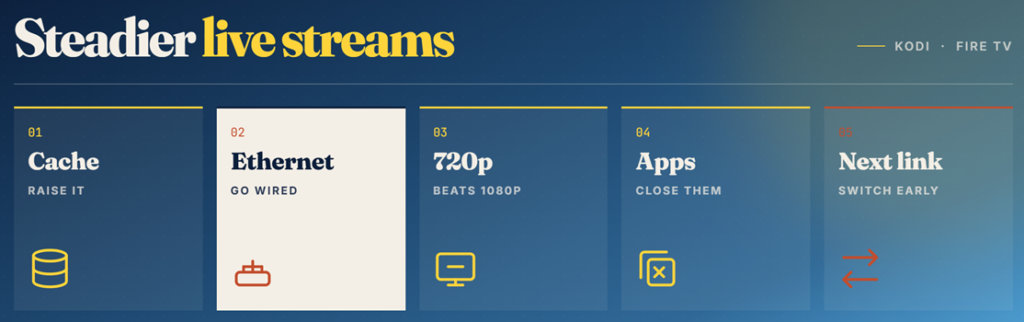
Free feeds are never going to match a paid broadcast, but a handful of settings changes made a visible difference to stability across every fixture I tested.
- Raise the Cache: Increasing Kodi video cache through an advancedsettings file gives the player more buffer to absorb the wobbles common on free feeds.
- Use a Wired Link: An ethernet adapter on the Firestick removes wireless interference entirely, and it fixed more stuttering for me than any addon setting did.
- Pick Lower Resolution: Where an event offers both, a stable 720p feed beats a 1080p one that pauses repeatedly during the busiest passages of play.
- Close Background Apps: Fire TV keeps applications suspended in memory, and clearing them before kick-off frees resources the Kodi player genuinely benefits from.
- Try Another Link Early: If a feed stutters in the opening minutes it rarely improves, so switch to the next numbered source straight away.
Is DaddyLive Safe and Legal to Use?
This question deserves an honest answer rather than reassurance, because the legal position around live sport is far clearer than it is with most Kodi scrapers.
- The Addon Code: DLTV itself is a listing reader and carries no media, so installing the software is not in itself an unlawful act.
- Rights Problem: The streams it surfaces are broadcast feeds redistributed without permission, and watching those is unlawful in most countries including the United Kingdom.
- Privacy Exposure: Without a VPN your provider can see exactly which streaming domains you contact, and live sport is heavily monitored by rights holders.
- Install Source: Only ever install from the developer repository, because rehosted copies circulating on forums are the classic delivery route for tampered code.
- Legal Options: Free legal channels through Pluto TV and Plex Live carry no risk, and several appear in our best Kodi live TV addons guide.
Best DaddyLive Alternatives
DaddyLive is genuinely useful when it works, but a free addon that depends on one upstream website will always have bad weekends. These three alternatives cover the same ground from different directions, and running one alongside DLTV removes most of the frustration.
1) Mad Titan Sports
Mad Titan Sports is the addon I keep installed as my main DaddyLive backup, because it aggregates several source lists rather than depending on a single website. It covers live fixtures, replays and 24/7 channels, and it supports Real-Debrid for anyone who already pays for one.
Features:
- Broad Sport Coverage: Football, American football, basketball, baseball, hockey, motorsport and combat sports all sit in clearly separated menus rather than one long list.
- Replay Section: Full match replays stay available for days after the final whistle, which matters if you cannot watch a fixture live.
- Multiple Feeds: Each event usually offers several independent sources, so a single failing provider rarely takes the whole fixture offline for you.
- Debrid Optional: Real-Debrid support improves link quality noticeably, but the addon remains genuinely usable on free sources without any account attached.
- My Testing: I opened the same three matches in both addons and Mad Titan found a working feed faster on two of them.
- 24/7 Channels: Looping themed channels run continuously in the background, giving you something watchable when no live fixture is currently scheduled.
- Active Repository: The Magnetic repository has stayed reachable throughout 2026, which is more than several rival sports repositories managed this year.
| Pros | Cons |
| Widest sports coverage | Menu takes learning |
| Replays stay available | Free links vary in quality |
| Multiple feeds per event | Occasional dead sections |
| Works without debrid | Heavier than DLTV |
| Reliable repository |
Pricing: Free addon. Optional Real-Debrid improves link quality at roughly €4 per 30 days.
Link: magnetic.website
2) SlyGuy
SlyGuy is the collection I recommend to anyone who wants live channels without the grey-area risk, and it is the one addon set here I run permanently. It bundles official apps for Pluto TV, Plex Live, Roku Channel and several broadcaster services into Kodi.
Features:
- Fully Legal Channels: Everything here streams from official free services, so there is no rights problem and no need to hide your traffic.
- Never Goes Down: Because the sources are commercial services rather than scraped feeds, availability is effectively permanent rather than dependent on volunteers.
- Real EPG Data: Proper electronic programme guides load for most services, giving Kodi a genuine live television experience rather than a bare channel list.
- Personal Note: I keep Pluto TV pinned on my home screen purely as the fallback when a free sports feed collapses mid-match.
- Many Services: Pluto TV, Plex, Roku Channel, ESPN and several regional broadcasters each install as separate addons from one shared repository.
- Low Maintenance: Updates arrive automatically and the addons rarely break, so there is nothing to reinstall before an important fixture starts.
- Region Aware: Available channel lineups follow your location, and a VPN can be used to switch between country catalogues where licensing permits.
| Pros | Cons |
| Completely legal | Very limited live sport |
| Extremely reliable | No premium fixtures |
| Full EPG support | Region-locked catalogues |
| Zero maintenance | Adverts on free tiers |
| Free forever |
Pricing: Free, ad-supported services. No account, payment card or debrid subscription is required at any point.
Link: slyguy.uk
3) The Crew
The Crew is the all-in-one I install when I want live television and on-demand content from a single addon rather than juggling three. Its live section is smaller than a dedicated sports tool, but the breadth elsewhere makes it a sensible second install.
Features:
- One Addon Covers Everything: Movies, television, live channels, sports and documentaries share a single interface, which keeps a Kodi build tidy and simple.
- Free Sources Work: Unlike debrid-only addons it still returns playable free links, so it stays useful without any paid subscription attached.
- Debrid Ready: Adding Real-Debrid unlocks far better quality on the on-demand side while leaving the live sections completely unaffected by the change.
- Testing Observation: I found its live section slower to load than DLTV, but it recovered from source outages more gracefully during the same weekend.
- Large Community: A big user base means broken scrapers get reported and repaired quickly, which is rarely true of smaller sports-only projects.
- Long Track Record: The Crew has survived several years and multiple Kodi versions, making it one of the more dependable community addons available.
- Regular Releases: The team ships new builds through the year, keeping compatibility with current Kodi releases rather than falling behind them.
| Pros | Cons |
| Covers every content type | Live section is secondary |
| Works without debrid | Slower menus |
| Large active community | Sports coverage thinner |
| Long, stable history | Occasional dead scrapers |
| Good all-round backup |
Pricing: Free addon. Real-Debrid is optional and costs about €4 per 30 days if you want better on-demand links.
Link: team-crew.github.io
Verdict: Is DaddyLive Worth Installing on Kodi?
DaddyLive, or DLTV as Kodi actually lists it, remains one of the easiest free routes into live sport and live channels. There is no account to create, no debrid service to pay for, and the schedule view genuinely is the fastest way to find a fixture that has already started. The trade-off is fragility. Because everything depends on one upstream website that keeps moving, the addon needs updating more often than anything else on a typical Kodi build, and there will be weekends when nothing resolves at all. Install it, keep it current, and pair it with something steadier so a big match never comes down to a single free link.
- Mad Titan Sports: The strongest backup, aggregating several source lists so one failing provider never takes your whole evening down.
- SlyGuy: The reliable, fully legal option, giving you real channels and proper guide data that simply never break.
- The Crew: The best all-rounder, adding movies and television alongside live channels from one well-supported community addon.
FAQs
Is the DaddyLive Kodi addon still working in 2026?
Yes, as of August 7, 2026. The Arkane14 repository still lists DLTV 1.0.20 as the latest release. Links break periodically when the upstream site changes domain, which is why staying on the newest build matters so much.
Why can I not find DaddyLive in my Kodi add-ons list?
Because Kodi lists it as DLTV, not DaddyLive. Look under Video Add-ons inside Arkane14 Repository after installing its repository zip, and you will find it under that shorter name instead.
Do I need Real-Debrid for DaddyLive?
No. DLTV pulls live feeds directly from the DaddyLive website and never touches torrents, so a debrid account adds nothing. It is one of the few genuinely useful Kodi addons that costs nothing to run.
Why does DaddyLive say no streams are available?
Usually the addon is out of date and pointing at a dead domain. Reinstall the latest version, clear the addon cache, restart Kodi, and check the fixture has actually started before assuming it is broken.
Is a VPN necessary to use DaddyLive?
It is strongly advised. Several internet providers block the underlying domains, which makes the addon appear dead, and live sports feeds are the most closely monitored category by rights holders.
Does DaddyLive work on a Firestick?
Yes. It runs through Kodi 21.3 Omega on any current Fire TV Stick. The 4K Max handles high-bitrate live feeds more comfortably, but the standard stick copes fine at 1080p.