Key Takeaway: HDO Box is not universally dead. Its current download page lists version 4.4.6, while the project says a security change now rejects modified and unofficial APKs. Start by identifying your app family, then clear its stored state, correct the TV player pairing, and reinstall the matching CPU build only if the earlier tests fail.
When HDO Box opens but no movie plays, the tempting response is to reinstall random APKs until one works. That often makes the problem worse. Firestick users now face several different failures that look similar: a blocked unofficial build, an old TV version waiting for Drama Player, corrupted app data, the wrong CPU package, or a genuine source outage.
I compared the current HDO Box download information, its release announcements, Amazon’s Fire TV guidance, Android’s installer rules, and recent user outage reports. The most useful discovery is version-specific: the current 4.x branch documents built-in playback, but older TV packages may hand video to Drama Player. Mixing those instructions produces the endless player prompt many guides misdiagnose.
Use the symptom table first, then follow the fixes in order. You should know within ten minutes whether the fault sits on your Fire TV, inside the installed APK, in its player handoff, or beyond your control on HDO Box’s servers.
Is HDO Box Down, or Is Your APK Being Rejected?
The current HDO Box download page lists version 4.4.6 for Android 7.0 and newer. Its version 4.4.0 security patch blocks modified requests, making an old mod resemble a sitewide outage.
- Everything Is Empty: no links across several unrelated titles points toward a rejected build, a catalog outage, or a network route problem rather than one movie.
- Only One Title Fails: a single unavailable episode or movie normally means its source disappeared; changing the whole application is unlikely to help.
- App Closes Instantly: force-closing before the catalog loads suggests corrupted data, low storage, an incompatible CPU build, or an outdated Android requirement.
- Player Prompt Repeats: the app can reach its catalog, but the installed TV build cannot complete its handoff to the expected companion player.
- My First Check: I compare three unrelated titles and one trailer before changing anything, because that quickly separates a catalog failure from a playback failure.
| What You See | Most Likely Layer | First Test |
|---|---|---|
| No posters or catalog | App data or service API | Clear cache, then test another network |
| Posters load but every title says no links | Rejected build or source outage | Check exact version and official release channel |
| Play opens a blank screen | Player handoff or stream format | Confirm built-in versus Drama Player build |
| App returns to Fire TV Home | Storage, data, or CPU compatibility | Force stop, restart, and check free storage |
| App not installed or parse error | APK file, signature, or ABI | Delete partial download and choose correct package |
Run This 10-Minute HDO Box Recovery Order
Do not begin with an uninstall. Reinstalling over an existing app can preserve stored data and the same failure. Start with reversible checks, protect your settings, and change one variable at a time.
- Test Other Apps: open YouTube or another known service first; if it also fails, restart the router before touching HDO Box itself.
- Force Stop HDO Box: go to Settings, Applications, Manage Installed Applications, HDO Box, then choose Force Stop before reopening the application.
- Clear Cache First: remove temporary files without erasing preferences, launch again, and test three unrelated titles rather than repeating one broken episode.
- Restart Fire TV: use Settings, My Fire TV, Restart, or disconnect power for one minute so background processes and memory are rebuilt cleanly.
- Clear Data Last: I use Clear Data only after cache and restart fail because it resets the app and may remove favorites or configuration.
Fix HDO Box Crashing or Closing on Fire TV
A crash before playback is usually local. HDO Box requires Android 7.0 or newer and offers v8a, v7a, and Universal APKs. Wrong architecture, damaged data, or low storage can close the app immediately.
- Free Working Space: remove unused APK installers and large apps until at least 1 GB remains, then restart before attempting another HDO Box launch.
- Update Fire OS: open Settings, My Fire TV, About, Check for Updates; newer system components can resolve crashes in sideloaded Android applications.
- Choose CPU Build: use arm64-v8a for compatible newer devices, armeabi-v7a for older 32-bit sticks, or Universal when the architecture is uncertain.
- Remove Partial Files: Downloader may leave an incomplete APK after a network interruption; delete it, reboot, and fetch one complete copy before installing.
- My Safe Fallback: I choose the larger Universal package when architecture cannot be confirmed, accepting extra storage use in exchange for broader compatibility.
Fix the Player Loop, Black Screen, or Nothing Plays
Player advice conflicts because HDO Box has several app families. Current 4.x builds document built-in playback; older phone packages may call Media ON, while older TV packages may expect Drama Player TV.
- Read the Prompt: if HDO Box names Drama Player or Media ON, note that exact wording and avoid substituting a similarly named modified player.
- Launch Player Once: open the requested companion directly after installation, grant only necessary permissions, close it, and return to HDO Box.
- Clear Both Caches: when a handoff loop persists, force stop HDO Box and its companion, clear each cache, then restart Fire TV.
- Avoid Mixed Families: a current built-in-player APK should not need a legacy Drama Player package; persistent prompts suggest mismatched or repackaged components.
- My Isolation Test: I play one trailer and one full episode; a working trailer with failed streams points to sources, not the video decoder.
| Installed App Family | Expected Playback | What Not to Mix |
|---|---|---|
| Current HDO Box 4.x | Built-in player according to current project information | Legacy player mods unless the app explicitly requests one |
| Older HDO Box phone build | Media ON may be requested | TV-only Drama Player packages |
| Older HDO TV / Fire TV build | Drama Player TV may be requested | Phone-only Media ON packages |
| Unknown modified build | Unpredictable; server requests may be blocked | Additional mods that obscure the original fault |
Fix No Links, Missing Episodes, Search, and Subtitle Errors
Catalog and playback faults need different treatment. HDO Box has acknowledged cached episode listings and subtitle fixes, so test several titles before resetting the device. One missing item does not prove a broken installation.
- No Links Anywhere: compare three popular and three older titles; complete failure suggests a blocked build, service outage, or network filtering rather than content availability.
- One Episode Missing: refresh the season, close the detail page, and return later because cached catalog updates can temporarily omit newest episodes.
- Search Returns Nothing: browse a category instead; if browsing works, the search index is failing upstream and reinstalling offers little value.
- Wrong Audio Track: open player audio controls before changing sources, because multi-language streams may default to the first embedded track rather than English.
- My Subtitle Check: I test subtitle availability on two titles and disable custom DNS temporarily before deciding whether the subtitle provider itself is unavailable.
Fix Parse Error, App Not Installed, or an Update Stuck
Android does not treat every similarly named APK as a valid update. The application ID, signing certificate, and version path must remain compatible, so mods and clones can conflict with an installed HDO Box copy.
- Parse Error: delete the downloaded file and fetch it again; an incomplete APK or package built for a newer Android level cannot be parsed.
- App Not Installed: a signature or package conflict is likely when an older copy remains; uninstalling removes the conflict but also erases app data.
- Update Never Finishes: stop retrying the in-app download, clear Downloader’s cache, confirm free space, and obtain one complete package from a recognized channel.
- Wrong Architecture: an incompatible ABI can produce install failure or instant crashes; switch between v8a, v7a, and Universal based on device capability.
- My Last Resort: I record the version and preferences, uninstall the mismatched package, restart, then install one consistent APK family instead of layering builds.
When DNS or VPN Testing Is Actually Useful
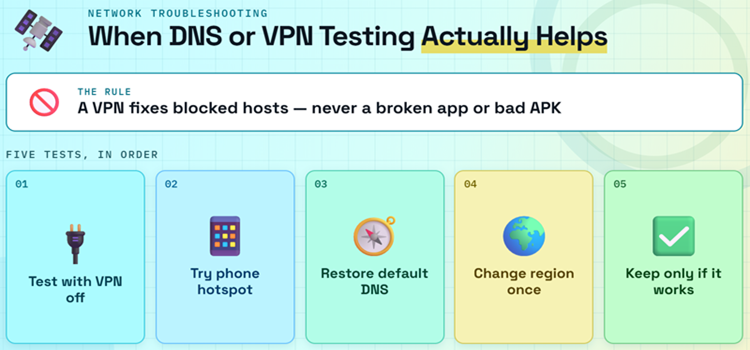
A VPN helps only when a provider, DNS resolver, or region blocks a required host. It cannot repair a rejected APK, mismatched CPU package, corrupted app data, or missing companion player.
- Test Without VPN: disconnect first because overloaded free servers can create the same timeout, buffering, and subtitle failures you are attempting to solve.
- Try Phone Hotspot: one short test on a different network cleanly separates home-router or provider filtering from an HDO Box service problem.
- Restore Automatic DNS: custom ad-blocking resolvers sometimes block catalog, subtitle, or player endpoints; return to default DNS before judging the app.
- Change Region Once: if the catalog loads only through one reputable VPN location, regional routing or filtering is plausible; repeated random switching adds noise.
- My Decision Rule: I keep the VPN only when the same title works immediately through it and fails repeatedly on the normal connection.
Remove Unofficial Builds Safely Before Reinstalling
Version 4.4.0 blocks modified APK requests, making source quality part of functionality. Conflicting sites publish different versions and player instructions, so identify the recognized release branch before replacing a working installation.
- Record Before Removal: note your current version, app family, and any player name so you can explain or reverse the change if needed.
- Delete Old Installer: remove cached APK files from Downloader after installation so a future tap cannot reinstall the obsolete or incompatible package accidentally.
- Uninstall Companion Mods: remove unofficial players paired with the rejected build, but retain legitimate players used independently by other apps on your device.
- Restart Before Reinstalling: a full reboot clears package-installer processes and old player handoffs that can survive after an app is removed from Fire TV.
- My Source Rule: I reject pages whose version, Android requirement, player instructions, and update history contradict the recognized release feed or each other.
How I Evaluated Safe HDO Box Replacements
I limited this shortlist to traceable services with official Fire TV availability or established television support, clear funding, and current first-party information. None depends on a modified HDO Box APK or Drama Player.
- Installation Source: every pick installs through the Amazon Appstore, a recognized TV app store, or the service’s own documented device route without mystery download codes.
- Rights Position: services license their catalogs, use public-library access, or host creator-authorized video rather than scraping unverified third-party playback links.
- Transparent Cost: each option clearly states free, ad-supported, library-funded, rental, or purchase terms so users are not surprised by hidden subscriptions.
- Fire TV Fit: remote navigation, supported-device documentation, and straightforward sign-in mattered more than catalog size alone for a practical living-room replacement.
- Different Strengths: I selected live channels, on-demand movies, local news, library lending, and creator video so one outage does not disable everything.
Best HDO Box Alternatives While You Troubleshoot
These are legal fallback apps, not HDO Box clones. Catalogs vary by country, but each service has a traceable operator and supported television route. The table highlights five options; detailed blocks explain all eight.
| Service | Best For | Access Model | Get Started |
|---|---|---|---|
| Tubi | Large on-demand catalog | Free with ads | Visit Site |
| Pluto TV | Cable-style live channels | Free with ads | Visit Site |
| Sling Freestream | Live and on-demand variety | Free; account optional | Visit Site |
| Local Now | Local news and weather | Free with ads | Visit Site |
| YouTube | Creator and official channels | Free with optional Premium | Visit Site |
1) Tubi
Tubi is the easiest HDO Box replacement for people who mainly want movies and complete television seasons without managing APK files. Fox owns the service, studios license the catalog, and the official app installs directly from the Amazon Appstore. It costs nothing because advertisements fund viewing, and Tubi says it never requests a payment card. I put it first because its Fire TV support is documented, the interface works well with a remote, and an account remains optional for ordinary viewing. The trade-offs are regional catalog differences, commercial breaks, and fewer brand-new theatrical titles than paid subscriptions. Still, opening a licensed app and pressing Play is a far more predictable experience than troubleshooting an unknown player package.
Features:
- Official Fire TV App: install Tubi from the Amazon Appstore without Downloader, unknown-source permissions, separate players, or manually selected CPU packages.
- Licensed Catalog: studio partnerships fund a legal movie and television library, avoiding the unstable scraped links that commonly disappear inside third-party APKs.
- No Payment Card: Tubi states that it never asks for card details and supports the service through short advertising breaks during programs.
- Optional Account: watch without registration, or create a free profile to synchronize a list and resume positions between supported devices.
- Broad Device Support: Amazon Fire TV, Android TV, Roku, Apple TV, consoles, smart televisions, and web browsers all have supported routes.
- Live Channels: a live section supplements the on-demand library with news and themed programming, though availability varies between supported countries.
- My Practical Pick: I favor Tubi when someone wants the quickest legal substitute with no sideloading, no card, and almost no setup burden.
| Pros | Cons |
| Direct Amazon Appstore installation | Advertising interrupts movies |
| No subscription or payment card | Catalog differs by country |
| Large licensed on-demand selection | |
| Account optional for basic viewing |
Pricing: Free and ad-supported. No subscription or payment card is required for standard viewing.
Link: https://tubitv.com/
2) Pluto TV
Pluto TV best replaces the channel-surfing side of HDO Box. Paramount operates it as a free, advertising-supported service built around a scrolling television guide, plus an on-demand catalog. Channels focus on news, reality, classic programs, movies, crime, documentaries, and single-show marathons rather than premium cable networks. I rank it second because users can install the official Fire TV app and begin watching without pairing a player or locating a current APK. The guide feels familiar from across the room, and the service is less fragile because its streams are licensed and centrally managed. It does not provide every current series, premium sports rights, or an ad-free upgrade, but it is dependable for casual viewing.
Features:
- Channel Guide: the grid presents scheduled programs like traditional television, making it easier to browse with a Fire TV remote from the sofa.
- Free Live Streams: watch themed entertainment, news, movie, reality, documentary, and classic television channels without purchasing a monthly channel bundle.
- On-Demand Library: films and full episodes sit beside the live guide, so viewers are not limited to whatever is currently scheduled.
- Major Operator: Paramount ownership provides traceable licensing and ongoing maintenance, reducing the risk of silent abandonment or fake replacement APKs.
- Simple Installation: the official app is available for Fire TV and other major platforms, with no companion video player required.
- Regional Lineups: country-specific channels and rights make the catalog more relevant locally, although international travel can change what remains available.
- My Use Case: I choose Pluto TV when the missing HDO Box habit is browsing a live grid rather than searching for one title.
| Pros | Cons |
| Familiar live television guide | No ad-free viewing tier |
| Free live and on-demand content | Premium sports are limited |
| Official app on major devices | |
| No sideloading or companion player |
Pricing: Free and ad-supported. Channel availability and on-demand titles vary by region.
Link: https://pluto.tv/
3) Sling Freestream
Sling Freestream combines live channels and on-demand programs without requiring a paid Sling TV subscription. Sling currently advertises more than 600 free channels and over 40,000 on-demand movies and shows, with no credit card and no account needed for basic watching. I place it above smaller services because one supported app covers news, entertainment, international channels, and themed programming while preserving a conventional guide. Creating a free account adds favorites, profiles, watchlists, and limited DVR features, but viewers can sample the service first. Availability and channel counts may differ by location, and ads are unavoidable. Even so, it offers a much clearer ownership and support path than a third-party movie APK with changing server sources.
Features:
- 600+ Channels: Sling advertises hundreds of free live channels spanning news, entertainment, reality, movies, international programming, and themed continuous streams.
- Large On-Demand Pool: more than 40,000 listed movies and shows give viewers a searchable alternative when nothing suitable appears in the live guide.
- No Card Required: basic Freestream access does not require payment information, separating the free service from Sling’s optional paid channel packages.
- Account Optional: begin watching without registration, then add a free account only when favorites, profiles, watchlists, or DVR become useful.
- Supported TV Devices: the standard Sling application reaches Fire TV and other major living-room platforms without a manually downloaded companion player.
- International Choice: free regional and language-focused channels provide genuinely useful variety for households underserved by mainstream American FAST streaming services.
- My Selection Reason: I included Freestream because it replaces both browsing and searching instead of forcing users to install separate live and movie apps.
| Pros | Cons |
| Hundreds of free live channels | Regular advertising breaks |
| Large on-demand selection | Lineup varies by location |
| No account for basic viewing | |
| Optional profiles and free DVR |
Pricing: Freestream is free and ad-supported. Paid Sling packages are optional and separate.
Link: https://www.sling.com/freestream
4) Local Now
Local Now is the most specialized alternative here. It centers on local news, weather, traffic, and community coverage, then supplements that feed with free national news, entertainment, lifestyle, and movie channels. Allen Media Group operates the service, and the official TV app avoids Downloader entirely. I recommend it as a companion rather than a complete HDO Box substitute: it solves the local-information gap better than broad movie apps, but its on-demand library is smaller. Location determines the usefulness of its local feed, with the strongest coverage in the United States. For Fire TV owners who opened HDO Box mainly for news or background channels, Local Now offers a safer, faster route without package conflicts or uncertain player dependencies.
Features:
- Localized Feed: selected location data shapes a continuous mix of nearby headlines, weather forecasts, traffic, and relevant community stories for the viewer.
- Live News: national and regional news channels supplement local coverage, giving cord-cutters a useful background television option throughout the day.
- Weather Focus: forecasts and severe-weather information receive more attention than on general entertainment platforms, making the service valuable during changing conditions.
- Free Entertainment: movie, lifestyle, documentary, and themed channels broaden the app beyond local information without introducing a monthly subscription charge.
- Official Distribution: supported television apps remove the need to enable unknown sources, select CPU architecture, or maintain a companion player package.
- Traceable Operator: Allen Media Group ownership gives users a clear company, privacy policy, support path, and rights framework behind the service.
- My Recommended Role: I pair Local Now with a larger movie app because its strongest value is timely regional coverage, not catalog depth.
| Pros | Cons |
| Strong local news and weather | Best coverage is US-focused |
| Free national channel selection | Smaller movie catalog |
| Official TV-device apps | |
| No sideloading required |
Pricing: Free and ad-supported. Local content depends on coverage in the selected area.
Link: https://localnow.com/
5) YouTube
YouTube is not a direct movie-catalog clone, but it is the broadest official video fallback on Fire TV. Verified studios, broadcasters, newsrooms, sports organizations, and independent creators publish free, advertising-supported programs alongside rentals and purchases. The official application receives platform updates and needs no sideloading or companion player. I include it because a user troubleshooting HDO Box can immediately confirm whether the Firestick, display, audio, remote, and internet connection work normally in another video app. Search quality depends on the channel and country, while misleading uploads still require judgment. Staying with verified channels and clearly labeled Movies & TV listings produces a safer experience than following random links or installer pages.
Features:
- Official Fire TV Support: install through the Amazon Appstore and receive normal application updates without enabling unknown sources or maintaining downloaded installer files.
- Verified Channels: broadcasters, studios, sports organizations, and public institutions publish authorized video under recognizable identities that viewers can check before watching.
- Free Viewing: millions of creator videos, news streams, documentaries, and selected films are supported by advertising rather than a required monthly subscription.
- Rent Or Buy: clearly labeled transactional titles provide another route to recent films without committing to a recurring streaming plan.
- Playback Diagnostic: a successful high-resolution YouTube stream helps confirm that Fire TV networking, HDMI output, audio, and decoding remain functional.
- Cross-Device History: signing in synchronizes subscriptions, playlists, purchases, and viewing progress across Fire TV, phones, computers, and supported smart televisions.
- My Safety Filter: I stay with verified or clearly owned channels and avoid uploads that redirect viewers toward APKs, messaging groups, or unknown websites.
| Pros | Cons |
| Official app with broad device support | Not a unified movie catalog |
| Huge amount of free content | Upload quality varies widely |
| Useful for connection diagnostics | |
| Optional rentals and purchases |
Pricing: Free with ads for standard viewing. Premium, rentals, and purchases are optional.
Link: https://www.youtube.com/
6) Kanopy
Kanopy turns a participating public-library card or university login into an ad-free film service. Its strengths are independent cinema, documentaries, classics, educational programs, and thoughtful children’s content rather than the newest commercial television. Access rules, monthly tickets, and available titles depend on the sponsoring institution, so two users may see different catalogs. I recommend checking Kanopy before paying for another subscription because many libraries already fund access for local residents. The app supports television devices, and activation is more trustworthy than sideloading an anonymous APK: viewers create an account, connect an eligible library, and follow the displayed device code. Kanopy will not replace HDO Box’s breadth, but its curated, licensed collection offers quality without advertising or package maintenance.
Features:
- Library Access: participating public libraries and universities sponsor viewing, allowing eligible members to stream without purchasing an individual monthly entertainment subscription.
- Ad-Free Films: regular titles play without commercial interruptions, creating a calmer experience than free advertising-supported services and many unofficial video players.
- Curated Catalog: documentaries, independent cinema, world film, classics, courses, and educational programs receive considerably more emphasis than disposable trending lists.
- Kids Collection: Kanopy Kids provides age-appropriate programs, with access rules that may differ from the ticket system used for general titles.
- Device Activation: the television app displays a code that links the device to an existing account without typing a long password using the remote.
- Institution Rules: monthly tickets, availability, and borrowing limits are set by the connected library or university and can change between locations.
- My Best Audience: I suggest Kanopy to viewers who value documentaries and international films more than an endless feed of recent mainstream releases.
| Pros | Cons |
| Free through participating institutions | Requires an eligible library or university |
| Ad-free standard viewing | Monthly limits vary |
| Strong documentary and world-film catalog | |
| Dedicated children’s collection |
Pricing: No direct subscription fee with an eligible participating library or university account. Limits vary by institution.
Link: https://www.kanopy.com/
7) Hoopla
Hoopla is another library-funded option, but it behaves differently from Kanopy. Participating libraries provide instant borrowing for movies, television, audiobooks, music, eBooks, and comics, while BingePass and SeasonPass can unlock grouped collections with one borrow. The official service says Fire TV Stick is supported, and titles return automatically without late fees. I rate Hoopla highly for households that want several media types inside one account, particularly when a local library offers generous monthly limits. Catalogs and allowances vary by library, and registration requires a valid card and PIN. It cannot promise every current film, yet its traceable licensing, ad-free playback, and direct TV app make it an excellent antidote to unstable third-party streams.
Features:
- Instant Borrowing: many catalog items are available immediately without a hold queue, then return automatically when the lending period expires.
- Multiple Media Types: one account can provide movies, television, audiobooks, music, eBooks, comics, manga, and collection passes through the library.
- Fire TV App: Hoopla documents support for Fire TV Stick alongside Roku, Apple TV, Android TV, web browsers, and mobile devices.
- No Advertising: borrowed movies and shows play without commercial breaks, giving the service a notable advantage over most free streaming platforms.
- BingePass Access: selected passes unlock a collection or partner service for a limited period while using a single library borrow.
- Library Limits: available titles, monthly borrow allowances, and supported pass collections depend on funding decisions made by each participating library.
- My Value Check: I verify local borrowing limits before recommending Hoopla, because the same free account can be generous in one city and restricted elsewhere.
| Pros | Cons |
| Free with participating library card | Catalog depends on local library |
| Ad-free movies and shows | Monthly borrow caps may apply |
| Supports Fire TV Stick | |
| No holds on instant-borrow titles |
Pricing: Free through participating libraries. Borrow limits and available content are set locally.
Link: https://www.hoopladigital.com/
8) Fandango at Home
Fandango at Home, previously known as Vudu, combines a rotating free-with-ads library with rentals and digital purchases. That mixed model suits viewers who want free browsing most nights but prefer a legitimate way to watch a specific recent release when needed. There is no mandatory monthly subscription, and supported devices keep purchased libraries associated with the account. I include it because it offers a clear transaction and support path when HDO Box cannot find a title, rather than sending users through another uncertain source. The free catalog is smaller than Tubi’s, and rentals can become expensive when used frequently. For occasional movie nights, however, paying once can be simpler than maintaining several unreliable APKs and player packages.
Features:
- Free With Ads: a clearly labeled rotating selection lets viewers watch without rental charges, while advertisements fund access to those titles.
- Rent Newer Titles: one-time rentals provide a legal path to specific movies without starting another recurring monthly subscription or channel bundle.
- Digital Purchases: bought films and shows remain connected to the account for playback across compatible devices under the service’s terms.
- No Mandatory Plan: creating an account does not force a monthly subscription, making the service suitable for occasional rather than continuous spending.
- Quality Labels: rental and purchase screens display resolution options before checkout, reducing uncertainty about whether a title supports higher-quality playback.
- Family Features: account libraries and curated sections make it easier to return to owned titles without searching across unstable third-party links.
- My Spending Rule: I reserve rentals for a specific planned movie; frequent casual viewing is better handled by Tubi, Pluto TV, or library services.
| Pros | Cons |
| Free ad-supported section | Rentals add up with frequent use |
| Current rentals and purchases available | Free catalog is smaller than Tubi |
| No required monthly subscription | |
| Account keeps digital library organized |
Pricing: Free-with-ads titles are available. Rental and purchase prices vary by title and video quality.
Link: https://athome.fandango.com/
Keep HDO Box Stable After It Starts Working
Once playback returns, do not replace a working build because a mirror claims something newer. Keep one fallback from our complete HDO Box alternatives guide, preserve storage, and change only one component at a time.
- Keep Version Notes: record the working HDO Box version, CPU family, and player method so a future update can be compared accurately.
- Retain Free Storage: leave at least 1 GB available for temporary downloads, application updates, thumbnails, caches, and normal Fire TV system maintenance.
- Delete APK Files: remove installers after successful setup, preventing accidental downgrades and reclaiming valuable storage that Downloader otherwise leaves behind.
- Avoid Automatic Mods: decline update prompts from unofficial companion players or clone packages, especially when their signing source cannot be verified.
- My Backup Plan: I keep one licensed Appstore service installed so a temporary HDO Box outage never turns into an urgent search for unknown APKs.
Verdict:
HDO Box not working has no universal cause. The 4.x branch uses built-in playback, older TV builds may need Drama Player, and unofficial mods can be rejected. Diagnose the symptom before reinstalling. For a legal fallback, these three cover the broadest uses:
- Tubi: best for a large licensed on-demand library, direct Fire TV installation, optional registration, and completely free viewing supported by advertisements.
- Pluto TV: best for replacing channel surfing with a familiar live guide, themed streams, news, movies, and no sideloaded player dependencies.
- Sling Freestream: best for combining hundreds of live channels with a large on-demand pool while keeping payment details and registration optional.
Start with Force Stop, Clear Cache, a Fire TV restart, and three-title testing. Reinstall only when the version, signature, or CPU-build evidence points there. That order fixes local failures without confusing a server outage with a device problem.
FAQs
Is HDO Box down right now?
It is not universally offline: the recognized download page lists version 4.4.6. If every title fails, confirm the installed build first. The version 4.4.0 security change blocks modified and unofficial APK requests, which can look like a complete outage.
Why does HDO Box open but show no links?
No links across several unrelated titles usually indicates a rejected or outdated APK, an upstream source outage, or a blocked network path. Check your exact version, clear stored data after lighter fixes, and compare the result on a phone hotspot.
Does HDO Box need Drama Player on Firestick?
Some older HDO TV builds require Drama Player TV, while the current 4.x HDO Box line documents a built-in player. Install a companion only when your exact app requests it. Mixing phone, TV, legacy, and modified packages creates repeated prompts.
How do I fix HDO Box force-closing on Firestick?
Force stop the app, clear its cache, restart Fire TV, free storage, and install Fire OS updates. If it still closes immediately, remove the incompatible APK and choose the matching v7a, v8a, or Universal package for your device.
Why does the HDO Box update say App not installed?
Android rejects an in-place update when the package ID, signing certificate, or version path conflicts with the installed copy. Note your current settings, uninstall the mismatched build, restart, then install one consistent package from a recognized source.
Can Downloader itself cause an HDO Box parse error?
Downloader is usually not the cause, but an interrupted transfer can leave a partial APK that Android cannot parse. Delete the file, clear Downloader’s cache, confirm storage, and follow our Downloader App for Firestick setup guide before fetching one clean installer.
What is the safest HDO Box alternative?
Tubi and Pluto TV are the simplest free replacements because both are licensed and install from the Amazon Appstore. Tubi is stronger for on-demand movies, while Pluto TV better recreates a live channel guide. Catalogs vary by country.