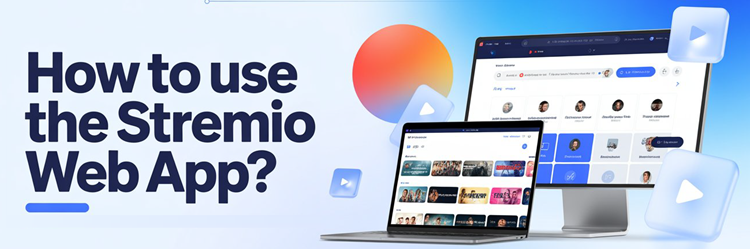
Key Takeaway: The Stremio Web App runs entirely in your browser at web.stremio.com with nothing to install. Sign in, add a few addons, and you can browse and stream in minutes. The one catch: the web version plays HTTP and debrid links but cannot stream raw torrents, so pairing it with a debrid service unlocks its full potential.
Not everyone wants to install a desktop program just to watch something. The Stremio Web App lets you use almost the entire Stremio experience straight from a browser tab on any computer, Chromebook, or even a phone. It is perfect for locked-down work laptops, shared machines, or a quick session on a device you do not own. This guide shows exactly how it works and where its limits lie.
I ran the web app in Chrome, Edge, and Safari across a Windows laptop and a MacBook to see how consistent it really is. Signing in synced my addons instantly, and debrid-powered streams played without a hitch. I also confirmed the well-known limitation first-hand: torrent-only sources would not start in the browser until I connected a debrid account, which resolved them into playable links.
How to Use the Stremio Web App (Step by Step)
Getting started takes three quick parts: open the web app, sign in, and load your addons. You do not download or install anything, which is the whole appeal of the browser version.
Part 1: Open the Stremio Web App
- Open any modern browser and go to web.stremio.com. This is the official web version linked from Stremio’s own downloads page.
- If your browser warns about streaming content, allow the page to load normally; the site itself is safe and hosts no media of its own.
- Bookmark the page so you can return to it in one click, since there is no app icon on your device.
Part 2: Sign In or Create an Account
- Select Log in and enter your Stremio email and password, or choose Sign up to make a free account in under a minute.
- Signing in matters because it pulls in any addons and library items you already use on other devices, keeping everything in sync.
- If you have never used Stremio before, register now so your web setup carries over to phones or TVs later.
Part 3: Add Addons and Start Streaming
- Click the puzzle-piece icon to open the addon catalog, then install a catalog and a streaming addon to feed the app with content.
- Return to the Board or Discover tab, pick a movie or show, and select a stream from the list that appears.
- Press play and the title opens in the browser’s built-in player, complete with subtitle and quality options.
For the best results, connect a debrid service inside your streaming addon before you press play, so the web app always has fast, browser-friendly links to work with.
What Is the Stremio Web App?
The web app is the same Stremio interface you know, delivered through a browser instead of an installed program. Understanding what it is helps set the right expectations.
- Browser-Based: The entire Stremio interface runs at web.stremio.com, so any computer with a modern browser becomes a streaming machine with zero installation.
- Account-Synced: Log in and your addons, library, and watch progress sync from the cloud, matching whatever you have set up on other devices.
- Addon-Powered: Like every version of Stremio, the web app shows nothing until you add addons that supply catalogs, streams, and subtitles.
- No Torrent Engine: The browser cannot run Stremio’s peer-to-peer streaming server, so it relies on HTTP and debrid links rather than raw torrents.
- Great for Locked Devices: It shines on work laptops, Chromebooks, or borrowed computers where you cannot or do not want to install software.
Stremio Web App vs Desktop App
The web and desktop versions look almost identical, but they differ in one important way around torrent streaming. This comparison shows which suits your needs.
| Feature | Web App | Desktop App |
|---|---|---|
| Installation | None, runs in browser | Download and install required |
| Addons and sync | Full support | Full support |
| Torrent (P2P) streaming | Not supported | Fully supported |
| Debrid / HTTP streams | Fully supported | Fully supported |
| Best for | Quick, install-free access | Power users and torrent sources |
How to Add Addons in the Stremio Web App
Addons are the engine of Stremio, and adding them in the browser is identical to any other platform. A good starter set covers catalogs, streams, and subtitles.
- Open the Catalog: Click the puzzle-piece icon to browse the built-in community addon list, then select Install on anything you want to use.
- Paste a Manifest URL: For addons outside the catalog, paste their manifest link into the addon search box and confirm the install.
- Start With Proven Picks: Our best Stremio addons guide lists dependable choices that work well in the browser.
- Favour Debrid Addons: Streaming addons that support debrid return HTTP links, which are exactly what the web player needs to start instantly.
- Sync Everywhere: Any addon you add in the browser is saved to your account and appears automatically on your phone, TV, or desktop.
Supported Browsers and Requirements
The web app is light, but a current browser and a solid connection make the difference between smooth playback and constant buffering. Here is what you need.
| Requirement | Details |
|---|---|
| Modern browser | Chrome, Edge, Firefox, or Safari, kept up to date |
| Stremio account | Free, needed to sync addons and library |
| Streaming addon | Supplies the actual links to play |
| Debrid service | Strongly recommended for reliable web playback |
| Stable internet | 5GHz Wi-Fi or wired for HD and 4K streams |
Why Some Streams Won’t Play in the Browser
The most common web-app complaint is streams that refuse to start. This almost always traces back to the browser’s inability to handle peer-to-peer torrents, and there is a clean solution.
- No P2P in Browsers: A web page cannot run Stremio’s local streaming server, so torrent-only sources have nothing to turn them into a playable link.
- Debrid Fixes It: A debrid service converts those torrent sources into direct HTTP links the browser can play, which restores almost all missing streams.
- HTTP Addons Work: Addons that already provide direct web links, including many official catalogs, play fine in the browser with no extra setup.
- Desktop for Pure Torrents: If you refuse to use debrid, the installable desktop app is the only version that streams raw torrents directly.
- Hosted Options Exist: Cloud addon setups can also resolve links server-side, giving the web app browser-friendly streams without a local torrent engine.
How to Cast the Stremio Web App to a TV
Because the web app lives in a browser, you can send it to a television using tools you may already have. This is handy when you want the browser version on a big screen.
- In Google Chrome, open the web app, click the three-dot menu, and choose Cast to send the tab to a Chromecast or Google TV device.
- Select your TV from the cast list, then play your title; the whole tab, including video and audio, appears on the television.
- Alternatively, connect your laptop to the TV with an HDMI cable and run the web app full-screen for the most reliable picture.
- For Apple setups, use AirPlay from Safari or mirror the browser tab to an AirPlay-capable device.
HDMI remains the most stable route for the web app, since it avoids the wireless hiccups that can interrupt casting a live video tab.
Stremio Web App Not Playing? Common Fixes
When the web app stalls, the cause is usually the torrent limit, an addon issue, or the browser itself. Match your symptom to the fix below.
| Symptom | Likely Cause | Fix |
|---|---|---|
| No streams found | Torrent-only addon | Connect a debrid service to the addon |
| Stream loads then stops | Weak connection | Switch to 5GHz Wi-Fi or wired internet |
| Player is black | Browser or extension conflict | Disable ad-blockers or try another browser |
| Cannot log in | Cached session error | Clear cookies for the site and sign in again |
| Addons missing | Not signed in | Log in so your saved addons sync back |
Is the Stremio Web App Safe to Use?
The web app itself is a legitimate product, but the usual Stremio caution about addons and content applies just as much in the browser.
- Official and Safe: web.stremio.com is Stremio’s own hosted version, so the platform is safe as long as you use the genuine address.
- Addons Set the Risk: Official addons are trustworthy, while some third-party ones index unofficial sources and fall into a legal grey area.
- Read a Review First: Our Stremio review covers the platform’s safety and privacy in more depth.
- Use a VPN: A VPN keeps your streaming private from your provider, which is worth having when you use third-party addons in the browser.
- Avoid Clones: Only use the official web address; copycat “Stremio online” sites can inject ads or malicious scripts into the player.
How to Use Subtitles in the Stremio Web App
Subtitles are one of the web app’s most useful features, especially for foreign films and hard-of-hearing viewers. They work almost automatically once set up.
- Install a Subtitle Addon: Add a subtitle addon such as OpenSubtitles so the web player can pull captions in dozens of languages on demand.
- Pick During Playback: Open the subtitle menu in the player and choose your language; the web app fetches and displays matching captions instantly.
- Set a Default Language: Configure your preferred language in settings so subtitles load automatically without selecting them for every title.
- Adjust the Timing: If captions drift out of sync, the player includes a delay control to nudge them back into step with the audio.
- Style the Text: You can change subtitle size and colour in the settings so captions stay readable on both small laptops and large screens.
Because subtitles sync to your account, the language and style you set in the browser carry across to Stremio on your phone and TV as well.
How to Manage Your Library in the Browser
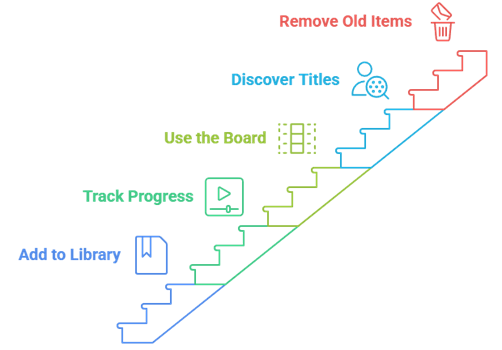
The web app is a full library manager, not just a player. Using it to organise what you watch keeps every device tidy because changes sync to your account.
- Add to Library: Select the bookmark or library button on any title so it is saved to your account and appears across all your devices.
- Track Your Progress: The web player records where you stopped, letting you resume an episode later on a phone or TV without hunting for your place.
- Use the Board: The Board tab surfaces continue-watching items and new episodes, giving you a quick launchpad each time you open the app.
- Discover New Titles: The Discover tab, fed by your catalog addons, helps you browse films and shows by genre, year, and rating.
- Remove Old Items: Clearing finished titles from your library keeps the continue-watching row focused on what you actually plan to watch next.
Since the library lives in your account rather than the browser, nothing is lost when you clear cookies or switch to a different computer entirely.
Using the Stremio Web App on a Mobile Browser
The web app is not limited to computers. It runs in mobile browsers too, which is handy when you cannot or do not want to install the dedicated app.
- Open in Any Browser: Visit web.stremio.com in Safari or Chrome on your phone, sign in, and the interface adapts to the smaller screen.
- Same Torrent Limit: As on desktop, mobile browsers cannot stream raw torrents, so a debrid service is what makes mobile playback reliable.
- Handy for iOS: With Stremio’s app availability shifting on Apple devices, the mobile web app is a dependable way to use Stremio on an iPhone.
- Cast From Mobile: Chrome on Android can cast the web tab to a Google TV, putting your phone’s browser session on the big screen.
- Add to Home Screen: Save the web app as a home-screen shortcut so it opens like an app icon without the browser address bar in view.
For occasional mobile viewing the web app is perfectly usable, though the dedicated Stremio mobile app remains smoother if your device supports installing it.
How Debrid Transforms the Web App
Debrid is mentioned throughout this guide for good reason: it is the single change that turns the web app from occasionally frustrating into consistently reliable.
- Turns Torrents Into Links: A debrid service resolves torrent sources into direct HTTP streams, which is exactly what a browser needs to play them.
- Instant Cached Playback: Popular titles are usually pre-cached on debrid servers, so streams start in seconds rather than buffering to load.
- Higher Quality Options: Debrid unlocks more 1080p and 4K sources that free addons rarely surface, improving what you can actually watch.
- One Setup, All Devices: Connecting debrid to an addon syncs it to your account, so the web app, phone, and TV all benefit at once.
- Low Monthly Cost: Services such as Real-Debrid and TorBox cost only a few dollars a month, a small price for the reliability they add.
If you take only one action from this guide, connecting a debrid service to your streaming addon is the change that fixes the most web app problems at once.
Keyboard Shortcuts and Player Controls
The web app’s player supports the kind of keyboard shortcuts you expect from a browser video experience, which speeds up everyday viewing on a laptop.
- Space to Pause: The spacebar toggles play and pause, the fastest way to stop a stream without reaching for the mouse.
- Arrows to Seek: The left and right arrow keys jump backward and forward a few seconds, ideal for catching a line you missed.
- Fullscreen Toggle: Pressing F or double-clicking the video expands it to fullscreen, and Escape returns you to the windowed view.
- Mute Quickly: The M key mutes and unmutes instantly, which is useful when a call or notification interrupts your viewing.
- Volume Keys: The up and down arrows raise and lower volume in small steps without touching your computer’s system controls.
These controls mirror what you already know from other web video players, so the Stremio web app feels immediately familiar the first time you use it.
Tips for a Smoother Web App Experience
A handful of small adjustments keep the web app fast and stable. These are the settings and habits that made the biggest difference in my testing.
- Keep the Browser Updated: Newer browser versions handle streaming and codecs better, so an up-to-date Chrome or Edge reduces playback glitches.
- Pause Heavy Extensions: Some ad-blockers and privacy extensions interfere with the player, so disable them for the site if streams misbehave.
- Use a Wired Connection: On a laptop that supports it, Ethernet delivers the steady bandwidth that HD and 4K web streams need.
- Bookmark the Real Site: Save the official web.stremio.com address to avoid landing on copycat sites that inject ads into the player.
- Sign In First: Always log in before browsing so your addons and library load, otherwise the app looks empty and streams will not appear.
With an updated browser, a debrid service, and a stable connection, the web app is reliable enough to be a genuine replacement for the desktop program for most viewing.
How to Run Stremio Web on a Smart TV Browser
Some smart TVs include a web browser, which raises the question of whether you can just load the Stremio web app there. The answer is nuanced.
- It Can Load: On TVs with a capable browser, web.stremio.com will often open and sign in, showing your familiar Board and Discover screens.
- Playback Varies: Many TV browsers struggle with the video player, so streams may stutter or fail even when the interface loads fine.
- Debrid Still Needed: The same torrent limit applies, so a debrid service is essential for any chance of smooth playback in a TV browser.
- Native App Is Better: Where a native Stremio app exists, such as on Samsung or Android TV, it will always outperform the browser version.
- Use as a Backup: Treat the TV browser route as a fallback for sets with no native app rather than a primary way to watch.
If your TV has a native Stremio app or can run a streaming stick, use that instead; the smart-TV browser is a last resort with inconsistent playback.
Does the Stremio Web App Work Offline?
Because it lives in a browser, people often ask whether the web app can work without internet or save titles for a flight. Here is the reality.
- No Offline Playback: The web app streams everything live from addons, so it needs an active internet connection and cannot play saved files.
- No Download Option: Unlike the desktop app, the browser version cannot download content for later, since it has no local storage engine.
- Library Needs Sync: Even your saved library relies on your account loading over the internet, so it will not appear without a connection.
- Plan for Travel: For offline viewing on a plane, download within a legitimate service’s own app rather than expecting Stremio web to help.
- Cache Is Temporary: Any browser caching is short-lived and not designed for offline playback, so do not rely on it for watching later.
If offline viewing matters to you, the web app is the wrong tool; a service with its own download feature is the only reliable way to watch without internet.
How to Fix Audio or Video Sync Issues in the Browser
Occasionally a stream in the web app plays with the sound slightly ahead of or behind the picture. A few quick steps usually bring them back into line.
- Reload the Stream: Stop and restart the title, which often re-syncs audio and video that drifted during a brief connection hiccup.
- Try Another Source: If one stream is out of sync, pick a different source from the list, as the problem is often in that specific file.
- Adjust Subtitle Delay: When only captions are off, use the player’s subtitle delay control to nudge them back into step with the speech.
- Update Your Browser: Sync problems sometimes stem from an outdated browser mishandling the video codec, so keep Chrome or Edge current.
- Disable Conflicting Extensions: Audio-enhancer or video extensions can interfere with playback, so turn them off for the site if sync issues persist.
Most sync problems are tied to a single stream, so switching sources is the fastest fix before you start changing browser settings.
When to Use the Web App vs the Desktop App
Both versions have a clear best use. Choosing the right one saves you the frustration of streams that will not start on the platform you picked.
- Pick Web for Speed: The browser app is ideal when you want instant access on a computer without installing anything or leaving a footprint.
- Pick Desktop for Torrents: If you rely on raw torrent sources without debrid, only the desktop app can stream them directly.
- Web for Shared Devices: On a work laptop or library computer, the web app is the only realistic way to use Stremio at all.
- Desktop for Power Users: Heavy users who want local downloads and full control will prefer the installed version’s extra features.
- Compare Alternatives: If neither fits, our best Stremio alternatives guide lists other apps worth trying.
Conclusion
The Stremio Web App is the fastest way to use Stremio anywhere, because it needs nothing more than a browser and a free account. Open web.stremio.com, sign in, add a couple of addons, and you are streaming in minutes. Just remember the one real limitation: browsers cannot run torrents directly, so connecting a debrid service is what turns the web app from good to genuinely reliable. For raw torrent streaming you will still want the desktop program, but for quick, install-free access on almost any computer, the web version is hard to beat.
FAQs
Is the Stremio web app free?
Yes. The web app at web.stremio.com is completely free to use, just like the rest of Stremio. You only need a free account to sync your addons, and every core streaming feature is included at no cost.
Can I stream torrents on the Stremio web app?
Not directly. Browsers cannot run Stremio’s peer-to-peer streaming server, so torrent-only sources will not play. Connecting a debrid service converts them into direct links the web player can stream without any problem.
Do I need to install anything for Stremio web?
No. That is the main advantage of the web app. It runs entirely in your browser with nothing to download, which makes it ideal for Chromebooks, work laptops, and any device where you cannot install software.
Does the Stremio web app work on iPhone or iPad?
It runs in the Safari browser on iOS, though the same torrent limitation applies. For the smoothest mobile experience, pair it with a debrid service or use Stremio’s dedicated mobile app instead.
Can I use the Stremio web app on a Chromebook?
Yes, and it is one of the best options for Chromebooks, which cannot run the Windows or Mac desktop app. Just open web.stremio.com in Chrome, sign in, and add your addons to start streaming.
Why does the web app say no streams were found?
This usually means your addon only offers torrent sources, which the browser cannot handle. Add a debrid service to that addon, or install an addon that provides direct HTTP links, and the streams will appear.
Is web.stremio.com the official Stremio site?
Yes. web.stremio.com is Stremio’s own official browser version, linked directly from the downloads page on stremio.com. Avoid copycat “Stremio online” sites, which can inject ads or malicious scripts into the player.
Can I download content on the Stremio web app?
No. The web app is for streaming only and cannot download files for offline viewing, since browsers do not run Stremio’s local engine. For downloads, you need the installable desktop application instead.