Key Takeaway: Mangolia IPTV is the common search name, but its storefront brands the service as Magnolia IPTV. The offer includes a 24-hour trial, one-to-five connection plans, and broad player support. Conflicting catalog figures, a young public domain, and unverified licensing make a short trial safer than a long commitment. Check the current Mangolia IPTV offer.
Many reviews repeat channel counts and uptime claims without checking whether the provider’s pages agree. I compared pricing, FAQ, apps, policy, country, and reputation sources to identify what is published, what remains unproven, and how to test before paying.
This review does not assume every channel is licensed or works everywhere. Performance changes by source, server load, player, device, route, and time. My score rewards pricing, trial access, and setup documentation while withholding credit for uptime, library, privacy, or rights claims without independent evidence.
Mangolia or Magnolia IPTV? Confirm the Name Before You Pay
The naming mismatch is the first thing competitors tend to skip. “Mangolia IPTV” is the search phrase and internal partner name, while the destination site currently displays “MAGNOLIA IPTV.” Treat the destination, checkout identity, and credentials as the decisive evidence—not a copied logo or similarly named reseller.
- Current Brand: the linked storefront uses Magnolia IPTV throughout its homepage, pricing, FAQ, apps, policy, and checkout-facing content as of August 7, 2026.
- Search Variation: Mangolia IPTV appears to be a persistent misspelling rather than a separate app, plan family, or independently documented streaming company.
- Domain Check: verify that every checkout and support page remains on magnoliaiptv.com; cloned IPTV stores often reuse names, layouts, testimonials, and channel claims.
- Credential Check: legitimate setup details should arrive privately after signup and include your server URL, username, password, connection allowance, and expiration date.
- Payment Pause: stop if the seller changes domains mid-order, requests unrelated gift cards, exposes another customer’s credentials, or refuses the advertised trial.
Mangolia IPTV Review at a Glance
My provisional editorial score is 3.2 out of 5. Pricing and setup information are detailed, but public evidence cannot verify the catalog, uptime, company history, or distribution rights. The free trial is valuable because your device and channels can answer questions the sales copy cannot.
| Review Area | What I Verified | What Remains Unproven | Score |
|---|---|---|---|
| Pricing | Complete one-to-five connection grid | Future price and service continuity | 4/5 |
| Trial and refund | 24-hour trial; conditional seven-day refund | Consistency of refund handling | 4/5 |
| Compatibility | Xtream/M3U plus major player guidance | Performance on every listed device | 4/5 |
| Transparency | Terms and privacy pages exist | Operator identity and experience history | 2/5 |
| Reliability | Provider publishes speed guidance | Independent uptime and bitrate evidence | 2/5 |
- Best Fit: cautious Firestick or Android TV users willing to run a full trial and begin with one month rather than prepaying long-term.
- Main Strength: the pricing grid clearly separates subscription length and simultaneous connections, making household cost easier to compare than vague “device support” promises.
- Main Weakness: large catalog and reliability claims come from the provider, while public pages contain conflicting channel and on-demand totals that need clarification.
- Risk Level: higher than a licensed mainstream service because ownership, rights coverage, and long-term operating history are not clearly established in public documentation.
- My Verdict: trial first, buy monthly second, and consider longer terms only after repeated peak-hour tests plus a successful support interaction.
What the Mangolia IPTV Subscription Actually Includes
Mangolia IPTV is a channel service, not a player application. After ordering, the provider says it sends credentials that you load into TiviMate, XCIPTV, IPTV Smarters, GSE IPTV, VLC, or another compatible player. That distinction matters because the provider controls the streams while the player controls menus, decoding, favorites, and guide presentation.
- Live TV: the pricing page advertises 22,000 channels, while the FAQ cites 16,000; neither page publishes a downloadable, date-stamped channel inventory.
- On Demand: plan cards show 36,000 movies and series, yet the FAQ separately claims 60,000 movies and 8,400 series, creating a material discrepancy.
- Program Guide: EPG support is included, but guide completeness depends on XMLTV mapping, regional feeds, player refresh behavior, and provider metadata accuracy.
- Stream Quality: the site advertises 4K, UHD, FHD, and HD; a resolution label does not prove bitrate, source quality, frame rate, or stability.
- Connections: the base subscription permits one simultaneous stream; installing credentials on several devices does not increase the number allowed to play concurrently.
Mangolia IPTV Pricing and Multi-Connection Costs
The official plans and pricing page lists five connection groups and six terms. Checked on August 7, 2026, the live single-connection cards show $13 monthly, $73 annually, and $220 lifetime—not the rounded figures repeated by some competitors. Confirm the checkout total before paying.
| Connections | 1 Month | 3 Months | 6 Months | 12 Months | Lifetime |
|---|---|---|---|---|---|
| 1 | $13 | $29 | $49 | $73 | $220 |
| 2 | $25 | $39 | $59 | $99 | $350 |
| 3 | $35 | $49 | $69 | $119 | $450 |
| 4 | $44 | $62 | $87 | $151 | $570 |
| 5 | $53 | $76 | $106 | $183 | $695 |
- Monthly Baseline: one connection costs $13, making it the sensible paid test after the free trial and before any discounted long-term commitment.
- Annual Discount: twelve months at $73 equals about $6.08 monthly, but the lower effective cost comes with substantially greater continuity risk.
- Household Pricing: five annual connections cost $183, or roughly $36.60 per connection, provided all five streams are genuinely needed at once.
- Manual Renewal: the terms state that subscriptions do not renew automatically, reducing surprise billing but requiring a new order when access expires.
- Lifetime Warning: “lifetime” describes the seller’s service life, not yours; no escrow, continuity guarantee, or defined minimum term appears on the reviewed pages.
How the Free Trial and Refund Promise Really Work
The 24-hour trial and seven-day refund language sound like one risk-free window, but they are separate protections. The trial is free and intended for testing. The refund statement says a full refund applies when the team cannot resolve a technical issue during the first week, which is narrower than an unconditional change-of-mind policy.
- Trial Length: new users can request one connection for 24 hours, enough for a focused test but not a meaningful long-term uptime measurement.
- Refund Trigger: the FAQ ties reimbursement to an unresolved technical problem, so document the fault and give support a reasonable opportunity to troubleshoot.
- Evidence Trail: save the plan page, receipt, delivery email, error screenshots, timestamps, affected channels, player version, and every support reply.
- Payment Method: cards and cryptocurrency are advertised; card disputes may offer consumer protections that irreversible crypto transfers generally do not provide.
- My Approach: complete the free trial, purchase one month only if it passes, and avoid upgrading until support has answered a real technical question.
A 24-Hour Trial Test That Exposes Real Weaknesses
Do not spend the trial browsing hundreds of categories. Build a short test sheet before the credentials arrive, then repeat the same channels at quiet and busy times. That exposes slow authentication, oversold servers, inaccurate guides, regional gaps, and device problems far faster than randomly sampling a huge catalog.
- Hour One: confirm credential delivery, portal login, playlist download, EPG population, expiration date, connection limit, and access to the promised regional groups.
- Channel Sample: test twenty specific channels you genuinely watch, including local news, one sports feed, one movie channel, and several international stations.
- Peak Window: repeat the same sample during a major live event or evening peak, recording startup delay, freezes, disconnects, and audio synchronization.
- Quality Check: compare claimed 4K or FHD streams on a large screen; look for soft upscaling, low bitrate, incorrect frame rate, and unstable resolution.
- Support Test: report one reproducible issue with device, player, channel, time, and error details; judge whether the reply solves it instead of sending boilerplate.
Device and IPTV Player Compatibility
The official apps page recommends XCIPTV and TiviMate builds for Firestick and Android, plus third-party players for mobile, Apple, and Windows. Credentials use Xtream Codes or M3U. I prefer a recognized player’s official release because reseller-modified APKs add another trust dependency.
| Device | Documented Player Options | Preferred Login | Important Limitation |
|---|---|---|---|
| Firestick / Fire TV | TiviMate, XCIPTV | Xtream Codes | Usually requires sideloading |
| Android TV / Mobile | Smarters Pro, XCIPTV, TiviMate | Xtream Codes | Player source must be verified |
| iPhone / iPad | Smarters Pro, GSE IPTV | Xtream Codes or M3U | App features vary by region |
| Windows / Mac | Smarters Pro, VLC | M3U or Xtream Codes | VLC provides a basic guide experience |
| Samsung / LG TV | Compatible IPTV player | M3U or portal credentials | Store availability depends on model |
- Player Separation: TiviMate, XCIPTV, Smarters, GSE, and VLC display streams but do not independently supply the channels included in this subscription.
- Credential Safety: never paste an M3U link into public screenshots or forums because the URL commonly contains a usable username, password, and server address.
- One-Stream Rule: you may switch a one-connection account between devices, but simultaneous playback requires a multi-connection plan according to the provider FAQ.
- Guide Behavior: Xtream Codes usually organizes categories and EPG data more cleanly than a raw M3U playlist, although either method can carry identical streams.
- App Choice: use a remote-friendly television player for Firestick, a touch-first app on mobile, and VLC only when simple playback matters more than navigation.
How to Install Mangolia IPTV on Firestick
Mangolia IPTV does not appear as a channel-filled application in the Amazon Appstore. You first install a compatible IPTV player, then add the private login sent after trial activation or purchase. Use only the provider’s verified destination and the player’s official distribution path; random APK mirrors can alter the app or capture credentials.
- Step 1: request the free trial and wait for the server URL, username, password, expiration details, and simultaneous-connection limit before installing anything.
- Step 2: install TiviMate, XCIPTV, or IPTV Smarters from a verified developer source, enabling unknown-app permission only when an official APK requires sideloading.
- Step 3: choose Xtream Codes when supplied, enter a neutral profile name, then copy the server, username, and password exactly without extra spaces.
- Step 4: let the first channel and EPG sync finish, hide unwanted country groups, create favorites, and add a parental-control PIN where necessary.
- Step 5: test one SD, HD, FHD, sports, local, and on-demand stream before changing decoder, buffer, VPN, DNS, or external-player settings.
Reliability Claims Versus What You Can Verify
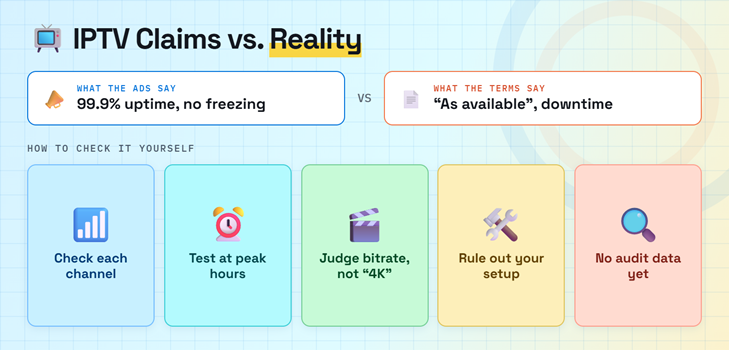
Magnolia’s homepage promotes anti-freeze technology, “stream without freezing,” and 99.9% uptime. Its terms simultaneously say the service is provided “as available” and may face maintenance or unforeseen downtime. That contradiction is common in IPTV marketing. A buyer should treat uptime as a claim until measured across the channels and hours that matter personally.
- No Universal Uptime: one percentage cannot describe every channel because upstream sources, regional servers, authentication, EPG systems, and VOD hosts can fail independently.
- Peak-Time Evidence: a daytime demo may look excellent while weekend sport buffers, so repeat identical tests during the provider’s most demanding traffic periods.
- Bitrate Matters: a stable low-bitrate stream can carry a 4K label; picture detail, motion handling, frame rate, and sustained throughput reveal more.
- Local Isolation: compare Ethernet or strong 5 GHz Wi-Fi, close background apps, reboot the Firestick, and test another player before blaming servers.
- Independent Gap: I found promotional reviews repeating the provider’s claims, but no published long-duration channel-by-channel uptime dataset that readers can audit.
Transparency, Privacy, Payment, and Legal Risk
This is where the article differs most from enthusiastic competitor reviews. The official site claims more than ten years of experience, while two automated reputation services report that magnoliaiptv.com was registered on December 1, 2025. A new domain does not prove misconduct, but the unexplained history gap deserves caution before a lifetime payment.
- Public Identity: the reviewed terms do not clearly name a registered operating company, physical address, country, or specific court jurisdiction for customer disputes.
- Privacy Claims: the policy says names, credentials, and email addresses support account delivery, but it does not present an independent security or no-logs audit.
- Domain Evidence: ScamAdviser and Scam Detector flag the recent registration while reaching different automated risk conclusions, so neither score should stand alone.
- Rights Evidence: the pages reviewed advertise major sports, PPV, movies, and global channels but do not publish broadcaster contracts or a licensing-partner directory.
- Buyer Protection: use the trial, prefer reversible payment, avoid credential reuse, save policy copies, and confirm local copyright rules before accessing any disputed content.
Fix Mangolia IPTV Login, EPG, and Buffering Problems
Troubleshoot in layers so one change does not hide another. Begin with credentials and account status, then playlist/EPG refresh, device resources, player decoding, network path, and provider support. If you need a clean player setup first, follow our IPTV Smarters Pro installation guide before modifying advanced playback settings.
| Symptom | Likely Layer | First Action | When to Contact Support |
|---|---|---|---|
| Authorization failed | Credential or expiration | Re-enter server, user, and password | Details still fail on a second player |
| Channels missing | Bouquet or playlist | Refresh playlist and reveal hidden groups | Promised region remains absent |
| Blank TV guide | EPG mapping | Force an EPG update and check time zone | Multiple players show no data |
| Only some channels buffer | Provider source | Compare nearby channels at the same time | Failures repeat across networks |
| Every stream buffers | Device or network | Reboot, test Ethernet, check available storage | Speed is stable but all streams fail |
- Login First: verify capitalization, protocol, port, expiration, and connection use; copying an old server URL is the most direct cause of authentication errors.
- Refresh Carefully: update channels and EPG once, then wait for completion; repeated refreshes can overload low-memory Firesticks and corrupt cached guide data.
- Player Comparison: load credentials into a second reputable player; identical failures point toward the account or provider rather than the interface.
- Network Comparison: test Ethernet or a mobile hotspot briefly; improvement isolates router, Wi-Fi, DNS, route, or ISP behavior without proving deliberate throttling.
- Useful Ticket: send channel name, country group, timestamp, device, player, connection type, error, and completed tests instead of only saying the service buffers.
Who Should Consider Mangolia IPTV—and Who Should Avoid It
Mangolia IPTV makes the strongest case to an experienced playlist user who understands that a low price and enormous catalog are not guarantees. Beginners can still try it, but they must be comfortable installing a player, protecting credentials, documenting problems, and walking away when the trial does not match their actual viewing needs.
- Consider It: you want a low-cost, short-term test, need several connection choices, and can evaluate specific channels rather than shopping by total count.
- Consider It: you already understand Xtream Codes or M3U players and can separate provider failures from Firestick, Wi-Fi, decoder, and EPG issues.
- Avoid It: you require published broadcaster licences, a clearly identified operating company, independently audited privacy controls, or guaranteed mainstream-app-store distribution.
- Avoid It: you are tempted by the lifetime discount but cannot afford to lose access if the domain, servers, policies, or business disappear.
- Safer Decision: spend nothing until the trial passes, buy only one month next, and extend service gradually after repeated viewing and support checks.
Mangolia IPTV Review Verdict
Mangolia IPTV publishes a complete multi-connection price grid, supports standard players, offers a free trial, and states that renewal is manual. Those positives do not erase the conflicting catalog totals, conditional refund wording, recent domain history, vague operator identity, or absent public licensing evidence.
| Pros | Cons |
|---|---|
| Free 24-hour trial before payment | Catalog totals conflict across official pages |
| Clear prices for one to five connections | Reliability and 99.9% uptime remain self-reported |
| Xtream Codes and M3U player compatibility | Operator identity and licensing partners are unclear |
| Manual renewal with no stated auto-billing | Lifetime plans carry substantial continuity risk |
My final score remains 3.2/5: trial-worthy, but not a confident long-term recommendation. Test your channels at peak time, choose the $13 monthly plan only if it passes, and trust what you verified. Visit Mangolia IPTV.
FAQs
Is Mangolia IPTV the same as Magnolia IPTV?
The reviewed offer is commonly written as Mangolia IPTV in searches and partner records, while the current destination website brands itself Magnolia IPTV. Confirm that the checkout remains on magnoliaiptv.com and that the plan details match this review before entering payment information.
How much does Mangolia IPTV cost?
The official single-connection prices checked on August 7, 2026 were $13 for one month, $29 for three months, $49 for six months, $73 for twelve months, and $220 for lifetime access. Multi-connection plans cost more.
Does Mangolia IPTV offer a free trial?
Yes. The official pricing and FAQ pages advertise a free 24-hour trial for one connection. Use it to test your exact channels, EPG, device, network, and peak-time playback before considering a paid plan.
Can I use Mangolia IPTV on Firestick?
Yes. The provider lists Firestick and Fire TV support through IPTV players such as TiviMate and XCIPTV. You receive Xtream Codes or M3U credentials after ordering; the subscription itself is not a standalone Amazon Appstore application.
Is Mangolia IPTV legal?
IPTV technology is legal, but legality depends on whether a provider holds distribution rights for every channel and title it supplies. Magnolia does not publish a licensing partner list on the pages reviewed. Compare clearly authorized options in our legal IPTV providers guide if licensing certainty is essential.
Should I buy a lifetime Mangolia IPTV plan?
I would not begin with lifetime access. A lifetime plan transfers most service-continuity risk to the buyer, especially when public performance history is limited. Test the free trial, then use a one-month plan before considering any longer commitment.