Key Takeaway: The SubMaker Stremio addon combines subtitle aggregation with optional AI translation. Its fetch-only mode needs no translation key, while translated “Make [Language]” entries require your chosen AI provider. Version 1.4.88 was the current release on August 14, 2026. Start with one source language, a small provider set, XML Tags, and Mobile Mode on Firestick or Android TV.
SubMaker can solve a subtitle gap that ordinary search addons cannot: it can take a synchronized subtitle in one language and create another language inside Stremio. The setup is also easy to overcomplicate. I reviewed the live ElfHosted configurator, maintainer repository, latest release, troubleshooting guide, deployment notes, community listing, and Stremio addon documentation to separate the essential controls from experimental extras.
What SubMaker Adds Beyond Subtitle Search
SubMaker has two separate jobs: finding existing subtitle files and translating a selected source into another language. It never supplies movies, episodes, or playback streams.
- Source Aggregation: searches OpenSubtitles, SubDL, SubSource, Wyzie, Stremio Community Subtitles, and Subs.ro according to the credentials and sources you enable.
- Translation Lists: creates “Make [Target Language]” groups whose order mirrors the source-language results, letting you translate the exact file already checked for synchronization.
- Fetch-Only Option: returns existing subtitles without sending text to an AI service, useful when your preferred language already has reliable community uploads.
- Shared Translation Cache: can reuse previously translated files from SubMaker’s database, reducing repeated API work and making later selections load substantially faster.
- Clear Boundary: provides only subtitle resources, so stream discovery, debrid access, catalogs, metadata, and video decoding remain responsibilities of other addons or Stremio.
| Capability | SubMaker handles it? | What is required |
|---|---|---|
| Find existing subtitles | Yes | At least one enabled source |
| Translate subtitle text | Optional | An AI provider or unofficial translator |
| Preserve timestamps | Yes | A suitable translation workflow |
| Supply video streams | No | A separate stream addon |
| Play the video | No | Stremio or an external player |
Is SubMaker v1.4.88 Current and Available?
The repository, package file, latest release page, and community directory agreed on version 1.4.88 during research. The public configuration page also loaded successfully.
- Current Release: GitHub labels v1.4.88 as latest, released May 23, 2026, with one subsequent main-branch commit visible during the August review.
- Directory Record: the Stremio Addons listing displayed version 1.4.88, 67 stars, a multilingual label, and the subtitles category when checked.
- Hosted Access: the ElfHosted configuration interface was reachable and exposed current source, language, translation, cache, mobile, toolbox, and advanced controls.
- Expired Tokens: a directory preview can show “Session token not found or expired” because its saved example configuration expired, not because SubMaker disappeared.
- Version Check: confirm the release page and configuration domain before reinstalling, because public hosting can update independently from cached community-directory descriptions.
Choose Fetch-Only or AI Translation First
Your first decision determines which credentials and controls matter. Fetch-only is simpler and more private; AI translation covers missing languages but adds time, limits, and processing.
- Fetch-Only Use: enable “Just Fetch Subtitles” when you only need aggregation, avoiding AI credential requirements, token charges, processing delays, and generated-language result groups.
- Translation Use: leave fetch-only disabled when your language is rarely uploaded, then provide a supported AI key and select source and target languages.
- Human First: prefer a synchronized human subtitle when available, because even strong models can mistranslate names, jokes, honorifics, technical language, or cultural context.
- Cost Awareness: SubMaker itself is free and open source, but AI providers can impose free-tier quotas, rate limits, usage billing, or model restrictions.
- Simple Baseline: begin with OpenSubtitles V3 and one language in fetch-only mode, then add translation only after ordinary subtitle retrieval works correctly.
Configure and Install SubMaker Step by Step
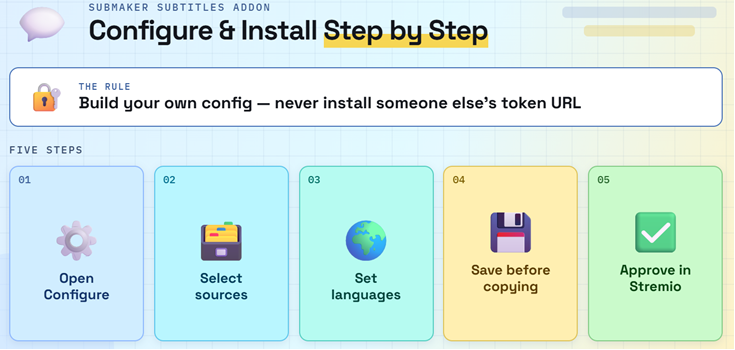
Build the configuration in a desktop or mobile browser, save it, and approve the generated manifest in Stremio. Never install somebody else’s tokenized URL.
- Open Configure: visit the https://submaker.elfhosted.com/, choose Quick Setup or advanced controls, and decide whether you want fetching only or AI translation.
- Select Sources: keep OpenSubtitles V3 initially, then add only providers whose account or API requirements you understand and can validate successfully.
- Set Languages: choose one source language for translation, select required target languages, and avoid enabling every available language simply to create more results.
- Save Configuration: use the page’s save control before copying the install address, because an unsaved token can produce a missing-session or expired-configuration error.
- Approve Addon: open Install in Stremio, inspect the SubMaker name and subtitle resource, confirm installation, then verify it appears under My Addons.
Open a familiar movie or episode after installation and inspect the subtitle picker. You should see fetched source and target languages, plus “Make” groups when translation is enabled. Test one original subtitle near the beginning, middle, and end before choosing its matching translated entry. This prevents a badly synchronized source from becoming a perfectly translated but unusable result.
Build a Fast Subtitle Provider Stack
More providers can increase coverage, but each additional request can delay the subtitle list. Start narrow, validate keys individually, and expand only for titles that need it.
- OpenSubtitles V3: requires no login and offers the quickest baseline, although the configuration page warns that results can be limited and rate-limited.
- Authenticated Search: uses OpenSubtitles credentials and is marked recommended, but incorrect credentials can trigger cached rejection periods and stricter shared-IP login limits.
- Direct Providers: SubDL, SubSource, Wyzie, and Subs.ro require their own user keys, so test every credential before enabling its provider.
- Community Source: Stremio Community Subtitles can use SubMaker’s shared token or your own authorization key with selected-language filtering and potentially faster requests.
- Timeout Balance: the default is 12 seconds; raise it toward 28–30 seconds for slower community sources only when missing results justify waiting longer.
| Subtitle source | User credential | Best starting use |
|---|---|---|
| OpenSubtitles V3 | None | Fast initial setup |
| OpenSubtitles Auth | Username and password | Account-based access |
| SubDL | API key | Extra multilingual coverage |
| SubSource | API key | Additional community results |
| Wyzie | API key | Multiple selectable sub-sources |
| Stremio Community Subtitles | Shared token or personal key | Community-curated files |
Map Source and Target Languages Correctly
SubMaker’s language lists are functional, not cosmetic. Source order determines which original file each translated entry uses, while targets control both fetched and generated results.
- Source Role: source languages supply the original subtitles that SubMaker can translate, and their result ordering is copied into each corresponding “Make” group.
- Single Source: one source language is recommended because it keeps original and translated result positions aligned, making synchronization checks easy before translation begins.
- Target Role: target languages fetch existing files and create translation groups, so a human subtitle may appear beside a generated option for comparison.
- Selection Limits: the live configurator allows up to three source languages and six total target languages, including languages selected for Learn Mode.
- Extended Languages: rare, ancient, and regional choices expand AI output substantially, but many have little provider coverage and depend almost entirely on translation quality.
Choose an AI Provider and Timestamp Workflow
Translation quality depends on both the model and the structure sent around each line. Use defaults first, then change one variable when a specific failure appears.
- Provider Choice: Gemini is the default, while OpenAI, Anthropic, DeepL, DeepSeek, Grok, Mistral, OpenRouter, Cloudflare, Google Translate, and custom endpoints are supported.
- Fallback Provider: multi-provider mode can retry failed translation groups through a secondary service after rate-limit, unavailable, prohibited, or other configured provider errors.
- XML Tags: wraps entries with numbered identifiers for robust reconstruction and is the maintainer’s recommended starting workflow when translated timestamps or lines become mismatched.
- JSON Structure: sends arrays with explicit fields, reducing ambiguous parsing, while Original Timestamps numbers lines and reattaches the source timing afterward.
- Full SRT: “Send Timestamps to AI” gives the model complete timing data but trusts it to preserve that structure, increasing the chance of malformed output.
| Workflow | How timing is handled | When to try it |
|---|---|---|
| XML Tags | IDs recover each subtitle entry | Best first choice |
| JSON | Structured arrays separate fields | Parsing errors or line mismatches |
| Original Timestamps | Original timing is reattached | AI changes timecodes |
| Send Timestamps to AI | Model rewrites full SRT | Only after safer modes fail |
Run Translated Subtitles on Firestick and Android TV
Android-based Stremio clients handle progressive subtitle translation differently from desktop. Configure on a browser first, then use Mobile Mode when the television client stalls.
- Account Sync: install SubMaker once on the same Stremio account, then confirm the addon reaches Firestick or Android TV through normal account synchronization.
- Mobile Mode: holds the request until the complete subtitle is ready because Android may request once and cache the incomplete initial response.
- Expected Delay: translated files can take one to three minutes in Mobile Mode, while full long-form translation may require up to five minutes.
- Reload Method: if the translated file does not appear automatically, select another subtitle and return to the same “Make” entry after processing.
- Compatibility Controls: try Force SRT output before experimental Safe or Aggressive Android modes, which are intended only for subtitle click and download failures.
Use Cache, Retranslation, and Learn Mode Wisely
SubMaker can trade storage, speed, API usage, and experimentation against each other. Understand these modes before forcing repeated translations or enabling every optional learning tool.
- Shared Database: stores completed translations permanently for reuse, lowering community API consumption and making the same source-language pair load quickly for later viewers.
- Bypass Cache: skips permanent shared results and keeps generated translations temporarily for 12 hours, useful when testing models, parameters, workflows, or corrected output.
- Forced Refresh: triple-click the same translated subtitle within six seconds to request fresh work when the source is synchronized but output is broken.
- Context Controls: whole-file and surrounding-context processing can improve dialogue coherence, yet they increase token use and can exceed provider limits or damage structure.
- Learn Mode: produces dual-language WebVTT entries with selectable source-target order and italics, turning ordinary playback into a practical language-learning aid.
Fix Empty Lists, Slow Searches, and Rate Limits
Diagnose retrieval before translation. Empty results usually point to disabled sources, language selection, credentials, or timeouts; 429 responses indicate upstream traffic limits.
- No Results: confirm a source is enabled, both relevant language groups are selected, and each required provider credential passes its adjacent test control.
- Slow Results: disable unused Wyzie sub-sources and other unnecessary providers before raising timeouts, because more simultaneous searches can make every title feel sluggish.
- Provider Timeout: increase the 12-second default only for a slow source you actually need; community subtitles may require approximately 28–30 seconds.
- HTTP 429: validate the AI key, choose a model with suitable quota, enable key rotation responsibly, or configure a secondary translation provider.
- Install Failure: save the configuration, copy a newly generated address, and reinstall when Stremio still points at a missing, deleted, or expired session token.
| Symptom | Likely cause | First action |
|---|---|---|
| No SubMaker entries | Addon or languages not synchronized | Reinstall and confirm selections |
| Empty provider results | Disabled provider or invalid key | Use the provider test |
| Subtitle list takes too long | Too many slow sources | Reduce sources before raising timeout |
| Translation returns 429 | AI quota exhausted | Change model, key, or provider |
| Configuration error | Old or expired session token | Save and reinstall a fresh URL |
Repair Bad Timing, Broken Lines, or Frozen Playback
A translation cannot repair a source subtitle that already drifts. Separate source quality, generated text structure, cached output, and device delivery before changing several controls together.
- Check Source: play the original near its beginning, middle, and end; choose another release-matched file when timing drifts before translation even starts.
- Change Workflow: move from XML Tags to JSON or Original Timestamps when the source is correct but translated lines become reordered, missing, or mistimed.
- Bypass Old Output: enable Bypass Cache or use the documented triple-click refresh when a previously stored translation remains incorrect after settings change.
- Android Freeze: Mobile Mode may hold playback while translation completes; wait, switch away and back, or use a faster compatible model.
- Formatting Failure: disable ASS/SSA passthrough and force SRT output when styling-heavy files load incorrectly on Firestick, Android TV, or an external player.
Protect API Keys, Tokens, and Subtitle Data
SubMaker processes sensitive credentials and subtitle text. Hosted convenience is useful, but your saved install address, provider accounts, cache choice, and AI service each deserve scrutiny.
- Encrypted Storage: the self-hosting configuration specifies AES-256-GCM protection for API keys and passwords, backed by a persistent 32-byte encryption key.
- Token Secrecy: treat the personalized configuration and manifest addresses like passwords, because anyone holding one may reinstall or reopen the associated setup.
- External Processing: AI translation sends subtitle text to the selected provider, whose data retention, billing, safety, and acceptable-use terms remain independently applicable.
- Cache Choice: use fetch-only or temporary bypass mode when shared permanent translation storage conflicts with your privacy preferences or experimental model settings.
- Safer Alternatives: compare ordinary search options in our best Stremio subtitle addons guide when AI processing is unnecessary for your languages.
Link: https://github.com/xtremexq/StremioSubMaker
Verdict
SubMaker is most valuable when a synchronized subtitle exists in the wrong language. Fetch-only mode also makes it a capable aggregator, but translation introduces credentials, waiting, provider quotas, and privacy tradeoffs. Use one source language, test the original file first, keep XML Tags as the baseline, and enable Mobile Mode only on Android-based clients that need it.
FAQs
Is the SubMaker Stremio addon free?
Yes. SubMaker is open-source software, and the community ElfHosted instance is free to configure. Translation providers can impose separate free-tier quotas, usage charges, rate limits, or account requirements. Subtitle sources such as SubDL, SubSource, Wyzie, and authenticated OpenSubtitles may also require free accounts or personal credentials.
Does SubMaker stream movies or TV shows?
No. SubMaker exposes subtitle resources only. It finds existing subtitle files and can translate a selected source into another language, but it does not provide catalogs, metadata, torrents, debrid results, or playable video. You still need lawful content access and a separate Stremio source for playback.
Do I need a Gemini API key for SubMaker?
Not for fetch-only mode. A translation key is required when you want AI-generated “Make [Language]” entries, with Gemini serving as the default Quick Setup option. Advanced configuration supports several alternatives, including OpenAI, Anthropic, DeepL, DeepSeek, Mistral, OpenRouter, Cloudflare, and compatible local endpoints.
Why does SubMaker show no subtitles on Firestick?
Confirm that SubMaker appears under My Addons, that source and target languages are selected, and that enabled provider keys pass validation. For translated files, enable Mobile Mode and wait before switching away and back. If Stremio itself is missing, follow our Stremio on Firestick installation guide first.
How long does SubMaker translation take?
The live guide says an initial translated selection may appear after roughly 20–30 seconds, while complete movies or episodes can require 30 seconds to five minutes. Mobile Mode commonly takes one to three minutes because Android receives a finished subtitle instead of progressively delivered segments. Cached translations can return much faster.
How do I fix an out-of-sync SubMaker translation?
Test the original subtitle first. If it already drifts, choose another source file. When only the translation is wrong, try XML Tags, JSON, or Original Timestamps, then bypass the old cache or triple-click the same entry for fresh output. Force SRT can also improve compatibility on Android-based players.