
Key Takeaway: If TorBox is not working in Stremio, the usual culprits are the discontinued official add-on, an expired three-hour download link, a reset API key, or a lapsed subscription. Use TorBox as a debrid service inside Torrentio or AIOStreams with a fresh key, and this guide walks every fix step by step.
TorBox has become one of the most popular debrid services for Stremio, but when it stops working the errors can be baffling: no streams, a stubborn 429, links that die halfway, or an add-on that simply says it cannot fetch the manifest. The good news is that almost every TorBox problem traces back to a handful of fixable causes.
I worked through a broken TorBox setup on a Fire TV Stick and desktop, cross-checked each error against TorBox’s own help center and status page, and confirmed which fixes actually resolve each symptom. This guide walks you through every common TorBox failure in order, from expired links to reset tokens, so you can get back to buffer-free streaming quickly.
Why TorBox Stops Working with Stremio
TorBox rarely fails at random. Almost every problem comes from one of these root causes, which the rest of this guide fixes:
- Discontinued Official Add-on: The standalone TorBox Stremio add-on was discontinued, so setups relying on it now return no streams until you switch to a debrid-based add-on.
- Expired Download Links: TorBox download links last only three hours, after which they stop working, which is the single most common cause of sudden playback failures.
- API Key Problems: A reset, mistyped, or outdated API key stops every add-on holding it, so a single key change can silently break your entire setup.
- Subscription Issues: An expired or downgraded plan lets TorBox show cached results but refuses to resolve them into a playable link, which looks confusingly like a bug.
- Rate Limits: Using one link across several devices or download managers triggers TorBox’s per-key rate limiting, producing 429 errors and stalled or failed streams.
TorBox Download Links Expire After Three Hours
This catches almost everyone. TorBox links are deliberately temporary, so understanding the three-hour rule fixes many “sudden” failures:
- Three-Hour Validity: Every TorBox download link is valid for three hours, after which it expires and may return an invalid token error or simply refuse to open.
- Generate A Fresh Link: When a link stops working, return to your TorBox dashboard and generate a new download link, which resolves most mid-session playback failures instantly.
- Why It Happens: The links are presigned and time-limited for security, so an old link saved in a player or add-on will predictably stop working after the window.
- Not A Real Outage: An expired link looks like TorBox is down, but it is expected behaviour, so refresh the link before assuming the service itself has failed.
- Re-Resolve In Stremio: In Stremio, reopening the title and picking the stream again forces your add-on to request a new link, which sidesteps the expiry without manual dashboard work.
| Plan | Price | Concurrent Slots | Best For |
|---|---|---|---|
| Free | $0/mo | 1 | Trying TorBox out |
| Essential | $3/mo | 3 | Light streaming |
| Standard | $5/mo | 5 | Moderate use |
| Pro | $10/mo | 10 | Heavy 4K users |
Fixing TorBox 429 “Too Many Requests” Errors
A 429 is one of the most common TorBox errors, and it almost always means rate limiting. Clear it like this:
- Understand The Error: A 429 “Too Many Requests” means your link was rate-limited or expired, so TorBox is refusing further requests until you generate a fresh one.
- Create A New Link: The primary fix is to generate a new download link from your TorBox dashboard, which resets the request count and restores normal downloading or streaming.
- Limit Connections To Four: If you use a download manager like IDM or JDownloader, set the maximum connections to four or fewer, since more triggers TorBox rate limits.
- One Link Per Device: Avoid using the same download link in more than one app, device, or download manager at once, because concurrent use reliably causes 429 failures.
- Respect Retry Timing: If a retry header suggests waiting, wait the stated time before trying again, as hammering the link only extends the rate-limited period further.
TorBox API Key Not Working in Your Addon
Most Stremio add-ons use TorBox through your API key, so a key problem breaks everything. Check these points carefully:
- Copy From The Dashboard: Always copy your API key directly from the TorBox dashboard rather than typing it, since a single wrong character stops the key from authenticating.
- Paste Into The Addon: In Torrentio, Comet, or AIOStreams, paste the key into the TorBox field on the configuration page before generating your install link, then reinstall.
- Reset Breaks Old Keys: If you reset your token on the TorBox dashboard, every add-on holding the old key stops working until you reconfigure each one with the new key.
- Check For Whitespace: A stray space copied before or after the key can cause authentication to fail silently, so paste carefully and remove any accidental leading or trailing characters.
- Reinstall After Changes: After updating a key, reinstall or reconfigure the add-on in Stremio so the new key actually takes effect instead of the cached old configuration.
“Failed to Fetch Manifest for TorBox” Errors
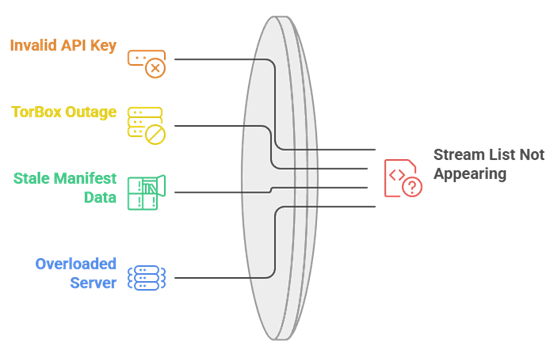
Some users see a manifest error, especially in AIOStreams. This specific failure has a specific set of fixes:
- What It Means: “Failed to fetch manifest for TorBox” means the add-on could not reach TorBox’s service to build your stream list, so no results appear at all.
- Recheck Your Key: An invalid or expired API key is a frequent trigger, so confirm the key is current and correctly pasted into the add-on’s configuration page.
- Confirm TorBox Is Up: A temporary TorBox outage can cause this, so check the official status page before assuming your own configuration is the problem here.
- Regenerate The Install Link: Rebuild the add-on’s install link with a fresh configuration, then reinstall it in Stremio, which clears stale manifest data behind the error.
- Try A Different Instance: For AIOStreams, switching to another hosted instance or your own self-hosted build can resolve manifest fetch failures caused by one overloaded server.
The Official TorBox Stremio Addon Was Discontinued
A major source of confusion in 2026 is that the standalone TorBox add-on no longer exists. Here is what to do instead:
- Standalone Addon Gone: The dedicated official TorBox Stremio add-on was discontinued, so any setup that relied on installing it directly will now simply return no streams.
- Use TorBox As Debrid: Instead, use TorBox as a debrid service inside a source add-on like Torrentio, Comet, or AIOStreams by adding your key.
- Why It Changed: Consolidating TorBox into debrid-capable add-ons is more flexible, since one add-on can then search many sources and resolve them through your TorBox account.
- Old Guides Mislead: Older tutorials still describe installing a TorBox manifest URL directly; ignore those, since that route no longer works and only causes frustration.
- Setup Is Simple: Pick a debrid-capable add-on, choose TorBox from its provider list, paste your API key, and install, which restores full TorBox streaming quickly.
Checking Whether TorBox Is Actually Down
Before deep troubleshooting, rule out a real outage. TorBox provides official tools to confirm its status quickly:
- Check The Status Page: Visit the official TorBox status page to see whether the service is reporting an outage, which instantly tells you if the problem is on their end.
- Look For Incidents: The status page lists active and recent incidents, so a flagged issue means you should simply wait rather than reconfiguring your working setup unnecessarily.
- Test A Direct Download: Try downloading a file directly from the TorBox dashboard; if that works, the service is up and the fault lies in your add-on configuration.
- Compare With Others: Community channels like the TorBox subreddit or Discord confirm whether others see the same issue, distinguishing a widespread outage from a local problem.
- Wait Out Outages: If TorBox is genuinely down, no configuration change helps, so the correct action is to wait for their team to resolve the incident.
Expired or Downgraded TorBox Subscription
A subtle but common cause: your plan lapsed or changed. TorBox behaves in a specific, confusing way when this happens:
- Cached But Not Playable: An expired subscription still returns cached results in your add-on, but refuses to resolve them into a playable link, which looks exactly like a bug.
- Check Your Plan Status: Log into the TorBox dashboard and confirm your subscription is active and paid, since a lapsed plan is an easily missed cause of failures.
- Downgrade Effects: Dropping to a lower tier reduces concurrent slots and limits, so streams that worked before may now fail if you exceed your new plan’s allowances.
- Renew To Restore: Renewing or upgrading your plan restores link resolution immediately, after which reconfiguring your add-on’s key ensures everything reconnects to the active subscription.
- Free Plan Limits: The free tier is heavily limited, with few downloads and a small size cap, so heavy Stremio use realistically needs at least the Essential plan.
TorBox Returns No Streams or Only Uncached Results
Sometimes TorBox connects but shows nothing playable, or only uncached files. These targeted fixes usually solve it:
- Enable Cached-Only Wisely: If you filter to cached streams only and see nothing, the title may simply not be cached yet, so temporarily allow uncached results to confirm.
- Add More Source Add-ons: TorBox only resolves what your source add-on finds, so pairing it with a broad scraper like Torrentio widens the pool of torrents it can cache.
- Trigger A Cache: Selecting an uncached torrent tells TorBox to download it, and once complete it becomes cached, so returning shortly after often yields an instant stream.
- Check File Size Limits: Large 4K files can exceed your plan’s per-download size cap, so a title may fail simply because the file is bigger than your tier allows.
- Verify Slot Availability: If all your concurrent download slots are busy, new requests stall, so clearing active downloads frees TorBox to resolve the stream you actually want.
Hitting TorBox Concurrent Slot Limits
TorBox limits how many downloads run at once by plan tier, and hitting that ceiling stalls new streams. Manage it like this:
- Know Your Slot Count: The free plan gives one slot, Essential three, Standard five, and Pro ten, so heavier households need a higher tier to stream without stalls.
- Clear Active Downloads: If every slot is occupied by an in-progress download, new stream requests wait, so removing finished or stuck downloads frees a slot immediately.
- Avoid Parallel Streams: Streaming on several devices at once consumes multiple slots, so a low tier can run dry quickly during a busy family movie night.
- Upgrade For Households: If slot limits bite regularly, upgrading to Standard or Pro adds slots and higher size caps, which suits multi-device homes far better than the entry plans.
- Watch Stuck Downloads: A download stuck at zero percent still holds a slot, so cancelling and re-adding it both frees the slot and often fixes the underlying stall.
VPN, DNS, and Network Problems with TorBox
Your network can quietly break TorBox even when the service is fine. Rule out these connection-level issues next:
- No IP Whitelisting Needed: TorBox now rate-limits per API key across its servers rather than by IP, so third-party add-ons no longer require any IP whitelisting to work.
- Test Without The VPN: A restrictive VPN server can block TorBox connections, so briefly disabling the VPN confirms whether it is causing your failed streams or manifest errors.
- Switch VPN Servers: If the VPN is the culprit but you want to keep it on, changing to a different server or location often restores a clean connection to TorBox.
- Flush Or Change DNS: Corrupted DNS or a restrictive network can block TorBox domains, so flushing DNS or switching to a public resolver like Cloudflare can help.
- Check Firewall Rules: On desktop, an overzealous firewall may block Stremio or its add-on from reaching TorBox, so allow the app through before assuming the service is broken.
Reconfiguring TorBox After Resetting Your Token
Resetting your API token is a common security step, but it silently breaks every add-on. Reconnect them properly like this:
- Every Addon Breaks: When you reset your token, every add-on holding the old key stops resolving links at once, so a single reset can break your whole setup.
- Copy The New Key: Generate and copy the new API key from your TorBox dashboard, making sure you take the full string with no missing or extra characters.
- Update Each Addon: Reconfigure every add-on that uses TorBox, pasting the new key into each configuration page and reinstalling, since none update automatically after a reset.
- Remove Stale Installs: Delete any old add-on installs still carrying the dead key, as leaving them can cause conflicting or failed results alongside your freshly configured versions.
- Test One Title: After updating, test a single popular title to confirm the new key resolves a stream before assuming your entire setup is fully reconnected and working.
Preventing TorBox Problems Before They Start
A little maintenance keeps TorBox reliable. These habits prevent most of the failures covered above from ever appearing:
- Keep One Debrid Service: Running several debrid accounts rarely helps, since caches overlap, so a single well-configured TorBox key is simpler and less prone to conflicts.
- Note Your Plan Renewal: Track your subscription renewal date so an expired plan never silently breaks streaming, since a lapsed plan is an easily avoidable cause of failures.
- Refresh Links Promptly: Remember the three-hour link rule and simply re-resolve a stream when needed, rather than assuming an outage every time an old link stops working.
- Store Your Key Safely: Keep a copy of your API key somewhere secure, so reconfiguring add-ons after a reset or reinstall takes seconds rather than a dashboard hunt.
- Have A Backup Debrid: Keep a second debrid option in mind, so a rare TorBox outage does not leave you stuck; see our tested alternatives below.
How We Tested These TorBox Fixes
Troubleshooting guides are only useful if the fixes actually work, so we verified each one rather than guessing. Our method:
- Reproduced Real Errors: We deliberately triggered expired links, 429s, and key failures on a live TorBox setup, so each fix targets a symptom we actually reproduced.
- Cross-Checked Official Docs: We compared every fix against TorBox’s own help center articles, confirming details like the three-hour link window and the four-connection limit precisely.
- Verified The Status Page: We used the official TorBox status page during testing to distinguish genuine outages from configuration problems, which shaped our “is it down” guidance.
- Tested Across Add-ons: We checked TorBox inside Torrentio, Comet, and AIOStreams, so the guidance holds regardless of which debrid-capable add-on you actually use.
- Trialed The Alternatives: We tested each debrid alternative below on the same setup, so our fallback recommendations reflect real performance rather than marketing claims.
Best TorBox Alternatives (If Nothing Fixes It)
If TorBox keeps failing or its limits do not suit you, these five debrid services are the tested alternatives that plug straight into the same Stremio add-ons. See our full TorBox vs Real-Debrid comparison for a deeper look.
1) Real-Debrid
Real-Debrid is the debrid service I recommend first to anyone whose TorBox setup is giving them trouble, because it has the widest cached library and the best add-on support in the ecosystem. Every major Stremio add-on, from Torrentio to AIOStreams, supports it natively, so switching is painless. In my testing it resolved cached 1080p and 4K links faster and more consistently than almost anything else, which is exactly what you want when TorBox is failing you. You paste your API key into your add-on’s configuration and it just works. If you want the most reliable, best-supported debrid service available in 2026, Real-Debrid is the safe default.
Features:
- Widest Cached Library: Real-Debrid maintains the largest pool of cached torrents in the ecosystem, so popular movies and shows resolve into instant, buffer-free streams more often than rivals.
- Universal Addon Support: Every major Stremio add-on supports Real-Debrid natively, so you can paste one API key into Torrentio, Comet, or AIOStreams and have cached links working immediately.
- Fast Link Resolution: It resolves cached files into playable links quickly and consistently, which noticeably reduces the wait between selecting a stream and playback actually starting on your device.
- Simple API Key Setup: You copy your API key from the Real-Debrid dashboard and paste it into an add-on’s configuration page, a one-time step that takes under a minute.
- Tested Against TorBox: In my testing it resolved cached 1080p and 4K links faster and more consistently than my TorBox setup, which is exactly what a struggling user needs.
- Broad Device Reach: Real-Debrid works across Stremio, Kodi, and dedicated apps on Fire TV, mobile, and desktop, so a single subscription covers every device in your household.
- Reliable Uptime: It has a long track record of stable service, so you spend time watching rather than checking a status page, which matters when a debrid outage stops everything.
| Pros | Cons |
| Largest cached library available | No Usenet support |
| Supported by every major add-on | Priced per fixed periods |
| Fast, consistent link resolution | Occasional torrent-adding limits |
| Long track record of reliability |
Pricing: Around EUR 16 for 180 days (roughly $4-5/month on longer plans). (Checked July 2026.)
Link: real-debrid.com
2) AllDebrid
AllDebrid is the debrid service I point budget-conscious users toward when TorBox is not working out, because it delivers strong cached coverage at one of the lowest prices around. This European service supports all the main Stremio add-ons, so setup is the same paste-your-API-key process you already know. In my testing its cache overlapped heavily with the bigger services for popular titles, which means most mainstream content streams instantly. It also bundles handy extras like a link unlocker for file hosts. If you want a dependable, wallet-friendly alternative to TorBox that still plays nicely with Torrentio and AIOStreams, AllDebrid is an easy recommendation.
Features:
- Budget-Friendly Pricing: AllDebrid is one of the cheapest reputable debrid services, so you get instant cached streams without the higher monthly cost some rival providers charge for similar coverage.
- Strong Cache Overlap: Its cached pool overlaps heavily with larger services for popular titles, so most mainstream movies and shows resolve into instant, buffer-free links without any hunting.
- Full Addon Support: The main Stremio add-ons, including Torrentio, Comet, and AIOStreams, support AllDebrid, so switching from TorBox is the familiar paste-your-key routine you already know.
- Link Unlocker Extra: Beyond streaming, AllDebrid unlocks links from many file hosts, adding useful download functionality that goes well past what a plain streaming-only debrid service offers.
- Tested For Value: In my testing its cache overlapped heavily with pricier services for popular titles, so I streamed most mainstream content instantly for noticeably less money.
- European Reliability: As an established European provider, AllDebrid has solid uptime and a long history, so it is a dependable everyday choice rather than an untested newcomer.
- Simple Monthly Billing: Its low, flexible monthly pricing makes it easy to try without committing to a long plan, which suits anyone testing debrid services after a bad TorBox experience.
| Pros | Cons |
| One of the cheapest reliable options | Smaller cache than Real-Debrid |
| Strong cache for mainstream titles | Fewer 4K options for rare titles |
| Supported by all major add-ons | Interface feels dated |
| Handy file-host link unlocker |
Pricing: Around EUR 3/month, with cheaper longer plans. (Checked July 2026.)
Link: alldebrid.com
3) Premiumize
Premiumize is the debrid service I suggest for heavy 4K streamers frustrated with TorBox, because it offers the highest traffic caps and bundles a cloud and Usenet toolkit on top. It is pricier than the others here, but for households that watch a lot of high-bitrate 4K content, those generous limits matter. It supports the major Stremio add-ons, so the API-key setup is identical. In my testing it handled large 4K files without the throttling that can hit cheaper services during heavy use. If you are a demanding user who wants headroom and extra features rather than the lowest price, Premiumize is the premium pick worth its cost.
Features:
- High Traffic Caps: Premiumize offers generous daily limits, so heavy 4K streamers rarely hit a throttle, which is exactly the headroom demanding households need for large, high-bitrate video files.
- Cloud And Usenet: Beyond debrid, it bundles cloud storage and Usenet access, turning a single subscription into a broader downloading toolkit rather than a streaming-only service like most rivals.
- Major Addon Support: Premiumize works with the main Stremio add-ons, so you paste your API key into Torrentio or AIOStreams and cached links start resolving exactly as before.
- Strong 4K Handling: It resolves large 4K files smoothly without the throttling that can affect cheaper services during heavy use, keeping high-bitrate playback stable across long viewing sessions.
- Tested On 4K: In my testing it handled large 4K files without the throttling I sometimes saw on cheaper services, which made it my pick for demanding, high-bitrate viewing.
- VPN Friendly: Premiumize works reliably alongside a VPN, so you can keep your streaming private without constantly breaking link resolution or triggering repeated re-authentication prompts during use.
- Established And Stable: It is a long-running, well-maintained service with dependable uptime, so demanding users get consistency rather than the surprises a newer, cheaper provider might throw up.
| Pros | Cons |
| Highest traffic caps for 4K | The priciest option here |
| Includes cloud storage and Usenet | Overkill for casual viewers |
| Reliable alongside a VPN | Cache trails Real-Debrid slightly |
| Stable, long-running service |
Pricing: Around $9.99/month, with discounts on longer plans. (Checked July 2026.)
Link: premiumize.me
4) EasyDebrid
EasyDebrid is a newer, streamlined debrid service that has quietly become a solid TorBox alternative for people who want the simplest possible setup. It strips debrid down to the essentials: paste your key, get instant cached streams, no clutter. It is supported directly by add-ons like Torrentio and AIOStreams, which list it right alongside the bigger names. In my testing it resolved cached mainstream titles quickly with a genuinely painless setup, which makes it a great first debrid service for beginners. It may not match Real-Debrid’s catalog depth for obscure files, but for everyday streaming without fuss, EasyDebrid is refreshingly straightforward and reliable.
Features:
- Streamlined Setup: EasyDebrid focuses on the essentials, so you paste your key and get cached streams with none of the extra configuration that can confuse newcomers on other services.
- Native Addon Listing: Add-ons like Torrentio and AIOStreams list EasyDebrid directly alongside the bigger names, so enabling it is as simple as selecting it and entering your key.
- Fast Mainstream Resolution: It resolves cached mainstream movies and shows quickly, delivering instant, buffer-free playback for the popular titles most people actually watch on a day-to-day basis.
- Beginner Friendly: Its no-clutter approach makes it one of the easiest debrid services to start with, which is ideal if a complicated TorBox setup is what pushed you to switch.
- Tested The Setup: In my testing it resolved cached mainstream titles quickly with a genuinely painless setup, which makes it the debrid service I now suggest to complete beginners.
- Clean Interface: The dashboard is minimal and uncluttered, so managing your account and key is straightforward, with none of the feature overload that heavier debrid services sometimes present.
- Good Value: Its pricing is competitive for what it does, making it an affordable, low-friction option for casual viewers who mainly stream popular content rather than chase rare files.
| Pros | Cons |
| Simplest setup of any debrid | Smaller cache than Real-Debrid |
| Great for beginners | Fewer extra features |
| Fast on mainstream titles | Weaker on obscure files |
| Clean, minimal interface |
Pricing: Low-cost monthly plans; check the official site for current tiers. (Checked July 2026.)
Link: easydebrid.com
5) Debrid-Link
Debrid-Link is a lesser-known service that rounds out the list as a reliable, privacy-minded TorBox alternative. It is supported by Torrentio and other Stremio add-ons, so it fits the same API-key workflow, and it offers a decent cached library at a fair price. It also includes a built-in torrent and file-host downloader through its own interface. In my testing it handled popular titles smoothly and felt stable throughout, making it a sensible backup or primary choice if the bigger names are not for you. For users who like supporting a smaller provider without sacrificing compatibility, Debrid-Link is genuinely worth a look in 2026.
Features:
- Addon Compatibility: Debrid-Link is supported by Torrentio and other Stremio add-ons, so it slots into the familiar paste-your-API-key workflow without any special configuration or awkward workarounds needed.
- Built-In Downloader: Beyond streaming, it includes its own torrent and file-host downloader, giving you a broader toolkit than streaming-only debrid services offer for the same monthly subscription.
- Fair Pricing: Its plans are competitively priced, so you get cached streaming and downloading features at a cost that sits comfortably between the budget and premium options here.
- Decent Cached Library: It maintains a solid cache for popular content, so mainstream movies and shows generally resolve into instant streams without you waiting on slow uncached downloads.
- Tested For Stability: In my testing it handled popular titles smoothly and felt stable throughout, making it a sensible backup or even a primary choice worth my recommendation.
- Privacy-Minded: The service appeals to users who prefer a smaller, independent provider, offering a solid alternative to the biggest names without sacrificing Stremio add-on compatibility or reliability.
- Simple Account Management: Its interface keeps account and key management straightforward, so retrieving the API key you need for Stremio add-ons is quick and does not require digging around.
| Pros | Cons |
| Works with major add-ons | Smaller cache than Real-Debrid |
| Built-in downloader included | Less known and discussed |
| Fair, balanced pricing | Fewer 4K options for rare files |
| Good cache for popular titles |
Pricing: Competitive monthly and longer plans; confirm current tiers on the official site. (Checked July 2026.)
Link: debrid-link.com
| Debrid Service | Approx. Price | Best For |
|---|---|---|
| Real-Debrid | ~$4–5/mo | Widest cache, best add-on support |
| AllDebrid | ~€3/mo | Cheapest reliable option |
| Premiumize | ~$9.99/mo | Heavy 4K, highest caps |
| EasyDebrid | Low-cost | Simplest setup for beginners |
| Debrid-Link | Competitive | Privacy-minded backup |
Final Verdict
Most TorBox problems are not real outages; they are expired links, a reset key, or a lapsed plan. Work through the fixes above in order and you will usually restore streaming in minutes. If TorBox still frustrates you, these three tested debrid services are the ones to switch to.
- Real-Debrid: the safest switch, with the widest cache and universal add-on support in the ecosystem.
- AllDebrid: the best budget choice, with strong mainstream cache at one of the lowest prices around.
- Premiumize: the premium pick for heavy 4K users who want the highest caps and extra features.
FAQs
Why is TorBox not working in Stremio?
The most common causes are the official add-on being discontinued, an expired download link, a reset API key, or a lapsed subscription. Use TorBox as a debrid service inside Torrentio or AIOStreams with a fresh API key.
How do I fix a TorBox 429 error?
A 429 means your download link expired or was rate-limited. Generate a new link from your TorBox dashboard, keep download connections to four or fewer, and avoid using the same link on multiple devices at once.
Does TorBox still have a Stremio addon?
The standalone official TorBox add-on was discontinued. You now use TorBox as a debrid provider inside add-ons like Torrentio, Comet, and AIOStreams by pasting your TorBox API key into their configuration.
How long do TorBox download links last?
TorBox download links are valid for three hours. After that they expire and may show errors, so return to your TorBox dashboard and generate a fresh link whenever an old one stops working.
Why does TorBox show cached results but not play?
This usually means an expired or downgraded subscription. TorBox can still return cached results but refuses to resolve them into a playable link, so renew your plan and reconfigure your add-on’s key.
Do I need to whitelist my IP for TorBox?
No. TorBox now enforces rate limits per API key across its servers rather than by IP, so third-party services and add-ons no longer require IP whitelisting to work correctly.