Key Takeaway: Premiumize is an all-in-one service bundling a multi-host debrid, cloud storage, Usenet, torrent caching, and a basic VPN for €9.99/month or €69.99/year. It works smoothly with Kodi and Stremio and suits power users who want more than a plain debrid, though it costs more than Real-Debrid.
Premiumize is the Swiss Army knife of debrid services. Where most rivals just unrestrict links, Premiumize adds cloud storage, Usenet access, and a built-in VPN on top, all under one login. This review covers what that bundle gets you, current 2026 pricing, setup on Kodi and Stremio, and whether the extra cost is justified.
I ran Premiumize on Kodi and Stremio and poked around its cloud and Usenet tools to see whether the all-in-one pitch holds up. Streaming was as smooth as any top debrid, and the cloud downloads were a genuinely useful extra, but the higher price kept nagging at me throughout testing, which shapes the verdict below.
Premiumize at a Glance
Here is the quick verdict before the detail. This table captures what Premiumize costs, what makes it different from a plain debrid, and the kind of user it rewards, so you can decide fast whether the bundle is worth a closer look.
| Detail | At a glance |
|---|---|
| Our rating | 4.2 / 5 |
| Starting price | €9.99 / month (€69.99 / year) |
| Extras | Cloud storage, Usenet, built-in VPN |
| Torrent support | Yes (cached) |
| Kodi & Stremio | Extensive |
| Best for | All-in-one power users |
What Is Premiumize?
Premiumize is a premium multi-host and cloud service that goes well beyond a standard debrid. As well as unrestricting links from dozens of file hosts and caching torrents, it gives you personal cloud storage, full Usenet access, and a simple built-in VPN, all bundled into a single subscription. That makes it more of a complete downloading and streaming toolkit than a single-purpose resolver.
- Multi-host debrid: it unlocks fast links from many file hosts, like a classic debrid.
- Torrent caching: it caches magnets so popular files stream back almost instantly.
- Cloud storage: it adds personal storage where you can save and re-stream downloads.
- Usenet and VPN: it includes Usenet access and a basic VPN, which rivals rarely bundle.
- Broad app support: it integrates with Kodi, Stremio, and most debrid-aware apps.
Premiumize Key Features
Premiumize justifies its higher price with breadth. If you want one subscription that handles streaming, downloading, storage, and a little privacy, its feature list is the widest in the category, and each part is genuinely usable rather than a token add-on.
- Multi-host debrid: unrestricts premium links across a large list of supported file hosts.
- Torrent caching: popular magnets resolve from the cache for instant, buffer-free playback.
- Cloud storage: save downloads to your account and stream them back to any device.
- Usenet access: built-in Usenet search and downloading without a separate provider.
- Built-in VPN: a basic VPN is included for a layer of privacy while you stream.
- Kodi and Stremio support: links cleanly through ResolveURL and popular Stremio addons.
- Cross-device access: one account serves your Firestick, phone, and computer at once.
Premiumize Pricing and Plans
Premiumize is one of the pricier options, which is the trade-off for its all-in-one feature set. It offers a simple monthly plan or a much cheaper yearly one, and it is a regular in our roundup of the best debrid services despite the higher entry cost.
| Plan | Price (checked July 2026) | Effective monthly |
|---|---|---|
| 1 month | €9.99 | ~€9.99 |
| 12 months | €69.99 | ~€5.75 |
Note: the yearly plan is far better value, cutting the effective monthly cost to about €5.75. Occasional multi-year promotions appear too, but even the annual plan sits above Real-Debrid and AllDebrid, so the extras have to earn their keep.
How Premiumize Works
Premiumize does the work on its own servers, then hands your device a fast, direct link. What sets it apart is that those links can come from file hosts, cached torrents, Usenet, or your own cloud storage, all through the same account and the same apps you already use.
- Send a request: your app or the website sends a link, magnet, or Usenet request.
- Server-side fetch: Premiumize fetches or streams it at premium speed on its servers.
- Instant cached items: cached torrents resolve at once; new items cache to your cloud first.
- Stream or download: you stream or download the resulting direct link to any device.
- Cloud replay: saved files stay in your cloud for later, on-demand playback.
How to Set Up Premiumize on Kodi
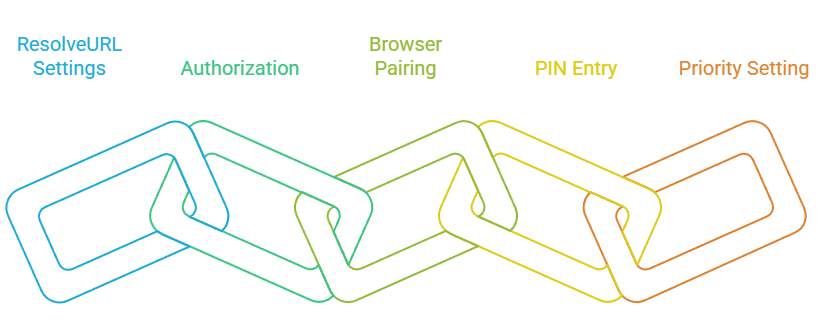
Premiumize links to Kodi through the same ResolveURL helper most addons use, so a single authorization usually covers your whole library. The PIN-style flow keeps your password off the TV, which is exactly what you want on a Firestick.
- In your Kodi addon, open ResolveURL settings and select Premiumize.
- Choose the authorize option; Kodi shows a PIN and a short link.
- On a browser, open the Premiumize pairing page and sign in.
- Enter the PIN to link Kodi to your Premiumize account.
- Raise Premiumize’s resolver priority so it is used before free hosts.
How to Set Up Premiumize on Stremio
For Stremio, Premiumize connects through addons such as Torrentio using either a PIN or an API key. It takes about a minute, after which cached, high-speed results tagged for Premiumize appear in your streams.
- Sign in at premiumize.me and locate your API key or pairing PIN.
- Open the Torrentio or Comet configuration page in Stremio.
- Select Premiumize as the debrid provider and enter your key or PIN.
- Install or update the addon so the details are saved to your account.
- Filter for cached results to get instant playback in Stremio.
Premiumize Supported File Hosts and Sources
Premiumize pulls from more source types than a typical debrid, which is a big part of its appeal. On top of a long list of standard file hosts, it reaches cached torrents, Usenet, and your own cloud, so a single account can resolve almost anything your Kodi and Stremio addons throw at it. The exact host list changes, but this is the shape of what it covers.
- File lockers: mainstream hosts such as Rapidgator, Nitroflare, and DDownload at full speed.
- Torrents: cached magnets resolve instantly, and new ones download to your cloud.
- Usenet: built-in Usenet search and downloading, with no separate provider needed.
- Cloud storage: keep finished downloads and re-stream them without fetching again.
- Web player: the bundled player streams saved cloud files with no third-party app.
- Live list: check the site’s host list, as sources are added or paused over time.
Premiumize Supported Devices and Apps
Because Premiumize plugs into common resolvers and addons, it runs on virtually any device you already stream on. The bundled cloud and web player also mean you can watch saved content without any third-party app at all.
- Firestick and Fire TV: through Kodi addons and debrid-aware apps.
- Kodi (any platform): via ResolveURL with the PIN login.
- Stremio: through Torrentio, Comet, and similar addons.
- Web and mobile: the built-in cloud player streams saved files anywhere.
- Computer: full access to cloud, Usenet, and download tools.
Premiumize Interface and Ease of Use
Premiumize packs a lot into its dashboard, so it is slightly busier than a single-purpose debrid, but it is well organised once you find your feet. The cloud, Usenet, and download tools each have their own clear area, and linking Kodi or Stremio is no harder than with any rival despite the extra features on offer.
- Grouped tools: debrid, cloud, and Usenet tools sit in clearly labelled sections.
- Keys easy to find: your API key and PIN are simple to locate when linking apps.
- Built-in player: the cloud player previews and streams saved files in the browser.
- Cross-device: mobile and TV browsers handle the dashboard well.
- Short learning curve: the extra tools add a little complexity, but core setup stays simple.
Premiumize Pros and Cons
Premiumize is the most feature-rich option here, but breadth comes at a price. Here is the honest balance after testing the whole bundle rather than just the debrid part.
| Pros | Cons |
|---|---|
| All-in-one: debrid, cloud, Usenet, and VPN | More expensive than Real-Debrid or AllDebrid |
| Cloud storage for saving and re-streaming | Overkill if you only need a plain debrid |
| Clean Kodi and Stremio integration | Bundled VPN is basic, not a full VPN replacement |
| Usenet access built in, no extra provider | Yearly commitment needed for the best price |
| One account covers many devices | Interface has a learning curve for beginners |
Premiumize Speed and Reliability
On streaming, Premiumize is excellent, matching the instant, cached playback of the best debrid services on mainstream content. Reliability is strong across the whole bundle, and the cloud element adds a safety net, since you can save a file once and stream it repeatedly without re-caching.
- Instant on popular files: cached content starts almost immediately in Kodi and Stremio.
- High resolutions: 1080p and 4K links are consistently available.
- Cloud replay: cloud-saved files re-stream instantly without another download.
- Dependable uptime: debrid, cloud, and Usenet are all reliable day to day.
- Light VPN: the bundled VPN adds privacy but is lighter than a dedicated service.
Premiumize vs Real-Debrid
The choice comes down to scope. Real-Debrid is a focused, cheaper streaming debrid; Premiumize is a broader toolkit that costs more. If you only want buffer-free Kodi and Stremio playback, Real-Debrid wins on value, as our best Real-Debrid alternatives guide explains. If you want cloud and Usenet too, Premiumize pulls ahead.
| Feature | Premiumize | Real-Debrid |
|---|---|---|
| Starting price | €9.99 / month | €4 / 30 days |
| Cloud storage | Yes | No |
| Usenet access | Yes | No |
| Built-in VPN | Yes (basic) | No |
| Best for | All-in-one power users | Value streaming |
Tips to Get the Best From Premiumize
To get real value from Premiumize you need to use more than just the debrid, otherwise you are overpaying for a plain resolver. These habits helped me make the most of the wider bundle during testing and justify the higher price.
- Save to cloud: keep frequently watched files in the cloud so they re-stream instantly.
- Top priority: set Premiumize as the top resolver in Kodi so its cached links come first.
- Use Usenet: search Usenet for content that is hard to find through torrents alone.
- Go yearly: pick the annual plan, as it cuts the effective monthly cost significantly.
- VPN as a bonus: treat the bundled VPN as extra and add a dedicated one for real privacy.
Is Premiumize Safe and Legal?
Premiumize is a legitimate, paid service, and using a multi-host or cloud tool is legal in itself. As always, the legality depends on the specific content you access, so responsibility rests with the user rather than the service.
- Legal service: the tool is legal; your usage determines the rest.
- Basic VPN only: the bundled VPN adds privacy but is not full-featured.
- Official only: buy only on premiumize.me or an official reseller.
- Avoid freebies: free-account offers are scams that steal logins.
- Consider a real VPN: serious privacy seekers may prefer a dedicated VPN.
Is Premiumize Worth It?
Premiumize is worth it if you will actually use the whole bundle. For someone who streams, downloads, stores files in the cloud, and dabbles in Usenet, paying one bill for all of it is genuinely convenient and can work out cheaper than separate services. If you only want cached streams for Kodi or Stremio, though, you are paying for features you will not touch.
- Bundle value: great if you use cloud storage and Usenet as well as debrid.
- One login: convenient to have streaming, storage, and privacy under one account.
- Overkill for some: hard to justify if you only need a plain streaming debrid.
- Yearly helps: the annual plan makes the price much more palatable.
- Cheaper rivals: Real-Debrid or AllDebrid are better for streaming-only needs.
Who Should Use Premiumize?
Premiumize is aimed squarely at power users, and knowing whether that is you prevents overpaying. It rewards people who want an all-in-one toolkit, while casual streamers will get the same playback quality for less from a focused debrid. Match it to how much of the bundle you will really use.
- Great for: power users wanting debrid, cloud, and Usenet in one place.
- Great for: anyone who saves and re-streams files from the cloud.
- Less ideal for: viewers who only want cached Kodi or Stremio streams.
- Less ideal for: budget users happy with a bare-bones debrid.
- Tip: start monthly to test the bundle before committing to a year.
Verdict
Premiumize earns a strong 4.2 out of 5. It is the most complete service in the category, blending a capable debrid with cloud storage, Usenet, and a basic VPN, and its Kodi and Stremio streaming is first-class. The only real drawback is price: at €9.99 a month it is hard to justify unless you use the extras. Power users will love it; streaming-only viewers should look at Real-Debrid or AllDebrid first.
FAQs
What is Premiumize?
Premiumize is an all-in-one premium service combining a multi-host debrid, cloud storage, Usenet access, and a basic VPN. It works with Kodi and Stremio and costs €9.99 a month or €69.99 a year.
How much does Premiumize cost in 2026?
Premiumize costs €9.99 per month or €69.99 per year, which works out to about €5.75 a month on the annual plan. Occasional multi-year promotions can lower the cost further.
Does Premiumize work with Kodi and Stremio?
Yes. Premiumize links to Kodi through ResolveURL with a PIN, and to Stremio through addons like Torrentio using a key or PIN. Both take about a minute to set up.
Is Premiumize better than Real-Debrid?
For streaming alone, Real-Debrid is cheaper and just as smooth. Premiumize is better if you also want cloud storage, Usenet, and a bundled VPN, since it combines them all in one subscription.
Does Premiumize include a VPN?
Yes, Premiumize bundles a basic VPN for a layer of privacy. It is handy but lighter than a dedicated VPN service, so heavy privacy users may still prefer a standalone provider.
Is Premiumize safe to use?
The service is legitimate and legal to use. Its bundled VPN adds some privacy, but always buy from official sources, avoid free-account scams, and consider a dedicated VPN for stronger protection.
Can I use Premiumize on a Firestick?
Yes. Premiumize works on Firestick through Kodi addons and debrid-aware apps. Link it once with the PIN and it resolves cached, high-speed streams automatically across your devices.
What are the best Premiumize alternatives?
Real-Debrid and AllDebrid are the main streaming-focused alternatives, both cheaper than Premiumize. Our best Real-Debrid alternatives guide compares them so you can choose the best fit for your needs.
Does Premiumize have a free trial?
Premiumize does not offer a full free trial, though it occasionally provides limited trial access. In most cases you start on the monthly plan, which is the lowest-risk way to test the whole bundle.
Is Premiumize good value compared to Real-Debrid?
For streaming only, Real-Debrid is cheaper and just as effective. Premiumize becomes better value when you also use its cloud storage and Usenet, since replacing those separately would cost far more.