Key Takeaway: Diggz Xenon still exists in 2026, but the current Diggz ecosystem presents Xenon mainly as a skin or flavor inside Diggz AIO Free and Debrid builds. Install through the official Chef Wizard, choose the correct free or debrid package, and avoid legacy guides that promise an older standalone Xenon layout.
The phrase “Diggz Xenon Kodi build” now points to several generations of instructions, which is why many users reach a missing menu or cannot find Chef Omega. I wrote this guide around the current Diggz AIO workflow, Kodi 21.3 Omega, and the official Diggz forum rather than recycling an obsolete repository sequence.
I compared the present AIO Free and Debrid branches, current Xenon flavors, common installation failures, storage demands, and recovery options. The steps below deliberately separate Kodi setup, repository installation, wizard selection, build restoration, debrid authorization, and post-install tuning so you can identify exactly where a failure occurs.
What Is the Diggz Xenon Kodi Build in 2026?
Diggz Xenon is best understood as the familiar Xenon interface and configuration offered through the actively maintained Diggz AIO family. The official Diggz forum now separates AIO Free and AIO Debrid builds while listing Xenon, Xenon Free, Xenon 2 Fen Light, and related flavors. That distinction explains why older instructions may show names that no longer appear in today’s Chef Wizard.
- Current Structure: Diggz AIO supplies the maintained build framework, while Xenon describes a selectable skin or flavor rather than one permanently fixed standalone package.
- Free Branch: AIO Free is designed around sources that do not require debrid, although link quality, speed, and availability remain more variable than cached services.
- Debrid Branch: AIO Debrid expects a supported premium resolver and is the better match for consistent cached movies, shows, larger files, and 4K playback.
- Flavor Choice: Xenon, Xenon Free, Xenon 2, Fentastic, Eminence, and other layouts may appear depending on the current wizard release and branch.
- Third-Party Status: Diggz is community software and is not developed, reviewed, or endorsed by the Kodi Foundation, Amazon, or any streaming service.
| Component | Current Role | What You Should Choose |
|---|---|---|
| Kodi 21.3 Omega | Stable Kodi base | Use the correct Android package for your device |
| Chef Wizard | Installs and maintains Diggz packages | Install only from the current Diggz repository |
| AIO Free | Non-debrid build branch | Choose when you will not authorize debrid |
| AIO Debrid | Cached-source build branch | Choose for stronger movie and TV playback |
| Xenon flavor | Skin, menus, widgets, and layout | Select only after the correct AIO branch loads |
What You Need Before Installing Diggz Xenon
A clean installation is safer than placing Diggz over an old build because saved dependencies, abandoned repositories, and incompatible skin settings can survive an ordinary update. Confirm your Kodi version, free storage, network stability, and account choices first. Fire TV devices with limited space may run Xenon, but heavier widgets and artwork caches require more maintenance than a single-addon configuration.
- Stable Kodi: Use Kodi 21.3 Omega for this guide; Kodi 22 Piers remains a beta branch and may expose dependency or skin compatibility problems.
- Free Storage: Leave at least 1.5GB available before installation so the wizard can download, extract, cache artwork, and complete first-run configuration safely.
- Fresh Profile: Back up favorites or Trakt data, then clear the previous build when possible instead of layering Diggz over unknown repositories and settings.
- Remote Access: Keep the Fire TV remote and a phone keyboard app nearby because repository URLs and account authorization codes are easy to mistype.
- Account Decision: Choose Free or Debrid before installing; selecting a debrid-oriented flavor without authorizing a resolver commonly produces results that will not play.
How to Install Diggz Xenon Through Chef Wizard
Start with Kodi open on its standard home screen. The exact repository filename can change, so rely on the current Diggz source and the visible Diggz repository name rather than a year-specific zip number. When the wizard presents current builds, select AIO Free or AIO Debrid first and then the desired Xenon flavor. Never substitute a random mirror from an unverified video description.
- Enable Unknown Sources: Open Settings, select System, choose Add-ons, and enable Unknown Sources after reading Kodi’s warning about responsibility for third-party packages.
- Add Diggz Source: Open File Manager, choose Add Source, enter the current address shown by the official Diggz installation documentation, and assign a recognizable name.
- Install Repository: Choose Add-ons, open the package installer, select Install from zip file, open your named source, and install the Diggz repository package.
- Open Program Add-ons: Select Install from repository, open the Diggz repository, enter Program add-ons, and install the currently listed Chef Wizard rather than assuming “Chef Omega.”
- Choose Build Branch: Launch the wizard, open its builds menu, select AIO Free or AIO Debrid, choose a Xenon flavor, and follow the fresh-install prompts.
| Symptom | Likely Cause | Best First Action |
|---|---|---|
| Source will not connect | URL changed, typo, DNS block, or server outage | Check the official Diggz forum before trying mirrors |
| Repository zip missing | Old guide or wrong source folder | Return to the current installation topic |
| Chef Omega not listed | Wizard naming changed | Install the current Chef Wizard shown in the repo |
| Xenon not shown | Looking in the wrong AIO branch | Open current AIO Free or Debrid builds |
| Build opens but nothing plays | Debrid not authorized or providers failed | Authorize the required service and refresh providers |
| Kodi crashes on menus | Insufficient memory or damaged skin cache | Restart, reduce widgets, or perform a clean reinstall |
Configure Real-Debrid, Trakt, and Players After Installation
The build is not finished when the home screen appears. Debrid authorization, Trakt, player mappings, and provider settings are separate systems, and each can fail independently. Complete one service at a time and test playback before moving on. This avoids the common situation where several authorization windows are changed together and nobody can tell which setting caused missing sources or failed playback.
- Debrid Authorization: Open the resolver or primary movie addon used by your selected flavor, authorize the account, confirm success, and then clear cached providers.
- Trakt Limitation: Authorize only where needed and review current Trakt addon restrictions, because excessive integrations can create confusing duplicate prompts or synchronization failures.
- Player Files: Use only the player package referenced by current Diggz documentation; old TMDb Helper player files can point toward renamed or removed addons.
- Provider Refresh: Re-scrape one familiar title after authorization and verify cached links appear before testing niche titles, live categories, or unusually large files.
- My Sequence: I test one ordinary movie, one television episode, and one live section separately so a failure can be assigned to the correct subsystem.
Diggz Xenon Not Working? Fix the Right Failure
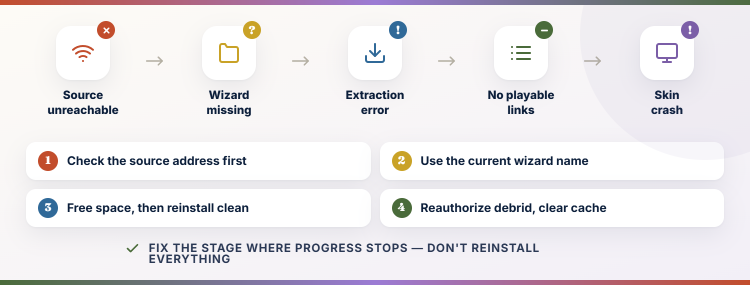
“Not working” can describe six separate failures: an unreachable source, missing repository, absent wizard, failed extraction, empty provider results, or playback errors. Reinstalling everything is excessive when only debrid authorization expired, but clearing one cache cannot repair an incomplete build extraction. Use the stage where progress stops as your diagnosis and preserve the rest of the installation until evidence points elsewhere.
- Connection Failure: If Add Source cannot connect, verify the current address and official forum status before changing Kodi security settings or installing from another domain.
- Wizard Missing: If “Chef Omega” is absent, install the current Chef Wizard listed by Diggz; the label used in an older tutorial may be obsolete.
- Extraction Error: Confirm free space, delete the incomplete package through the wizard when supported, restart Kodi, and repeat a fresh installation without interruption.
- No Playable Links: Reauthorize the required debrid service, clear provider cache, refresh scrapers, and test a common title before blaming the entire build.
- Skin Crash: Switch temporarily to Estuary from Interface settings if possible, reduce widgets, and inspect whether Kodi remains stable without the Xenon skin active.
Is Diggz Xenon Legal and Safe?
Kodi is legal open-source media software, while Diggz is an unofficial community build assembled from third-party repositories, skins, services, and addons. Legality depends primarily on the content sources you access and your local rules. Safety depends on where the repository came from, what dependencies it installs, and whether you review permissions and updates instead of treating a preconfigured build as automatically trustworthy.
- Kodi vs Build: The Kodi Foundation does not endorse Diggz, bundled streaming addons, unofficial repositories, or the content any third-party provider exposes.
- Content Rights: Use streams you are authorized to access; a polished menu or working link does not establish licensing, ownership, or legal availability.
- Source Integrity: Use the repository address published by the Diggz team and avoid repackaged zips, shortened mirrors, and APK bundles from unrelated download pages.
- Network Privacy: A VPN can hide traffic from the local network or ISP, but it does not make unauthorized streaming legal or verify a repository.
- Update Control: Remove dead repositories and review unexpected changes because a build increases the number of independent components allowed to update inside Kodi.
Best Diggz Xenon Alternatives
A full build is convenient, but it is not the best answer for every Firestick. These three alternatives keep Kodi lighter and make failures easier to isolate. They do not reproduce the complete Xenon dashboard; instead, each provides a focused streaming path that can survive skin changes and usually requires less storage, background artwork, and maintenance.
1) Umbrella
Umbrella is the alternative I would choose when a full build feels too heavy. It keeps Kodi close to its standard interface while supplying a polished debrid-first movie and television workflow. Setup takes longer than installing Diggz AIO, but the result uses less storage, exposes fewer moving parts, and is considerably easier to troubleshoot after updates.
Features:
- Lean Setup: Umbrella adds one focused video addon instead of replacing Kodi’s skin, menus, widgets, player files, and supporting services with an entire preconfigured package.
- Debrid Workflow: Real-Debrid, Premiumize, or another supported resolver is required for the strongest cached results, predictable startup, and high-bitrate 4K playback.
- Source Control: Filters let you limit quality, file size, languages, codecs, providers, and undesirable formats before results appear in the source-selection window.
- Trakt Support: Trakt authorization synchronizes watched status, collections, lists, and progress without depending on a build-specific menu or a separate widget configuration.
- Hands-On Note: I found a clean Umbrella installation easier to recover because each failure usually belongs to the addon, debrid authorization, or scraper package.
- Frequent Maintenance: The repository can update the addon independently, avoiding the large forced reinstalls that sometimes accompany community build revisions or skin changes.
- Flexible Skinning: You can keep Estuary for speed or add a lightweight skin later, rather than accepting every visual and navigation decision bundled by Diggz.
| Pros | Cons |
|---|---|
| Lighter than a full build | Debrid strongly recommended |
| Excellent cached-source controls | Manual setup takes longer |
| Easy to isolate problems | No prebuilt live-TV layout |
| Works with Trakt |
Pricing:
- Free and open-source Kodi addon.
- A compatible debrid subscription is separate.
- Optional Trakt account can be used for syncing.
Link: https://umbrellaplug.github.io/
2) The Crew
The Crew suits readers who want movies, television, sports, and live sections without committing to an elaborate skin. I use it as a broad fallback because it can expose both free and debrid-assisted sources. Its interface is less dramatic than Xenon, yet that simplicity makes navigation quicker on entry-level Fire TV hardware and easier to explain to new users.
Features:
- Broad Categories: Movies, series, sports, live television, kids, and additional sections sit inside one addon while Kodi’s normal home screen remains unchanged.
- Free Sources: The addon can return some non-debrid links, although availability and quality vary considerably by title, provider uptime, region, and time of day.
- Debrid Upgrade: Authorizing a supported debrid account usually improves startup time, reduces dead links, and exposes larger cached files with better video quality.
- Simple Recovery: Clearing provider cache, reauthorizing services, or reinstalling one repository is less disruptive than wiping and rebuilding a customized Kodi installation.
- Hands-On Note: I could reach major content sections with fewer menu layers than a widget-heavy build, which matters when using a basic Fire TV remote.
- Kodi Compatibility: The repository delivers updates through Kodi’s addon system, but third-party components can still break independently after provider or API changes.
- Community Documentation: A large user base means common authorization, dependency, and playback errors are discussed widely, though advice should still be checked for recency.
| Pros | Cons |
|---|---|
| Many categories | Free links can fail |
| Works with or without debrid | Some sections change frequently |
| Simple standard interface | Less polished than Xenon |
| Large support community |
Pricing:
- Free third-party Kodi addon.
- Debrid service is optional and billed separately.
- No official paid support plan is required.
Link: https://team-crew.github.io/
3) POV
POV is a compact debrid-focused option for people who prefer speed over a prebuilt dashboard. I recommend it when the visual weight of Diggz slows a Firestick or creates maintenance fatigue. It does not reproduce Xenon’s categories and widgets, but it delivers a cleaner path from search to cached stream while leaving you in control of Kodi’s appearance.
Features:
- Focused Purpose: POV concentrates on movies and television rather than bundling a skin, live guide, maintenance wizard, weather widgets, and unrelated program addons.
- Fast Menus: A smaller interface reduces artwork loading and background widget work, helping low-memory streaming devices remain responsive during longer Kodi sessions.
- Debrid Required: The addon is designed around premium cached sources, so users should authorize a compatible service before expecting consistent playable results.
- Source Filtering: Quality, size, codec, and provider controls can reduce an overwhelming result list and prevent unsuitable files from reaching the player.
- Hands-On Note: I found the lean menu structure noticeably easier to navigate after clearing Kodi data because very little configuration had to be restored.
- Trakt Integration: Account authorization brings collections, lists, watch progress, and scrobbling into the addon without relying on Xenon’s home-screen widget configuration.
- Independent Updates: POV updates separately from skins and wizards, reducing the chance that one visual package refresh forces a complete streaming setup replacement.
| Pros | Cons |
|---|---|
| Very lightweight | Debrid account required |
| Fast debrid results | No full live-TV dashboard |
| Good filtering controls | Less beginner guidance |
| Minimal maintenance |
Pricing:
- Free third-party Kodi addon.
- Compatible debrid access costs extra.
- Trakt synchronization is optional.
Link: https://kodifitzwell.github.io/repo/
When a Clean Kodi Setup Is the Better Choice
A preconfigured build saves initial setup time but transfers control to someone else’s menu design, addon selection, update schedule, and support cycle. Clean Kodi takes longer on day one and is usually quicker to understand on day thirty. Readers who already know which one or two addons they use should consider the lighter route before repeatedly reinstalling a large package.
- Choose a Build: Diggz suits people who value a ready-made television interface, multiple categories, artwork-rich widgets, and guided setup more than minimal maintenance.
- Choose Clean Kodi: A standard skin plus one maintained addon is better when storage is tight, startup speed matters, or failures need straightforward diagnosis.
- Hardware Matters: Entry-level Fire TV hardware benefits most from fewer widgets, while boxes with more memory and storage handle complex skins more comfortably.
- Maintenance Budget: Build users should expect occasional fresh installs, service reauthorization, provider changes, and menu adjustments after major revisions.
- Parent Guide: For the base application steps, follow our Kodi on Firestick installation guide before adding any community repository.
Verdict:
Diggz remains one of the most visible Kodi build families, but current instructions must follow Diggz AIO rather than an old standalone Xenon recipe. Choose the Free or Debrid branch deliberately, install the current Chef Wizard, and treat Xenon as the interface flavor. If the build proves too heavy, a focused addon provides a cleaner long-term setup.
- Umbrella: Best for a polished debrid-first library with strong filtering, Trakt support, and substantially less maintenance than a complete community build.
- The Crew: Best when you want broad movies, shows, sports, and live sections while keeping Kodi’s standard interface and optional free sources.
- POV: Best for experienced debrid users who prioritize speed, low resource use, and direct control over sources rather than a dashboard.
FAQs
Is Diggz Xenon still available in 2026?
Yes, but current Diggz documentation presents Xenon through the Diggz AIO ecosystem and its available flavors. If an old guide promises a separate legacy build or a missing Chef Omega menu, use the current official forum instructions instead.
Why can’t I find Chef Omega or Xenon?
The Diggz wizard and build names have changed over time. Install the current Chef Wizard shown in the active Diggz repository, then check both AIO Free and AIO Debrid branches for the available Xenon flavor.
Does Diggz Xenon require Real-Debrid?
The AIO Debrid branch requires a compatible premium resolver for its intended workflow. AIO Free is designed for non-debrid use, but free results can be less consistent and may vary by provider availability.
Which Kodi version should I use?
Use Kodi 21.3 Omega for the stable setup described here. Kodi 22 Piers is still a beta branch, so builds, skins, repositories, and binary dependencies may not all be ready for it.
Is a build better than individual Kodi addons?
A build is faster to configure and provides a complete interface, while individual addons are lighter and easier to troubleshoot. Our best Kodi builds comparison can help you decide whether the extra interface and maintenance are worthwhile.