Key Takeaway: To activate Real-Debrid, open real-debrid.com/device in any browser, sign in, and type the short code your streaming app shows you. Premium starts at €4 for 30 days. Every device you link appears under My Devices and can be removed at any time.
Real-Debrid unlocks fast, cached links inside Kodi, Stremio, Weyd, and dozens of other apps, but each app has to be linked to your account before any of that happens. The quickest, safest way to do that on a TV is the device-code method at real-debrid.com/device, and this guide walks the whole thing through, from creating an account to fixing a code that will not accept.
I linked Real-Debrid to a Fire TV Stick 4K Max, a Kodi 21 Omega install, and Stremio during testing, and the device-code flow took under a minute each time. I also ran the Stremio API-token route and deliberately broke the pairing a few ways, so this guide covers both paths plus the exact fixes for codes that refuse to authorize.
How to Activate Real-Debrid on Your Device (Step by Step)
Activating Real-Debrid is a three-part job: create an account that has active premium, open the device page where you will read your code in, and enter the code your app generates. Once the link is approved, the app pulls cached, high-speed links automatically instead of slow free hosts. On a fresh device the whole process takes about two minutes, and you only do it once per app.
Part 1: Create a Real-Debrid Account and Add Premium
- Go to real-debrid.com and select Sign up, then register with an email address and password.
- Open the confirmation email and click the verification link to activate the account.
- Log in, open the Premium tab, choose a plan (from €4 for 30 days), and pay by card, PayPal, crypto, or a voucher.
- Wait for the account status to switch to Premium before linking any device, because free accounts cannot unlock torrents or hosters.
Part 2: Open real-debrid.com/device and Sign In
- On a phone or computer browser, go to real-debrid.com/device.
- Sign in with the same account that holds your premium subscription.
- Leave this tab open, because this is the box where you will type the code from your streaming app.
Part 3: Enter the Code From Your App
- In your streaming app, open its Real-Debrid or ResolveURL setting and choose (Re)Authorize My Account.
- The app displays a short code (usually 8 characters) and points you to real-debrid.com/device.
- Type that code into the device page and select Continue, then Allow to approve access.
- Return to the app; it confirms the link within a few seconds and is ready to pull premium links.
Real-Debrid at a Glance
Before the detail, here is the quick reference most people are looking for. The table sums up what Real-Debrid costs, where you activate it, and what it works with, so you can see at a glance whether it fits your setup.
| Detail | At a glance |
|---|---|
| Starting price | €4 for 30 days (from ~€2.67/mo on 180 days) |
| Free version | Yes, but it cannot unlock torrents or hosters |
| Activation page | real-debrid.com/device (code) or real-debrid.com/apitoken (Stremio) |
| Works with | Kodi, Stremio, Firestick, Android, iOS, web |
| Torrent caching | Yes, cached torrents play almost instantly |
| Devices per account | Multiple at the same time |
What Is the real-debrid.com/device Page?
The device page is Real-Debrid’s official pairing screen, and it exists to keep your password off devices with awkward keyboards. Instead of typing your email and password into a TV app you may not fully trust, you approve the app from a browser you control. That makes it the standard way to connect apps on a Firestick, an Android TV box, or a games console, where entering credentials with a remote is slow and easy to get wrong.
- Password-free linking: it connects an app to your account without exposing your password on the streaming device itself.
- Login required: the page only works while you are signed in, so keep that browser tab logged in as you activate.
- One entry per device: each successful code creates a single entry under My Devices in your account settings.
- Handles re-auth: the same page re-links an app whenever an old authorization expires or is revoked.
- Any browser works: it runs on any browser, so a phone is usually the easiest second screen to use.
What You Need Before You Activate Real-Debrid
A few things need to be in place before the code will work, and missing premium is the single most common reason activation appears to fail. Confirm your account status first, then run down the basics in the table below so you are not troubleshooting a link that was never going to resolve in the first place.
| Requirement | Why it matters |
|---|---|
| Active premium plan | Free accounts can link a device but cannot unlock torrent or hoster links. |
| A second-screen browser | You need a phone or PC to open real-debrid.com/device and type the code. |
| A supported app | Kodi (with ResolveURL), Stremio, Weyd, Downloader-installed apps, and similar. |
| Stable internet | Both the app and the browser must reach Real-Debrid’s servers to pair. |
| Correct date and time | A device clock that is badly wrong can break the secure pairing request. |
- Check premium first: confirm the account shows Premium, not Free, before generating any code.
- Same account: keep the app and browser signed in to the same Real-Debrid account throughout.
- Password ready: have your password handy in case the browser asks you to re-authenticate.
- Act fast: use a code quickly, as each one expires only a few minutes after it is shown.
- VPN optional: a VPN adds privacy but is not required to activate a device.
Where to Find Your Activation Code in Popular Apps
Every app hides the authorize button in a slightly different place, but they all lead to the same device page (or, for Stremio, to the API token). Use the table as a quick map so you are not digging through menus, then follow the app-specific sections below for the exact button names and order.
| App | Where the code appears |
|---|---|
| Kodi (Seren, Fen, etc.) | Addon settings → ResolveURL → Real-Debrid → (Re)Authorize. |
| Stremio (Torrentio, Comet) | Uses an API token from real-debrid.com/apitoken, not a device code. |
| Weyd / WolfLauncher | Tools or Accounts → Real-Debrid → Authorize. |
| Downloader-installed APKs | In-app Real-Debrid login screen with a code + device link. |
| Kodi ResolveURL (global) | Program add-ons → ResolveURL → Universal Resolvers. |
- Shared resolver: most Kodi addons share one ResolveURL setting, so you usually authorize once for all of them.
- Per-addon toggle: if an addon has its own Real-Debrid switch, enable it after ResolveURL is linked.
- Stremio uses a token: Stremio users copy the API token instead of hunting for a device code.
- QR shortcut: some APKs show a QR code as well as the text code for faster entry.
- Set priority: after linking, make Real-Debrid the priority resolver so it is used first.
How to Activate Real-Debrid on a Firestick
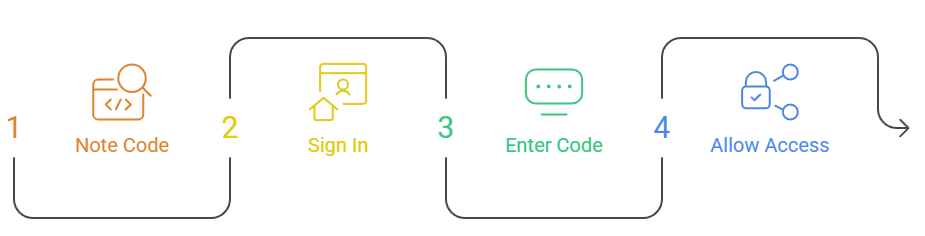
On a Fire TV Stick the device-code method is by far the easiest route, because typing a password with the remote is slow and error-prone. The steps below assume you are using a Kodi addon, but the flow is identical for most Firestick streaming apps that support Real-Debrid, including Weyd and apps you sideload with Downloader.
- Open your app and go to its Real-Debrid or ResolveURL authorization screen.
- Note the code shown on the TV, then pick up your phone.
- On the phone browser, open real-debrid.com/device and sign in.
- Type the code, select Continue, then Allow.
- Return to the Firestick; the app confirms the link and premium results appear in scrapes.
How to Activate Real-Debrid in Kodi (Addon Authorization)
Kodi routes almost all premium links through a helper called ResolveURL, so linking it once covers Seren, Fen, The Crew, and most other addons at the same time. If a single addon still asks separately, just repeat the same authorize step inside that addon and enter a second code.
- Open ResolveURL: in the addon settings, find the ResolveURL or Accounts section.
- Generate a code: select Real-Debrid, then choose (Re)Authorize My Account to get a code.
- Approve in browser: enter that code at real-debrid.com/device and approve it on your phone.
- Raise priority: set Real-Debrid’s priority to 90 or higher so it resolves before free hosts.
- Clear cache: clear the addon’s provider cache if old free links keep showing after linking.
How to Activate Real-Debrid in Stremio (Torrentio and Comet)
Stremio is the exception to the device-code rule. Its addons connect to Real-Debrid with an API token rather than a pairing code, so you copy one string instead of visiting the device page. It is still quick once you know where to look, and it means you never type your password into the addon at all.
- Copy your token: sign in and open real-debrid.com/apitoken to copy your private API token.
- Open the addon: in Stremio, open the Torrentio (or Comet) addon configuration page.
- Paste the token: choose Real-Debrid as the debrid provider and paste your API token.
- Save it: install or update the addon so the token is stored on your Stremio account.
- Keep it secret: treat the token like a password, since anyone with it can use your account.
How to Activate Real-Debrid on Android, iOS, and Web Apps
Mobile and browser apps mix both methods. Native Android apps that support the device flow will show a code, while lighter web players and most iOS apps ask for the API token instead. Check the app’s account screen and use whichever field it presents rather than forcing one method.
- Android apps: apps like Weyd or CloudStream usually offer the device-code authorize button.
- iOS apps: on iOS, players that support Real-Debrid typically ask for the API token instead.
- Web players: browser-based players almost always use the token from real-debrid.com/apitoken.
- Multi-device: you can link many devices to one account, so mobile and TV share a subscription.
- Safer option: if an app offers both, the device code is the safer choice on shared devices.
Which Devices and Apps Support Real-Debrid?
Real-Debrid is supported by a huge range of streaming apps and works on almost any device those apps run on. It does not have its own player; instead it plugs into apps you already use, so support really comes down to whether your chosen app has a Real-Debrid option in its settings. The list below covers the most common setups people activate.
- Firestick and Fire TV: Kodi addons, Weyd, and many sideloaded APKs.
- Kodi (any platform): Seren, Fen, The Crew, and other ResolveURL addons.
- Stremio: Torrentio, Comet, MediaFusion, and similar debrid-enabled addons.
- Android and Android TV: CloudStream, Weyd, and standalone debrid players.
- Computer and web: the Real-Debrid site itself for direct downloads and unrestricted links.
Real-Debrid vs a VPN: Do You Need Both?
People often confuse the two, but Real-Debrid and a VPN do completely different jobs, and using one does not remove the need for the other. Real-Debrid makes links fast and reliable; a VPN keeps your activity private. Many streamers run both, so it helps to see exactly where each one fits.
| Feature | Real-Debrid | VPN |
|---|---|---|
| Main job | Unrestricts and speeds up links | Hides your IP and encrypts traffic |
| Stops buffering | Yes, via cached links | No, but can bypass throttling |
| Adds privacy | No | Yes |
| Typical cost | From €4 / 30 days | Usually more per month |
| Used together? | Recommended for privacy + speed | Recommended alongside Real-Debrid |
Real-Debrid Pricing at a Glance
Activation is free, but you need premium for it to do anything useful. Real-Debrid uses one-off blocks of days rather than an auto-renewing subscription, and longer blocks are cheaper per month. Our Real-Debrid explainer covers the plan in depth, and the service also features in our roundup of the best debrid services.
| Plan | Price (checked July 2026) | Effective monthly |
|---|---|---|
| 15 days | €3 | ~€6.00 |
| 30 days | €4 | ~€4.00 |
| 90 days | €9 | ~€3.00 |
| 180 days | €16 | ~€2.67 |
Fidelity points: every purchase earns loyalty points (200 on a 30-day block, 800 on 180 days). Reach 1,000 points and you can redeem 30 days of premium for free, which lowers the effective cost of longer blocks even further over time.
Is There a Real-Debrid Free Trial?
Real-Debrid does not offer a traditional free trial, but you can create a free account to see the dashboard and link a device before paying. The catch is that a free account cannot unlock torrents or premium hosters, so it is only useful for testing the sign-up and activation flow rather than actually streaming.
- Free account: lets you explore the site and test the device-pairing screen.
- No torrent unlock: free accounts cannot resolve cached torrents, which is why people pay.
- Cheapest entry: the lowest paid tier is the 15-day block at €3.
- Earn free days: fidelity points from any purchase can later earn you free premium days.
- Avoid scams: steer clear of sites promising free premium accounts, as they are scams.
How to Renew, Extend, or Upgrade Real-Debrid
Because Real-Debrid sells blocks of days rather than an auto-renewing plan, nothing charges your card automatically. That is good for control but means you have to top up manually before your days run out, or your linked apps quietly stop resolving premium links until you do.
- Buy a block: sign in, open the Premium tab, and buy another block to extend your days.
- Days stack: buying more days adds to your remaining balance rather than replacing it.
- Best value: longer blocks cost less per month, so 180 days suits heavy streamers.
- Redeem points: cash in 1,000 fidelity points for a free 30-day block before they lapse.
- No re-linking: existing device authorizations stay valid, so you need not re-link after renewing.
How Long Does Real-Debrid Device Authorization Last?
A linked device stays authorized as long as your premium is active and you do not manually remove it, so it does not silently drop after a day like some services. That said, a handful of situations do force a re-authorization, and knowing them up front saves a lot of confusion when links suddenly stop resolving.
- Survives restarts: the link stays valid across app restarts and device reboots.
- Needs active premium: letting premium lapse stops links resolving until you renew.
- Manual removal: removing the device in account settings instantly revokes that link.
- Reinstalls reset it: reinstalling the app or wiping its data usually means linking again.
- Password changes: changing your Real-Debrid password can invalidate existing links.
How to Manage or Remove Authorized Devices
Real-Debrid keeps a list of everything you have linked under My Devices, and it is worth checking now and then. If you sell a device, notice a login you do not recognise, or just want a clean slate, removing old entries takes only a few seconds and immediately cuts off that app.
- Find your devices: sign in and open My Account → My Devices to see every active link.
- Remove old ones: select Remove next to any device you no longer use or recognise.
- Forces re-auth: removing a device makes that app authorize again before it can resolve.
- On a breach: if you suspect a leak, change your password and clear all devices at once.
- Reset the token: regenerate your API token too if you think it has been exposed.
Real-Debrid Device Activation Not Working? Fixes
Most activation problems come down to three things: no premium, an expired code, or the app and browser sitting on different accounts. Work through the table below in order and the failure usually clears in under a minute, without needing to reinstall anything.
| Symptom | Likely cause | Fix |
|---|---|---|
| “Invalid code” on the device page | Code expired before you entered it | Generate a fresh code and type it immediately. |
| Links still slow or missing | Account is not premium | Buy or renew a premium block, then re-scrape. |
| Authorize button does nothing | ResolveURL not installed or updated | Update ResolveURL, then retry the authorize step. |
| Linked but no cached results | Real-Debrid priority too low | Raise its resolver priority above free hosts. |
| Constant re-authorize prompts | Password changed or device removed | Re-link the app and avoid sharing the account widely. |
- Same account: double-check the app and browser are signed in to the same account.
- Fix the clock: confirm the device clock is set to automatic date and time.
- Drop the VPN: disable a VPN briefly if the pairing request keeps timing out.
- Clear cache: clear the addon cache after linking so old free links are dropped.
- Start fresh: if nothing works, remove the device and run the flow from scratch.
Tips to Get the Best Real-Debrid Streams
Once activation is done, a few small tweaks make a big difference to how often you get instant, high-resolution playback. These are the settings I change on every new install before I start streaming, and they take just a couple of minutes.
- Top priority: give Real-Debrid the highest resolver priority so cached links load first.
- Cached only: filter your addon to show cached results only for instant playback.
- Pick popular files: prefer 1080p or 4K sources that are already cached over rare ones.
- Weekly cleanup: clear provider cache weekly so stale links do not clog your results.
- Add a VPN: pair it with a VPN if your provider throttles streaming traffic.
Real-Debrid Terms You Should Know
A few words come up constantly when you activate and use Real-Debrid, and knowing them makes the settings screens far less confusing. Here is the short glossary I wish I had when I first linked an account.
- Cached link: a file Real-Debrid already holds, so it plays instantly with no wait.
- Hoster: a file-host site whose premium links Real-Debrid unlocks for you.
- ResolveURL: the Kodi helper that passes links to Real-Debrid for resolving.
- API token: the private key Stremio and web apps use instead of a device code.
- Fidelity points: loyalty points that add up to free premium days over time.
Is Real-Debrid Safe and Legal to Use?
Real-Debrid itself is a legitimate, paid unrestricted downloader used by many people for legal downloads and faster access to files they are entitled to. The legality depends entirely on what you choose to stream through it, not on the service, so the responsibility sits with the user rather than the tool.
- Legal service: the tool is legal; how you use it is your responsibility.
- Not private: it hides nothing about your identity, so it is no substitute for a VPN.
- Official only: pay only on real-debrid.com or an authorised reseller.
- No free generators: avoid “free” account generators, which steal logins.
- Add a VPN: many users add a VPN for privacy when streaming through third-party apps.
Conclusion
Activating Real-Debrid comes down to one habit: keep the app and a browser signed in to the same premium account, then pass the short code between them at real-debrid.com/device. Stremio users swap the code for an API token, and everyone else uses the pairing page. Once linked, buffering-free cached links show up automatically, and a single subscription can cover your Firestick, Kodi box, and phone at the same time, which is why it remains the most popular add-on to any serious streaming setup.
FAQs
What is the real-debrid.com/device page for?
It is Real-Debrid’s official pairing page. You sign in there and enter the code your streaming app shows, which links that app to your account without ever typing a password on the TV itself.
Do I need premium to activate Real-Debrid?
You can link a free account, but it will not unlock torrent or hoster links. Premium, from €4 for 30 days, is what makes cached, high-speed streams appear inside your apps.
Why does my activation code say invalid?
Codes expire within a few minutes. If yours is rejected, generate a new one in the app and type it into the device page straight away, making sure both are signed in to the same account.
How do I activate Real-Debrid on Stremio?
Stremio addons use an API token, not a device code. Copy your token from real-debrid.com/apitoken and paste it into the Torrentio or Comet configuration page before you install the addon.
How many devices can I link to one account?
Real-Debrid allows several devices on a single subscription, so your Firestick, Kodi box, phone, and computer can all use it. You can review and remove them under My Devices at any time.
Does device activation expire?
A linked device stays active as long as your premium is valid and you do not remove it. Reinstalling the app, changing your password, or letting premium lapse can force you to re-authorize.
Is Real-Debrid a VPN?
No. Real-Debrid speeds up and unrestricts links but does not hide your IP address. If you want privacy while streaming, run a separate VPN alongside it.
Can I use one Real-Debrid account on Kodi and Stremio together?
Yes. Link Kodi with a device code and Stremio with your API token using the same account. Both count as separate devices and can run at the same time without conflict.
Does renewing Real-Debrid re-link my devices automatically?
Yes. Buying more days simply extends your balance, and existing device authorizations keep working. You only re-link if you reinstall an app or change your password.
What if Real-Debrid still is not working after activation?
Raise Real-Debrid’s resolver priority, clear your addon cache, and confirm premium is active. If problems continue, our guide to the best Real-Debrid alternatives covers services that may suit you better.