Key Takeaway: SportsDevil is not dependable on current Kodi. The surviving version is 2019.12.29, requires Python 2, and is absent from Kodi’s official Omega repository. Do not downgrade Kodi or install unknown ZIPs to revive it. Use Motorsport Hub, IPTV Simple Client with an authorized playlist, or MLB.TV.
SportsDevil once gathered links from many sports sites, but current search results still recycle installation paths from its Kodi 17 and 18 era. I checked the surviving package metadata, repository history, Kodi requirements, and maintained official alternatives to separate an old download from a working addon.
SportsDevil Status on Kodi 21.3 and Kodi 22
My status verdict is “legacy and effectively abandoned,” not “temporarily down.” The strongest evidence is inside the surviving addon metadata: version 2019.12.29 asks Kodi for the old Python 2 addon runtime. Kodi moved Python addons to Python 3 beginning with Matrix, while the maintained stable release is now Kodi 21.3 Omega and Kodi 22 remains a prerelease beta.
- Package Age: The surviving SportsDevil package directory carries builds dated 2019 rather than a maintained, current Omega-compatible release for supported Kodi versions.
- Python Requirement: Its addon metadata declares
xbmc.python 2.14.0, while Kodi 19 and later require Python 3-compatible addons. - Stable Kodi: Team Kodi identifies Kodi 21.3 Omega as the current supported stable and maintained branch, not Kodi 18 Leia.
- Next Release: Kodi 22 Piers Beta 1 uses an even newer Python environment, making a Python 2 package less plausible.
- Official Catalog: SportsDevil is absent from Kodi’s Omega addon catalog, so there is no vetted installation, automatic update path, or support channel.
Why Old SportsDevil Installation Guides Fail
An old repository page returning HTTP 200 does not prove its addon can run. I found a downloadable Cy4Root repository ZIP, but its own configuration points to a plugin collection last pushed in 2021, where SportsDevil remains the 2019.12.29 package. Other tutorials reference repositories that refuse connections or no longer contain the addon, so copying their source URL only reproduces an outdated chain.
- Reachable Page: A repository landing page can stay online for years while every addon inside it remains obsolete, broken, or unsafe to install.
- Missing Repository: When Kodi cannot connect, the host may be offline, TLS support may be outdated, or the original directory may be gone.
- Dependency Failure: Kodi may reject installation because Python 2 modules and old playback helpers are unavailable on Omega, Nexus, or Matrix.
- Empty Categories: Even a launchable legacy copy can show no events when its parsers no longer recognize source pages or resolve stream tokens.
- Misleading Updates: A newly dated tutorial often republishes old screenshots and paths without verifying package version, repository commits, or current Kodi compatibility.
Can You Install SportsDevil Today?
You may still locate an old ZIP, but that is different from having a safe, supported installation. The sensible answer on Kodi 19 through 21 is no: do not enable unknown sources merely to force a Python 2 addon into a Python 3 build. Kodi 18 can read the older dependency format, yet Leia is end-of-life and the external sports scrapers can still fail.
- Kodi 21 Omega: Do not install SportsDevil; use a maintained Omega addon from the official Kodi repository and retain current security fixes.
- Kodi 20 Nexus: The Python 3 compatibility gap remains, so changing repository addresses will not repair the package’s old runtime declaration.
- Kodi 19 Matrix: This was the breaking Python 3 transition; Team Kodi warned that unported Python 2 addons would stop functioning.
- Kodi 18 Leia: A legacy package may install, but the platform is unsupported and SportsDevil’s remote source parsers remain stale and unreliable.
- Kodi 22 Beta: Avoid using a prerelease build to test abandoned addons; Beta 1 prioritizes current Python 3.14-compatible extensions and reports.
| Kodi version | Addon runtime | SportsDevil assessment | Recommended action |
|---|---|---|---|
| 22 Piers Beta 1 | Python 3.14 branch | Not compatible | Use only for current-addon testing |
| 21.3 Omega | Python 3 | Not supported | Choose official Omega alternatives |
| 20 Nexus | Python 3 | Not supported | Update Kodi, then replace addon |
| 19 Matrix | Python 3 transition | Legacy package breaks | Replace, do not force dependencies |
| 18 Leia | Python 2 | May install; sources unreliable | Do not downgrade or keep online |
Remove an Old SportsDevil Copy Cleanly
If SportsDevil remains on a long-used Firestick, remove the addon before troubleshooting current replacements. Uninstalling it does not erase Kodi’s media library, but deleting Kodi application data does, so keep those actions separate. The safest cleanup removes SportsDevil, its abandoned repository, and dependencies Kodi marks as orphaned, then restores official-repository-only updates without resetting the entire application.
- Uninstall Addon: Open Add-ons, My add-ons, Video add-ons, SportsDevil, Information, and Uninstall; accept removal of its user settings when offered.
- Remove Repository: Under My add-ons, open Add-on repository, select the old source that supplied SportsDevil, and uninstall that repository separately.
- Delete File Source: In Settings, File manager, remove the obsolete repository source so its address is not reused during a future guide.
- Clear Orphans: In Settings, System, Add-ons, Manage dependencies, remove only items Kodi labels orphaned rather than deleting shared modules indiscriminately.
- Restore Defaults: Disable Unknown sources after cleanup and keep “Update official add-ons from” set to Official repositories only for predictable updates.
Install a Supported Sports Replacement from Kodi’s Repository
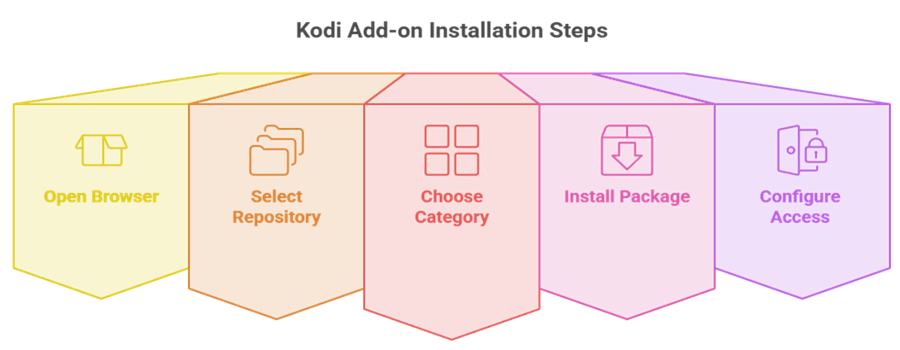
Maintained replacements are simpler because Kodi’s official repository is already installed and handles compatible versions automatically. You do not need Downloader, a custom file-source address, or an external ZIP. The exact category differs: Motorsport Hub and MLB.TV are Video add-ons, while IPTV Simple Client is a PVR client that requires your own authorized M3U playlist and optional XMLTV guide.
- Open Browser: From Kodi’s home screen, select Add-ons, then the open-box icon to enter the Add-on browser and repository tools.
- Select Repository: Choose Install from repository, then Kodi Add-on repository; this route avoids unknown ZIP files and abandoned third-party update channels.
- Choose Category: Open Video add-ons for Motorsport Hub or MLB.TV, or PVR clients when installing IPTV Simple Client for licensed playlists.
- Install Package: Select the addon, review its dependencies, choose Install, and wait for Kodi’s “Add-on installed” confirmation before opening configuration.
- Configure Access: Sign in only on the service’s official authorization flow, or enter playlist and EPG addresses provided by your legitimate television service.
Match the Replacement to Your Sports Access
No single lawful addon duplicates SportsDevil’s old promise of free links to almost every event. A better replacement starts with the rights you already have: official free streams, a league subscription, or a licensed TV playlist. This produces fewer categories but far more predictable playback, clearer blackout rules, and an update path maintained by Kodi or the underlying service.
- Free Motorsport: Choose Motorsport Hub for official live races, replays, classics, and schedules aggregated from rights-holder channels without a user account.
- Baseball Subscription: Choose MLB.TV for out-of-market Major League Baseball games, archived broadcasts, and account-based playback subject to location restrictions.
- Provider Channels: Choose IPTV Simple Client when a legitimate provider gives you an M3U address and, ideally, a matching XMLTV electronic guide.
- Free Highlights: The official YouTube addon suits rights-holder highlights, press conferences, qualifying clips, and selected live events published by verified channels.
- Regional Services: Search Kodi’s official catalog for your broadcaster, then confirm account, country, and blackout requirements before assuming live games are included.
| Viewer need | Best route | Account or input | Main limitation |
|---|---|---|---|
| Free legal motor racing | Motorsport Hub | No login | Motorsport only |
| Out-of-market baseball | MLB.TV | Paid MLB account | Blackouts and exclusivities |
| Licensed live-TV channels | IPTV Simple Client | Provider M3U and optional EPG | Supplies no channels itself |
| Official clips and selected streams | YouTube | Optional Google API setup | Not a full league package |
Best SportsDevil Alternatives
These three alternatives are listed in Kodi’s current Omega catalog and cover distinct lawful use cases. They do not scrape unauthorized event pages or pretend one free source can replace every sports package. Pick the option that matches your sport, subscription, or licensed playlist rather than installing all three without a clear viewing source.
1) Motorsport Hub
Motorsport Hub is the clearest modern replacement when your priority is racing rather than every sport. It collects live events, replays, classics, and shows from official rights-holder sources, adds a weekend schedule, and hides spoilers by default. I verified version 1.0.2 in Kodi’s Omega catalog, updated August 17, 2026, with YouTube listed as its playback dependency.
Features:
- Official Sources: The addon indexes streams published by rights holders, official YouTube channels, free FAST services, and public motorsport archives.
- Broad Racing Mix: Coverage spans Formula 1 classics, MotoGP, WEC, IMSA, NASCAR, IndyCar, Formula E, rally, motocross, karting, and more.
- Live Now: A dedicated view groups official channels currently broadcasting, reducing the search time before a race or supporting session begins.
- Weekend Guide: Upcoming sessions appear in your local timezone, making the addon useful for discovery even before a stream becomes available.
- Spoiler Control: Result-revealing titles and thumbnails remain hidden until playback, which protects viewers catching a race after its original broadcast.
- Health Checks: Source availability is checked daily, so stale channels are less likely to linger indefinitely inside the browsing menus.
- Fresh Listing: In my review, its August 2026 Kodi update was substantially newer than every SportsDevil package record found during research.
| Pros | Cons |
| Free and legal source model | Motorsport rather than general sports |
| Current Omega listing | YouTube addon required for playback |
| Live and replay discovery | |
| Timezone and spoiler tools |
Pricing:
- Addon: Free
- Account: No login required
- Sources: Free official streams and archives
Link: https://kodi.tv/addons/omega/plugin.video.motorsporthub/
2) IPTV Simple Client
IPTV Simple Client is the flexible choice when a legitimate TV provider supplies an M3U playlist and optional XMLTV guide. The addon adds those channels to Kodi’s Live TV interface but provides no streams, subscriptions, or rights by itself. I checked version 21.11.0 in the Omega catalog, where Kodi documents multicast, unicast, radio, and EPG support.
Features:
- M3U Input: Load a local or remote playlist supplied by an authorized service, tuner gateway, home server, or organization you trust.
- EPG Support: XMLTV guide data can add program names, schedules, descriptions, and channel mapping when the provider maintains accurate identifiers.
- Live TV UI: Channels appear in Kodi’s television interface with groups, guide views, favorites, and remote-friendly navigation rather than scraper menus.
- Radio Channels: Compatible playlists can include radio streams alongside television, making one PVR client useful for multiple authorized media sources.
- Platform Builds: Kodi publishes Omega packages for Android, Windows, and macOS architectures, covering Firestick, common desktops, and several media boxes.
- No Bundled Content: The client cannot create sports access; your playlist must remain active, licensed, correctly formatted, and reachable from Kodi.
- Setup Reality: In my configuration review, most failures trace to expired M3U credentials, mismatched EPG IDs, or provider-side channel changes.
| Pros | Cons |
| Official Kodi PVR client | Does not include channels |
| M3U and XMLTV support | Quality depends on the provider |
| Native guide interface | |
| Multi-platform packages |
Pricing:
- Addon: Free and open source
- Playlist: Supplied by your authorized provider
- EPG: Provider-supplied or separately licensed
Link: https://kodi.tv/addons/omega/pvr.iptvsimple/
3) MLB.TV
MLB.TV is the focused choice for baseball viewers who already subscribe or want official out-of-market coverage. It supports live and archived games through an account rather than scraping event pages. I verified Kodi addon version 2026.4.9+matrix.1, updated April 26, 2026; MLB listed a $69.99 seasonal promotional price during the August 22 price check.
Features:
- Official Games: Access comes through an MLB account and subscription, providing a defined rights chain rather than anonymous third-party event links.
- Live Coverage: The service carries current out-of-market regular-season games, with national exclusivities and home-territory blackouts determined by the viewer’s location.
- Game Archives: Completed broadcasts remain available on demand, including restricted live games after the delay described in MLB’s current blackout policy.
- Current Build: Kodi’s Omega catalog lists a 2026 release, showing active maintenance for the present season and supported Python environment.
- Account Playback: Sign-in keeps entitlements attached to MLB rather than an unknown repository, although authentication changes can still require addon updates.
- Baseball Scope: This alternative does one league well; it will not replace SportsDevil categories for football, motorsport, combat sports, or basketball.
- Price Check: I found the August promotional season price below the full-season figure, so readers should confirm the checkout total before purchase.
| Pros | Cons |
| Licensed live and archived games | Baseball only |
| Current 2026 Kodi release | Blackout restrictions apply |
| Official account authentication | |
| Out-of-market coverage |
Pricing:
- Kodi Addon: Free
- MLB.TV: $69.99 per season promotional price
- Restrictions: Blackouts and national exclusivities apply
Link: https://kodi.tv/addons/omega/plugin.video.mlbtv/
Fix Playback Problems on Maintained Sports Addons
A replacement can fail without being abandoned. Diagnose the layer that owns the problem: Kodi’s addon package, your account or playlist, a required playback component, the event’s rights restrictions, or the network. That distinction prevents the SportsDevil habit of repeatedly adding repositories when the real issue is a blackout, expired token, unavailable source, or malformed guide entry.
- Update First: Open Add-ons, Available updates, and install the current official package before clearing data or changing a working provider configuration.
- Check Entitlement: Confirm the subscription covers that event and location; a valid password cannot override MLB blackouts or broadcaster exclusivities.
- Validate Inputs: For IPTV Simple Client, test whether the provider’s M3U and XMLTV addresses remain active without publishing credentials or private tokens.
- Confirm Dependencies: Motorsport Hub requires the YouTube addon for playback, while protected services may depend on an updated InputStream Adaptive component.
- Read the Log: Kodi’s event and debug logs distinguish authentication, HTTP, dependency, and decoder errors more reliably than generic “not working” messages.
| Symptom | Likely layer | Best first check |
|---|---|---|
| Addon will not install | Version or dependency | Confirm Omega package and update Kodi |
| Login rejected | Account authorization | Reauthorize through official service flow |
| One event unavailable | Rights or blackout | Check service availability rules |
| All playlist channels fail | Provider or expired M3U | Request a current authorized URL |
| Guide is empty | XMLTV mapping | Refresh EPG and compare channel IDs |
| Motorsport item will not open | YouTube dependency | Update and configure YouTube addon |
Is SportsDevil Legal and Safe?
Kodi itself is legal software, but an addon inherits the legal and security qualities of its code and sources. SportsDevil’s unofficial scraper model could expose links without clear permission, while abandoned repositories no longer provide meaningful maintenance assurance. If you want broader current choices, compare the maintained options in our best Kodi addons for sports guide, then verify each source’s rights in your country.
- Kodi Legality: Team Kodi distributes a lawful media player without bundled content and separates its official repository from unsupported third-party sources.
- Stream Rights: A free link to normally paid coverage is a warning sign; the viewer remains responsible for lawful access and location rules.
- Repository Risk: Unknown ZIP files can request broad Kodi access, install dependencies, and receive updates outside Team Kodi’s reviewed repository channel.
- VPN Limits: A VPN can secure traffic on an untrusted network, but it does not license a stream or cancel a service’s terms.
- Safer Baseline: Keep Kodi updated, prefer the official repository, use your own authorized accounts, and remove abandoned sources that no longer receive fixes.
SportsDevil Verdict for Current Kodi Users
SportsDevil belongs to Kodi’s Python 2 era. Its reachable ZIP cannot overcome a 2019 version, old runtime, missing official listing, and stale scrapers. On Kodi 21.3, uninstall it instead of downgrading. Match your replacement to the access you have:
- Motorsport Hub: Best for free, official racing streams, current and upcoming sessions, replays, classics, and spoiler-aware discovery from verified sources.
- IPTV Simple Client: Best for bringing an authorized provider’s M3U channels and XMLTV guide into Kodi’s native Live TV interface.
- MLB.TV: Best for subscribers wanting official out-of-market baseball games and archives, with clear account requirements and geographic blackout rules.
FAQs
Is the SportsDevil Kodi addon still working in 2026?
No dependable current release exists. The surviving version is 2019.12.29, declares a Python 2 dependency, and is not listed in Kodi’s Omega repository. Treat it as abandoned.
Can I install SportsDevil on Kodi 21.3 Omega?
You may find an old ZIP, but it is not a supported Omega installation. Kodi 21 uses Python 3 addons, whereas SportsDevil’s available metadata requests Python 2.
Would downgrading to Kodi 18 make SportsDevil work?
It might allow the legacy package to install, but Leia is end-of-life and SportsDevil’s external parsers can remain broken. Downgrading sacrifices current fixes without restoring sources.
What is the safest SportsDevil alternative?
Use an addon from Kodi’s official repository. Motorsport Hub suits free official racing, MLB.TV serves subscribers, and IPTV Simple Client handles an authorized provider playlist.
How do I install a sports addon on Firestick?
First follow our Kodi on Firestick installation guide. Inside Kodi, open Add-ons, Install from repository, Kodi Add-on repository, choose the correct category, and select Install.
Do I need a VPN for SportsDevil or its alternatives?
A VPN is not an addon requirement and does not make unauthorized streams lawful. Use one only for ordinary network privacy while respecting subscriptions, blackouts, and local law.