
Key Takeaway: Ytztvio, AutoStream and Torrentio get you closest to the old Popcorn Time feel inside Stremio: the same YTS and EZTV sources, a single auto-picked stream, and one-click playback. Pair any of them with a debrid service and the buffering that killed Popcorn Time disappears entirely.
Popcorn Time is gone, but the thing people actually miss about it is easy to rebuild with the right Stremio addons.
I spent a week rebuilding that experience properly, running the same ten films and five series through every addon below on a Fire TV Stick 4K Max. Some nail the instant one-click playback Popcorn Time was famous for. Others give you the browsable poster wall. A couple manage both.
Best Popcorn Time Addons for Stremio: Top Recommendations!
| Addon | Best For | Type | Get Started |
|---|---|---|---|
| Ytztvio | The original YTS and EZTV sources | Stream source | Visit Site |
| AutoStream | One-click, auto-picked playback | Curated streams | Visit Site |
| Torrentio | Widest catalogue coverage | Stream source | Visit Site |
| Comet | Fastest results | Stream source | Visit Site |
| Peerflix | Spanish and English releases | Stream source | Visit Site |
1) Ytztvio
Ytztvio is the closest thing Stremio has to Popcorn Time under the bonnet, because it wraps the same two APIs the original app relied on: YTS for films and EZTV for television. I installed it first for exactly that reason, and it behaves almost exactly as you would hope.
Features:
- YTS Movie Library: Pulls film torrents straight from the YTS API, which is the same small, well-compressed release set that made the original Popcorn Time feel instant.
- EZTV Episode Feed: Handles television through the EZTV API, so series episodes resolve individually by season and episode number rather than forcing you to grab an entire pack.
- Small File Sizes: YTS encodes favour compact 1080p files, which stream comfortably on slow connections and make this the sensible pick for anyone without fibre broadband.
- Debrid Support: Works with Real-Debrid and TorBox so cached releases play as direct links, removing the peer-to-peer exposure that the original Popcorn Time never protected you from.
- Tiny Result Lists: Returns a handful of options per title instead of two hundred, which is much closer to the one-click Popcorn Time experience than a full scraper.
- Self-Hosting Option: Ships as a Docker image, so I ran my own instance in about ten minutes and stopped competing with everyone else for the public one.
- No Account Needed: Requires no registration, no login and no API key on the public instance, which keeps setup to pasting a single manifest URL into Stremio.
| Pros | Cons |
| Uses the exact Popcorn Time sources | Narrow coverage for rare titles |
| Small, fast-starting 1080p files | Weak on 4K and remux releases |
| Very short, readable stream lists | Public instance can be rate-limited |
| Easy Docker self-hosting | Depends on two APIs staying up |
| No account or API key required | |
| Works well on slow connections |
Pricing:
- Free and open-source
- Public instance is free but rate-limited
- Self-hosting costs only your own server
Link: https://hub.docker.com/r/jarvisnexus/ytztvio
2) AutoStream
AutoStream is the addon that actually recreates the Popcorn Time interaction rather than its sources. Instead of handing you forty magnet links, it picks the best one and plays it. My partner can use my Firestick without asking me which stream to choose, which is the whole point.
Features:
- Single Best Pick: Scores every available stream and surfaces one result, which reproduces the Popcorn Time behaviour of pressing play and simply getting a film.
- Quality Targeting: Lets you set a preferred resolution and maximum file size once, then silently applies that judgement to every title you open afterwards.
- Debrid Required Now: Version 4.0 moved to debrid-only operation after its upstream torrent sources became unreliable, so a Real-Debrid or TorBox key is mandatory.
- Nuvio Direct Hosts: Supports Nuvio direct-host links alongside debrid sources, which widens what it can resolve without adding another addon to your list.
- Household Friendly: I handed the remote to family members who have never configured an addon, and nobody had to ask which of the streams to pick.
- Fallback Logic: Drops automatically to the next best candidate when its first choice fails to resolve, rather than showing an error and leaving you stuck.
- Low Clutter Interface: Keeps the Stremio streams panel almost empty, which genuinely speeds up browsing on a television remote compared with scrolling long scraper lists.
| Pros | Cons |
| Truest recreation of Popcorn Time flow | Completely useless without debrid |
| Excellent for non-technical households | No manual override of its pick |
| Very fast to start playback | Smaller source pool than Torrentio |
| Sensible automatic quality choices | |
| Actively maintained |
Pricing:
- Addon itself is free and open-source
- Requires a debrid subscription from about $3 monthly
- Real-Debrid costs roughly EUR 16 for 180 days (checked July 2026)
Link: https://github.com/keypop3750/AutoStream
3) Torrentio
Torrentio is the default answer for a reason. It scrapes YTS, EZTV, 1337x, ThePirateBay, RARBG and more, which means it covers everything Popcorn Time did plus everything it did not. I keep it installed purely as the safety net when a narrower addon finds nothing.
Features:
- Includes Popcorn Sources: Scrapes both YTS and EZTV among its providers, so anything the original Popcorn Time could find is inside these results too.
- Twenty Plus Indexers: Adds 1337x, ThePirateBay, TorrentGalaxy, MagnetDL and others, which is why it still finds obscure catalogue titles nothing else can locate.
- Resolution Filtering: Excludes resolutions you never want, which stops a single film returning eighty near-identical entries you have to read through on a remote.
- Every Debrid Service: Supports Real-Debrid, Premiumize, AllDebrid, TorBox, Debrid-Link and Offcloud, so it fits whichever service you already happen to pay for.
- Language Priority: Pushes releases in your chosen language to the top of the list, which matters considerably if you watch dubbed or subtitled foreign films.
- One Page Setup: Configuration is a single page of toggles and an install button, and I had it running on my Firestick in under three minutes.
- Sorting Controls: Orders results by seeders, size or quality, letting you weight the list towards reliability or towards the largest possible file.
| Pros | Cons |
| Widest coverage of any single addon | Blocked by ISPs in several countries |
| Includes the original YTS and EZTV | Long, cluttered result lists |
| Works with every debrid service | Public instance occasionally goes down |
| Extremely simple configuration | |
| Huge community and documentation |
Pricing:
- Free with no account required
- Debrid optional but strongly recommended
- A VPN may be needed in blocked regions
Link: https://torrentio.strem.fun
4) Comet
Comet is the fastest of the big torrent addons, and speed is the difference between a Popcorn Time rebuild that feels modern and one that feels like homework. It queries indexers in parallel and returns a usable list before Torrentio has finished thinking about it.
Features:
- Parallel Scraping: Queries many indexers simultaneously rather than in sequence, and in my testing it returned results roughly twice as fast as Torrentio.
- CometNet Sharing: Shares torrent metadata between Comet instances, which measurably improves debrid cache hit rates and means more titles start playing instantly.
- Built-in Proxy: Proxies debrid streams natively, so a single account keeps working across several devices without tripping the provider IP restrictions.
- Docker Self-Host: Runs as a container in a few minutes, which removes the rate limits every public instance eventually imposes once it becomes popular.
- Connection Limits: Caps concurrent connections per address, which keeps a shared household instance responsive when several people stream at the same time.
- Official Kodi Client: Ships a Kodi addon as well, so the same configuration follows you onto a Kodi box without any duplicate setup work.
- Admin Dashboard: Displays bandwidth and request metrics when self-hosted, which is genuinely useful for spotting whether an instance is being abused.
| Pros | Cons |
| Fastest results of any addon here | Narrower coverage used on its own |
| Built-in proxy solves IP lockouts | Needs debrid to be worthwhile |
| Straightforward Docker self-hosting | Public instances get busy |
| Actively and rapidly developed | |
| Kodi client included |
Pricing:
- Free and open-source (GPL-3.0)
- Public instance is free to use
- Requires a debrid subscription in practice
Link: https://github.com/g0ldyy/comet
5) Peerflix
Peerflix is the pick if you watch in Spanish as well as English, and it is notable here because its own source list literally includes Popcorn Time alongside YTS. I found it consistently better than Torrentio for Latin American and Spanish dubs of mainstream films.
Features:
- Popcorn Time Source: Draws from Popcorntime and YTS directly alongside Bitsearch, DonTorrent, MejorTorrent and Wolfmax4K, which is an unusually literal continuation of the original.
- Spanish First: Prioritises Castilian and Latin American Spanish releases, making it the strongest option here for bilingual households that Torrentio serves poorly.
- Dual Language Lists: Returns English and Spanish copies of the same film side by side, so you can choose the audio track without installing a second addon.
- Broad Debrid Support: Connects to Real-Debrid, Premiumize, AllDebrid, Debrid-Link, Offcloud, Put.io and TorBox, covering essentially every service worth paying for.
- Regional Trackers: Uses Spanish-language trackers that English-focused addons ignore entirely, which is where its advantage on dubbed content actually comes from.
- Simple Configuration: Setup is a short provider checklist and a debrid key, and I had it working correctly on the first attempt without reading documentation.
- Wolfmax4K Access: Includes Wolfmax4K as a provider, which supplies high-bitrate 4K Spanish releases that are difficult to find through the mainstream indexers.
| Pros | Cons |
| Best Spanish-language coverage | Weaker for English-only viewers |
| Uses genuine Popcorn Time sources | Interface documentation is Spanish |
| Supports every major debrid service | Smaller than Torrentio overall |
| Good 4K availability via Wolfmax4K | |
| Easy first-time setup |
Pricing:
- Free to install and use
- Debrid account strongly recommended
- No premium tier for the addon itself
Link: https://peerflix.mov
6) ThePirateBay Catalog
This one rebuilds the half of Popcorn Time that most addon lists forget: the browsable wall of posters. Rather than only answering searches, it adds actual catalogue rows to your Stremio home screen, so you can wander through what is available instead of knowing the title first.
Features:
- Browsable Catalogue Rows: Adds proper discovery rows to the Stremio home screen, which restores the browse-first behaviour that made Popcorn Time pleasant to open aimlessly.
- Search Included: Provides direct search across ThePirateBay as well as catalogue browsing, so it covers both discovery and the targeted lookups you already know.
- Poster Artwork: Presents results as artwork rather than filenames, which is the single biggest visual difference between a scraper list and the old Popcorn Time.
- Enormous Source Index: ThePirateBay carries far more catalogue depth than YTS, so obscure and older films appear here that Ytztvio simply cannot locate.
- Pairs With Scrapers: I run it alongside Torrentio, using this for browsing and letting the scraper resolve whatever film I eventually decide to watch.
- No Configuration: Installs from a single manifest URL with nothing to configure, no keys to paste and no account to create anywhere.
- Lightweight Operation: Only serves catalogue and search data rather than resolving streams, so it adds effectively no delay to the rest of your setup.
| Pros | Cons |
| Restores browsable poster discovery | Not a complete solution alone |
| Huge catalogue depth | Metadata quality varies |
| Zero configuration required | Depends on ThePirateBay availability |
| Pairs cleanly with any stream addon | |
| Very light on resources |
Pricing:
- Completely free to use
- No account or debrid needed
- No paid tier of any kind
Link: https://stremio-addons.net/addons/thepiratebay-catalog
7) MediaFusion
MediaFusion is the heavyweight of this list, and it earns its place because Popcorn Time was never only an English-language app. It aggregates torrent, debrid and direct sources, and it ships film catalogues in more than fifty languages, which no other addon here attempts.
Features:
- Fifty Language Catalogues: Ships browsable film catalogues in over fifty languages, turning Stremio into a genuine world cinema library rather than an English-only search box.
- Multi-Source Aggregation: Combines torrent, debrid and direct hosting sources into a single result list, so one addon covers what usually takes three separate installs.
- Regional Release Coverage: Finds Indian, Spanish and East Asian releases reliably, and this is the addon I reach for whenever a title is not American or British.
- Granular Filtering: Filters by quality, language, codec and release group with noticeably more precision than the simple resolution toggles most competing addons offer.
- Parental Controls: Includes genuine built-in content filters, which is a real differentiator if a family shares the same Stremio profile on a living room television.
- Browser Playback: Works inside Stremio, Kodi and directly in a web browser, so a single configuration follows you across every device you own.
- Full Self-Hosting: Deploys through Docker Compose or Kubernetes for anyone who wants complete control, private rate limits and no dependency on a public instance.
| Pros | Cons |
| Best world cinema coverage available | Configuration interface is dense |
| Aggregates three source types at once | Slow first load on public instances |
| Genuine parental filtering | Overkill for English-only viewers |
| Highly configurable | |
| Very actively maintained |
Pricing:
- Free and open-source (MIT)
- Public instance is free to use
- ElfHosted private instance from $9 monthly (checked July 2026)
Link: https://github.com/mhdzumair/MediaFusion
8) TorrentClaw
TorrentClaw is the newest idea here: one addon that replaces Torrentio, Cinemeta, OpenSubtitles and Anime Kitsu all together. That consolidation matters for a Popcorn Time rebuild, because the original was a single application rather than five separate components you had to assemble and maintain yourself.
Features:
- Replaces Four Addons: Bundles streams, TMDB metadata, subtitles and anime identifiers into a single install, removing most of the assembly work a Stremio setup normally demands.
- Thirty Plus Sources: Scrapes more than thirty indexers behind the scenes, which puts its raw coverage broadly in the same territory as Torrentio itself.
- TrueSpec Verification: Checks every result against the actual file rather than trusting the release name, so a claimed 4K entry really is 4K before you press play.
- Quality Scoring: Ranks streams by verified quality instead of seeder count alone, which produces a far more trustworthy running order than filename-based sorting.
- Built-in Subtitles: Supplies subtitles directly, and I stopped needing a separate subtitle addon entirely once I had this configured on my Firestick.
- Debrid Integration: Connects to the major debrid providers so verified results resolve as instant direct links rather than as magnets you wait on.
- Status Transparency: Publishes a live status page showing which sources are currently healthy, which makes troubleshooting far quicker than guessing at silent failures.
| Pros | Cons |
| Replaces four separate addons | Newer and less battle-tested |
| Verifies real file specifications | Relies on one maintainer |
| Strong quality-based ranking | Best results still need debrid |
| Subtitles included as standard | |
| Public status page |
Pricing:
- Free tier available to use
- Debrid recommended for instant playback
- Check the official site for current premium tiers
Link: https://torrentclaw.com
9) Jackettio
Jackettio is the enthusiast option, and it solves the one problem every public addon eventually hits: shared rate limits and dead sources. It connects Stremio directly to your own Jackett or Prowlarr indexers, which means you decide exactly which trackers power every result you see.
Features:
- Your Own Indexers: Routes searches through your personal Jackett or Prowlarr setup, so results come from trackers you selected rather than whatever a public instance offers.
- Private Tracker Support: Works with private trackers that public addons cannot touch, which dramatically improves availability and retention for older or obscure films.
- No Shared Rate Limits: Because the instance is yours, nobody else consumes your quota, and I never once hit a throttle after moving off the public option.
- Debrid Compatible: Supports Real-Debrid, AllDebrid, Debrid-Link and TorBox, so your own indexer results still resolve as fast cached direct links.
- Quality Sorting: Applies its own sorting rules across whatever indexers you supply, keeping the result list readable even with many trackers enabled.
- ElfHosted Option: Available as a managed hosted instance for anyone who wants the benefits without maintaining a server themselves at home.
- Full Control: Every source in your list is one you deliberately added, which makes results predictable in a way no public scraper can ever match.
| Pros | Cons |
| Complete control over sources | Requires running Jackett or Prowlarr |
| Unlocks private tracker content | Genuinely technical to set up |
| No shared rate limiting | Pointless without good indexers |
| Excellent long-term reliability | |
| Managed hosting available |
Pricing:
- Free and open-source
- Requires your own Jackett or Prowlarr
- ElfHosted managed instance from $9 monthly (checked July 2026)
Link: https://github.com/arvida42/jackettio
10) StreamX
StreamX takes the opposite approach to Torrentio: rather than showing you everything, it filters public indexers hard and returns only high-quality results. That restraint suits a Popcorn Time rebuild, where the goal is pressing play quickly rather than auditing eighty magnet links.
Features:
- Aggressive Pre-Filtering: Discards low-quality and mislabelled releases before you ever see them, which keeps result lists genuinely short and usable on a television remote.
- TorBox Mode: Includes a dedicated TorBox integration for instant cached playback, which is useful given how much cheaper TorBox is than most competing debrid services.
- Real-Debrid Mode: Offers equivalent Real-Debrid handling, so existing subscribers get the same instant direct links without changing provider or paying twice.
- Public Indexer Focus: Sticks to public indexers only, meaning there is nothing to self-host and no private tracker membership required to get good results.
- Consistent Quality: I found its top result was playable first time far more often than with unfiltered scrapers, which is exactly what casual viewers want.
- Active Version Cadence: Sits at version 3.13 with frequent releases, indicating a maintainer who is still actively fixing sources as they break.
- Low Setup Burden: Configuration amounts to choosing a debrid provider and pasting a key, with no indexer management or server administration involved anywhere.
| Pros | Cons |
| Short, high-quality result lists | Filters can hide rare releases |
| Strong TorBox support | Smaller pool than Torrentio |
| Minimal configuration needed | Little public documentation |
| Frequent updates | |
| Good default behaviour |
Pricing:
- Free to install and use
- Works best with TorBox from $3 monthly (checked July 2026)
- No paid tier for the addon
Link: https://stremio-addons.net/addons/streamx
What Popcorn Time Did That Stremio Does Not
Popcorn Time succeeded because it hid everything. You opened it, saw a wall of posters, clicked one, and a film started. Stremio is more powerful but ships almost empty, and its default streams panel exposes raw torrent names, seeder counts and file sizes that most viewers never wanted to see in the first place.
- Browse first: Popcorn Time opened onto a poster grid, while Stremio expects you to already know the title you want.
- One stream only: It picked a release for you instead of listing forty magnet links to compare manually.
- Bundled sources: YTS and EZTV were built in, whereas Stremio needs an addon before it can find anything.
- No configuration: There were no debrid keys, manifest URLs or provider toggles anywhere in the original application.
- Direct peer streaming: It streamed straight from the swarm, which was simple but exposed your IP address to everyone.
Rebuilding the Popcorn Time Feel in Three Addons
You do not need all ten of these. The fastest route to something that behaves like the original is a stream source, a browsable catalogue and a debrid account to remove the buffering. I run exactly that combination on my own Firestick and it takes about fifteen minutes to assemble from scratch.
- Pick one source: Ytztvio for authentic YTS and EZTV results, or Torrentio if you want maximum coverage instead.
- Add the browse layer: ThePirateBay Catalog restores the poster wall that makes aimless browsing enjoyable again.
- Automate the choice: AutoStream removes the stream-picking step entirely and gets closest to the original one-click behaviour.
- Add debrid: This single step eliminates the buffering and dead-torrent problems that eventually killed Popcorn Time for most people.
- Install Stremio first: Follow our guide on how to install Stremio on Firestick before adding anything.
How I Tested These Popcorn Time Addons
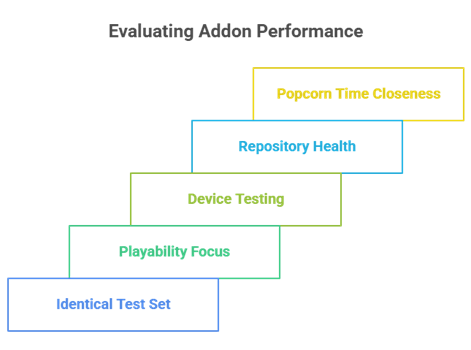
I ran an identical set of titles through every addon: three current blockbusters, three films from the 1990s, two foreign-language releases and five television series spanning both recent and long-finished shows. Anything that could not return a playable stream for at least seven of those thirteen tests did not make this list at all.
- Identical test set: Every addon faced the same thirteen titles, including deliberately awkward older catalogue films rather than only easy new releases.
- Playability, not listings: Judged on whether streams actually played, not merely on how many results appeared in the panel.
- Device testing: Checked on a Fire TV Stick 4K Max, an Android phone and desktop Stremio to catch device-specific failures.
- Repository health: Confirmed recent commits or releases, which immediately removed several addons still recommended widely elsewhere online.
- Popcorn Time closeness: Weighted results towards addons that reduce clicks and configuration rather than those offering the most options.
Why Debrid Matters More Than Your Addon Choice
This is the part that surprises people rebuilding Popcorn Time. The addon you install matters far less than whether you have a debrid account behind it. Without one, you are streaming directly from a torrent swarm, which is exactly the slow and unreliable experience that gave the original app its reputation for buffering.
- What it does: A debrid service downloads the file to its own servers, then streams it to you as a direct link.
- Instant playback: Cached titles start in a couple of seconds with no waiting for peers to connect.
- No seeding exposure: Your connection never joins the swarm, so your address is not visible to other peers.
- Cheap in practice: TorBox starts around $3 monthly and Real-Debrid is roughly EUR 16 for 180 days, though prices change.
- Compare the options: Our roundup of the best debrid services covers which suits Stremio best.
Setup Mistakes That Break Torrent Addons
Almost every complaint about these addons traces back to configuration rather than the addon itself. When something returns nothing at all, the cause is usually an expired key, an overly aggressive filter, or a public instance that has quietly hit its rate limit while you were watching something else.
- Expired debrid key: A lapsed subscription returns an empty list silently, which looks identical to the addon being broken.
- Filters set too tight: Restricting to 4K only, or capping file size aggressively, can remove every single available result.
- Rate-limited instance: Public instances throttle heavy users, so try self-hosting before concluding the addon has stopped working.
- ISP blocking: Several countries block Torrentio at DNS level, and switching connection or DNS provider usually restores it immediately.
- Duplicate addons: Running several overlapping scrapers produces enormous duplicated lists and makes everything feel considerably slower.
Legality, Seeding and Staying Private
Stremio itself is entirely legal software, and so are the addons as pieces of code. What determines your exposure is the source of the specific file you stream. Torrent-based addons index content that is frequently copyrighted, and without a debrid service in front of them you are also uploading to other users.
- The app is legal: Stremio is legitimate open-source software and installing it breaks no law anywhere.
- Sources are the issue: Every addon in this list indexes torrent content that is often copyrighted in your country.
- Debrid is legitimate: The services themselves are lawful businesses, but responsibility for what you stream remains entirely yours.
- Seeding exposes you: Streaming without debrid means uploading to the swarm, which is what generates ISP notices.
- Choose a fast VPN: A slow provider ruins 4K playback, so pick one with nearby servers and a proper Fire TV application.
Verdict:
A convincing Popcorn Time rebuild is three components, not ten addons. One source that returns short and reliable lists, one catalogue layer that gives you posters to browse, and a debrid account underneath so nothing buffers. Everything else on this list is refinement rather than requirement.
- Ytztvio: The most faithful choice, wrapping the exact YTS and EZTV sources the original Popcorn Time depended on.
- AutoStream: Recreates the one-click behaviour by picking a single stream for you, provided you already have debrid.
- Torrentio: The safety net with the widest coverage, and still the simplest addon to configure correctly.
FAQs
Is there a real Popcorn Time addon for Stremio?
Not under that exact name, but Ytztvio is functionally the closest thing available. It wraps the YTS and EZTV APIs, which were the two sources the original Popcorn Time relied on for films and television respectively. Peerflix goes further still and lists Popcorntime among its own providers, though its strength is Spanish-language content rather than English.
Which addon feels most like the original Popcorn Time?
AutoStream, because it reproduces the interaction rather than the sources. Popcorn Time never asked you to choose between forty magnet links, and neither does AutoStream: it scores everything available, picks one, and plays it. The important caveat is that since version 4.0 it only works with a debrid service attached, so it is not a free option.
Do I need Real-Debrid for these Stremio addons?
Not strictly, but without it you will recreate the buffering that made people abandon Popcorn Time originally. A debrid service turns torrents into instant direct links and keeps you out of the swarm. TorBox starts at roughly $3 monthly and Real-Debrid is about EUR 16 for 180 days, and AutoStream now requires one outright.
Are these Popcorn Time addons safe to use?
The addons themselves are open-source code and carry no malware risk from the official sources listed here. The genuine risks are legal rather than technical, since torrent indexes carry copyrighted material, and privacy-related, because streaming without debrid exposes your IP address to every other peer sharing that file.
Why did my Stremio addon suddenly stop finding streams?
Nine times out of ten it is an expired debrid subscription or a public instance hitting its rate limit, not the addon breaking. Check your key first, then loosen any resolution or file size filters you set, then try a different instance. ISP-level blocking is the next most common cause in several countries.