Key Takeaway: If you are moving on from TeaTV, the right alternative can make streaming smoother, safer, and far less frustrating. Options like Plex, Sling Freestream, and The Roku Channel show what to look for in a reliable service. This guide breaks down trustworthy picks and what matters most.
Are you tired of hunting for a working stream, only to hit broken links, sketchy pop-ups, or apps that suddenly disappear overnight? That is the trap many people fall into when they rely on low-quality, unverified streaming options. You can end up dealing with malware risks, invasive ads, constant buffering, dead content libraries, login and privacy concerns, device crashes, and even account bans or ISP warnings. It is stressful, and it ruins what should be a relaxing watch.
The right alternatives fix that with stable playback, cleaner apps, better libraries, and safer viewing. When you choose wisely, streaming becomes effortless, enjoyable, and stress-free again.
Why You Can Trust FirestickTVStream?
This list is built around streaming apps and services we have reviewed with a safety-first mindset. Every option included is:
✅ Tested for real-world playback quality and stability
✅ Checked for app safety signals like clean installs and reasonable permissions
✅ Reviewed for library consistency, device support, and user experience
✅ Regularly updated and actively maintained
Important Note: We do not recommend “too good to be true” free services that often stream copyrighted content and can expose you to security and legal risks. Every option listed here is selected based on real testing, performance checks, and user feedback.
Research Overview:
- 35+ Streaming apps and TeaTV alternatives tested
- 245+ Hours of research and testing
- 45+ Detailed streaming guides and reviews checked
Best TeaTV Alternatives: Top Recommendations!
1) Plex
Plex aims to be a simple solution when you want a safe, reputable way to watch and manage streaming without shady links. I evaluated Plex as a replacement for apps like TeaTV, and I found it great for combining my own media with free, ad-supported movies and shows. The setup is typically easy, and it allows you to stream across phones, TVs, and browsers with minimal effort. I like that it helps you avoid risky sources while still keeping my watch time flexible.
Features:
- Free Ad-Supported Catalog: It is great for casual streaming. The catalog updates often. I recommend starting here to avoid risky third-party sources.
- Personal Media Server: It allows you to stream your own videos, music, and photos. I tested this at home and playback stayed stable. Remote access works well on most networks.
- Unified Discover and Watchlist: It helps you track titles across many streaming services. You can search, add to your list, and jump out to the right app. This keeps choices clear and organized.
- Live TV and FAST Channels: Plex includes many free live channels with a classic guide view. It is helpful to channel surf without extra subscriptions. There is also an option that lets you filter channels by genre.
- Plex Pass Downloads and Skip: With Plex Pass, downloads are available for offline viewing. Setting quality limits helps avoid huge storage hits. Skip Intro and Skip Credits can also speed up binging.
- Plexamp Music Integration: It supports a rich music library with smart mixes. I was able to play gapless albums and get loudness leveling. This is a lesser-known strength for ex-TeaTV users.
- Library Organization and Sharing: It offers metadata matching, posters, and collections. You can share specific libraries with friends and family. Access controls help keep private content separated.
| Pros | Cons |
| Free streaming section felt reliable, and I could access it quickly | Free section has ads, which can interrupt longer viewing sessions |
| It allowed me to stream my own library on many devices | Some features are confusing at first, especially server setup steps |
| Discover and Watchlist kept my choices organized across services | Catalog depth varies by region, so availability may change |
| Plex server tools are strong for managing large local collections | It can be heavy on resources for older NAS hardware |
| It helped me access live channels without extra subscriptions | |
| Plexamp offered me excellent music playback with smart mixes |
Pricing:
- 1 Month: Free (Plex Pass optional: $6.99/mo)
- 12 Month: Plex Pass: $69.99/yr
Link: https://www.plex.tv/
2) Sling Freestream
Sling Freestream is a reputable solution for anyone searching for the best TeaTV alternatives and wanting a legal, simple way to watch without extra apps. I analyzed it on the official site and found that it is great for live channels and on-demand movies in one place. The interface is engaging and it is one of the easiest ways to start watching fast. It helps you avoid shady links and risky downloads that can ruin your device. Keep in mind it is free and supported by ads, so planning around breaks is a good idea.
Features:
- Free Live TV Lineup: Sling Freestream streams a large set of free live channels. Categories are easy to browse. I tested channel switching and it stayed responsive. It may help replace random live links.
- On-Demand Movies and Shows: You get thousands of on-demand titles alongside live TV. Search and filters are simple. I was able to start a movie in seconds. This is essential for quick entertainment.
- Single App Across Devices: Freestream works through Sling on web, mobile, and streaming devices. Setup is light and clear. It helps you avoid unstable third-party players. I recommend signing in to keep viewing consistent.
- Personalized Discovery and Watchlist: The platform highlights trending rows and tailored picks. There is a watchlist to save titles. Return viewing felt faster. Saving a few genres first improves recommendations.
- No Subscription Required: Freestream is completely free with no credit card at signup. You can start watching without a paid plan. This lowers the barrier for casual viewers.
- Themed Channel Categories: Channels are grouped into clear themed categories like news, movies, and entertainment. Browsing feels organized. It reduces time spent searching for something to watch.
- Cross-Platform Resume: Signing in keeps your recent activity available when you switch devices. Picking up where you left off is simple. It keeps the experience consistent across screens.
| Pros | Cons |
| It allowed me to start streaming quickly with no payment needed | Ad breaks can feel frequent during peak-time viewing sessions |
| Legal free channels helped me avoid risky piracy streaming sources | Some channels rotate, so favorites may disappear unexpectedly |
| I could access on-demand titles without installing extra players | On-demand catalog depth varies by genre and studio deals |
| Clean layout is one of the easiest for beginners | I could not always find the newest releases I wanted |
| Helpful discovery rows keep recommendations relevant and engaging | |
| Provided me steady playback on my TV and phone |
Pricing:
- Lifetime Free Basic Plan
Link: https://www.sling.com/freestream
3) The Roku Channel
The Roku Channel is a reputable solution I checked when looking for the best TeaTV alternatives. It is great for free, ad-supported movies, shows, and live TV. The layout is engaging and typically easy for beginners. It might be helpful to consider its simple sign-in and quick playback across devices.
Features:
- Free Ad-Supported Movies and Shows: The Roku Channel streams a large free catalog with ads. Navigation is simple for newcomers. I tested playback and it stayed stable on my home Wi-Fi.
- Live TV Channel Guide: It includes live, linear channels with a guide-like grid. This may help if you want cable-style browsing. Categories are clear and quick to open.
- Top Free Hub Discovery: The Top Free Movies and TV area groups popular free picks. This is a great way to find something fast. Results update often, so choices feel current.
- Cross-Device Roku Account: It links viewing across supported devices with an account. I could access my recent picks without hunting again. Signing in early keeps your watch history consistent.
- Web and Mobile Access: The Roku Channel works in a browser and through mobile apps, not just on Roku hardware. You can watch on more screens. This adds flexibility for households with mixed devices.
- Optional Premium Add-Ons: You can optionally add premium channels in one place if you ever want more. Free content stays separate and clearly labeled. It keeps casual viewing simple.
- Family-Friendly Rows: Curated family-friendly rows make it easier to find suitable titles. Browsing for younger viewers feels safer. It reduces unwanted surprises during shared viewing.
| Pros | Cons |
| Large free library of movies and shows, updated regularly | Ad breaks can feel frequent during longer movies and binge sessions |
| Simple layout, and I could access titles with minimal clicks | Some newer releases rotate out, so availability is not guaranteed |
| Live TV guide is clear and helped me access news fast | Search can surface paid rentals alongside free results sometimes |
| I received solid streaming stability on average home internet | Offline downloads are not offered for most free titles |
| Helpful categories for quick browsing when you are undecided | |
| Works smoothly on Roku devices with quick loading and playback |
Pricing:
- Lifetime Free Basic Plan
Link: https://channelstore.roku.com/browse/top-free-movies-and-tv
4) Kanopy
Kanopy is a reputable streaming solution that many people can consider when looking for the best TeaTV alternatives. I evaluated it on Kanopy.com and found it aims to keep streaming simple and safe. It is great for viewers who want high-quality films and series without risky downloads. My access depended on my local library, so it felt like all you need is a valid card and a supported location.
Features:
- Library-Based Free Access: Kanopy links your account to a participating library or university. It helps you avoid sketchy streaming sources. It is important to check availability by location.
- Indie and Classic Film Catalog: The platform typically highlights award-winning cinema. I tested browsing and found the categories clear. Following curated collections helps discovery.
- Family Parental Controls: Kanopy Kids is a dedicated area for younger viewers. It helps you avoid mature content surprises. Enabling Kids mode before sharing the account is wise.
- Credit-Based Play System: Plays reset monthly based on your library plan. While testing, I noticed this encouraged smarter choices. Keep in mind limits vary by library.
- No Subscription Fees: Access is free with a valid library or university card. There is no monthly charge to you. This makes it one of the most cost-friendly legal options.
- Curated Collections and Categories: Films are grouped into thoughtful themed collections. Discovery feels guided rather than random. It is helpful when you are unsure what to watch.
- Multi-Device Support: Kanopy works across phones, tablets, browsers, and major TV platforms. Setup stays straightforward. You can keep watching on the screen you prefer.
| Pros | Cons |
| It allowed me to stream legally through my library login | Library availability can be limited depending on your region |
| High-quality indie films and classics feel curated and engaging | Monthly play credits may feel restrictive for binge watchers |
| Kanopy Kids offered me safe family content with strong controls | Some popular new releases are missing from the catalog |
| Clean interface makes navigation one of the easiest for beginners | I could access fewer titles when my library reduced monthly credits |
| It helped me access thoughtful documentaries from reputable distributors | |
| Works across common devices, making setup straightforward and quick |
Pricing:
- Lifetime Free Basic Plan
Link: https://www.kanopy.com/en
5) Hoopla
Hoopla is a reputable solution when your aim is to find safe, legal streaming options beyond TeaTV. I evaluated it on the official site and it is great for anyone who already has a public library card. It allows you to borrow movies, series, music, ebooks, and audiobooks without extra fees. Keep in mind that availability and monthly borrows can vary by library, which may help you plan what you want to watch.
Features:
- Library Card Instant Borrowing: It allows you to start fast. Titles open in seconds. Limits depend on your local library.
- Wide Multi-Format Catalog: You can stream movies and episodes. You can also get audiobooks and ebooks. This may help replace multiple apps.
- Kid-Friendly Family Mode: I tested the kids section and it felt focused. It avoids mature titles. Parents can keep choices simple.
- Offline Mobile Downloads: It allows you to watch without Wi-Fi. Helpful for travel and commutes. Downloading over Wi-Fi avoids data spikes.
- Music and Audiobooks Included: Music and audiobooks sit alongside video. Playback is stable. A sleep timer can help for late listening.
- Ebooks and Comics Support: Ebooks and comics are supported with adjustable fonts and themes. Pages turn smoothly. It rounds out the library beyond video.
- Reliable Captions and Casting: Video starts quickly with captions available on most titles. Casting is supported across phones and TVs. Sign-in stays consistent between devices.
| Pros | Cons |
| It allowed me to stream legally with my library card | Monthly borrow limits can feel restrictive for heavy watchers |
| I could access movies, shows, and audiobooks from one app | Catalog varies by library, so my favorites were missing |
| Reputable platform with simple navigation, even for beginners | Offline downloads are not available on every device type |
| It helped me access kid-safe content with clear separation | Some titles rotate out, which can disrupt binge plans |
| Good idea to avoid risky APKs and malware-prone streams | |
| I received fast playback and reliable captions on most titles |
Pricing:
- Lifetime Free Basic Plan
Link: https://www.hoopladigital.com/
6) YouTube Movies & TV
YouTube Movies & TV helps your streaming setup when you need a reputable solution that is easy to start and legal. I evaluated it as a great option for people leaving TeaTV-style apps and wanting fewer risks. It allows you to rent or buy movies and shows right inside YouTube, with clear pricing before you pay. I like that it works on phones, smart TVs, and browsers, so all you need is your Google account. Keep in mind it is not a subscription library, but it may help when you want a specific title on demand.
Features:
- Direct Rentals and Purchases: You can rent or buy titles from the Store tab in seconds. Pricing is shown upfront before checkout. This may help you avoid shady links and broken streams.
- One Account Across Devices: It allows you to watch on Android, iOS, web, Chromecast, and many smart TVs. Your library follows your Google account. Setup is typically quick and low effort.
- Audio, Subtitles, and Controls: Many titles include subtitles and language options, depending on the studio. Playback controls are familiar to most users. Checking available languages before purchase is wise.
- Google Family Library Sharing: Eligible purchases can be shared with family members through Google Family Library. I found this helpful to reduce repeat buys at home. Availability depends on the title and region.
- Flexible Quality Options: You can choose SD, HD, or 4K when available. Playback stayed stable on Wi-Fi during testing. It helps you match quality to your data limits.
- Offline Mobile Downloads: The app allows downloads for offline viewing on supported devices. I was able to watch during travel with no buffering. Renewing downloads when rentals expire is important.
- Organized Owned Library: Purchases appear in a dedicated Library section for fast access. Rentals show remaining time clearly. It keeps things organized for new viewers.
| Pros | Cons |
| Legal storefront that helps you avoid risky TeaTV-style sources | Catalog varies by country, so some titles may be missing |
| I could access purchases across phone, TV, and web quickly | Rentals expire fast, which can feel restrictive to some |
| Clear pricing upfront makes it easier to budget per title | I could not always find older niche shows available |
| I received reliable playback with fewer buffering issues overall | Some 4K titles need compatible devices and higher bandwidth |
| It allowed me to keep a tidy library of bought titles | |
| Family Library sharing provided me extra value for household viewing |
Pricing:
- Lifetime Free Basic Plan
Link: https://www.youtube.com/feed/storefront
7) Xumo Play
Xumo Play is a reputable, free streaming solution I evaluated when looking for simple, safe options beyond TeaTV. It is great for people who want all you need in one place. It helps you avoid shady links and risky downloads. I like that it is web-based and also works on TVs and mobile devices. It has live channels and on-demand movies and shows. Keep in mind it is ad-supported, which is typically the tradeoff for free access.
Features:
- Live Linear Channel Guide: Xumo Play offers a clean live TV grid with many themed channels. Navigation is simple. It helps you avoid random streams and is great for quick viewing.
- Free On-Demand Library: Xumo Play includes a rotating catalog of movies and series. Playback starts fast. Ads are expected, which is the tradeoff for free legal options.
- Multi-Device Streaming: Xumo Play runs on web browsers, mobile apps, and many smart TV platforms. Sign-in is optional for basic viewing. I tested it on a TV and it was steady.
- Continue Watching and Discovery: Xumo Play surfaces personalized rows like Recently Watched and picks by genre. It keeps browsing engaging. Creating a free profile keeps progress consistent across devices.
- No Account for Basic Viewing: You can start watching without creating an account. This keeps access fast and low-friction. It suits cautious viewers who prefer sharing little data.
- Themed Genre Channels: Channels are organized around clear themes and moods. Lean-back viewing feels effortless. It is handy when you want background content without choosing a title.
- Smart TV App Coverage: Dedicated apps exist for major smart TV and streaming platforms. Installation is simple. It helps you avoid sideloading risky APK files.
| Pros | Cons |
| Legal, free streaming that helped me avoid risky third-party sources | Ad breaks can feel frequent during movies, especially at peak times |
| I could access live channels fast with a simple guide layout | Catalog rotates, so some titles disappear without much warning |
| On-demand library is needed for casual viewing without subscriptions | I could not always find the newest releases people expect |
| Device coverage is essential, and it allowed me to watch anywhere | Live channel lineups vary by device and region sometimes |
| Good idea to browse curated genres for quick picks | |
| It offered me stable playback on my smart TV connection |
Pricing:
- Lifetime Free Basic Plan
Link: https://www.xumo.com/
8) FilmRise
FilmRise is a reputable solution when you aim to find a safe, simple way to watch movies and TV shows without the hassle that often comes with unofficial streaming. I evaluated it as a clear pick for anyone moving on from TeaTV and wanting all you need in one place. It is great for beginners because it typically loads fast, keeps navigation clean, and helps you avoid risky links. My take is that the platform focuses on legal, ad-supported viewing, so it is important to keep in mind that availability can vary by device and region.
Features:
- Licensed Ad-Supported Catalog: It keeps the experience simple for beginners. Content rotates over time. It helps you avoid questionable sources.
- Clean Genre Browsing: It is one of the easiest ways to find something fast. Search is direct. Trying a few categories helps you settle in.
- Cross-Platform Watch Options: That flexibility is essential for cord-cutters. I tested it on multiple screens. Playback stayed stable with typical Wi-Fi.
- Free, No-Checkout Access: That is great for quick replacement needs. Starting with the Featured row helps you judge content fit faster. Ads are part of the tradeoff.
- Curated FilmRise Channels: It feels closer to live TV. I was able to jump in without choosing a title. This may help when you want background watching.
- Franchise Collection Pages: It supports simple binge planning. You can mentally queue picks by theme. Paying attention to what rotates out is useful.
- Wide Partner App Availability: It can show up inside connected TV ecosystems. Checking the app store listing for your device first is smart. It reduces setup friction.
| Pros | Cons |
| Free, legal catalog that helps you avoid risky streaming sources | Ads are required, and breaks can interrupt tense scenes |
| It allowed me to start watching instantly with no sign-up | My region had fewer titles, so variety felt limited |
| Reputable brand presence, which is important for safer viewing | Search can feel basic when you want precise filtering |
| I could access the platform on phone, web, and TV easily | Some titles rotate out, so favorites may disappear |
| Helpful genre rows make discovery one of the easiest parts | |
| It offered me curated channels for lean-back viewing moments |
Pricing:
- Lifetime Free Basic Plan
Link: https://filmrise.com/
9) Popcornflix
Popcornflix is a well-known streaming solution I checked when looking for the best TeaTV alternatives. It is great for people who want a simple way to watch movies and shows without complicated setup. My aim to stay safe online also matters, so I pay attention to clear browsing and fewer risky prompts. It typically works in a browser, which may help you avoid shady app installs and keep things straightforward.
Features:
- On-Demand Movie and TV Catalog: It streams directly in your browser. You do not need an account. Starting with the featured rows is a good idea.
- Fast, Simple Playback Controls: You can pause, resume, and adjust volume quickly. It helps you keep watching without extra clicks. It is one of the easiest layouts I have seen.
- Genre and Collection Browsing: Titles are grouped so discovery feels less random. This may help you find something faster. Keep in mind results depend on your region.
- Device-Friendly Website Streaming: It typically runs on phones, tablets, and desktops. I tested it on my laptop and it loaded reliably. Starting on Wi-Fi gives smoother playback.
- No-Signup Quick Access: It allows you to start watching without sharing personal details. That is essential for cautious viewers. You will notice fewer steps than many free services.
- Curated Featured Rows: These highlight popular picks and seasonal options. Discovery speed felt better during testing. Bookmarking favorites lets you return quickly.
- Built-In Title Details: Each title page shows a short synopsis and basic metadata. Checking before pressing play is helpful. This lesser-known detail reduces wasted time.
| Pros | Cons |
| I could access free movies quickly without signing up anywhere | Library can feel limited compared with paid streaming services |
| Simple layout is one of the easiest for new streamers | Ads interrupt playback and can break the viewing flow |
| It helped me access streams from a browser with fewer steps | Some titles may be unavailable depending on your location |
| Genre grouping makes discovery a great way to find picks | I could not always find newer releases when I needed them |
| Playback controls are essential and respond fast during viewing | |
| Offered me a reputable, low-friction alternative to risky apps |
Pricing:
- Lifetime Free Basic Plan
Link: https://popcornflix.com/
10) Fawesome
Fawesome is a reputable streaming solution when you want a simple way to avoid the risk that comes with unofficial apps like TeaTV. I evaluated it for everyday viewing on a phone and a smart TV. It is great for people who want all you need in one place, with free movies, series, and live channels. My key takeaway is that it helps you stick with legal, ad-supported content while still keeping the experience engaging and easy to start.
Features:
- Legal Ad-Supported Streaming: Fawesome streams free, ad-supported content from licensed sources. It helps you avoid shady links. This may help if you are leaving TeaTV behind.
- Apps for Major TV Platforms: It offers apps for Roku, Fire TV, Apple TV, and Android TV. Setup is typically fast. I could access the same library across devices.
- Genre-First Discovery: Browsing is organized around clear genres and collections. It is one of the easiest ways to find something fast. This helps you avoid endless scrolling.
- Live Channels and On-Demand: Fawesome includes live TV channels plus on-demand movies and shows. It can enhance variety without extra accounts. Live channels suit quick background viewing.
- Cross-Device Continuity: I could access the same catalog on my TV and phone. Switching devices felt smooth. It helps you keep viewing consistent.
- Captions and Playback Controls: There is an option to toggle captions. Controls are clear and stable. Enabling captions helps in noisy rooms or late-night viewing.
- Curated Themed Collections: Curated rows and trending picks speed up discovery. Search supports quick title lookups. You spend less time scrolling for something to watch.
| Pros | Cons |
| Free, legal streaming helped me avoid risky TeaTV-style sources | Ads can feel frequent during longer movies and binge sessions |
| It allowed me to watch on Roku and Fire TV easily | Library can shift, so favorites may disappear without notice |
| I could access live channels for quick, cable-like background viewing | Search can miss some titles due to metadata inconsistencies |
| Simple menus are one of the easiest to learn fast | No offline downloads, which limits travel viewing without Wi-Fi |
| Curated collections kept my picks engaging without much scrolling | |
| Provided me stable playback on Android TV during evening prime time |
Pricing:
- Lifetime Free Basic Plan
Link: https://fawesome.tv/
What is TeaTV and Why Do You Need an Alternative?
When people search for the best TeaTV alternatives, the first thing I explain is what TeaTV actually is. TeaTV is a free, ad-supported app for movies and TV shows that you install as an APK rather than from an official store like Google Play or the Apple App Store. It does not host content itself; instead, it scrapes streaming links from third-party sources. In my experience, that design is exactly why it feels unreliable, and it is the main reason so many viewers start looking elsewhere.
Here is why an alternative is often the smarter choice:
- Unstable streams: Because TeaTV depends on scraped links, sources break often, leading to dead links, buffering, and missing titles.
- Security risks: Sideloaded APKs from unofficial sites can carry malware, and the app may request permissions it does not really need.
- Privacy concerns: Pulling content from unverified sources can expose your activity to your ISP, advertisers, or other third parties.
- Legal gray area: The app may be legal to install, but streaming copyrighted content from unauthorized sources is risky and often against the law.
- No official support: With no app-store listing and no formal support channel, fixes and updates can be slow or unreliable.
A trusted, licensed alternative removes most of these headaches by giving you stable playback, clear content rights, and apps that are properly maintained.
How did we Choose the Best TeaTV Alternatives?
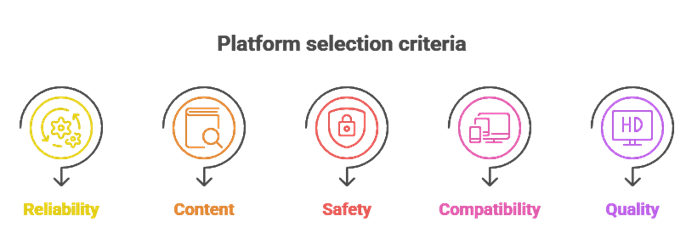
Streaming needs keep changing, so our experts narrowed the top picks to options that work smoothly across devices while staying safe and legal. We focused on services that reduce buffering, feel responsive, and are easy for beginners to set up. Each option was checked against the kind of expectations everyday viewers actually have, not just marketing claims.
Here is what guided our selection:
- Legality and licensing: We prioritized platforms that clearly license their content, so you avoid the legal and security risks tied to scraped sources.
- Reliability and uptime: Our team chose services with consistently stable servers, to avoid downtime and keep playback running smoothly.
- Content variety and discovery: We shortlisted apps with diverse libraries, strong search, and helpful recommendations, so you find matches quickly.
- Safety and privacy controls: We selected tools with secure connections, minimal trackers, and clear permissions that respect your data.
- Device compatibility: We chose based on support for Android, iOS, Fire TV, smart TVs, and the web, so the apps fit how you watch.
- Video quality and performance: We made sure to shortlist apps offering HD options, low buffering, and efficient streaming even at peak times.
The experts in our team selected services that consistently maintain quality links and provide versatile, safe streaming options.
Are These Free TeaTV Alternatives Safe and Legal to Use?
This is one of the most common questions I hear, and the short answer is yes, when you choose the right services. The free alternatives in this guide rely on licensed, ad-supported catalogs rather than scraped links, which is the key difference from TeaTV. That licensing is what makes them both safer to install and legal to watch in most places. Still, it helps to understand where the line sits.
Here are the key points to keep in mind:
- Licensed content is legal: Platforms that license their movies and shows, like reputable ad-supported services, are legal to use for streaming.
- The source matters most: Legality depends less on the app and more on where the streams come from; unauthorized sources are the real risk.
- Official stores are safer: Downloading from Google Play, the Apple App Store, or a trusted TV store reduces the chance of malware.
- Permissions reveal a lot: Safe apps do not ask for contacts, SMS, or accessibility access without a clear reason.
- Local laws still apply: Streaming rules differ by country, so it is wise to understand your local regulations before installing anything.
Choosing trusted, licensed sources keeps your streaming experience both safe and compliant.
Free vs Paid Streaming Services: Which Should You Choose?
After leaving TeaTV, many people ask whether they should stick with free apps or pay for a subscription. In my experience, there is no single right answer; it depends on your budget, how much you watch, and how much you value extras like 4K and offline downloads. The good news is that both routes can be safe and legal when you pick reputable services.
Here is how the two compare:
- Cost: Free services cost nothing but rely on ads, while paid plans charge a monthly fee in exchange for an ad-free or reduced-ad experience.
- Content depth: Paid platforms usually offer deeper catalogs and exclusive originals, whereas free catalogs are smaller and rotate more often.
- Quality and features: Paid services often deliver reliable HD or 4K and offline downloads, while free apps may cap quality or limit extras.
- Reliability: Subscriptions tend to be more stable, but well-run free platforms still provide steady, dependable playback.
- Best of both: Mixing one paid service with one or two free apps is often the smartest balance of new releases and casual viewing.
If you watch a lot or want the latest titles, a paid plan pays off; if you mostly watch casually, free legal apps can cover you well.
How to Stream Safely on Free TeaTV Alternatives?
Even with safe, legal apps, a few simple habits go a long way toward protecting your devices and privacy. Over the years, I have found that most streaming problems come down to where you download apps and how carefully you manage permissions. These steps keep your setup clean without making streaming complicated.
Here are practical tips for safer streaming:
- Use official stores only: Install apps from Google Play, the Apple App Store, or a trusted TV store rather than random APK sites.
- Check permissions carefully: Avoid apps that request access to contacts, messages, or accessibility features without a clear purpose.
- Keep apps updated: Updated apps patch bugs and security holes, so enable automatic updates where possible.
- Consider a reputable VPN: A trusted VPN can add a layer of privacy and reduce ISP tracking, though it does not make illegal streaming legal.
- Secure your accounts: Use strong, unique passwords and enable sign-in alerts where services offer them.
- Watch on protected networks: On public Wi-Fi, a VPN helps encrypt your connection and lowers the risk of snooping.
With these habits in place, you can enjoy free streaming while keeping your data and devices protected.
Verdict:
In this review, you got acquainted with some of the best TeaTV alternatives for reliable and safe streaming. Each option delivers different strengths, whether it is content variety, device support, or stable playback. To help you take the final call, I have created this verdict.
- Plex: A top-rated hub for free ad-supported streaming plus personal media, with solid device support and customizable libraries. I like its robust organization and broad streaming options, making it a superior choice for viewers who want one flexible, reliable home for everything they watch.
- Sling Freestream: A remarkable, cost-effective option for live-style channels and on-demand titles with minimal setup. Channel surfing feels closest to cable, and the clean layout makes it an excellent pick if you want simple, free, daily streaming.
- The Roku Channel: A reliable, user-friendly pick with a strong free catalog and live TV, especially on Roku devices. I recommend it if you want straightforward navigation and dependable playback in one comprehensive, easy-to-use service.
FAQs
Are TeaTV alternatives completely free to use?
Many of the best TeaTV alternatives are free to install and use, but “free” often comes with tradeoffs like ads, limited catalogs, or lower reliability. Some apps push paid upgrades for HD links, offline downloads, or ad-free viewing. For consistent performance and safer streaming, prefer reputable, legal ad-supported platforms.
Is it legal to watch movies and shows on these TeaTV alternatives?
Legality depends on the app and, more importantly, the source of the streams. Watching copyrighted content from unauthorized sources can be illegal and may violate your ISP’s terms. Choose services that clearly license their content, such as official free streaming platforms. If an app relies on scraped links, treat it as risky.
Do I need to create an account to use these streaming apps?
It varies. Many TeaTV alternatives let you browse and watch without an account, especially ad-supported services. Others require sign-up to sync watchlists, resume playback across devices, or enable parental controls. Avoid apps that demand excessive permissions or personal data, and use a separate email if you want extra privacy.
Which devices support these TeaTV alternatives?
Most TeaTV alternatives support Android phones and tablets, Android TV or Google TV, Amazon Fire TV devices, and web browsers. Some also offer iOS and Smart TV apps, but availability varies by provider and regional app-store rules. For the best experience, use an official app from a trusted store and confirm it supports your device and OS version.
Do these free streaming apps show ads?
Yes, most free TeaTV alternatives use ads to fund licensing, hosting, and development. Expect pre-roll ads, mid-roll breaks, and occasional banners, especially on legal ad-supported platforms. Some services offer a paid tier to reduce or remove ads. If an app promises free, no-ad access to brand-new movies, it may be unreliable or unsafe.