Key Takeaway: The Superflix Stremio addon is a fast, free streaming addon that pulls direct HD links for movies and series, with unusually strong coverage of Latin American and Spanish and Portuguese content. It installs in minutes through a simple configuration page and plays without a debrid account, which makes it one of the easiest addons for a beginner to add.
If you have used Stremio for a while, you know most addons lean on torrents and a debrid service. Superflix is different because it returns direct links, so streams often play instantly with nothing else configured. I set it up on both desktop and a Firestick and was surprised how quickly it started returning working results.
In this guide, I will explain what the Superflix Stremio addon is, walk you through installing it on desktop and Firestick, and cover safety, fixes, the best alternatives, and the questions people ask most, all from hands-on testing.
What Is the Superflix Stremio Addon?
Superflix is a community-built Stremio addon that searches direct streaming sources and displays ready-to-play links inside Stremio. Rather than hosting content, it acts as a search layer that returns direct HD and Full HD links for movies and TV series. It is best known for its strong catalogue of Latin American, Spanish, and Portuguese-language titles, which the mainstream English-first addons often miss entirely.
Because Superflix returns direct links rather than torrents, it does not strictly need a debrid service, which makes it one of the simplest addons to get working. Once installed, the same setup follows your Stremio account across every device.
Key Features of the Superflix Addon
- Direct HD Links: it returns direct streaming links rather than torrents, so most titles play instantly without a debrid account, seeders, or any waiting.
- Latin Content Strength: it has unusually strong coverage of Brazilian, Latin American, and Spanish-dubbed films and series that English-first addons rarely index at all.
- No Debrid Required: it works straight out of the box, and in my testing it returned playable links immediately without any debrid subscription connected.
- Movies And Series: it covers both films and multi-season shows with proper episode selection, so an entire series is browsable directly inside Stremio.
- Language Options: it offers multiple audio and subtitle language choices, which is genuinely useful for dubbed content and reducing clutter in your results.
- Lightweight And Fast: it returns results quickly and barely touches system resources, so it runs smoothly even on older Firestick hardware without stuttering.
- Simple Configuration: it installs from a single config page and syncs through your Stremio account, so one setup applies across every device you use.
What You Need Before Installing Superflix
Superflix is one of the lighter addons to set up, but a few things need to be in place first. You do not need a debrid account, though a VPN and an updated Stremio install make for a smoother, more private experience.
| Requirement | Details |
| Stremio app | Version 5 or newer, installed and signed in |
| Device | Firestick, Android TV, phone, or desktop |
| Internet | Stable 15 Mbps or faster for HD playback |
| Debrid account | Optional — Superflix plays without one |
| VPN | Recommended for privacy, not required |
| Config page | The current official Superflix configuration URL |
How to Install the Superflix Stremio Addon
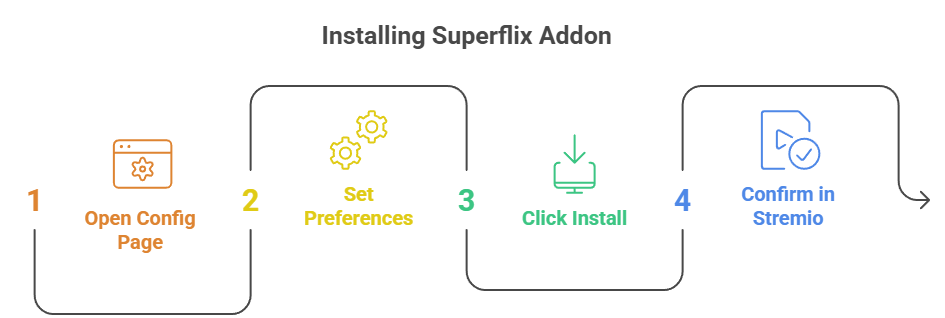
Installing Superflix is quick and works the same across desktop and mobile. You open its configuration page in a browser first, then hand it off to Stremio to finish. Make sure Stremio is already installed and you are signed in before you begin, so the addon syncs to your account.
- Open the config page: Visit the official Superflix addon configuration page in any browser on your computer or phone.
- Set your preferences: Choose your preferred audio language, subtitles, and stream quality options before installing the addon.
- Click Install: Select the install button, and choose Open when your browser prompts you to launch Stremio.
- Confirm in Stremio: Click Install inside Stremio, and wait for the confirmation that the addon has been added to your account.
- Sign in everywhere: Use the same Stremio account on your other devices so Superflix syncs to them automatically.
Once installed, search for any popular movie or show and open its detail page. Superflix links will appear in the streams list, ready to play.
How to Install Superflix on a Firestick
The one wrinkle on a Firestick is that typing a long addon URL with a remote is miserable, so configure on a phone or computer first. If Stremio is not on your Firestick yet, our guide on how to install Stremio on Firestick walks through it.
- Install Stremio first: Sideload Stremio on your Firestick through the Downloader app if it is not already installed.
- Sign in on both: Log into the same Stremio account on your Firestick and on your phone or computer.
- Configure on a computer: Open the Superflix config page in a browser, set your options, and click install to add it.
- Let it sync: Reopen Stremio on the Firestick, and the Superflix addon will already be there with no typing required.
- Test a title: Open a popular movie and confirm Superflix links appear in the streams list before settling in to watch.
Is the Superflix Addon Safe and Legal to Use?
The Superflix addon itself is safe when installed from its official configuration page, and it is just a search tool that returns links. The legal question depends on what you stream and the sources behind those links. Streaming copyrighted content without permission may break local laws, so understanding this difference matters before you use any streaming addon.
- Install Officially: Only use the official Superflix config page to avoid cloned or malicious versions that can carry unwanted extras.
- Use Licensed Content: Prefer content you have the right to watch to stay within the law in your country.
- Direct Links Vary: Because it returns direct links, source quality and availability can change, so results are not always consistent.
- Check Local Laws: Streaming rules differ by country, so review your local regulations before relying on any streaming addon.
- A VPN Helps: Running a VPN keeps your streaming private whenever the sources sit in a legal grey area.
Should You Use a VPN With the Superflix Addon?
A VPN is optional but recommended by many users for privacy when streaming addons pull from third-party sources. It hides your IP address and encrypts your connection, which is especially useful on shared networks. A VPN does not make unlicensed streaming legal and can slightly reduce speed, so pick a fast provider with a Fire TV app.
- Privacy Protection: A VPN hides your IP address from external servers and trackers whenever Superflix pulls a direct stream.
- Public Wi-Fi Safety: On public networks, a VPN encrypts your connection and reduces the risk of anyone intercepting your traffic.
- Unblock Sources: A VPN may help reach region-limited sources, which matters given Superflix’s strong international catalogue.
- Legal Responsibility: A VPN does not make unlicensed streaming legal, so always follow the laws in your own country.
- Speed Impact: Choose a VPN with fast, nearby servers so your direct Superflix streams stay smooth and buffer-free.
Common Superflix Problems & How to Fix Them
Most Superflix issues are quick to fix and usually trace back to the config, the source, or Stremio itself. Working through these in order solves the majority of problems without reinstalling everything from scratch.
- No Streams Appearing: Reinstall the addon from the official config page, since a rotated or outdated instance URL is the most common cause.
- Links Not Playing: Direct sources sometimes go down, so try a different link in the list or search the title again.
- Addon Not Installing: Make sure Stremio is installed and updated, then retry the install from the official Superflix config page.
- Buffering Streams: Lower the selected quality, switch to a wired connection, or connect a faster VPN server to steady playback.
- Wrong Language: Reopen the config page and set your preferred audio and subtitle language, then reinstall so the change takes effect.
| Symptom | Likely Cause | Fix |
| No streams at all | Rotated or dead instance | Reinstall from the official config page |
| Link buffers or stalls | Slow source or connection | Pick another link or switch to a wired setup |
| Wrong audio language | Default config setting | Set the language on the config page and reinstall |
| Addon will not add | Outdated Stremio version | Update Stremio, then retry the install |
Best Superflix Addon Alternatives
Superflix is excellent for direct links and international content, but no single addon covers everything. If a title is missing or a source is down, these two addons pair perfectly with Superflix and widen your coverage considerably.
1) MediaFusion
MediaFusion is the natural companion to Superflix, because it shares that same strength in international and Latin American content while adding torrent and debrid sources on top. It pulls from many providers at once, and I keep it installed alongside Superflix to catch anything the direct links happen to miss.
Features:
- Multi-Source Aggregation: it combines torrent, debrid, and direct sources into one result list, so it fills the gap whenever a Superflix direct link is unavailable.
- Fifty Language Catalogues: it ships catalogues in over fifty languages, matching Superflix’s international strength and extending it to titles the direct-link sources never reach.
- Granular Filters: it filters by quality, language, and codec with more precision than most addons, keeping the result list focused on exactly what you want.
- Debrid Support: it works with Real-Debrid and similar services, so cached titles play instantly, adding the speed that pure direct-link addons sometimes lack.
- Parental Filters: it includes built-in content filters, which is a genuine benefit when the same streaming box is shared across a whole family household.
- Browser Playback: it works in Stremio, Kodi, and directly in a web browser, so the same configuration follows you across every platform you use.
- Active Development: it is updated frequently on GitHub, and I have found it stays reliable as sources change far better than abandoned addons do.
| Pros | Cons |
| Excellent international coverage | Public build is a beta |
| Multi-source, not just direct links | Denser to configure |
| Strong filtering options | Slower than direct links |
| Debrid support for speed | |
| Actively maintained |
Link: github.com/mhdzumair/MediaFusion
2) Torrentio
Torrentio is the mainstream addon almost every Stremio user runs, and it is the widest safety net when Superflix comes up empty. It scrapes more than twenty torrent indexers and resolves them through your debrid account, and in my testing it finds older or obscure titles that direct-link addons rarely carry.
Features:
- Widest Torrent Reach: it pulls from more than twenty public indexers, giving it the broadest raw coverage of any single addon for hard-to-find titles.
- Quality Sorting: results arrive ordered by resolution, seeders, and size, so the best available copy of a film usually sits right at the top.
- Every Major Debrid: it connects to Real-Debrid, Premiumize, AllDebrid, and more, resolving cached torrents into fast direct links with no extra setup.
- Simple Configuration: one page, a few toggles, and an install button is the whole setup, which is as gentle as Superflix for a beginner.
- Resolution Filters: exclude resolutions you never want, which stops your list filling with low-quality copies of a title you would rather watch in HD.
- P2P Fallback: without debrid it can stream directly from the swarm, which Superflix does not do, though it does expose your IP address.
- Still Updated: despite constant rumours of its death, I still see it receiving commits in 2026, so it remains a dependable backup source.
| Pros | Cons |
| Widest raw torrent coverage | ISP-blocked in some regions |
| Very simple setup | Long unfiltered result lists |
| Works with every debrid | Best with a debrid account |
| Great for obscure titles | |
| Still maintained in 2026 |
Link: torrentio.strem.fun
Final Thoughts
The Superflix Stremio addon is one of the easiest ways to add free, direct-link streaming in 2026, especially for Latin American or Spanish and Portuguese content. It is lightweight, simple to install, and works without a debrid account, which makes it a great first addon. Pair it with MediaFusion or Torrentio for the widest coverage.
FAQs
Is the Superflix Stremio addon free?
Yes, the Superflix addon is completely free. Because it returns direct streaming links rather than torrents, it does not even require a debrid subscription to play most titles. That makes it one of the cheapest and simplest addons to set up, though pairing it with other addons gives you wider coverage overall.
Do I need Real-Debrid to use Superflix?
No, you do not need Real-Debrid for Superflix. Unlike torrent-based addons such as Torrentio or Comet, Superflix returns direct links that play on their own. A debrid account will not hurt, but the whole appeal of Superflix is that it works instantly without one, which is why beginners like it.
How do I install Superflix on Firestick?
Install Stremio on your Firestick, then open the Superflix config page in a browser on your phone or computer, set your options, and install it to your account. Sign into the same account on the Firestick and it syncs across automatically. For a broader set of options, see our roundup of the best Stremio addons.
Why is Superflix not showing any streams?
The most common cause is an outdated or rotated instance URL, so reinstall the addon from the official config page first. Also confirm Stremio is updated and try searching the title again, since direct sources occasionally go offline. Reinstalling after refreshing the config usually restores results quickly.
Is the Superflix addon safe to use?
The addon is safe when installed from its official configuration page. Safety mainly depends on avoiding cloned versions and using a VPN for privacy. As with any streaming addon, legality depends on what you stream, so stick to licensed content where possible and follow the laws in your country.