Key Takeaway: Kodi not working on Firestick usually stems from an outdated build, a broken add-on, or a full cache, and each is quick to fix. If you would rather skip the maintenance, a reliable service like OrigineTV or Tellystudio delivers stable channels with no add-ons to manage. Below, I cover the fixes first, then the best Kodi alternatives.
Kodi is brilliant when it works, but on Firestick it can crash, buffer, or throw the dreaded no-stream-available error at the worst moment. I have fixed every one of these issues on my own devices, so this guide starts with the exact steps to get Kodi running again, then covers the most reliable alternatives if you would rather move on. Whether it is a broken add-on, a bloated build, or a storage problem, you will find a clear fix below.
Why You Can Trust FirestickTVStream?
This guide covers fixes and alternatives for Kodi on Firestick that have been tested firsthand. Every recommendation here is:
✅ Checked for stability and reliable playback during peak hours
✅ Reviewed for interface quality, content access, and feature depth
✅ Evaluated on device support, ease of setup, and overall user experience
✅ Verified for safe, official download sources and honest pricing
Important Note: We avoid recommending pre-loaded builds or cracked apps because they often carry malware or unstable add-ons. Every option here is chosen from official sources based on real testing, performance checks, and user feedback.
Research Overview:
- 20+ streaming apps tested on Firestick
- 200+ Hours of research and testing
- 45+ Detailed guides and reviews checked
Why is Kodi Not Working on Firestick?
Kodi itself is stable, so problems on Firestick almost always trace back to add-ons, storage, or configuration rather than the app. Outdated add-ons, heavy builds, and cache buildup are the usual culprits, and each shows different symptoms. Identifying the likely cause below helps you apply the right fix quickly, instead of wiping everything and rebuilding your setup from scratch.
- Outdated Add-Ons: Outdated add-ons or scrapers that have stopped working are the most common reason streams fail to load in Kodi.
- Bloated Build: A build packed with too many add-ons drains the Firestick limited memory, causing crashes, freezing, and slow performance.
- Cache Buildup: Cache that piles up over time slows Kodi down and triggers buffering during playback on a Firestick.
- Full Storage: A Firestick low on free storage leaves no room for Kodi to run smoothly or update its add-ons.
- Real-Debrid Lapsed: An unauthorised or expired Real-Debrid account blocks the high-quality links that many add-ons rely on for streams.
- Outdated Kodi: An old Kodi version can clash with newer add-ons, so running outdated software often causes playback failures.
How to Fix Kodi on Firestick
Run through these fixes in order and Kodi should be working again within a few minutes. Begin with a simple restart, then update add-ons, clear the cache, and update Kodi before considering a clean reinstall. The steps below are ordered from the quickest, most common fixes to the deeper ones, so you rarely need to try them all before your streams return.
- Restart Kodi: Force close Kodi and restart your Firestick to clear temporary memory glitches before trying anything deeper.
- Update Add-Ons: Update your add-ons in the repository, and re-authorise Real-Debrid if high-quality links have stopped appearing.
- Clear The Cache: Clear the cache using a maintenance add-on, then remove any add-ons you no longer use to free memory.
- Update Kodi: Update Kodi to the latest stable version, such as Kodi 21 Omega, for the best add-on compatibility.
- Clean Reinstall: If a build causes crashes, uninstall it and run a clean Kodi install with two or three quality add-ons.
- Free Up Storage: Remove unused apps to free Firestick storage, since a full device is a frequent hidden cause of Kodi problems.
Best Kodi Alternatives
If Kodi has become more hassle than it is worth, these apps deliver reliable streaming on Firestick with far less maintenance.
1) Stremio
Stremio is the closest thing to Kodi for streaming movies and shows through add-ons, and it is far simpler to set up. I switched to it whenever Kodi acted up and never looked back for casual viewing. You get a clean interface, community add-ons, Real-Debrid support, and free apps for Firestick and Android TV.
Features:
- Closest To Kodi: A clean interface with community add-ons delivers movies and shows quickly, giving you a Kodi-like experience without the fiddly configuration.
- Real-Debrid Support: Real-Debrid and Torrentio support unlocked high-quality streams for me, turning Stremio into a genuinely powerful replacement for a Kodi build.
- Cross-Device Sync: Cross-device sync keeps your library and progress aligned across Firestick, phone, and computer, so you continue watching anywhere.
- Simple Setup: Add-ons install with a click, so setup takes minutes rather than the hours a full Kodi build can demand.
- Free To Use: Stremio is completely free, with optional premium services, and installs easily on Firestick through the Downloader app.
- Regular Updates: Frequent updates keep add-ons and the core app working, so you face fewer broken streams than an ageing Kodi build.
Pricing:
- Free
Link: stremio.com
2) Plex
Plex is a polished media platform that streams your own library plus a growing catalogue of free ad-supported movies and live TV. I recommend it when Kodi feels too fragile. You get a beautiful interface, free live channels, and reliable apps for Firestick, mobile, and smart TVs, with an optional Plex Pass for extras.
Features:
- Free Movies And TV: Free ad-supported movies, shows, and live TV channels give you plenty to watch instantly, with no personal media library required.
- Personal Library: Organising my own films and shows into Plex created a Netflix-style library that streamed flawlessly across every device at home.
- Polished Stable App: A polished, stable interface runs reliably on Firestick and smart TVs, avoiding the crashes that plague overloaded Kodi builds.
- Optional Plex Pass: The free tier covers most needs, while an optional Plex Pass adds DVR, offline downloads, and premium features.
- Wide Device Support: Reliable apps cover Firestick, mobile, smart TVs, and browsers, so your library and live channels follow you anywhere.
- Easy Setup: Setup is straightforward with no add-ons to configure, making Plex a low-maintenance alternative to a fragile Kodi build.
Pricing:
- Free; Plex Pass optional
Link: plex.tv
3) Jellyfin
Jellyfin is a free, open-source media server with no premium tiers or hidden costs, making it a favourite for privacy-minded users. I like it as a fully free Plex alternative that also fills the Kodi gap. You get complete control of your media, live TV support, and apps for Firestick and Android TV.
Features:
- Free And Open-Source: Completely free and open-source with no paywalls, it lets you stream your own media library without any subscription at all.
- Full Privacy Control: Full control over my server and data appealed to me for privacy, with no accounts or tracking required to stream.
- Live TV And DVR: Live TV and DVR support through tuners and M3U playlists let you combine local recordings with IPTV in one interface.
- Wide Device Apps: Apps run on Firestick, Android TV, and browsers, so your self-hosted library is available on every screen in the house.
- No Hidden Costs: With no premium tiers, every feature is available for free, unlike some rivals that lock DVR or sync behind a paywall.
- Active Community: A strong open-source community adds plugins and updates regularly, keeping Jellyfin capable and secure over time.
Pricing:
- Free (open-source)
Link: jellyfin.org
4) Emby
Emby is a feature-rich media server that streams your own content with a slick interface, sitting neatly between Plex and Jellyfin. I use it when I want premium features with self-hosting. You get live TV and DVR, strong device support, and free core apps for Firestick and Android TV, with an optional Emby Premiere upgrade.
Features:
- Polished Media Server: A polished interface streams your personal media library beautifully, giving you an organised, Netflix-style hub that never depends on flaky add-ons.
- Live TV And DVR: Live TV and DVR support let me combine an over-the-air tuner or M3U playlist with my library in one clean app.
- Wide Device Support: Strong device support covers Firestick, Android TV, and smart TVs, so your server is reachable from every screen you own.
- Free Core Features: Core features are free, while an optional Emby Premiere unlock adds offline sync, hardware transcoding, and extra tools.
- Stable Playback: Reliable playback avoids the crashes of heavy Kodi builds, giving you a dependable home for your own media collection.
- Easy Organisation: Automatic metadata and artwork organise your library neatly, so films and shows are easy to browse on the big screen.
Pricing:
- Free; Emby Premiere optional
Link: emby.media
5) Tubi TV
Tubi is a completely free, legal streaming app with thousands of movies and shows, and it needs zero setup. I recommend it as a no-maintenance alternative when Kodi becomes too much work. You get a huge ad-supported catalogue, a simple interface, and reliable apps for Firestick, mobile, and smart TVs across most regions.
Features:
- Huge Free Catalogue: A massive free catalogue of movies and shows streams legally with light ads, giving you instant entertainment without any subscription.
- Zero Configuration: Zero configuration means it just works the moment you install it, which made it my reliable fallback when Kodi refused to cooperate.
- Simple Interface: A clean, simple interface and personalised recommendations make browsing easy for the whole family on the big screen.
- Reliable Licensed Streams: Reliable, licensed streams run smoothly on Firestick and smart TVs, with no add-ons, builds, or maintenance to worry about.
- No Account Needed: You can start watching without creating an account, so there is nothing to set up before you stream.
- Wide Availability: Apps are available on Firestick, mobile, and smart TVs across most regions, so you can watch on any screen.
Pricing:
- Free (ad-supported)
Link: tubitv.com
How to Install a Kodi Alternative on Firestick
Setting up a replacement app on Firestick is quick, whether it streams free content or connects to your own media server. Most apps install from the Amazon Appstore or through the Downloader app, then you either sign in or add your add-ons. The steps below cover the general process so you can be watching within a few minutes of switching from Kodi.
- Enable Unknown Sources: Open Settings, My Fire TV, then Developer Options, and enable Apps from Unknown Sources if you are sideloading an app.
- Install The App: Install from the Amazon Appstore where available, or use the Downloader app with the official download link on Firestick.
- Sign In Or Add Add-Ons: Open the app and sign in, then add your add-ons in Stremio or connect to your Plex, Emby, or Jellyfin server.
- Connect A Server: For server apps, install the server software on a PC or NAS and link it to the Firestick app.
- Connect And Stream: Connect a VPN for privacy, then start streaming your movies and shows on the new app.
How Did We Choose These Kodi Alternatives?
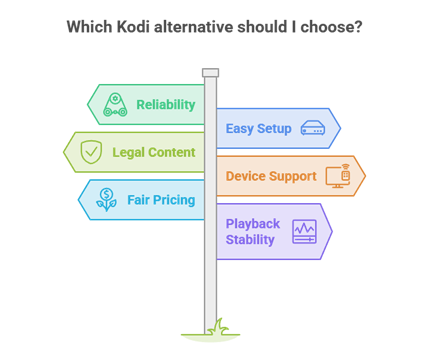
We selected alternatives that solve the biggest Kodi weaknesses: instability and constant maintenance. Reliability came first, so every pick runs smoothly on Firestick without endless add-on repairs. We valued easy setup, favoured apps with clean legal content or full control of your own media, and checked device support across Firestick and Android TV. The criteria below shaped the final order for a dependable, low-effort switch.
- Reliability First: Every pick runs smoothly on Firestick without the constant add-on repairs that make Kodi frustrating during heavy daily use.
- Easy Setup: We favoured apps that install and configure quickly, since not everyone wants to build repositories and tweak settings for hours.
- Legal Or Owned Content: We prioritised apps with clean legal libraries or full control of your own media, reducing the risk that Kodi add-ons can carry.
- Device Support: We confirmed smooth operation across Firestick and Android TV, so your chosen alternative works on the hardware you already own.
- Fair Pricing: We favoured free and open-source options, rewarding apps that deliver dependable streaming without pushing costly subscriptions.
- Playback Stability: We tested streams through peak hours, ensuring each alternative delivers the steady playback Kodi sometimes cannot manage.
Should You Use a VPN With Kodi and Its Alternatives?
A VPN is strongly recommended with Kodi and most alternatives, especially when you use third-party add-ons. It hides your streaming from your internet provider, helps prevent throttling that causes buffering, and adds privacy when content comes from unofficial sources. If you need a recommendation, our guide to the best VPNs for IPTV ranks the quickest, most reliable options.
- Privacy Protection: A VPN masks your streaming from your internet provider, keeping your Firestick viewing private whenever you use third-party add-ons.
- Throttling Prevention: By hiding your traffic, a good VPN helps stop ISP throttling that causes buffering during peak evening hours.
- Smoother Streams: Routing through a less congested server can stabilise playback, reducing drops when networks are busy with heavy demand.
- Legal Apps Exempt: Fully legal apps like Tubi and Plex do not need a VPN, but it remains a smart safeguard for add-on streaming.
- Fast Encrypted Servers: Choose a VPN with fast, nearby servers and strong encryption, so you gain privacy without slowing your Firestick streams.
How to Stream Safely on Firestick
Safe streaming on Firestick comes down to a few habits. Install apps only from trusted sources such as the Amazon Appstore or the developer official site, and avoid pre-loaded builds or cracked apps that hide malware. Keep Kodi, your add-ons, and device software updated, clear the cache regularly, and run a VPN for privacy. The points below keep your Firestick secure and your streaming smooth.
- Use Trusted Sources: Install apps only from the Amazon Appstore or the developer official site, avoiding pre-loaded builds and cracked apps that hide malware.
- Keep Software Updated: Update Kodi, your add-ons, and device software regularly to patch security holes and prevent avoidable playback problems.
- Clear The Cache: Clear the cache regularly to maintain performance, since a bloated cache slows Kodi and triggers buffering over time.
- Run A VPN: A VPN adds privacy whenever you stream from third-party add-ons, keeping your activity hidden from your internet provider.
- Stick To Legal Content: Favour legal content where possible, and never enter card details on untrustworthy sites when subscribing to any service.
Verdict:
When Kodi becomes too much hassle, these three apps deliver the most reliable streaming on Firestick with far less maintenance. If you would rather skip the upkeep entirely, pairing a player with a dependable live service like OrigineTV removes the effort completely.
- Stremio: My top replacement for its Kodi-like add-ons and simple setup. Pick it if you want familiar add-on streaming with Real-Debrid support and none of the build maintenance Kodi demands.
- Plex: The best all-round pick, with free movies, live TV, and a polished library for your own media. I recommend it when you want a stable, low-maintenance app that just works.
- Jellyfin: Ideal for a fully free, private media server with no paywalls. Choose it if you value open-source control of your own library across Firestick and other devices.
FAQs
Why does Kodi keep buffering on Firestick?
Buffering usually comes from cache buildup, a weak connection, or an overloaded add-on server. Clear the cache, use 5GHz Wi-Fi or Ethernet, and add a VPN to reduce throttling.
Is Kodi legal on Firestick?
Yes, Kodi is legal, open-source software. Legality depends on the add-ons you use; official add-ons are fine, while third-party add-ons that stream pirated content are not.
What is the best alternative to Kodi?
Stremio is the closest alternative, with a similar add-on system and simpler setup. For more options, see our full guide to the best Kodi alternatives.
How do I fix the Kodi no stream available error?
Update the add-on, clear the cache, and re-authorise Real-Debrid if you use it. If the add-on is discontinued, switch to a maintained option like The Crew or Seren.
Does Kodi still work on Firestick in 2026?
Yes. A clean install of Kodi 21 Omega with two or three quality add-ons runs well on modern Firesticks. Problems usually come from heavy builds and an unmaintained cache.