Key Takeaway: The USA TV Stremio addon, built by drykilllogic, adds free live United States channels across news, sports, entertainment, and Spanish-language categories directly inside Stremio. Install it from the verified community listing, browse channels by category, and pair it with a VPN for privacy. It supplies channels itself, so no playlist or subscription is required.
USA TV is the most installed live-television addon in the Stremio community catalog, and it brings a broad grid of American channels into the app for free. This guide covers installing it cleanly and getting stable playback on every device.
I installed the current 1.5.0 build on a fresh Stremio account and worked through every category, from local news to sports and Spanish-language channels, on both desktop and a Fire TV Stick. Below I explain how the addon is laid out and how I fixed the buffering and loading issues that new users hit most often.
What the USA TV Stremio Addon Offers
USA TV drops a large grid of American live channels into Stremio without any playlist or subscription. It is a channel provider, not a metadata tool, so understanding its scope helps set expectations.
- Free Live Channels: the addon supplies United States channels itself at no cost, so you never import an M3U playlist, buy a subscription, or configure external credentials to start watching.
- Broad Categories: it groups channels into local, news, sports, entertainment, lifestyle, kids, documentary, and Spanish-language sections, giving a familiar cable-style layout inside Stremio’s clean interface.
- HD Where Available: many channels stream in HD or full HD, though quality depends on each channel’s own source, so expect a mix across the full lineup you browse.
- Regularly Updated: the developer refreshes the addon periodically, with the current release updated in July 2026, which helps keep dead channel links pruned and the grid reasonably reliable.
- Channel Provider Only: it delivers live streams rather than movie catalogs, so pair it with metadata or on-demand addons if you want a complete Stremio setup beyond live television.
What You Need Before Installing USA TV
USA TV needs almost nothing to run, which is part of its appeal. Still, a short checklist keeps installation smooth and helps you decide whether to add a VPN before you begin.
- Stremio Account: a single synchronised Stremio login is required, because the addon installs to your account and then follows you onto Firestick, phones, and web automatically afterward.
- Stable Internet: live channels stream in real time, so a steady connection of at least ten megabits keeps HD channels playing without the constant rebuffering that frustrates new users.
- A VPN, Ideally: because the addon indexes public streams, many viewers run a VPN for privacy, and it is worth having installed and connected before you start watching.
- Compatible Device: Stremio runs on Fire TV, Android, Windows, Mac, and the web, and USA TV works anywhere Stremio does, so pick whichever screen you watch on most.
- Player Set Up: Stremio’s built-in player handles most channels, but installing an external player like VLC gives a reliable fallback if a particular stream refuses to open.
| Requirement | Needed for | Cost |
|---|---|---|
| Stremio account | Installing the addon | Free |
| Stable internet | Smooth live playback | Your plan |
| VPN | Privacy while streaming | Optional, paid |
| External player | Fallback playback | Free |
Installing USA TV on Stremio the Right Way
The safest route is the verified community listing rather than a manifest link from a random tutorial. Open the addon page, check it is reachable, then send it into Stremio directly.
- Open the Listing: visit the addon’s page on the community catalog, confirm its version and install count, and check the reports graph so you know the addon is currently healthy.
- Use the Install Button: click Install on the listing, which opens Stremio and presents an install prompt showing the USA TV name and the live channel resources it provides.
- Approve in Stremio: confirm the prompt, and the addon adds a live-television catalog to your Board and Discover screens, ready to browse by category within a few seconds.
- Avoid Fake Copies: ignore third-party manifest URLs promising extra channels, since cloned addons can carry broken links or unwanted redirects; the verified listing is the only source you need.
- Test a Channel: open any news or local channel first, because those are the most stable, to confirm playback works before assuming the whole addon is set up correctly.
Browsing Channel Categories Inside the Addon
USA TV organises its lineup into clear categories so you are not scrolling one endless list. Knowing how the grid is arranged makes finding a specific channel much faster on a remote.
- Local and News: these sections gather national networks and regional news feeds, and they tend to be the most reliable channels, making them the best place to test playback first.
- Sports Section: live sports channels sit in their own group, though availability of specific games varies and premium sports feeds are often the first to go dark during high demand.
- Entertainment and Lifestyle: general entertainment, movies, lifestyle, and reality channels fill out the biggest part of the grid, covering the everyday viewing most households actually leave running in the background.
- Kids and Documentary: family-friendly cartoons and factual channels each have a section, which makes the addon usable for shared households wanting safer options without hunting through the entire channel list.
- Spanish-Language Row: a dedicated Latino and Spanish-language category reflects the addon’s roots, offering news and entertainment feeds that are genuinely useful for bilingual and Spanish-speaking viewers in the States.
| Category | Typical channels | Reliability |
|---|---|---|
| Local / News | National and regional news | High |
| Sports | Live sports feeds | Variable |
| Entertainment | General and lifestyle | Medium to high |
| Spanish-language | Latino news and shows | Medium |
Setting Up USA TV on Firestick and Android TV
Because addons live on your Stremio account, the smoothest path is to install once and let your Fire TV Stick or Android TV inherit it automatically after signing in.
- Install Stremio First: sideload or install Stremio on your Fire TV Stick, sign into the same account, and the USA TV addon appears without any separate installation.
- Sync Handles It: anything you added on desktop, including USA TV, syncs down to the television within seconds, so configuring on a computer first is genuinely the easier route.
- Remote-Friendly Browsing: the category layout works well with a Fire TV remote, though scrolling long sports lists is slower, so favourite your regular channels where the interface allows it.
- Watch the Hardware: the cheaper Fire TV Stick Lite can struggle with several HD channels back to back, so give it a moment between switches to avoid the player stalling.
- I Ran It on 4K: I tested USA TV on a Fire TV Stick 4K Max, and most news and entertainment channels opened within seconds, only busy sports feeds lagging.
Adjusting Region, Language, and Interface Quirks
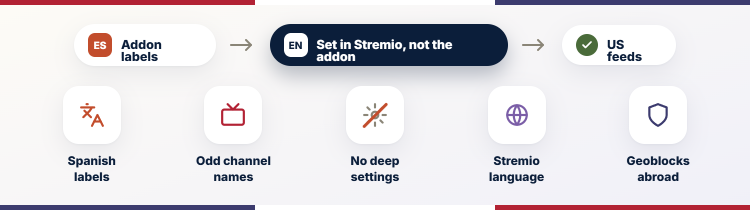
USA TV was built by a Spanish-speaking developer, so a couple of interface elements lean that way. None of it stops the channels working, but knowing the quirks avoids confusion.
- Spanish Interface Labels: some category names and metadata appear in Spanish because the addon’s default language is Mexican Spanish, though the actual channels are United States feeds.
- Channel Naming: a few channels use abbreviated or Spanish-influenced names, so if you cannot find a network by its exact American title, scroll nearby entries before assuming it is missing.
- No Deep Settings: unlike playlist addons, USA TV offers little manual configuration, so you accept its lineup as provided rather than editing sources, which keeps setup simple but limits customisation.
- Stremio Language Separate: your overall Stremio interface language is set in Stremio itself, not the addon, so change it there if you want menus and buttons in English throughout.
- Region Availability: the feeds target a United States audience, so viewers abroad may find some channels geoblocked, which is another reason many people run a VPN set to America.
USA TV Channels Not Loading? Troubleshooting
Live-TV addons break more often than on-demand ones because they depend on third-party stream links. Most USA TV problems are a dead channel or a network issue rather than a broken addon.
- Single Dead Channel: if one channel fails but others play, its source simply went offline, so pick another feed in the same category rather than reinstalling the entire addon.
- Everything Fails: when no channel opens, the problem is usually your connection or a VPN server, so test your internet, switch VPN locations, and reopen Stremio before troubleshooting further.
- Constant Buffering: persistent buffering points to bandwidth or an overloaded source, so lower other network use, try a wired connection, or choose a lighter channel to confirm the pattern.
- Addon Missing: if USA TV disappears after an update, reinstall it from the verified listing, and your Stremio account restores the catalog across every signed-in device once more.
- Stream Won’t Open: a channel that spins forever may need an external player, so set VLC or another player as the fallback and retry the same channel through it.
| Symptom | Likely cause | Fix |
|---|---|---|
| One channel dead | Source offline | Pick another feed |
| No channels play | Connection or VPN | Test net, switch server |
| Constant buffering | Bandwidth limit | Reduce load, go wired |
| Stream won’t open | Player issue | Use external player |
Getting Smoother Playback and Fewer Buffers
A few habits make USA TV noticeably more watchable, especially on cheaper streaming sticks. These tweaks target the bandwidth and player settings that cause most of the stutter people complain about.
- Prefer a Wired Link: an Ethernet adapter on your Fire TV Stick removes the wireless drops that cause live channels to freeze, and it is the single biggest improvement.
- Close Background Apps: other apps and downloads compete for bandwidth and memory, so close them before watching, particularly on a Fire TV Stick Lite with limited resources to spare.
- Pick Stable Channels: national news and entertainment feeds usually hold up better than niche or premium sports sources, so lean on them when you want reliable, uninterrupted background viewing.
- Set a Fallback Player: configuring an external player like VLC gives Stremio a second way to open a stubborn stream, which rescues many channels that the built-in player cannot handle.
- Restart Periodically: live streaming builds up memory use over long sessions, so fully closing and reopening Stremio every few hours keeps playback smooth on lower-powered devices over time.
USA TV Versus Bring-Your-Own-Playlist Addons
Stremio has two very different kinds of live-TV addon, and confusing them causes most disappointment. Our roundup of the best Stremio addons for live TV compares the field in detail.
- USA TV Supplies Channels: it ships its own United States feeds, so it works the moment you install it, with no playlist, credentials, or external service required to start watching.
- Playlist Addons Do Not: connectors like M3U or Xtream tools carry zero channels themselves and only display a playlist you already own, which is useless without your own source.
- Ease Versus Control: USA TV trades configuration for simplicity, while playlist addons give total control over sources at the cost of setup, so pick based on what you own.
- Reliability Differs: USA TV’s channels can go dark without warning, whereas a good paid playlist you supply is often steadier, since you control the provider behind every channel.
- Use Them Together: nothing stops you running USA TV for free American channels alongside a playlist addon for your own subscription, giving the widest live lineup Stremio can display.
| Aspect | USA TV | Playlist addon |
|---|---|---|
| Supplies channels | Yes | No |
| Setup effort | Very low | Higher |
| Cost | Free | Depends on your playlist |
| Source control | None | Full |
Do You Need a VPN to Run USA TV
USA TV works without a VPN, but many users choose to run one. Understanding what a VPN does and does not do here helps you decide whether it is worth the cost.
- Privacy From Your ISP: a VPN hides which streams you open from your internet provider, which is the main reason privacy-minded viewers keep one connected while using free live-TV addons.
- Bypassing Geoblocks: some feeds are restricted to United States viewers, so people abroad often set a VPN to a US server to reach channels that would otherwise be blocked.
- Not a Speed Fix: a VPN does not cure buffering and can slightly reduce speed, so pick a fast, nearby server if playback quality matters more than maximum privacy.
- Choose Reputable Providers: free VPNs often log data or throttle heavily, so a paid, no-logs provider is the safer choice if you decide privacy is worth paying for.
- Optional, Not Required: the addon streams fine without one, so treat a VPN as a privacy and access upgrade rather than a mandatory part of installing USA TV.
Updating USA TV and Removing It Cleanly
A little maintenance keeps USA TV reliable, and removing it properly matters if you switch addons. Both are quick once you know where Stremio hides the controls.
- Reinstall for Updates: live-TV addons benefit from fresh installs, so periodically reinstall USA TV from the listing to pull the latest channel fixes the developer has published since last time.
- Check the Reports Graph: the community listing shows recent problem reports, so a quick glance tells you whether current outages are widespread or just affecting your own connection today.
- Remove From Addons: to uninstall, open Stremio’s addon list, find USA TV, and click remove, which clears its catalog from every device linked to your account within seconds.
- Clear Then Reinstall: if the addon misbehaves after an update, removing and reinstalling it resets the manifest cleanly, which fixes most glitches faster than any other troubleshooting step available.
- Swap Without Conflict: USA TV coexists with other live-TV addons, so you can trial alternatives alongside it and remove whichever you like less without breaking the rest of your setup.
Is USA TV Legal and Safe to Stream
The legality of a free live-TV addon depends on what its channels are and where their streams come from. Being honest about the grey areas helps you use it sensibly.
- Mixed Sources: the addon indexes publicly available streams, and some are official free feeds while others are of uncertain origin, so the lineup sits in a genuine legal grey area.
- Free Public Channels: where a channel is a legitimate free-to-air or official web feed, watching it is fine, and much of the news and local content falls into this category.
- Premium Feeds Are Risky: any channel that mirrors a paid subscription network is not licensed, so avoid relying on premium sports or movie feeds if staying legal matters.
- Safety of the Addon: installed from the verified listing, the addon itself is not malware, but a VPN still adds a sensible privacy layer given the nature of its sources.
- Your Responsibility: laws vary by country, so you are responsible for what you watch, and sticking to clearly free and official channels keeps your usage on the safest footing.
Verdict
USA TV is the easiest way to get a broad wall of free American live channels into Stremio, which is exactly why it tops the community charts. Expect the odd dead channel and some Spanish-language labels, so lean on the stable news and entertainment feeds and keep an external player ready. For casual live viewing that costs nothing, it is hard to beat.
FAQs
Is the USA TV Stremio addon free?
Yes, USA TV is completely free and supplies its own American channels, so there is no subscription, playlist, or credential to buy. You only pay if you choose to add an optional VPN for privacy.
Do I need a playlist for USA TV?
No, unlike M3U or Xtream connector addons, USA TV carries its own channels. You install it and browse immediately, with no external playlist, provider login, or configuration file required to start watching live.
Why are some USA TV channels not working?
Live channels rely on third-party sources that go offline without warning. If one channel fails, pick another; if all fail, check your internet or VPN server and reopen Stremio before reinstalling the addon.
Does USA TV work on Firestick?
Yes, install Stremio on your Fire TV Stick, sign into the same account, and USA TV syncs down automatically. A Fire TV Stick 4K handles HD channels more smoothly than the cheaper Lite model.
Is a VPN required for USA TV?
No, the addon streams without one, but many users run a VPN for privacy and to reach United States-only feeds from abroad. Choose a fast, reputable no-logs provider if you decide to use one.
Are there other live-TV options for Stremio?
Yes, several addons cover live television differently. If you already own a subscription, a connector that loads your own playlist may suit you better; see our guide to the best IPTV Stremio addons.