Key Takeaways: To install Torrentio on Stremio, open the official configuration page at torrentio.strem.fun/configure, choose your providers and sorting, paste your debrid API key if you use a service such as Real-Debrid, then click Install. Stremio opens and asks you to confirm, so click Install once more and Torrentio appears in your add-ons. Because add-ons are tied to your Stremio account, installing Torrentio once on a phone, PC, or the web syncs it automatically to your Firestick and every other device you are signed in on.
Stremio is one of the best free streaming apps available, but on its own it does very little. The real power comes from add-ons, and Torrentio is the most popular add-on of them all. Once it is installed, Torrentio turns Stremio into a single search box for movies, TV shows, and anime. It pulls high quality links from across the biggest torrent sources and presents them in a clean, easy to browse list right inside the app.
This guide is the most complete Torrentio walkthrough you will find. We do not just show you the basic install. We cover both installation methods, the full configuration page explained option by option, how to connect a debrid service such as Real-Debrid for fast and buffer free streams, device specific steps for Firestick and Fire TV, recommended settings for different types of users, a full troubleshooting section, and the best alternatives to switch to if Torrentio ever goes offline.
Whether you are setting up Stremio for the first time or you already use it and want a cleaner, faster Torrentio setup, you will find everything you need below. Let us get started.
🔧 Recommended for a smooth Torrentio setup
- A reliable VPN to keep your streaming private and avoid ISP throttling. See our recommended VPN.
- A debrid service such as Real-Debrid for fast, cached, buffer free links. Get Real-Debrid.
What Is Torrentio?
Torrentio is a community add-on for Stremio that scrapes public torrent indexes and turns them into ready to play streams. When you open a movie or episode in Stremio, Torrentio searches dozens of torrent sources in the background, matches the right files, and shows you a list of links sorted by quality and the number of seeders. You never have to visit a torrent site or download a file yourself, because everything happens inside the Stremio interface.
Torrentio pulls from many of the most well known torrent providers, including the following:
- YTS, EZTV, 1337x, The Pirate Bay, and RARBG
- KickassTorrents, TorrentGalaxy, and MagnetDL
- Nyaa, TokyoTosho, and AniDex for anime
- Plus a long list of regional and foreign language trackers
The biggest reason people choose Torrentio over other add-ons is its support for debrid services. When you connect a provider such as Real-Debrid, AllDebrid, Premiumize, TorBox, or Put.io, Torrentio serves you fast cached links instead of raw torrents. That single change is the difference between constant buffering and instant, high quality playback.
What You Need Before You Start
Running through this short checklist first will save you time and avoid the most common setup problems:
- Stremio installed and a free account. Add-ons in Stremio are saved to your account online, not to local storage. This is what lets Torrentio sync across every device automatically.
- A decision on debrid (optional but strongly recommended). You can use Torrentio for free, but a debrid service transforms the experience. If you stream regularly, set one up before you begin.
- A VPN (recommended). Torrentio uses torrent sources, so a VPN keeps your activity private and stops your internet provider from throttling your speeds.
- A stable internet connection. For smooth 1080p and 4K playback, connect to a 5 GHz Wi-Fi band or use an Ethernet adapter on your streaming device.
💡 Pro Tip: If you do not have Stremio yet, install it first and log in. The easiest way to configure Torrentio is on a phone, PC, or web browser where you can copy and paste, and it will then sync to your Firestick on its own.
How Torrentio Works: With and Without a Debrid Service
Understanding this one concept will help every other step make sense. Torrentio finds torrent links for you either way, but how those links play depends entirely on whether you use a debrid service.
Without a debrid service, Stremio streams the torrent directly to your device. Your playback quality and speed depend on how many people are sharing that file, and your IP address becomes visible to others in the torrent swarm. This works for popular titles but can buffer on anything less common.
With a debrid service, the torrent is fetched and cached on the provider’s high speed servers and delivered to you as a direct stream over an encrypted HTTPS connection. There is no buffering on cached files, the quality is consistent, and your device never joins the torrent swarm. The table below makes the difference clear.
| Factor | Without Debrid (Free) | With Debrid (Real-Debrid and similar) |
|---|---|---|
| Streaming speed | Depends on the number of seeders, can buffer | Fast and near instant on cached files |
| Reliability | Variable, dead torrents are common | High, cached links stay stable |
| Quality access | Limited to well seeded files | Consistent 1080p and 4K |
| Privacy | Your IP joins the torrent swarm | Traffic runs through the debrid server over HTTPS, IP hidden from the swarm |
| Cost | Free | A few dollars per month |
| Best for | Casual viewing of popular titles | Regular streaming, 4K, and reliability |
Method 1: Install Torrentio From the Stremio Add-ons Catalog (Easiest)
This is the fastest way to get Torrentio running with its default settings. It is perfect if you just want to try the add-on quickly, although it does not include any custom filters or a debrid connection. Follow these steps:
- Open the Stremio app and sign in to your account.
- Select the Add-ons icon from the menu. It looks like a small jigsaw puzzle piece.
- In the add-on search bar, type Torrentio.
- Select the correct Torrentio add-on from the results. Be careful, because copycat add-ons sometimes use similar names.
- Click Install. By default Torrentio enables a large set of providers with no quality limits.
- Open any movie or show and you will now see Torrentio links ready to stream.
⚠️ Note: The catalog install gives you Torrentio with no filters and no debrid service, which means cluttered results and slower free links. For the best experience, use Method 2 below to configure it properly.
Method 2: Install Torrentio From the Configuration Page (Recommended)
This is the method we recommend for everyone. The configuration page lets you control which providers Torrentio uses, how results are sorted, which low quality sources are removed, and most importantly, it lets you connect a debrid service. We suggest doing this on a phone, PC, or web browser so you can copy and paste easily.
Step 1: Open the Torrentio Configuration Page
In your browser, go to the official address: torrentio.strem.fun/configure. This is the only page you should use to configure the add-on, as it always loads the current, official version.
Step 2: Configure Your Settings Option by Option
This is where most guides stop short. Here is what every option does and what we recommend:
- Providers: These are the torrent sources Torrentio scrapes. They are all enabled by default, and we recommend leaving them on to get the most results. You can disable foreign language providers if you only want English audio, though many of those files include English tracks anyway.
- Sorting: If you use a debrid service, choose by quality then size. If you do not use debrid, choose by quality then seeders, because without debrid the number of seeders controls how well a file plays.
- Priority foreign language: Leave this blank unless you want results with audio in a specific foreign language pushed to the top.
- Exclude qualities: Remove CAM and Screener sources so you never see poor camera recordings. If your device or connection cannot handle large files, you can also exclude 4K here.
- Max results per quality: Limits how many links appear for each resolution. Leave it blank for all results, or set a low number such as 3 to 5 to reduce clutter and speed up loading.
- Video size limit: Caps the file size of the links shown. Useful on slower connections. You can set different limits for movies and series.
Step 3: Add Your Debrid Service (Optional but Recommended)
Scroll to the debrid section and select your provider from the dropdown, for example Real-Debrid. A field for your API key will appear. Click the link next to it, which takes you to your provider’s website where you can copy your personal API key, then paste it into the field. If you use more than one debrid service, you can add several, and Torrentio will check them in order.
There are two debrid options worth understanding:
- Don’t show download to debrid: These are torrents that were found but not yet cached on the debrid server. We recommend leaving this unchecked, especially with Real-Debrid, because many of these links are actually playable and you would otherwise miss out on them. Clicking such a link simply asks your provider to start caching the file and poses no risk to you.
- Don’t show debrid catalog: Check this box to hide the extra catalog of files you have previously streamed, which keeps your home screen tidy.
Step 4: Install Torrentio
Once you are happy with your settings, click Install. Your browser should open Stremio automatically and prompt you to install the add-on. Click Install again to confirm.
If nothing happens when you click Install, copy the manifest link manually instead. Right click the Install button, select Copy Link, then open Stremio, go to Add-ons, click Add Add-on, paste the link, and confirm. When a debrid service is connected, the add-on will show in your list with a tag such as Torrentio RD.
💡 Pro Tip: After installing, quit Stremio fully and reopen it. This forces the app to load your new configuration. Then search for any popular title to confirm that streams appear.
How to Use Torrentio on Firestick and Fire TV
Firestick is the most popular device for Stremio, so this section matters for most readers. There is one important thing to understand first. Stremio is no longer available in the Amazon Appstore, so you have to sideload it. After that, you do not configure Torrentio on the Firestick itself. Instead, you install and configure it on a phone, PC, or the web, and it syncs to your Firestick through your account.
Part 1: Sideload Stremio Onto Your Firestick
- Go to Settings > My Fire TV > About, highlight your device name, and press the select button 7 times to unlock Developer Options.
- Go back to My Fire TV > Developer Options and turn on Apps from Unknown Sources (also shown as Install Unknown Apps) for the Downloader app.
- Install the Downloader app from the Amazon Appstore and open it.
- In Downloader, enter stremio.com, then download the Stremio for Android TV APK (the ARM version).
- When the download finishes, click Install, then open Stremio.
- Sign in using the same Stremio account you used to install Torrentio.
Part 2: Let Torrentio Sync Automatically
Because add-ons live on your Stremio account, Torrentio will already be there as soon as you log in on the Firestick. Open any movie or episode and your Torrentio links, including any debrid links, will appear under the available streams. There is nothing extra to set up on the TV itself.
⚠️ Warning: Always connect your VPN before opening Stremio on your Firestick. Amazon and your internet provider can see traffic from sideloaded apps, and a VPN keeps your streaming private.
Installing Torrentio on Other Devices
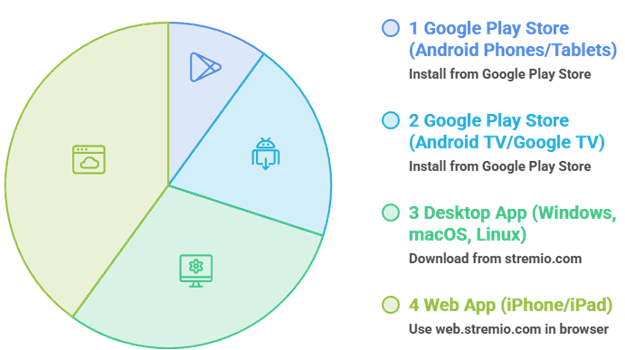
The configuration steps are identical on every platform, because your add-ons follow your account. Here is how to get Stremio itself on each device:
- Android phones and tablets: Install Stremio from the Google Play Store, sign in, and Torrentio syncs over.
- Android TV and Google TV (Nvidia Shield, Google TV Streamer, and similar): Install from the Google Play Store directly.
- Windows, macOS, and Linux: Download the desktop app from stremio.com. This is the easiest place to configure Torrentio.
- iPhone and iPad: Use the web app at web.stremio.com in your browser, since the native app is not available. This is also handy for pasting your API key and manifest link.
Recommended Torrentio Configuration Presets
There is no single best configuration, because the right settings depend on how you stream. Use the presets below as a starting point and adjust from there.
| User Type | Sorting | Exclude | Max per Quality | Size Limit | Debrid |
|---|---|---|---|---|---|
| Free user (no debrid) | Quality then seeders | CAM, Screener | 3 to 5 | 5 to 10 GB | None |
| Real-Debrid user | Quality then size | CAM, Screener | Blank (all) | Blank | Real-Debrid |
| Slow connection | Quality then seeders | CAM, Screener, 4K | 2 to 3 | 2 to 4 GB | Optional |
| 4K home theater | Quality then size | CAM, Screener | Blank (all) | Blank | Real-Debrid or TorBox |
Understanding Torrentio Stream Labels
When you open a title, Torrentio shows a list of links with several tags. Knowing what they mean helps you pick the best one every time:
- RD+ (or AD+, PM+, and similar): The file is already cached on your debrid server. These stream instantly at full speed and are always your best choice.
- [Download] or [RD Download]: The file is not cached yet. Clicking it asks your debrid provider to fetch it, which can take a short while before it plays.
- Seeders count: Shown on free torrent links. The higher the number, the smoother the playback when you are not using debrid.
- Resolution tags: Look for 2160p or 4K, 1080p, and 720p. You may also see HDR, Dolby Vision, and codec labels such as x265 or HEVC for smaller, higher quality files.
Best Debrid Services for Torrentio
A debrid service is the single biggest upgrade you can make to Torrentio. All of the options below are supported. Prices change often, so treat these as a rough guide and check the provider for current rates.
| Service | Approximate Price | Notes |
|---|---|---|
| Real-Debrid | Around a few dollars per month, cheaper on longer plans | The most popular choice with a huge cache. Allows one IP at a time, but multiple devices on your home network share that one IP. |
| AllDebrid | Similar to Real-Debrid | A strong, reliable alternative with a large cache. |
| Premiumize | Monthly or yearly plans | Works as a debrid service and also offers its own catalog and cloud features. |
| TorBox | Free tier plus paid plans | A newer service that is fast, growing quickly, and good at flagging which files are cached. |
| Put.io | Higher price, storage focused | Doubles as cloud torrent storage as well as a debrid resolver. |
| Offcloud, DebridLink, EasyDebrid | Varies | All supported by Torrentio, with smaller user bases. |
For most people, Real-Debrid offers the best balance of price, cache size, and reliability, which is why it is the default recommendation across the streaming community.
Why a VPN Matters for Torrentio
Because Torrentio relies on torrent sources, privacy is a real consideration. Here is the plain reasoning, without the hype:
- Privacy from the swarm: If you stream free torrents without debrid, your IP address is visible to everyone sharing that file. A VPN hides your real IP behind the VPN server.
- No ISP throttling: Internet providers often slow down traffic they identify as torrenting. A VPN encrypts your connection so they cannot single it out, which means smoother streams.
- Consistent access: A VPN helps you avoid provider level blocks and keeps your full speed available for streaming.
A debrid service already reduces your exposure to the swarm, because the actual torrent traffic happens on the provider’s servers. Even so, a VPN protects your wider privacy and is worth running whenever you use Torrentio.
Torrentio Not Working? Troubleshooting Guide
Torrentio is hugely popular, and that popularity means its servers sometimes go offline. Most issues fall into a handful of categories. Use the table below to find your problem and the fix:
| Problem | Likely Cause | How to Fix It |
|---|---|---|
| No streams appear | Add-on offline, a very new or niche title, or no debrid cache | Test with a popular title, check the server status, reinstall the add-on, and consider adding a debrid service. |
| “Bad Error” or an error code | The Torrentio server is overloaded or down | Wait and retry later, and use a backup add-on in the meantime. |
| Only foreign language results | Foreign providers enabled or a priority language set | Disable foreign providers in the config and clear the priority language field, then reinstall. |
| Constant buffering on free links | Low seeders and no debrid | Pick a link with more seeders, lower the quality, or add a debrid service. |
| Streams stopped after changing your API key | The old configuration is still cached | Re-enter your API key and reinstall the add-on so Stremio loads the new settings. |
| Duplicate Torrentio entries | The add-on was installed more than once | Remove the extra installs and keep a single configured version. |
| Works on your phone but not your Firestick | Different accounts or not synced | Sign in with the same Stremio account on both devices. |
💡 Pro Tip: To check whether Torrentio is down for everyone, search for torrentio.strem.fun on a website status checker. If it is offline for everyone, the only fix is to wait or switch to an alternative add-on.
Best Torrentio Alternatives (For When It Goes Offline)
Because Torrentio is not always stable, the smartest move is to keep one or two backup add-ons installed. These all work in a similar way and several pair beautifully with a debrid service:
| Add-on | Type | Why Use It |
|---|---|---|
| Comet | Debrid focused scraper | Fast and modern, excellent with Real-Debrid and TorBox. |
| MediaFusion | Multi source scraper | Pulls from many providers, supports debrid, and can be self hosted. |
| AIOStreams | Aggregator | Combines several add-ons into a single results list. |
| Torrentio Lite | Lighter Torrentio | Fewer providers for faster loading and a shorter list of results. |
| TorBox add-on | Debrid native | Serves streams directly from the TorBox service. |
Can You Use Torrentio in Kodi?
There is no official Torrentio add-on for Kodi, but you can still access the same torrent sources. Kodi add-ons such as Jacktook and Quicksilver can pull from Torrentio style sources and pair with the same debrid services, giving you a comparable experience inside Kodi.
Beyond Stremio, Torrentio also works inside several other media hub apps, including Nuvio, Vidi, and similar players, so you are not locked into one app to use it.
Is Torrentio Legal and Safe to Use?
Stremio and Torrentio are tools, much like a web browser. The apps themselves are legal. What matters is how you use them. Streaming content that you do not own or that is not licensed for free distribution may break copyright law in your country, and you are responsible for what you choose to stream.
To stay on the right side of this and protect yourself, we recommend the following:
- Stick to public domain titles and content that is licensed for free streaming.
- Use a reputable VPN to keep your activity private.
- Consider a debrid service, which keeps your device out of the torrent swarm.
- Only install add-ons from official sources to avoid malware and copycats.
Tips to Get the Best Out of Torrentio
- Always favor RD+ links when you use a debrid service, as they play instantly.
- Keep a backup add-on installed so you can keep watching when Torrentio is down.
- Exclude CAM and Screener sources so you never accidentally play a poor quality recording.
- Configure once on a PC or phone and let your settings sync to every device through your account.
- Reinstall the add-on after any settings change so Stremio loads your latest configuration.
Conclusion
Installing Torrentio is what turns Stremio from an empty shell into a powerful, free streaming hub. Once you have it configured the right way, with sensible filters and ideally a debrid service connected, you get a clean list of high quality links for almost anything you want to watch, on every device you own.
The most important habits to remember are simple. Configure Torrentio once on a phone or PC and let it sync, favor cached debrid links for instant playback, keep a backup add-on ready for the times Torrentio goes offline, and run a VPN to keep your streaming private. Follow those and you will have a setup that most streaming enthusiasts spend a long time piecing together.
FAQs
Is Torrentio free to use?
Yes. Torrentio is completely free and works without any paid service. A debrid subscription such as Real-Debrid is optional, but it greatly improves speed and reliability.
Do I need Real-Debrid for Torrentio?
No, but it makes a big difference. Without a debrid service you rely on torrent seeders, which can buffer. With Real-Debrid you get fast, cached, high quality links for a few dollars per month.
Why is Torrentio not showing any streams?
The most common reasons are that the Torrentio server is temporarily offline, the title is very new or niche, or your debrid cache does not have the file yet. Test with a popular title first, check the server status, and reinstall the add-on if needed.
Can I install Torrentio directly on my Firestick?
You do not configure it on the Firestick itself. Install and configure Torrentio on a phone, PC, or the web, then sign in to Stremio on your Firestick with the same account. The add-on syncs across automatically.
What is the difference between RD+ and download links?
RD+ links are already cached on your debrid server and play instantly. Download links are not cached yet, so clicking one asks your provider to fetch the file before it can play.
Is Torrentio safe?
The add-on itself is safe when installed from the official configuration page. Because it uses torrent sources, we recommend a VPN for privacy and a debrid service to keep your device out of the torrent swarm.
Why am I only getting foreign language results?
This usually means foreign providers are enabled or a priority language is set in your configuration. Open the config page, disable the foreign providers you do not want, clear the priority language field, and reinstall the add-on.
Does Torrentio work on iPhone and iPad?
Yes. Use the Stremio web app at web.stremio.com in your browser to configure and use Torrentio, since the native iOS app is not available.
What are the best alternatives to Torrentio?
Comet, MediaFusion, AIOStreams, Torrentio Lite, and the TorBox add-on are the most reliable alternatives. Keeping one installed as a backup means you can keep streaming whenever Torrentio goes offline.
🎬 Happy streaming from the FirestickTVStream team.