Key Takeaway: Stremio wins if you want something that works within ten minutes and stays working. Kodi wins if you want live TV, local files, and total control. Most people should start with Stremio, and only move to Kodi when they hit a wall.
These two apps get compared constantly, and almost every comparison misses the point. They are not competing for the same job.
I have run both on a Fire TV Stick 4K Max for years, and for this comparison I rebuilt each from scratch in July 2026 — Kodi 21.3 Omega and the current Stremio Android build — timing the setup, the first stream, and how each behaved a week later.
Kodi vs Stremio: The Short Answer
If you only read one section, read this one. The two apps overlap far less than their reputations suggest, and the right choice is usually obvious once you know which of these rows actually matters to you in practice.
| Kodi | Stremio | |
| Setup time | 30–60 minutes | Around 10 minutes |
| Learning curve | Steep | Gentle |
| Plays local files | Yes, excellent | Limited |
| Live TV / PVR | Yes, full PVR support | No |
| Add-on ecosystem | Enormous, fragmented | Smaller, more stable |
| Debrid support | Via addons (Seren, Umbrella) | Via addons (Torrentio, Comet) |
| Interface | Changeable via skins | Fixed, Netflix-style |
| Breaks often? | Third-party addons, frequently | Rarely |
| Firestick install | Sideload via Downloader | Sideload via Downloader |
| Cost | Free | Free |
| Best for | Power users, media libraries | Getting watching quickly |
What Is Kodi?
Kodi is a media centre that happens to support add-ons, and that ordering matters. It was built to organise and play files you already own, and the streaming add-on ecosystem grew on top of that foundation rather than being the reason it exists in the first place.
- A local media player first: Point it at a folder or network share and it builds a library with posters, cast, and metadata automatically.
- Full PVR and live TV: The PVR IPTV Simple Client turns Kodi into a live TV box with any M3U playlist and EPG you supply.
- Completely reskinnable: Skins rebuild the entire interface, which no other app in this comparison allows you to do at all.
- Two add-on worlds: The official repository holds safe utilities, while third-party repositories supply everything the official one deliberately will not.
- Non-profit and open-source: No ads, no telemetry, no account, and no company that can change the terms on you next year.
What Stremio Actually Is
Stremio is a streaming front-end with no content of its own. It ships completely empty, and everything you watch arrives through an add-on you chose to install. That design is what makes it fast to set up and, crucially, what keeps it working when Kodi add-ons are breaking.
- Catalogue first: Cinemeta gives you posters, trailers, and ratings out of the box, so it feels like a streaming service before you add anything.
- Sources are add-ons: Torrentio, Comet, and MediaFusion supply the streams, and installing one takes a single click.
- Debrid-friendly: Pair an add-on with Real-Debrid and links resolve to fast cached HTTPS streams rather than live torrent swarms.
- Syncs across devices: A free account carries your library, add-ons, and watch progress between Firestick, phone, and desktop.
- Fixed interface: There are no skins. You get one layout, it is a good one, and you cannot break it.
Setup and Learning Curve: Where Most People Give Up
This is the single biggest practical difference, and it is the reason so many people install Kodi, never finish configuring it, and quietly stop opening it. Stremio asks almost nothing of you; Kodi asks quite a lot before it gives anything back.
- Stremio, roughly ten minutes: Sideload the APK, sign in, install one source add-on, and you are watching. That is the entire process.
- Kodi, roughly an hour: Enable Unknown Sources, add a repository, install an addon, install a provider package, connect debrid, then tune the settings.
- Kodi has more to break: Each of those steps is a place where a guide can be out of date and the whole thing stalls.
- Stremio hides the complexity: The add-on does the configuring, so a bad add-on is uninstalled in one click rather than debugged.
- Reinstalling differs: A fresh Stremio takes minutes because your account remembers everything. A fresh Kodi means doing it all again.
Streaming Quality and Speed: Which One Buffers Less
In a straight fight over how quickly a film starts and how steadily it plays, the answer is not the app at all. It is whether you are using debrid, and once you are, the two are close enough that the difference stops mattering.
- Without debrid, Stremio wins: Torrentio surfaces well-seeded public torrents more reliably than most free Kodi scrapers manage.
- With debrid, it is a draw: Seren on Kodi and Torrentio on Stremio both resolve to the same cached links from the same provider.
- Kodi playback is stronger: Kodi handles more codecs, more container formats, and does passthrough audio far better than Stremio does.
- Stremio recovers better: When a source dies mid-stream, Stremio falls back to another quickly. Kodi addons often just stop.
- Hardware matters more than either: On a Fire TV Stick 4K Max both are smooth. On a second-generation Stick, Kodi with a heavy skin is not.
Where Kodi Wins Outright
There are three jobs Stremio simply cannot do, and if any of them is on your list then the comparison ends here. This is not a matter of preference or polish — the functionality does not exist in Stremio and is not planned.
- Live TV and IPTV: Kodi drives a full PVR with EPG, recording, and timeshifting. Stremio has no equivalent whatsoever.
- Your own media: A NAS full of films becomes a proper library in Kodi. Stremio local file support is an afterthought.
- Interface control: Skins let you rebuild Kodi around how you actually watch. Our roundup of the best Kodi skins covers the ones worth installing.
- Music and photos: Kodi is a complete media centre. Stremio is a video app and makes no pretence otherwise.
- Offline everything: Kodi works perfectly with no internet connection at all, which Stremio effectively cannot.
Where Stremio Wins Outright
Stremio wins on the things that decide whether an app is still installed six months later. Kodi is more capable, but capability you never configure is worth nothing, and this is where that gap shows up most clearly.
- It stays working: Stremio add-ons break far less often than Kodi third-party repositories, which disappear regularly and without notice.
- One-click add-ons: Installing a source is a single click. In Kodi it is a repository, a zip, an addon, and often a provider package.
- Genuine cross-device sync: Your library and add-ons follow your account to any device. Kodi needs a shared database and real effort.
- Better discovery: Cinemeta gives you a browsable catalogue immediately, whereas Kodi shows you an empty menu until you build one.
- Lower maintenance: Our guide to the best Stremio addons is a short list because there is far less to maintain.
Can You Just Run Both?
Yes, and this is what I actually do. The two apps are not really competitors, and once you stop treating the question as either-or, the sensible arrangement becomes fairly obvious. They cost nothing, and a Fire TV Stick 4K Max handles both without complaint.
- Stremio for films and shows: It is faster to reach, easier to browse, and it breaks less. This is the everyday app.
- Kodi for live TV: Point the PVR client at your IPTV playlist and leave it configured. This is the job Stremio cannot do.
- Kodi for your library: Local files, a NAS, or a Jellyfin server all belong in Kodi rather than Stremio.
- One debrid account covers both: Real-Debrid works in Seren and Torrentio simultaneously, so there is no duplicate cost.
- Storage is the only limit: Both apps together sit comfortably on a Firestick, but clear the cache occasionally.
How to Install Each One on a Firestick
Neither app is in the Amazon Appstore, so both are sideloaded through Downloader, and the process is nearly identical. The difference is what happens afterwards: Stremio is ready, and Kodi is only just beginning.
- Enable unknown apps: In Fire TV Settings, go to My Fire TV, Developer Options, and allow installs from Downloader.
- Install Downloader: Grab it from the Amazon Appstore, then use it to fetch the APK for whichever app you are installing.
- Stremio, then finish: Sideload the APK, sign in, install one source add-on, and you are watching within minutes.
- Kodi, then keep going: Sideload the APK, then enable Unknown Sources, add a repository, install an addon, and configure it.
- Storage warning: A Firestick has limited space, so clear the cache before installing both apps and a debrid-heavy addon set.
Kodi Addons vs Stremio Addons: The Direct Equivalents
Most of the confusion in this comparison comes from add-on names, because the two ecosystems solve identical problems with different vocabulary. Once you map them onto each other, the choice stops feeling like a leap into the unknown.
| Job | Kodi | Stremio |
| Debrid streams | Seren, Umbrella | Torrentio, Comet |
| Free torrent streams | Elementum | Torrentio (no debrid) |
| Catalogue and metadata | TMDb Helper | Cinemeta (built in) |
| Watch tracking | Trakt addon | Trakt add-on |
| Subtitles | OpenSubtitles addon | OpenSubtitles add-on |
| Live TV | PVR IPTV Simple Client | No equivalent |
| Local library | Built in | Very limited |
Why Kodi Addons Break More Often Than Stremio Ones
This is the difference that decides which app you are still using next year, and it is structural rather than a matter of quality. It comes down to where the add-on lives and who is responsible for keeping it alive.
- Kodi addons are installed code: They run on your device, so when a scraper site changes, the addon must be patched and you must update it.
- Stremio add-ons are hosted services: They run on someone else server, so a fix is deployed once and every user has it immediately.
- Repositories vanish: Kodi third-party repos disappear regularly, taking the update path for their addons with them.
- Stremio failures are visible: An add-on either responds or it does not, and you swap it out in one click.
- Kodi failures are silent: An addon returning nothing looks identical to an addon that is misconfigured, which is why troubleshooting takes so long.
What Each One Actually Costs to Run
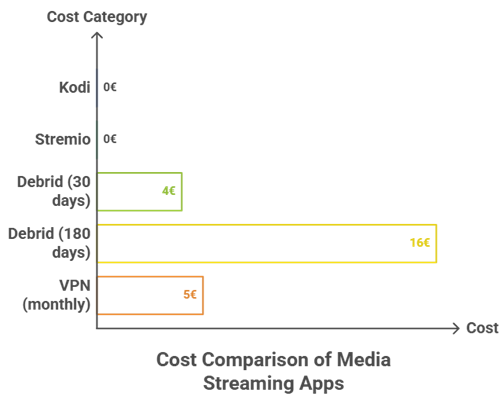
Both apps are free, and both are much less useful for free than most guides admit. Being honest about the real running cost is more helpful than pretending either is a completely no-cost route to watching everything.
- Kodi, base cost: Nothing. It is a non-profit project with no ads, no accounts, and no paid tier of any kind.
- Stremio, base cost: Nothing. The app and account are free, and the official add-ons cost nothing either.
- Debrid, the real cost: Roughly €4 for 30 days or €16 for 180 days, checked 14 July 2026, and it serves both apps at once.
- VPN, if you torrent: Budget a few dollars a month if you plan to use torrent-based add-ons in either app.
- Hardware, the hidden cost: A Fire TV Stick 4K Max handles both comfortably. An older Stick will make Kodi feel far worse than Stremio.
Are Kodi and Stremio Legal and Safe?
Both apps are entirely legal, and both are routinely described as illegal by people who have not looked closely. The distinction is the same in each case: the software is legal, and the third-party add-ons people install into it very often are not.
- Both apps are clean: Kodi is a non-profit media player and Stremio is a commercial company. Neither ships with any content.
- The add-ons are the issue: Torrent-based add-ons in either app index copyrighted material, and streaming it without permission is unlawful in most countries.
- Official sources are safe: The Kodi repository and Stremio official add-on catalogue contain nothing that puts you at risk.
- A VPN is standard practice: If you use torrent-based add-ons in either app, your IP is visible in the swarm without one.
- Debrid changes the exposure: Real-Debrid fetches over HTTPS on your behalf, which is a meaningfully different profile to torrenting directly.
Kodi vs Stremio for IPTV and Sports
This is the question that ends the debate for a lot of our readers, and it is not close. If live channels are the reason you bought a Firestick, one of these apps does the job and the other does not attempt it.
- Kodi handles IPTV properly: The PVR IPTV Simple Client takes any M3U playlist and EPG, and gives you a real channel guide.
- Recording and timeshift: Kodi can pause live TV and record to disk, which no Stremio add-on can replicate.
- Stremio has no PVR: A handful of add-ons expose live streams, but there is no guide, no recording, and no channel management.
- Sports favour Kodi: Live events need a channel list and an EPG, and that is precisely what Stremio lacks.
- The practical answer: Use Kodi for your IPTV subscription and Stremio for on-demand films, rather than forcing either to do both.
Which One Should You Install First?
If you have read this far and still cannot decide, this is the honest recommendation, based on what people actually end up using rather than what sounds most impressive on paper. It is worth being direct about it.
- Start with Stremio: It takes ten minutes, it works, and if it does everything you need then you have saved yourself an evening.
- Add Kodi when you hit a wall: The moment you want live TV, local files, or a different interface, install Kodi alongside it.
- Do not start with Kodi builds: They are the fastest route to a broken, unfamiliar setup you cannot troubleshoot.
- Budget for debrid either way: Around €4 a month transforms both apps, and one account serves both simultaneously.
- Keep both installed: They cost nothing, and using each for what it is good at beats forcing either to be something it is not.
Verdict:
Kodi is the more powerful application and Stremio is the better one for most people, and those two statements are not in conflict. The question is not which app is better in the abstract, but which one you will still have configured and working in six months.
- Stremio: The right first install for almost everyone. Ten minutes to a working setup, and it rarely breaks afterwards.
- Kodi: The right choice for live TV, local libraries, and anyone who genuinely wants to control the interface.
- Both together: The setup I actually run — Stremio for films and shows, Kodi for IPTV and everything stored locally.
FAQs
Is Stremio better than Kodi?
For most people, yes. Stremio takes about ten minutes to set up and rarely breaks. Kodi is more powerful, but it demands far more configuration and its third-party addons fail much more often.
Can Stremio do live TV like Kodi?
No. Kodi has full PVR support with an EPG, recording, and timeshifting through the PVR IPTV Simple Client. Stremio has no equivalent feature and none is planned.
Do Kodi and Stremio both need Real-Debrid?
Neither requires it, but both are transformed by it. One Real-Debrid account works in Seren on Kodi and Torrentio on Stremio at the same time, so there is no reason to pay twice.
Which is faster on a Firestick?
Stremio, generally. Kodi can match it, but only if you avoid heavy skins and keep home screen widgets to a minimum. On an older Fire TV Stick, Stremio is clearly the safer choice.
Are Kodi and Stremio legal?
Both apps are completely legal. What is not legal, in most countries, is streaming copyrighted material through third-party torrent addons, and that applies equally to both.
Can I run Kodi and Stremio at the same time?
Yes, and it is the setup I would recommend. Use Stremio for films and shows, and Kodi for live TV and any media stored on your own network. Both are free.