Key Takeaway: Stremio itself is safe. It is legitimate open-source software with no malware, and the app has never been the problem. Risk enters through the third-party addons you install, because some index copyrighted torrents and streaming without a debrid service or VPN exposes your IP address to strangers.
This question gets answered badly almost everywhere, usually with either a flat yes or a vague warning about piracy. The honest answer has three separate parts, because “safe” can mean free of malware, legally safe, or private. Stremio scores very differently on each one. I have used it as my main streaming app for years, so this guide separates what genuinely puts you at risk from what does not, and explains what actually changes your exposure.
Is the Stremio App Itself Safe to Install?
Yes, and this part is not really debatable. Stremio is open-source software from a registered company, its code is publicly auditable, and the desktop and mobile builds are distributed through official channels including the Amazon Appstore and Google Play. Nobody has credibly demonstrated malware in an official Stremio build.
- Open-source code: The application source is public, so any hidden tracking or malicious behaviour would be visible to independent reviewers.
- Official distribution: Builds come from Stremio own site and mainstream app stores rather than from anonymous file-sharing links.
- No bundled adware: The installer carries no toolbars, no bundled software and no advertising injected into the interface itself.
- Registered company: Stremio is developed by an actual company with a legal identity rather than by an anonymous developer account.
- Sideloading is the risk: Downloading a modified Stremio APK from a forum is genuinely dangerous, which is where most malware stories originate.
Where the Actual Risk Comes From
Stremio ships almost empty. It becomes useful only once you add addons, and those addons are written by independent developers with no vetting process between them and you. This is the honest answer to the safety question: the risk is not the app, it is what you choose to plug into it and where those addons source their content.
- Addons are third-party: Anyone can publish a Stremio addon, and there is no formal review process before it reaches users.
- Content sourcing varies: Some addons index only official metadata, while others scrape torrent sites carrying clearly copyrighted material.
- Addons cannot install software: They run as remote web services, so an addon cannot place files on your Firestick or access your storage.
- Credentials are the exposure: Addons asking for debrid or IPTV logins can misuse them, so only install from reputable published sources.
- Abandoned addons linger: Projects go offline while guides keep recommending them, which wastes time but poses no direct security threat.
Stremio and the Law: What You Should Know
Installing and using Stremio is legal everywhere. The application is a media player, and owning a media player has never been unlawful. What changes your legal position is the specific content a given addon serves you, and whether the rights holder has licensed it for distribution in your country.
- The app is lawful: No jurisdiction treats installing an open-source media player as an offence in itself.
- Content determines exposure: Streaming a film that nobody licensed for free distribution is where legal risk genuinely begins.
- Some addons are entirely legal: Metadata, subtitle, poster and licensed FAST channel addons involve no copyrighted stream at all.
- Torrent addons are grey: Addons indexing public torrent trackers carry material that is frequently copyrighted in your jurisdiction.
- Uploading is treated differently: Many countries penalise sharing far more heavily than viewing, which matters when streaming without debrid.
Is Your Personal Data Safe With Stremio?
This gets asked less often but deserves an answer. A Stremio account stores your library, addon list and watch progress so they sync across devices. That is a modest amount of data, and you can avoid even that by using the app without registering, though you lose synchronisation between your phone and television.
- Minimal account data: Registration requires only an email address, and the stored profile is your library and addon list.
- Anonymous use possible: Stremio works without an account entirely, though your addons then live only on that single device.
- Addons see your requests: Each addon receives the titles you search, so a self-hosted instance is the most private arrangement.
- Your ISP sees traffic: Without a VPN, your provider can observe that you are streaming and from which services.
- Debrid keys are sensitive: Treat an API key like a password, since anyone holding it can consume your subscription.
Seven Habits That Make Stremio Genuinely Safer
Most of the risk in a Stremio setup is avoidable, and none of these steps are difficult. The people who run into trouble are almost always the ones sideloading modified builds, installing addons from random forum posts, or streaming torrents directly without anything sitting between them and the swarm.
- Install from official sources: Get Stremio from its own site or an official app store, never from a repackaged APK.
- Vet addons before installing: Use the community catalogue and check the project has recent commits and a visible maintainer.
- Add a debrid service: This removes peer-to-peer entirely, so you never upload and never expose your address to other peers.
- Run a VPN: Encrypts your streaming from your internet provider and prevents throttling during busy evening periods.
- Prefer legal addons: Metadata, subtitle and licensed channel addons deliver real value with no legal ambiguity attached.
- Never reuse passwords: Use a unique password for Stremio and store debrid keys somewhere other than a browser text file.
Safer Stremio Alternatives
If the grey areas bother you, these three apps deliver genuinely free, fully licensed streaming with none of the legal ambiguity that addon-based setups carry.
1) Plex
Plex is the most complete legal alternative available, and the one I recommend most often to people who want to stop worrying about addons altogether. It combines hundreds of free advertising-supported live channels and on-demand films with a proper media server for anything you already own.
Features:
- Free Legal Channels: Streams hundreds of licensed advertising-supported live channels and on-demand films at no cost, with no legal ambiguity whatsoever.
- Personal Media Server: Catalogues films and shows you already own and streams them to any device, which no addon-based setup can replicate.
- Nothing Breaks: Because it does not depend on scraper addons, it does not stop working when an upstream source disappears overnight.
- Universal Application: Runs properly on Firestick, Android, iOS, browsers and smart televisions with a consistent interface across all of them.
- No Account Sharing Risk: Your library stays yours, and I have never had to re-enter credentials or repair a broken configuration.
- Optional Plex Pass: A paid upgrade adds DVR recording, downloads and skip-intro features, though the free tier covers most people entirely.
- Stable Playback: Streams start quickly and hold steady on ordinary broadband, without the buffering that uncached torrent streams frequently produce.
Pricing: Free tier; Plex Pass $6.99 monthly or $69.99 yearly (checked July 2026)
Link: plex.tv
2) Tubi
Tubi is the simplest possible answer to the safety question, because there is nothing to configure and nothing grey about any of it. Owned by Fox, it carries a genuinely large licensed catalogue of films and series, funded entirely by advertising rather than by any subscription.
Features:
- Fully Licensed Catalogue: Every title is properly licensed by Fox, so there is no legal question to consider before pressing play.
- Large Film Library: Carries tens of thousands of films and series, which is far larger than most people expect from a free service.
- No Account Required: Browsing and streaming both work without any registration at all, though signing in preserves your watch progress across different devices.
- Zero Configuration: There are no addons, manifests, debrid keys or provider settings, which removes every failure point a Stremio setup has.
- Genuinely Free: I have used it for two years without paying anything, and there is no upsell to a premium tier.
- Strong Back Catalogue: Particularly good for older films and cult titles that paid subscription services have quietly dropped from their libraries.
- Firestick Native: Available directly from the Amazon Appstore, so installation requires no sideloading, developer options or unknown sources toggling whatsoever.
Pricing: Completely free, advertising-supported (no subscription tier)
Link: tubitv.com
3) Pluto TV
Pluto TV is the closest legal equivalent to traditional broadcast television, and it is owned outright by Paramount. It runs hundreds of themed live channels alongside an on-demand library, making it the natural safe replacement if live channels were what you wanted from Stremio addons.
Features:
- Hundreds Of Channels: Runs a large lineup of themed live channels covering films, news, sport, classic television and continuous single-series channels.
- Owned By Paramount: Backed by a major studio, which means the content is licensed and the service is not going to disappear suddenly.
- Traditional TV Feel: Channels run on a schedule rather than requiring you to choose, which suits background viewing better than on-demand apps.
- On-Demand Included: Carries a separate library of films and series alongside the live channels, so it covers both viewing modes.
- Stremio Addon Available: A community addon brings the same lineup into Stremio, which is how I use it alongside my existing setup.
- No Registration Needed: Works immediately without creating an account, and never requires payment details at any point during setup or afterwards.
- Broad Device Support: Available on Firestick, Android, iOS, browsers and most smart televisions through their own official application stores worldwide.
Pricing: Completely free, advertising-supported (no paid tier)
Link: pluto.tv
Moving From Addons to a Safer Setup
Switching does not have to mean abandoning Stremio entirely. Most people end up with a hybrid: legal apps for everyday viewing, and a trimmed-down Stremio with only reputable addons for the rest. That combination removes most of the risk while keeping the flexibility that made you install Stremio originally.
- Audit your addon list: Remove anything you have not used recently, especially addons whose repositories have stopped receiving updates.
- Install the legal apps first: Plex, Tubi and Pluto TV all come from the Amazon Appstore with no sideloading required.
- Keep metadata addons: Poster, subtitle and catalogue addons carry no legal risk and genuinely improve how Stremio looks.
- Add debrid if you stay: Our roundup of the best debrid services covers which options suit Stremio.
- Test before deleting: Run both setups for a week and see how often you actually reach for the addon-based one.
How Did We Assess Stremio Safety?
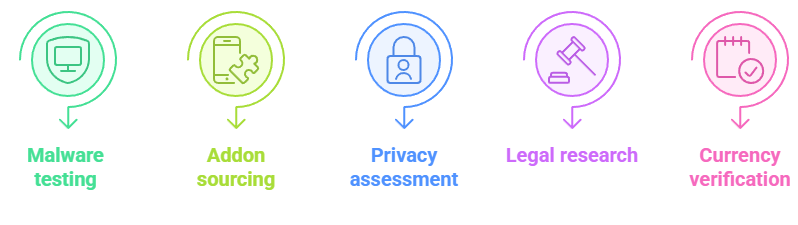
We treated safety as three genuinely separate questions rather than as one, because conflating malware risk with legal risk and privacy risk is exactly why most published answers to this question end up being unhelpful.
- Malware testing: Official builds were installed and checked across desktop, Android and Firestick for bundled software.
- Addon sourcing review: Individual addons were categorised by whether they serve licensed, public or copyrighted content.
- Privacy assessment: We examined what account data Stremio stores and what each addon can observe about you.
- Legal position research: Distinctions between streaming and uploading were checked rather than treated as one issue.
- Currency verification: Every claim was re-tested against the current application and addon ecosystem in July 2026.
Apps and addons that combined licensed sourcing, transparent maintenance and minimal data collection scored highest in this assessment.
Does a VPN Actually Make Stremio Safer?
Partly, and it is worth being precise about what it does. A VPN encrypts your traffic so your internet provider cannot see what you stream, and it defeats DNS-level blocking of addons like Torrentio. What it does not do is make copyrighted content legal, and it is not a substitute for a debrid service.
- Hides traffic from your ISP: Your provider sees an encrypted connection rather than which streaming sources you are actually using.
- Unblocks restricted addons: Several countries block popular addons at DNS level, and switching server usually restores them immediately.
- Prevents throttling: Some providers slow streaming traffic specifically, and encryption stops them identifying it for that purpose.
- Not a legality fix: A VPN changes who can observe you, not whether the content you stream was licensed.
- Choose speed carefully: A slow provider ruins 4K playback, so pick nearby servers and a proper Fire TV application.
Verdict:
Stremio is safe software, and treating it as dangerous misses the point entirely. The application carries no malware, collects very little data and is legal to install anywhere. Your actual exposure is decided by which addons you install and whether anything sits between you and a torrent swarm.
- Plex: The most complete safe alternative, combining free licensed channels with a personal media server that never breaks.
- Tubi: The simplest option, with a large fully licensed film catalogue and absolutely nothing to configure or maintain.
- Pluto TV: The best safe choice for live channels, backed by Paramount and available as a Stremio addon too.
FAQs
Is Stremio safe to use on a Firestick?
Yes. Stremio is legitimate open-source software and the Firestick build carries no malware. The important detail is installing it from the Amazon Appstore or the official site rather than a modified APK found on a forum, since repackaged builds are where genuine malware risk lives. What you install inside Stremio matters far more than Stremio itself.
Can Stremio give my device a virus?
No. Stremio addons run as remote web services rather than as software on your device, so an addon cannot write files to your Firestick or access your storage. That architecture makes Stremio structurally safer than sideloading APKs. The realistic risks are legal exposure from copyrighted sources and handing credentials to an untrustworthy addon.
Is Stremio legal in 2026?
The application is legal everywhere and always has been. Legality depends entirely on what a particular addon serves you. Metadata, subtitle and licensed channel addons involve no copyrighted material at all, while addons indexing public torrent trackers frequently carry content that is copyrighted in your country. Our guide to the best Stremio addons flags which is which.
Do I need a VPN to use Stremio safely?
Not for the app itself, and not if you only use legal metadata or licensed channel addons. A VPN becomes genuinely worthwhile if you use torrent-based addons, because it hides your streaming from your internet provider and unblocks addons restricted at DNS level. It does not make copyrighted content legal, and it is not a replacement for a debrid service.
Does Stremio track what I watch?
Only to the extent you allow. A Stremio account stores your library, addon list and watch progress so those sync across devices, which requires just an email address. You can use the app without registering at all, though you then lose synchronisation. Individual addons do see the titles you request, which is why self-hosted instances offer the most privacy.