Key Takeaway: Choose Stremio for streaming without server maintenance. Choose Jellyfin for owned files, family accounts, playback, and control. Use both when discovery and storage matter.
Stremio and Jellyfin look similar but solve different problems. Stremio is an addon-driven streaming hub. Jellyfin is a self-hosted server that organizes your files. Choosing by interface alone leads to the wrong setup.
I compared their current releases, official clients, server requirements, profiles, Trakt options, playback, remote access, and costs. Stremio wins convenience; Jellyfin wins ownership, family control, and predictable access to a curated collection.
Stremio vs Jellyfin: The Short Answer
Stremio is better for fast, low-maintenance discovery. Jellyfin is better for permanent personal libraries, separate household users, and reliable access to owned media. This table focuses on differences that change daily use.
| Decision | Stremio | Jellyfin | Better Choice |
|---|---|---|---|
| Start watching quickly | Install app and addons | Build server and add files | Stremio |
| Own and organize media | Limited local-library role | Core purpose | Jellyfin |
| Family accounts | Up to six Supporter profiles | Free server-side users and permissions | Jellyfin |
| Local offline resilience | Mostly internet-dependent | Works on the home network | Jellyfin |
| No server maintenance | Yes | No | Stremio |
| Live TV recording | No full DVR | Tuner, guide, and DVR support | Jellyfin |
- Best for beginners: Stremio removes server, storage, folder naming, and remote-access configuration, so the first successful playback usually requires fewer decisions.
- Best for collectors: Jellyfin turns owned files into persistent movie, television, music, photo, and home-video libraries with metadata under your control.
- Best for families: Jellyfin creates independent users with library, playback, download, bitrate, and administrative permissions without requiring a paid subscription.
- Best during outages: Jellyfin keeps serving local files over your home network even without internet, although fresh online metadata will not load.
- Best combined setup: Use Stremio to discover or access authorized online sources, then keep favorite owned media permanently inside a Jellyfin library.
What Each Media Center Actually Does
The shared “media center” label hides their architecture. Stremio is a catalog client whose addons return metadata or streams. Jellyfin uses one server to scan and serve files to connected clients.
- Stremio Model: The app combines catalogs, watch progress, and addon results; Stremio itself states that it does not provide the movies or shows.
- Jellyfin Model: The server indexes folders you control, fetches metadata, manages users, and sends selected media to compatible clients on demand.
- Storage Difference: Stremio normally streams without building a permanent collection, while Jellyfin becomes useful only after you supply organized storage and authorized files.
- Failure Ownership: A Stremio addon or upstream source can disappear beyond your control; a Jellyfin failure is usually your server, network, disk, or configuration.
- Best Mental Model: Think of Stremio as a universal streaming browser and Jellyfin as a private household streaming service that you operate yourself.
Setup, Hardware, and the First Evening
Stremio starts faster because the viewing device handles the visible work. Jellyfin also needs a server—an existing computer, NAS, supported single-board computer, or dedicated machine—plus storage, backup, and network planning.
- Stremio Start: Install the correct client, sign in or use guest mode, add legitimate sources, and the same account can synchronize configuration across devices.
- Jellyfin Start: Install the server, create an administrator, add correctly named media folders, scan libraries, and then connect each client to the server address.
- Hardware Floor: Jellyfin 10.11 requires ARM64 on ARM systems, while very old 32-bit Raspberry Pi installations cannot move to the current stable branch.
- Transcoding Headroom: A modern Intel integrated GPU or comparable hardware can handle incompatible clients efficiently; CPU-only 4K transcoding may overwhelm surprisingly powerful processors.
- Beginner Warning: Do not buy server hardware before testing direct play with your actual televisions, codecs, subtitles, and audio formats; compatibility determines the required power.
Library Ownership vs Instant Discovery
Stremio presents a broad searchable catalog before you own a file, but streams depend on addons and regional services. Jellyfin shows only stored libraries, yet that catalog remains stable, editable, and controlled locally.
- Discovery Advantage: Stremio’s Cinemeta and addon catalogs make browsing new titles faster, with lists and results gathered into a consistent interface across screens.
- Ownership Advantage: Jellyfin preserves exact editions, bonus material, home videos, and personal metadata because the underlying files and database stay under your administration.
- Metadata Control: Jellyfin lets you correct posters, titles, season ordering, collections, and provider matches; Stremio’s catalog data is largely controlled by the selected addon.
- Search Reliability: Jellyfin search is limited to indexed libraries but predictable; Stremio can find more titles while returning no playable authorized source for some results.
- Long-Term Value: A carefully backed-up Jellyfin collection becomes a durable household archive, whereas a Stremio library mostly records interests and progress rather than ownership.
Playback Quality, Direct Play, and Buffering
Neither name guarantees better video. Jellyfin preserves a file’s quality when clients support it or the server can transcode. Stremio quality depends on the source, delivery route, service speed, player, and device.
- Direct Play: Jellyfin is most efficient when the client supports the container, video, audio, and subtitles, allowing the server to send the original file unchanged.
- Transcoding Cost: Unsupported codecs, bandwidth limits, or subtitle burn-in can force Jellyfin to re-encode video, increasing server load and sometimes reducing quality.
- Source Variability: Stremio may expose several resolutions and encodes, but a 4K label alone says nothing about bitrate, compression, audio quality, or reliability.
- Network Difference: Local Jellyfin playback avoids internet congestion; remote Jellyfin depends on home upload speed, while Stremio depends on the selected external delivery path.
- Quality Winner: Jellyfin wins for known high-bitrate files and home theater consistency; Stremio wins when convenience matters more than preserving one exact master.
Device Support on Fire TV, Smart TVs, and Mobile
Both platforms cover mainstream screens, but clients differ. Stremio no longer needs sideloading on Fire TV because its official app reached the Amazon Appstore in December 2025. Jellyfin also offers an official Fire TV client.
| Platform | Stremio | Jellyfin |
|---|---|---|
| Fire TV | Official Amazon Appstore app | Official Fire TV app |
| Android / Android TV | Official mobile and TV apps | Official mobile and TV apps |
| Windows, macOS, Linux | Stremio 5 and web options | Server packages plus desktop/web clients |
| Samsung / LG TVs | Official supported TV apps by model year | Official Tizen and webOS clients |
| Roku / Xbox | No comparable official client listing | Official clients available |
| iPhone / iPad | Limited native/web routes vary by region | Official client options connect to your server |
- Firestick Choice: Both are legitimate store-install options now, so the deciding factor is your content model rather than a complicated sideloading process.
- Client Variation: Jellyfin codec and subtitle behavior differs between Roku, Fire TV, browsers, mobile apps, and televisions, which can unexpectedly trigger server transcoding.
- Stremio Consistency: Account-linked addons and progress follow supported devices, but some platforms offer limited playback features compared with desktop or Android builds.
- Console Edge: Jellyfin’s official Xbox client and Roku availability make it easier to serve an owned library across households with mixed streaming hardware.
- Buying Advice: Confirm the exact television model, operating system, HDR format, audio receiver, and subtitle needs before treating an app-store listing as full compatibility.
Profiles, Family Permissions, and Trakt Sync
Jellyfin is stronger for families because users and permissions are free. Stremio added up to six Supporter profiles in 2026. Both use Trakt differently: account integration in Stremio and an official Jellyfin server plugin.
- Jellyfin Users: Create separate accounts, hide libraries, restrict playback or downloads, limit remote bitrate, and keep watch history independent for every family member.
- Stremio Profiles: Supporters can separate histories, addons, recommendations, and child-safe catalogs across up to six profiles tied to one account.
- Free-Tier Difference: Jellyfin’s multi-user controls cost nothing; Stremio’s original free functionality remains available, but the newer profile system sits behind Supporters.
- Trakt on Stremio: Trakt can help carry watched progress and lists beyond one app, reducing lock-in when supported metadata matches correctly.
- Trakt on Jellyfin: The official Trakt plugin records watched media and synchronizes states, but authorization and scheduled tasks must be configured for each relevant user.
Privacy, Security, and Remote Access
Jellyfin offers data control, not automatic security. It needs no central account and can remain inside a home network, while remote access becomes your responsibility. Stremio offers guest mode, but addon privacy varies.
- Local Privacy: Jellyfin can operate without internet for playback, keeping account records, library metadata, and viewing activity on hardware you administer.
- Remote Security: Do not expose Jellyfin’s default port directly without understanding the risk; prefer a properly configured reverse proxy or trusted VPN route.
- Update Discipline: Install Jellyfin security releases promptly, back up configuration and databases first, and verify plugin compatibility before major upgrades such as 10.11.
- Stremio Accounts: Standard accounts enable cross-device synchronization, while guest mode avoids backend calls at the cost of synced libraries and settings.
- Addon Boundaries: Stremio addons do not execute local code, but they can receive requests and return outside links, so operator trust and source legality still matter.
Live TV, DVR, Music, and Photos
Jellyfin also manages music, photos, home videos, and live television from supported tuners or M3U sources. Stremio focuses on video discovery; its live-stream addons do not equal a managed household DVR.
- Live TV Inputs: Jellyfin natively supports HDHomeRun and M3U tuners, with additional backend options available through plugins for authorized channel sources.
- Guide and Recording: Jellyfin maps XMLTV or Schedules Direct data to channels and can record broadcasts, offering a true living-room DVR workflow.
- Stremio Live Streams: Addons may expose channels or events, but guide quality, availability, recording, and channel management depend on the individual service.
- Music Library: Jellyfin indexes albums, artists, lyrics, and playlists across compatible clients; Stremio is not designed as a full personal music server.
- Personal Media: Family videos and photographs belong naturally in Jellyfin because access can remain private and separated from entertainment libraries by user permissions.
What Stremio and Jellyfin Really Cost in 2026
Both core applications are free, but the systems are not costless. Stremio shifts infrastructure to devices and selected services. Jellyfin charges no fee, yet servers, disks, backups, electricity, and upload bandwidth cost money.
| Cost Area | Stremio | Jellyfin |
|---|---|---|
| Core software | Free | Free server and official clients |
| Optional paid tier | Supporters: $3.49 monthly, $39.99 yearly, $199.90 lifetime | No required subscription |
| Server hardware | Not normally required | Existing PC, NAS, or dedicated server |
| Storage and backup | Minimal for normal streaming | Scales with library size and redundancy |
| Electricity | Viewing device only | Always-on server plus drives |
| Remote bandwidth | Normal downstream connection | Server upload and client download |
- Stremio Free Core: All features that existed before Supporters remain free; the paid tier unlocks experimental profiles, downloads, filters, subtitle tools, and customization.
- Jellyfin Software: The server and official clients have no fee, hidden feature license, or required central account according to the project’s current policy.
- Storage Reality: A protected Jellyfin library needs primary disks plus backups; RAID can improve availability but does not replace an independent backup.
- Remote Streaming: Jellyfin recommends planning meaningful upload capacity, especially below 100 Mbps, and applying a conservative server-side remote bitrate limit.
- Value Decision: Stremio usually costs less in money and time; Jellyfin’s higher ownership cost purchases permanence, control, and local availability rather than content.
Maintenance, Reliability, and Offline Viewing
Stremio needs less routine work, but outside sources remain unpredictable. Jellyfin needs backups, scans, disk monitoring, updates, and troubleshooting, yet a healthy local server keeps saved media available without internet.
- Stremio Maintenance: Keep clients updated and remove failing addons; configuration sync reduces the effort of rebuilding a supported device after reinstalling the application.
- Jellyfin Maintenance: Monitor disk health, capacity, backups, permissions, logs, metadata matching, transcode cache, network certificates, and plugin compatibility as the library grows.
- Upgrade Care: Jellyfin 10.11 introduced database migrations and internal backup tools; major-version instructions should be read before pressing update on a production library.
- Offline Difference: Jellyfin serves existing media across a local network during an internet outage, while most normal Stremio discovery and streaming routes stop working.
- Reliability Tradeoff: Stremio reduces administrator failures; Jellyfin reduces third-party availability failures. Choose the type of responsibility you are willing to own.
Can You Use Stremio and Jellyfin Together?
Yes. Stremio can remain the fast discovery interface while Jellyfin stores favorites, family media, rare editions, and anything needed without an outside source. Community bridges can expose Jellyfin files inside Stremio.
- Separate Roles: Keep Stremio lightweight for browsing and use Jellyfin as the permanent archive, avoiding a complicated automation stack until you genuinely need one.
- Bridge Addons: Projects such as Stremio-Jellyfin bridges can return matching server files inside Stremio, but they are community integrations rather than guaranteed native features.
- Metadata Matching: Bridges depend on compatible identifiers, remote reachability, and correct server configuration, so mismatched titles or seasons can produce incomplete results.
- Plugin Options: Jellyfin can add Trakt, subtitle, reporting, and metadata functions through its catalog; see our best Jellyfin plugins guide for useful extensions.
- Simplest Combination: Install both official Fire TV apps and switch by task; this is easier to troubleshoot than making one interface control every source.
Which Media Center Should You Choose?
Choose based on what you possess and will maintain. Someone with no files gains little from Jellyfin. A collector with terabytes of organized media gives up control by using only Stremio.
- Choose Stremio: You want fast discovery, minimal setup, modern navigation, account sync, and no always-on computer or organized storage requirement.
- Choose Jellyfin: You own media, value offline local playback, need separate household users, or want full control over metadata, quality, and access.
- Choose Both: You enjoy Stremio’s catalog but want favorites, children’s content, personal videos, or difficult-to-replace editions stored permanently under your control.
- Avoid Stremio-Only: Do not rely on it as the sole plan for irreplaceable media, multi-user permissions, a managed music collection, or local-outage viewing.
- Avoid Jellyfin-First: Do not build a server merely to reproduce instant discovery when you own no files and dislike hardware, networking, storage, and backups.
Are Stremio and Jellyfin Legal and Safe?
Both applications are legal software. Safety depends on installation sources, server exposure, addons, and media rights. Use official downloads, keep Jellyfin patched, and stream only content you own or are authorized to access.
- Official Software: Stremio and Jellyfin publish open-source components and legitimate clients; the software itself does not make unauthorized media use lawful.
- Stremio Sources: Official and community addons vary greatly, so verify the operator, permissions, content rights, and delivery method before relying on one.
- Jellyfin Content: A self-hosted server should contain files and tuner sources you are legally allowed to store, access, record, and share.
- Network Exposure: Strong passwords, current software, encrypted remote access, limited permissions, and tested backups matter more than simply labeling Jellyfin “private.”
- Store Verification: Avoid lookalike apps and unofficial APK mirrors; both platforms provide current client links through their official downloads pages.
How Did We Evaluate Stremio and Jellyfin?
A fair comparison follows the path from installation to playback. The evaluation separates client convenience from server ownership, then checks where each platform places cost, work, privacy risk, and responsibility.
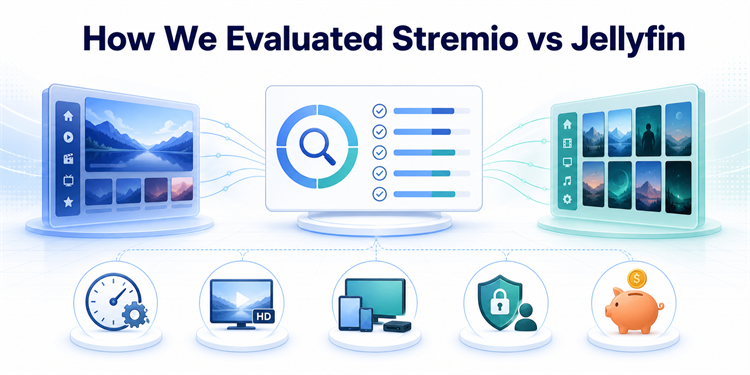
- Setup Effort: Count the hardware, account, storage, networking, addon, client, and library steps required before a television can play the first title.
- Playback Path: Distinguish direct play from remuxing, server transcoding, torrent or HTTP streaming, and external-player handoff because each fails differently.
- Device Coverage: Verify current official clients for Fire TV, Android TV, computers, mobile devices, browsers, smart televisions, consoles, and streaming boxes.
- Control and Privacy: Compare data location, account requirements, user permissions, addon exposure, remote-access configuration, updates, backups, and dependency on outside infrastructure.
- Total Cost: Include optional subscriptions, server hardware, storage, electricity, backup capacity, internet upload speed, and the time needed to maintain everything.
Verdict: Stremio or Jellyfin?
Stremio is the better first choice for quick browsing. Jellyfin is better for a lasting household library. Using both is not a compromise; it gives each platform the job its architecture handles best.
- Stremio: Best for simple installation, broad discovery, account-synced addons, and users who do not want server hardware, storage planning, or routine administration.
- Jellyfin: Best for owned media, high-quality local playback, family permissions, live TV recording, offline resilience, and privacy under informed self-hosting.
- Both Together: Best for enthusiasts who want Stremio’s discovery convenience without giving up a durable, backed-up Jellyfin collection for favorites and personal media.
FAQs
Is Jellyfin better than Stremio?
Jellyfin is better for owned files, separate users, local playback, metadata control, live TV recording, and privacy. Stremio is better for fast discovery without running a server.
Does Stremio replace a Jellyfin server?
No. Stremio can replace browsing for someone without a personal collection, but it does not become a multi-user server for owned media, permissions, backups, or local offline access.
Can Stremio play media from Jellyfin?
Community bridge addons can expose matching Jellyfin files as Stremio sources after you configure the server and integration. This is not native guaranteed interoperability, so expect extra maintenance, identifier matching, and remote-access considerations.
Which works better on a Firestick?
Both have official Fire TV options. Stremio is easier without a server. Jellyfin is dependable for a known library when the Firestick can direct-play or the server can transcode.
Do Stremio and Jellyfin support Trakt?
Yes. Stremio supports Trakt tracking and lists. Jellyfin offers an official Trakt plugin for watched-state synchronization, with authorization and scheduled tasks configured for individual server users.
What should I try if neither platform fits?
Kodi suits users who want a powerful player and local interface without a dedicated server, while Plex and Emby offer more managed server experiences. Our best Stremio alternatives comparison explains the tradeoffs.