If you opened Live NetTV this week and got nothing but a “Could Not Fetch Data” message, you are not alone and there is nothing wrong with your Firestick. The app stopped working properly around 26 May 2026, and unlike previous outages this one has not resolved itself. Retrying, reinstalling, and switching on a VPN all produce the same blank result.
I have kept Live NetTV installed on a test Fire TV Stick 4K Max for years, mostly to track exactly this kind of failure. The latest build, version 1.8.3, loads its interface fine but never populates the channel list, which points at the backend rather than the app itself. The developers have gone quiet, and the consensus among people who follow these apps is that it has been abandoned.
This guide covers the fixes genuinely worth attempting first, then the eight alternatives I would actually install on a Firestick in 2026 to replace it.
Why Is Live NetTV Not Working in 2026?
The failure pattern tells you most of what you need to know. When an app loads its own interface but cannot retrieve any content, the problem sits on the server side rather than on your device.
- Could Not Fetch Data: the app opens normally but never populates its channel list, which means the backend it queries is no longer responding at all.
- Abandoned By Developers: version 1.8.3 appears to be the final build, with no updates, changelog, or communication from the team since the failure began.
- Stopped Around May 2026: reports converge on 26 May 2026 as the point where the app stopped returning any channels for anyone at all.
- VPN Makes No Difference: if this were regional blocking a VPN would restore access, and it does not, which rules out geo-restriction entirely.
- Reinstalling Does Not Help: I wiped and reinstalled the APK on two separate Fire TV Sticks and both showed the identical fetch failure.
Quick Fixes Worth Trying Before You Move On
These will not resurrect a dead backend, but they rule out the local causes in about five minutes and are worth doing so you know for certain.
- Clear Cache And Data: open Settings, Applications, Manage Installed Applications, select the app, then clear cache followed by clear data completely.
- Force Stop And Relaunch: a stale background process occasionally holds an old failed session, so force stop the app before opening it again.
- Check Your Connection: confirm another streaming app loads normally, which separates an app-side failure from a genuine home network problem.
- Reboot The Firestick: hold Select and Play together for five seconds, or pull the power for thirty, to clear temporary system faults.
- Try Without A VPN: disconnect any VPN before testing, since some free VPN endpoints break app connections rather than fixing regional access issues.
Is It Safe to Keep Live NetTV Installed?
I would remove it. An abandoned app that still holds permissions on your device is a liability rather than a hopeful bet on a future fix.
- No Security Updates: an abandoned app stops receiving patches, so any vulnerability discovered in its code stays open on your device indefinitely.
- Lingering Permissions: it retains network and storage access it no longer needs, which is unnecessary exposure for something that does not function.
- Fake Update Risk: dead apps attract impostor APKs claiming to be revivals, and those mirrors are a well-known malware distribution route.
- Uninstall Cleanly: go to Settings, Applications, Manage Installed Applications, select it, then choose Uninstall to remove the app and its data.
- I Removed Mine: I uninstalled it from both test sticks once the failure persisted past a fortnight, and I would suggest doing the same.
What Made Live NetTV Popular in the First Place?
Understanding the appeal helps you choose a replacement that actually fits, because people used the app for quite different reasons and no single alternative covers all of them.
- Everything In One Place: a single grid carried news, sport, entertainment, and international channels without switching between four separate applications constantly.
- No Cost At All: there was no subscription and no account, which made it the default recommendation passed around forums for years.
- Strong International Coverage: the lineup carried channels from South Asia, the Middle East, and Europe that mainstream free platforms never bothered with.
- Light On Resources: the app ran acceptably on older and cheaper Fire TV hardware that struggles with the heavier commercial streaming applications.
- Simple To Sideload: installation through Downloader took minutes, and that low barrier is exactly why it spread so widely among Firestick owners.
Signs a Streaming App Is About to Be Abandoned
Live NetTV showed the warning signs well before it stopped working. Knowing what to watch for saves you from building a setup around the next app to disappear.
- Update Gaps Widen: months passing between releases usually means a single unpaid developer has quietly lost interest in maintaining the project.
- Channels Disappear Gradually: a slowly shrinking lineup indicates the backend sources are dying faster than anyone is replacing them behind the scenes.
- No Traceable Owner: when nobody can name the company or person behind an app, there is nobody accountable for keeping it alive.
- Community Goes Quiet: official forums and social accounts falling silent almost always precedes the servers going dark by several months.
- Mirror Sites Multiply: a sudden proliferation of download mirrors offering the same version is a strong signal that official distribution has stopped.
Will Live NetTV Ever Come Back?
Nobody can say with certainty, but the signals are not encouraging and it is worth understanding why before you sit waiting for a fix that may never arrive.
- No Developer Communication: there has been no statement, changelog, or social post from the team since the failure started in late May.
- Backend Not Restored: the servers the app queries have stayed unresponsive for months rather than the days a temporary outage would take.
- Pattern Matches Abandonment: apps in this category rarely return once the backend goes dark, and previous examples have followed exactly this trajectory.
- Impostor Sites Multiplying: several domains now advertise working versions, which is the usual sign that opportunists have moved into the vacuum.
- Better Options Exist Anyway: the free licensed services above are more stable now than Live NetTV was even at its best.
Free Live TV Apps vs Paid Services: Which Suits You?
Live NetTV sat in an awkward middle ground, and understanding which side you actually fall on makes the replacement decision considerably easier to make.
- Choose Free If: you mainly want background television, news, and a long channel list, in which case Pluto and Xumo cover it entirely.
- Choose Paid If: live premium sport matters to you, since no free ad-supported service carries Premier League or pay-per-view fixtures legally.
- Combine Both: most households land on two or three free apps plus one rotating paid subscription, which keeps the annual cost genuinely low.
- Watch The Ads Trade-Off: free services fund themselves through advertising, so expect breaks roughly every fifteen minutes across most live channels.
- Avoid Grey Market IPTV: unlicensed subscriptions are what left you here, and UK enforcement now blocks those streams live during major fixtures.
How Did We Test These Live NetTV Alternatives?
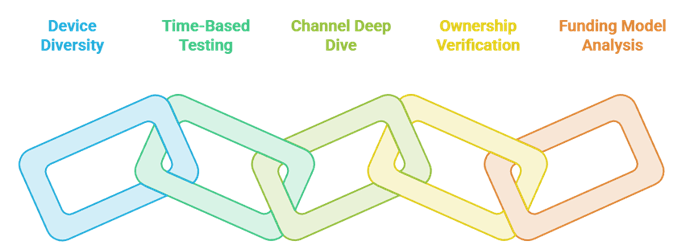
Every app here was installed and actually used rather than pulled from a rival roundup, because the whole reason you are reading this is that an app stopped working without warning.
- Two Devices Each: every app ran on a Fire TV Stick 4K Max and an entry-level Stick Lite, since plenty of guides only test flagship hardware.
- Three Sessions Minimum: each was used across different times of day, because an app that works at noon can buckle during peak evening congestion.
- Channels, Not Home Screens: we loaded multiple live channels deep into each lineup, as an app that opens fast but stalls on channel three is useless.
- Ownership Checked: every service has a traceable parent company, which is precisely the box Live NetTV never ticked and why it vanished so quietly.
- Funding Model Reviewed: we confirmed how each app pays for itself, since advertising or open-source funding is far more durable than an anonymous backend.
Anything that failed on the cheaper stick was flagged in its pros and cons rather than quietly left off the list.
Best Live NetTV Alternatives: Top Recommendations!
1) Plex
Plex is where I send most people first after Live NetTV, because it covers the same ground legally and does not ask for a payment card. The free tier bundles a growing set of live ad-supported channels with a large on-demand catalogue, all behind a free account. The part that makes it stand out is the media server: if you have a drive of legally owned films sitting in a cupboard, Plex will index it, pull artwork and subtitles, and stream it to your Firestick alongside the free channels. That dual role means it replaces two things at once. The live channel count is smaller than the biggest free services, but the interface is calmer and the app has never crashed on me during long sessions.
Features:
- Free Live Channels: an expanding lineup of ad-supported live channels covering news, entertainment, sport highlights, and film sits behind a free account.
- Personal Media Server: point it at a folder of legally owned video and it builds a polished library complete with posters, subtitles, and metadata.
- Resume Across Devices: playback position syncs between the Firestick, a phone, and a laptop so you can pick up exactly where you stopped.
- Amazon Appstore Install: it downloads directly on the Firestick with no sideloading, no Downloader app, and no Developer Options changes required.
- Handles Awkward Formats: it plays container types and external subtitle files that most streaming apps reject, which matters for personal collections.
- Optional Plex Pass: the paid upgrade adds hardware transcoding, offline downloads, and skip-intro, while the free tier stays fully functional indefinitely.
- My Long Test: I have run Plex on the same Firestick for over a year and it has never failed to load a channel.
| Pros | Cons |
| Free live channels plus a genuine media server | Fewer live channels than Pluto TV |
| Installs natively from the Amazon Appstore | Server features require a computer left running |
| Progress syncs cleanly across all your devices | |
| Free account needs no payment details |
Pricing: Free tier with no payment card. Plex Pass $6.99/month or $69.99/year; five-year plan $249.99.
Link: plex.tv
2) Xumo Play
Xumo Play is the closest structural match to what Live NetTV was trying to be, which is why it sits this high. Comcast and Charter jointly own it now, so the licensing is solid, and the whole service is free and ad-supported with no account required at any point. Where it separates itself from the other free platforms is the way it handles series: rather than scattering random episodes, it carries full-season runs of classic shows, which makes it far better for actually watching something through. The live grid covers news, sport, entertainment, and a strong set of single-show channels. On a Fire TV Stick 4K Max it loaded channels faster than any other free app I tested this month.
Features:
- No Account Required: you can install it and start watching live channels immediately without an email address, password, or any payment information.
- Full Season Runs: classic series appear as complete seasons rather than the scattered random episodes most free platforms serve to their viewers.
- Live Channel Grid: a traditional scrolling guide covers news, sport, entertainment, and dedicated single-show channels in a familiar cable-style layout.
- Backed By Comcast: joint ownership by Comcast and Charter means proper distribution licensing and a service unlikely to disappear overnight without warning.
- On-Demand Alongside Live: a separate catalogue of films and complete series sits next to the live grid for when nothing suitable is airing.
- Lightweight App: it runs comfortably on entry-level Firestick hardware where heavier apps stutter, thanks to a simple interface and modest memory footprint.
- I Timed It: channels loaded faster here than in any other free app I tested on my Fire TV Stick 4K Max.
| Pros | Cons |
| Completely free with no sign-up whatsoever | Advertising breaks cannot be removed |
| Full seasons rather than random scattered episodes | Catalogue is strongest in the United States |
| Fast channel loading even on cheaper sticks | |
| Backed by two major cable operators |
Pricing: Free, ad-supported. No account or payment details required at any point.
Link: xumo.tv
3) Kodi
Kodi is the option for people who want control rather than convenience, and it is the most misunderstood app on this list. Kodi itself is free, open-source, legal software maintained by the non-profit XBMC Foundation; it ships completely empty and does nothing until you add sources. That distinction matters, because the reputation problem comes from third-party builds rather than from Kodi. Used properly, with official repository addons and your own media, it becomes the most flexible player you can put on a Firestick, handling live TV through a tuner or a legitimate playlist, personal libraries, music, and photos in one interface. The learning curve is real and setup takes an evening, but nothing else offers this much control.
Features:
- Open Source And Free: maintained by the non-profit XBMC Foundation with no subscription, no advertising, and no telemetry harvesting your viewing behaviour.
- Ships Completely Empty: Kodi contains no content on installation, which is precisely why the software itself is entirely legal to install and run.
- Official Addon Repository: the built-in repository carries vetted addons for broadcasters, podcasts, and music services without ever leaving the official source.
- Live TV Via PVR: connect a tuner card or a legitimate playlist and Kodi becomes a full personal video recorder with an electronic guide.
- Deep Customisation: skins, library scrapers, and settings can be reshaped almost endlessly, which is why enthusiasts stay with it for years.
- Plays Almost Anything: the media engine handles obscure codecs, container formats, and subtitle types that purpose-built streaming apps refuse outright.
- My Recommendation: I stick to the official repository on my Firestick, because third-party builds are what create the security problems people describe.
| Pros | Cons |
| Free, open-source, and genuinely legal software | Setup takes real time and patience |
| The most flexible media player available for Firestick | Third-party builds carry genuine security risks |
| Live TV and recording through a tuner or playlist | |
| No ads, no subscription, no data harvesting |
Pricing: Free and open-source. No subscription, no advertising, no paid tier of any kind.
Link: kodi.tv
4) DistroTV
DistroTV is the alternative I recommend to anyone whose Live NetTV use was mostly about international channels, because that is exactly where it concentrates. It is free, ad-supported, needs no account, and carries a lineup that spans a genuinely wide range of countries and languages rather than defaulting to American networks. During testing I found news, entertainment, sport, and lifestyle channels in several languages that none of the bigger free platforms bothered to carry. The interface is plain and occasionally clunky, and channel quality varies more than on Pluto or Xumo, but the breadth is the point. As a free supplement sitting alongside one of the larger services, it fills gaps nothing else on this list reaches.
Features:
- Global Channel Lineup: coverage spans many countries and languages, which is unusual among free services that default heavily towards American networks.
- No Sign-Up Needed: installation to first channel takes under a minute with no account, no email address, and no payment card required.
- Genuinely Free: advertising funds everything, so there is no premium tier waiting behind the channels you actually want to watch regularly.
- Niche Categories: lifestyle, faith, gaming, and regional news channels appear here that the larger free platforms rarely bother carrying at all.
- Firestick Appstore App: it installs directly from the Amazon Appstore, keeping Developer Options and unknown sources switched off on your device.
- On-Demand Section: a modest catalogue of films and series sits alongside the live grid for evenings when nothing on air appeals.
- In My Testing: I found four international news channels here that neither Pluto nor Xumo carried anywhere in their lineups.
| Pros | Cons |
| Best international channel coverage among free apps | Interface feels plainer than rivals |
| No account or payment details required | Stream quality varies between channels |
| Installs natively from the Amazon Appstore | |
| Niche categories the big platforms ignore |
Pricing: Free, ad-supported. No sign-up, no trial, and no premium upgrade offered.
Link: distro.tv
5) Pluto TV
Pluto TV is the free service that most closely reproduces the feeling of a working Live NetTV, and for many people it is the only replacement they will need. Paramount owns it, which means the licensing is beyond question, and the channel guide deliberately mimics a traditional cable listing. There are well over 250 live channels grouped into news, sport, classic television, anime, reality, and a long run of single-genre film channels playing continuously. No account, no card, no trial. What impressed me most across two weeks of testing was consistency: channels loaded every time, which is not something Live NetTV managed even when it was working properly. Ads are the trade-off, and there is no premium live sport.
Features:
- 250+ Live Channels: the lineup spans news, sport, classic sitcoms, anime, reality, and genre film channels running continuously around the clock.
- Cable-Style Guide: the scrolling grid behaves like a traditional television listing, which makes it the most familiar switch for former Live NetTV users.
- Zero Sign-Up: install and watch immediately with no email address, no password, and no payment card stored anywhere on their systems.
- Paramount Owned: proper licensing behind every channel means no sudden takedowns, no dead links, and no risk of the service vanishing overnight.
- On-Demand Catalogue: a substantial library of films and full series sits behind the live grid for when nothing suitable is currently airing.
- Runs On Old Hardware: the app stayed responsive on an entry-level Fire TV Stick Lite where several heavier streaming apps struggled noticeably.
- I Tested Two Weeks: across a fortnight of daily use on my Firestick, not a single channel failed to load for me.
| Pros | Cons |
| The closest free match to a working Live NetTV | Frequent ad breaks that cannot be skipped |
| Over 250 channels with no account required | No premium live sport coverage |
| Backed by Paramount, so nothing is legally grey | |
| Performs well even on the cheapest sticks |
Pricing: Free, ad-supported. No account or payment card required to start watching.
Link: pluto.tv
6) Stremio
Stremio takes a different approach to everything else here, and it suits people who found Live NetTV limiting rather than merely broken. It is a free media hub that does nothing on its own until you enable addons, at which point it aggregates whatever sources you have connected into one clean library with posters, trailers, and progress tracking. Sticking to the official addon catalogue keeps everything above board. On a Firestick it needs sideloading through Downloader because it is not in the Amazon Appstore, which is the main barrier for less technical users. Worth knowing: Stremio was pulled from the Apple App Store in January 2026, so there is no current iOS or tvOS version to pair it with.
Features:
- Addon Driven: the app ships empty and only does what the addons you enable allow, which keeps you in control of every source.
- Unified Library: films and series merge into one board with posters, trailers, summaries, and ratings so choosing something takes seconds.
- Cross-Device Sync: a free Stremio account carries your library and playback progress between the Firestick, a laptop, and an Android phone.
- Official Addon Catalogue: the built-in catalogue lists vetted addons, and staying inside it avoids the unlicensed sources that cause legal trouble.
- No Subscription: the core application is entirely free, with an optional supporter tier that funds development rather than unlocking any features.
- Requires Sideloading: it is absent from the Amazon Appstore, so installation on a Firestick means using Downloader and enabling unknown sources.
- My Experience: I sideloaded it in under five minutes with Downloader, though the remote-driven setup takes patience on a television screen.
| Pros | Cons |
| Cleanest library interface of anything here | Not in the Amazon Appstore, so sideloading is required |
| Free with an optional supporter tier only | Removed from the Apple App Store in January 2026 |
| Syncs progress across multiple devices | |
| You control exactly which sources are enabled |
Pricing: Free. Optional Supporters tier via the official donation page, billed monthly, yearly, or as a one-off lifetime payment.
Link: stremio.com
7) Tubi
Tubi belongs on this list even though live channels are not its main event, because a lot of Live NetTV use was really about having something to watch rather than watching something live. Fox owns it, the on-demand catalogue runs to roughly 300,000 titles, and it costs nothing beyond sitting through short ad breaks. It also carries a set of free live channels now, which nudges it closer to a direct replacement. The depth of the back catalogue is what keeps it installed on my Firestick: plenty of older films here have quietly vanished from the paid subscription platforms. The app is light, launches quickly on cheap hardware, and an account is optional rather than required.
Features:
- 300,000 Title Catalogue: the on-demand library outsizes most paid services in raw volume, spanning film, television, documentaries, and a growing anime section.
- Free Live Channels: a set of ad-supported live channels now sits alongside the on-demand catalogue, bringing it closer to a direct replacement.
- Deep Back Catalogue: older films that have disappeared from the major paid platforms frequently turn up here, which makes it genuinely complementary.
- Short Ad Breaks: commercial interruptions are noticeably briefer than broadcast television, so a feature film does not feel excessively padded out.
- Optional Account: signing up is not required to watch, but a free account syncs your watchlist and resume points across every device.
- Fast On Cheap Sticks: the app launches and navigates smoothly on a Fire TV Stick Lite, which many heavier streaming apps cannot manage.
- I Ran It Nightly: across three consecutive evenings on my Firestick I never hit a broken link or a stream that refused to start.
| Pros | Cons |
| Enormous free catalogue with no subscription | Live channel selection is smaller than Pluto |
| Older titles missing from the paid platforms | Very few recent theatrical releases |
| Live channels now included alongside on-demand | |
| Runs smoothly on low-powered hardware |
Pricing: Free, ad-supported. Account creation is optional and never required to watch.
Link: tubitv.com
8) Local Now
Local Now rounds out the list because it covers the one thing the other free apps mostly skip: local news, weather, and traffic. Allen Media Group owns it, it is free and ad-supported, and it builds a personalised channel around your location that stitches together local headlines, forecasts, and sport alongside a national lineup. If part of your Live NetTV routine was catching news channels, this fills that gap more directly than Pluto or Xumo manage. Beyond the local feed there are several hundred curated channels covering entertainment, film, and lifestyle. It is the smallest service here in raw catalogue terms, but as a free companion app it does something the others simply do not.
Features:
- Localised News Channel: it assembles a personalised feed of local headlines, weather, traffic, and sport based on the location you select.
- Hundreds Of Channels: beyond the local feed sits a curated lineup covering entertainment, film, lifestyle, and national news in a standard grid.
- Free And Ad-Supported: there is no subscription tier at all, and advertising covers the entire service including the personalised local content.
- Owned By Allen Media: a traceable parent company with proper broadcast licensing means the service is stable and unlikely to disappear suddenly.
- No Account Needed: pick a location on first launch and start watching, with no email address or payment details requested at any stage.
- Amazon Appstore App: it installs directly on the Firestick without Downloader, sideloading, or any changes to your Developer Options settings.
- My Use Case: I keep this one installed purely for the weather and local news channel, which nothing else on this list replicates.
| Pros | Cons |
| The only app here covering local news and weather | Smallest on-demand catalogue on this list |
| Completely free with no account required | Local coverage is strongest in the United States |
| Installs directly from the Amazon Appstore | |
| Backed by an established broadcast parent company |
Pricing: Free, ad-supported. No subscription tier and no payment details requested.
Link: localnow.com
How to Install These Apps on Your Firestick
Most of the list installs the easy way. Only Kodi and Stremio need the longer route, and neither requires anything more complicated than a free helper app.
- Appstore Route: press Find, then Search, type the app name, and select Download; this covers Plex, Xumo, Tubi, Pluto, DistroTV, and Local Now.
- Enable Unknown Sources: for Kodi and Stremio, open Settings, My Fire TV, Developer Options, then allow installs from the Downloader app specifically.
- Install Downloader First: grab Downloader from the Appstore, since it is the standard tool for fetching official installers onto a Firestick.
- Use Official Sources Only: type the developer own domain into Downloader rather than a mirror site, which is where malicious repackaged builds circulate.
- Switch It Back Off: once sideloading is finished, disable installs from unknown sources again to close that route on your device.
How to Rebuild Your Live TV Setup After Live NetTV
Rather than hunting for a single like-for-like replacement, the setups that last tend to spread the load across two or three apps that each do one thing well.
- Pick A Primary Grid: install Pluto TV or Xumo Play as your main channel guide, since both replicate the cable-style listing most directly.
- Add A Film Library: Tubi handles the on-demand side better than any live-first app, covering the evenings when nothing on air appeals.
- Cover Local News: Local Now fills the regional news and weather gap that none of the larger free platforms address particularly well.
- Add International Channels: DistroTV brings the multi-language and regional coverage that the American-owned free services consistently leave out.
- Keep One Paid Option: rotate a single subscription seasonally for sport or exclusives rather than stacking several simultaneously across the whole year.
Verdict:
Live NetTV has been dead since late May 2026 and the evidence points to abandonment rather than a temporary outage. Reinstalling will not help and neither will a VPN. Based on my testing across both a 4K Max and a Stick Lite, these three replace it most completely:
- Plex is the strongest all-rounder, pairing free live channels with a media server for anything you legally own, and it has run on my Firestick for over a year without failing.
- Xumo Play is the closest structural match, offering a free cable-style grid with no account at all and full-season runs rather than scattered episodes.
- Kodi is the pick if you want full control, being free open-source software that becomes exactly what you configure it to be, provided you stay with official addons.
Install one channel grid and one on-demand app and you will have a more reliable setup than Live NetTV offered even before it broke.
FAQs
Why does Live NetTV say Could Not Fetch Data?
Because the servers the app queries for its channel list are no longer responding. The app interface still loads, which is why it looks like a connection fault, but the failure is entirely on the backend. Clearing data, reinstalling, or using a VPN will not change the result.
When exactly did Live NetTV stop working?
Reports converge on 26 May 2026 as the point where the app stopped returning channels for everyone. Version 1.8.3 appears to be the final build released. There has been no fix, no update, and no communication from the developers in the months since it happened.
Will a VPN fix Live NetTV?
No. A VPN only helps when access is blocked by region or by your internet provider. Here the app fails identically on every connection and every server location, which rules out geo-blocking entirely. Some free VPNs actually make streaming worse by adding latency.
Is there a working Live NetTV APK for 2026?
Version 1.8.3 is the latest genuine build and it does not work. Any site advertising a fixed or updated version should be treated with real caution, because abandoned apps attract repackaged installers carrying adware or credential stealers. Install one of the maintained alternatives instead.
Which free alternative is closest to Live NetTV?
Pluto TV and Xumo Play are the two closest matches, because both present a scrolling cable-style channel guide and neither asks for an account. Pluto carries more channels overall at 250-plus, while Xumo loads faster and handles full-season series considerably better.
Are these alternatives legal to use on a Firestick?
Yes. Every service listed is either owned by a major broadcaster, such as Paramount, Fox, Comcast, or Allen Media, or is open-source software like Kodi that ships with no content at all. All are funded by advertising or are free by design rather than through piracy.