Key Takeaway: The original Fen addon is gone, and the fork most people install today is Fen Light AM from The Red Repo. It only works with a debrid account, so budget roughly four euros monthly before you start.
Fen built its reputation as one of the fastest, cleanest movie and TV addons on Kodi, and searches for it have never really stopped. The version you can actually install in 2026, though, is not the one most guides describe.
I installed the Fen Light AM fork on a clean Kodi 21.3 Omega build running on my Fire TV Stick 4K Max, connected Real-Debrid, and streamed for several evenings to see whether the addon still earns its old reputation or simply coasts on it.
What Is the Fen Kodi Addon?
Fen is a debrid-first video addon for Kodi built around a fast, uncluttered interface. Understanding exactly what it does, and what it deliberately refuses to do, saves you a lot of wasted installs later.
- Movies and TV Only: Fen concentrates on on-demand films, television series and anime rather than live channels, so it is a Netflix-style browser rather than a sports tool.
- Scraper Based: It searches external indexes for playable links instead of hosting anything itself, which is why a scraper module has to be installed alongside it.
- Built for Debrid: The whole interface assumes a premium debrid account is attached, and the menus feel broken and empty without one connected first.
- Speed First Design: Fen loads posters, lists and source results faster than most rivals because it keeps its metadata handling deliberately lightweight throughout the interface.
- Fork Ecosystem: Because the original was abandoned, several community forks now carry the Fen name forward with different scrapers, artwork and update schedules behind them.
Fen, Fen Lite and Fen Light AM: Which One Should You Install?
This is where most readers get stuck, because three similarly named addons still circulate online and only one of them is genuinely worth your time in 2026.
- Original Fen: Developer tikipeter pulled the official repository and stopped work entirely, so any guide pointing you at the old source URL is now obsolete.
- Fen Lite: The slimmed-down sequel followed the original into retirement when the same developer stepped away, and its repository no longer serves working files.
- Fen Light AM: An unofficial fork by a coder known as AnonyMouse, this is the build almost every current Fen guide is actually describing today.
- AM Is Frozen Too: The fork author has confirmed development has stopped, so it keeps working for now but will receive no further fixes or scraper updates.
- Newer Forks Exist: Red Light, Forge and FenSkeleton all rebuild the same interface with active maintainers, and they are the safer long-term choice.
| Version | Status in 2026 | Worth Installing? |
|---|---|---|
| Fen (original) | Abandoned, repo removed | No |
| Fen Lite | Abandoned | No |
| Fen Light AM | Frozen but functional | Only short term |
| Red Light / Forge | Actively maintained | Yes |
What You Need Before You Install Fen Light
Fen is fussier than most addons about its prerequisites, and skipping any single one of these is the usual reason an install ends in a dependency error.
- Kodi 21.3 Omega: Run the current stable release, because the Fen forks target the Python 3 API and older Kodi 18 builds will refuse them.
- Unknown Sources On: Enable Unknown Sources under System, Add-ons before you begin, otherwise Kodi silently blocks every third-party repository you try to add.
- A Debrid Account: Real-Debrid, TorBox, Premiumize or AllDebrid is mandatory here rather than optional, since Fen deliberately ships with no free scraper set.
- CocoScrapers Module: This separate dependency does the actual link hunting, and Fen returns an empty source list until the module is present and enabled.
- A VPN Connected: Third-party scraping is visible to your provider, so keep a reputable VPN running as covered in our Real-Debrid setup guide.
Installing Fen Light From The Red Repo Step by Step
The install follows the standard two-stage Kodi pattern: add the repository as a file source first, then install the addon itself from inside that repository listing.
- Add the Source: Open Settings, File Manager, Add Source, and enter the Red Repo address exactly, naming the source something short you will recognise later.
- Install From Zip: Return to the home screen, choose Add-ons, the box icon, Install from Zip File, then pick the source and the repository zip inside.
- Install From Repository: Select Install from Repository, open The Red Repo, browse to Video Add-ons and choose the Fen Light entry from the list.
- Add CocoScrapers: Install the CocoScrapers module from its own source before first launch, or the addon opens with menus but finds nothing playable.
- Launch and Wait: Open Fen once and let it build its cache fully before browsing, since the first launch is always noticeably slower than later ones.
| Requirement | Why It Matters | Cost |
|---|---|---|
| Kodi 21.3 Omega | Python 3 API compatibility | Free |
| Unknown Sources enabled | Allows third-party installs | Free |
| CocoScrapers module | Supplies the actual links | Free |
| Debrid subscription | Required, not optional | From about €4 monthly |
| Reputable VPN | Privacy while scraping | Paid subscription |
Connecting Real-Debrid and Trakt Inside Fen
Fen without a debrid account is an empty shell, so this step matters far more here than it does on almost any other Kodi addon you will install.
- Open Accounts: Inside Fen, open Tools then Accounts, and you will find separate entries for each supported debrid provider and for Trakt.
- Authorise the Code: Choose your provider, note the short code Kodi displays, then enter it on the provider website while the addon waits for confirmation.
- Prefer Cached Links: Turn on cached-only results in the source settings so Fen skips uncached torrents that would otherwise stall before playback begins.
- Add Trakt Last: Trakt authorisation is optional but syncs watch progress across devices, and it uses exactly the same short-code pairing flow.
- Test a Popular Film: Play a well-known recent release first, because an obscure title failing tells you nothing useful about your setup.
| Debrid Service | Entry Price | Notes |
|---|---|---|
| Real-Debrid | About €4 per 30 days | Largest cache, most widely supported |
| AllDebrid | From €2.99 per 30 days | Cheapest, offers a short free trial |
| Premiumize | €9.99 per month | Includes 1 TB cloud storage |
Getting Around the Fen Interface Day to Day
Once your accounts are attached, the payoff is an interface that genuinely stays out of your way. These are the parts of it worth learning first.
- Discover Menu: The Discover section surfaces trending and newly released titles pulled from metadata providers, and it is the fastest route to something watchable.
- My Lists: Personal watchlists, favourites and Trakt collections all live together here, which keeps a long viewing queue genuinely manageable over time.
- Source Sorting: Results can be ordered by resolution, size or provider, and setting a sensible default stops you scrolling past dozens of low-quality links.
- Quality Filters: Capping results at 1080p rather than 4K noticeably shortens scraping time on a Firestick without any visible drop in picture quality.
- Playback Tools: A long press on any result opens tools for source information, downloading, or forcing a different player when a link misbehaves.
Fen Light Showing No Sources? Here Is What Fixes It
An empty source list is the complaint that dominates Fen support threads, and in testing it always traced back to one of these five causes.
- Missing Scrapers: If CocoScrapers was never installed or has been disabled, Fen has nothing to search with and will return zero results every time.
- Default API Keys: Reset the TMDb and Trakt API keys back to default inside settings, because expired custom keys silently break metadata and scraping together.
- Stale Cache: Clear the addon cache and the providers cache from Tools, then close Kodi completely and reopen it before testing again.
- Debrid Expired: Reauthorise your debrid account whenever results dry up suddenly, as a lapsed subscription looks identical to a broken addon from inside Kodi.
- Repository Gone: If the Fen entry has vanished from the repo listing, the fork has been pulled and you should move to an actively maintained alternative.
| Symptom | Likely Cause | Fix |
|---|---|---|
| No sources found | CocoScrapers missing | Install the scraper module |
| Blank posters and titles | Custom TMDb key expired | Reset API keys to default |
| Links load then stop | Uncached debrid torrent | Enable cached-only results |
| Addon missing from repo | Fork pulled by maintainer | Switch to Red Light or Forge |
| Dependency error on install | Kodi version too old | Update to Kodi 21.3 Omega |
Is Fen Safe and Legal to Use on Kodi?
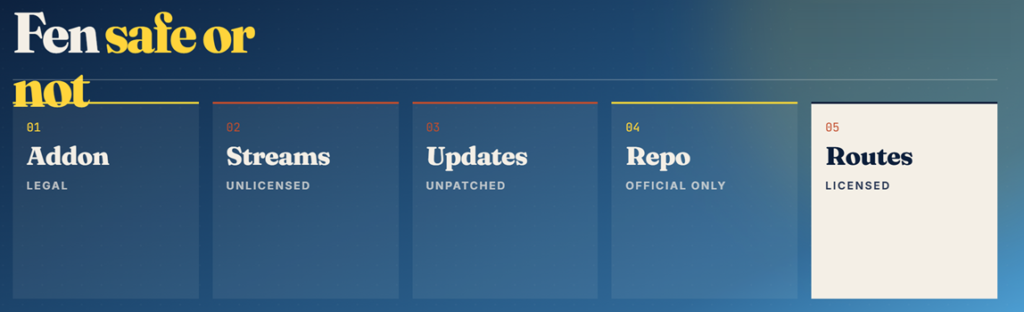
Fen sits in exactly the same grey area as every other third-party Kodi scraper, and it is worth being clear-eyed about that before you install anything.
- The Addon Itself: Fen contains no media of its own and is simply a search interface, so the software is not inherently unlawful to install.
- Stream Legality: Most links it surfaces are unlicensed copies, and streaming those is illegal in many countries regardless of how the addon is described.
- Abandonware Risk: An unmaintained addon stops receiving security patches, which matters more than usual when the code is fetching remote content constantly.
- Repository Trust: Install only from the repository the fork author publishes, because rehosted zips circulating on forums are the classic route for tampered code.
- Safer Routes: Licensed services and free legal channels carry no risk at all, and several are covered in our best Kodi addons roundup.
Best Fen Alternatives
Fen Light AM still runs, but a frozen addon is a countdown rather than a plan. These three alternatives rebuild the same fast, debrid-driven experience with maintainers who are still shipping updates, and each one installed cleanly during testing.
1) Umbrella
Umbrella is the addon I point most Fen refugees toward, because it delivers the same debrid-powered speed with a far healthier development pace behind it. It reached version 6.7 during 2026 and covers movies, television, anime and documentaries with deep Trakt integration included.
Features:
- Wide Debrid Support: Real-Debrid, Premiumize, AllDebrid and TorBox all integrate natively, so whichever service you already pay for will work without extra modules.
- Huge Catalogue: Movies, television, anime and documentaries are all browsable from one menu, giving it noticeably broader coverage than Fen ever offered.
- Trakt Integration: Full Trakt support tracks watch progress and syncs collections across every device you use, which makes long series far easier to follow.
- Frequent Updates: The team ships fixes regularly rather than seasonally, so broken scrapers tend to be repaired within days rather than abandoned entirely.
- Cloud Playback: Beyond torrents it plays files already sitting in your debrid cloud storage, turning the addon into a personal library browser too.
- My Testing: I ran Umbrella beside Fen on identical searches and it returned cached links faster in almost every case I tried.
- Beginner Friendly: Despite the depth of its settings, the default configuration works immediately after authorising debrid, so nothing needs tuning on day one.
| Pros | Cons |
| Fastest cached results | Debrid account effectively required |
| Very large library | Settings menu is dense |
| Active development | Heavier than Fen on old hardware |
| Trakt sync built in | Torrent sources need a VPN |
| Best Fen replacement |
Pricing: Free addon. A debrid subscription is effectively required, starting around €4 per 30 days with Real-Debrid.
Link: umbrellaplug.github.io
2) Red Light
Red Light is the closest thing to a Fen Light continuation that I have tested, and it lives in the same Red Repo many readers already have added. Its maintainer has openly committed to steady updates, which is precisely what the frozen fork stopped doing.
Features:
- Familiar Layout: The menu structure deliberately mirrors Fen Light, so anyone migrating keeps their muscle memory instead of relearning an entire interface.
- Gears Scrapers: It ships with its own maintained scraper package rather than depending on an external module that can fall out of sync.
- Debrid Coverage: Real-Debrid, TorBox, Premiumize and AllDebrid are all supported, matching Fen feature for feature on the accounts that matter.
- Same Repository: Because it sits in the Red Repo, existing Fen users can install it without adding a single new file source.
- Committed Maintainer: The developer has publicly promised constant updates, which is the one thing the frozen Fen Light AM fork can no longer offer.
- Testing Note: I installed it straight after Fen and the source results were near identical, with slightly cleaner quality labelling on releases.
- Light Footprint: It stays deliberately lean on resources, which keeps browsing responsive on older Fire TV hardware that struggles with heavier addons.
| Pros | Cons |
| Direct Fen successor | Younger, smaller community |
| Actively maintained | Debrid still required |
| Own scraper package | Documentation is thin |
| Shares the Red Repo | Fewer settings than Umbrella |
| Very familiar interface |
Pricing: Free addon. Debrid subscription needed for usable results, from about €2.99 per 30 days with AllDebrid.
Link: repo.redwizard.xyz
3) POV
POV is another Fen-derived addon, this one maintained by Fitzwell, and in my testing it has quietly become the steadiest option in the whole family. It keeps the minimal aesthetic Fen fans like while adding several practical touches the original never received.
Features:
- Fen Heritage: The codebase descends directly from Fen, so menus, source dialogs and playback tools all behave the way returning users expect.
- Steady Releases: Fitzwell has kept POV updated through 2026 while several sibling forks stalled, which matters more than any single feature here.
- Clean Source List: Results arrive tidily grouped by quality and provider, making it quick to spot the best cached link without scrolling endlessly.
- Personal Note: I found its search noticeably quicker on television episodes than on films, which suits anyone working through long-running series.
- Trakt and Lists: Watchlists, collections and progress tracking all sync through Trakt, keeping viewing history consistent across Kodi installations you own.
- Low Resource Use: It runs comfortably on a standard Fire TV Stick rather than demanding the 4K Max, which widens its practical audience considerably.
- Simple Setup: Authorise debrid, pick a quality cap, and it is ready, with no scraper module to install separately beforehand.
| Pros | Cons |
| Reliable update record | Smaller catalogue than Umbrella |
| Very light on resources | Debrid strongly recommended |
| Familiar Fen interface | Less anime coverage |
| Tidy source grouping | Minimal customisation |
| Easy first-time setup |
Pricing: Free addon. Works best with a debrid account; Real-Debrid costs roughly €4 per 30 days.
Link: kodifitzwell.github.io
Verdict: Should You Still Install Fen in 2026?
Fen remains one of the best-designed addons Kodi has produced, and the Fen Light AM fork still works today if you have a debrid account and a little patience with its setup quirks. What has changed is the safety net underneath it. With the original developer gone and the fork author confirming development has stopped, every future scraper break becomes permanent. If you already run Fen and it works, there is no urgency to rip it out this week. If you are installing from scratch, put that effort into a maintained fork instead, because the interface you actually like has been rebuilt elsewhere by people who are still shipping fixes.
- Umbrella: The strongest all-round replacement, pairing Fen-level speed with a much larger library and genuinely frequent updates.
- Red Light: The most faithful successor, sitting in the same repository with a maintainer committed to keeping its scrapers alive.
- POV: The lightest option, ideal on older Fire TV hardware where heavier debrid addons start to feel sluggish.
FAQs
Is the Fen Kodi addon still working in 2026?
The Fen Light AM fork still installs and streams if you have a debrid account, but the original Fen and Fen Lite are both dead. Development on the AM fork has also stopped, so treat it as a temporary solution.
What repository do I install Fen from now?
The Fen Light AM fork has been distributed through The Red Repo, with the Old Salts repository as a backup source. Availability has been inconsistent through 2026, so check the video add-ons listing before assuming it is still there.
Do I need Real-Debrid to use Fen?
Yes, effectively. Fen ships without free scrapers and expects a premium debrid account to resolve links. Real-Debrid costs around €4 per 30 days, while AllDebrid starts near €2.99 and offers a short trial.
Why does Fen say no sources are available?
The most common cause is a missing or disabled CocoScrapers module, followed by expired custom TMDb or Trakt API keys. Reset those keys to default, clear the addon cache, restart Kodi, then retest with a popular film.
What is the difference between Fen and Fen Light?
Fen was the original full addon, Fen Lite was the slimmer official follow-up, and Fen Light AM is an unofficial community fork of that lighter build. Only the AM fork has circulated in working form recently.
Does Fen work on a Firestick?
Yes. It runs on Kodi 21.3 Omega on any current Fire TV Stick, though the 4K Max handles scraping and high-bitrate playback more comfortably than the older Lite models do.