Key Takeaway: The Loop 8.0c installs from https://loopaddon.uk/theloop/ and needs no account, subscription or debrid service. The repository was reachable when checked on August 7, 2026, and its strongest feature remains the 24/7 channel guide rather than any single live event.
The Loop occupies an unusual corner of Kodi. It is part live sports schedule, part rolling television channel, and its 24/7 zones keep something playing long after every fixture of the day has finished.
I added the repository to a clean Kodi 21.3 Omega profile on my Fire TV Stick 4K Max, left the 24/7 zones running through several evenings, and opened live fixtures across football and fight nights to see where the addon holds together and where it frays.
What The Loop Kodi Addon Actually Streams
The name causes confusion because The Loop does two quite different jobs, and most people install it expecting only one of them to be there.
- Rolling 24/7 Channels: Themed channels play continuously without any schedule, so a category like classic soaps or motorsport simply keeps running whenever you open it.
- Daily Sports Schedule: A separate section lists football, rugby, cricket and combat-sports fixtures for the day; use Refresh Menu whenever the displayed date or event list looks stale.
- Replay Archive: Recent matches stay watchable for a while after the final whistle, which makes it useful across different time zones and working patterns.
- No Account Needed: Nothing here asks for a login, a subscription or a debrid service, which keeps the barrier to trying it effectively zero.
- Current Build Check: The addon was listed at version 8.0c, updated July 14, 2026, while the live source directory still offered repository.loop-3.0.4.zip during this refresh.
The Loop Addon Versus the Loop Section in Mad Titan Sports
Search results mix these two constantly, and installing the wrong one is a common reason readers tell us the guide did not match what they saw.
- Two Separate Things: The Loop is a standalone addon with its own repository, while Mad Titan Sports contains an internal section that also uses the name.
- Different Repositories: The standalone addon comes from loopaddon.uk, whereas Mad Titan Sports is installed from the Magnetic repository on an entirely different domain.
- Overlapping Content: Both surface looping channels, though the standalone addon carries far more zones and a much deeper archive of rolling categories.
- Different Strengths: Mad Titan is stronger on live fixtures across major leagues, while The Loop is stronger on continuous background viewing.
- Run Both Happily: They install independently without conflict, and our Mad Titan Sports guide covers the other side of that pairing.
| The Loop | Mad Titan Sports | |
|---|---|---|
| Repository | loopaddon.uk | magnetic.website |
| Best for | 24/7 rolling channels | Live major-league fixtures |
| Replays | Yes, Replay Zone | Yes, extensive |
| Debrid support | Not used | Optional Real-Debrid |
| Cost | Free | Free |
What You Need Before You Install The Loop
There is very little to prepare here compared with a debrid addon, but the two Kodi settings below are non-negotiable and catch people out constantly.
- Kodi 21.3 Omega: Run the current stable Kodi release, because the addon and its dependencies expect the Python 3 API rather than legacy Kodi 18.
- Unknown Sources On: Enable Unknown Sources under System, Add-ons first, otherwise Kodi silently refuses the file source and offers no explanation at all.
- The Exact Path: Enter https://loopaddon.uk/theloop/ exactly, because the bare domain does not provide the repository files needed by Kodi.
- A Working VPN: Free sports feeds are the most heavily monitored category online, so keep a reputable VPN connected before you open anything live.
- InputStream Adaptive: Keep Kodi’s official InputStream Adaptive component enabled and updated, because recent playback failures have been resolved by updating this dependency before reopening The Loop.
| Requirement | Why It Matters | Cost |
|---|---|---|
| Kodi 21.3 Omega | Dependency compatibility | Free |
| Unknown Sources enabled | Allows third-party installs | Free |
| https://loopaddon.uk/theloop/ | Current repository source | Free |
| Reputable VPN | Privacy on live feeds | Paid subscription |
| Debrid account | Not used by this addon | Not required |
Installing The Loop on Kodi Step by Step
The install is quick, and the one detail worth triple-checking is the source address, since a single missing character produces a failure that looks like a dead repository.
- Add the Source: Open Settings, File Manager, Add Source, enter https://loopaddon.uk/theloop/ exactly, and name the source theloop so it is easy to identify.
- Install From Zip: Open Add-ons, choose Install from Zip File, select theloop and pick repository.loop-3.0.4.zip, or the highest version shown if the repository changes later.
- Install From Repository: Choose Install from Repository, open The Loop repository, browse to Video Add-ons and select The Loop to install the addon.
- Accept Dependencies: Approve Kodi’s dependency list and let InputStream Adaptive and InputStream Helper finish before opening the addon or testing its live sources.
- Open and Wait: Launch the addon once and allow the zone list to build fully, since the first load is always slower than every later one.
Touring the Zones: 24/7, Replay, Fight and Fan
The zone names are not always self-explanatory, and knowing what sits behind each one turns a confusing menu into something you can navigate quickly.
- 24/7 Zone: Continuous themed channels run here without any schedule, which is the section most people actually stay for once the novelty of fixtures fades.
- Replay Zone: Recently finished matches sit here for a limited window, making it the first place to look if you missed something earlier.
- Fight Zone: Boxing, wrestling and mixed martial arts events gather here, filling up sharply on event nights and looking sparse midweek.
- Soap and Fan Zones: Long-running dramas and fan-curated collections loop continuously, and these are the closest thing here to traditional background television.
- Find My Game: A search tool cuts straight through every zone at once, which beats browsing when you already know the fixture you want.
| Zone | What It Holds | Best Used For |
|---|---|---|
| 24/7 Zone | Continuous themed channels | Background viewing |
| Replay Zone | Recently finished matches | Catching up after work |
| Fight Zone | Boxing, wrestling and MMA | Event nights |
| Today’s Football | Fixtures kicking off today | Live match hunting |
| Soap Zone | Long-running drama loops | Casual daytime viewing |
Adding a Guide With PVR IPTV Simple Client
The Loop can configure Kodi’s PVR IPTV Simple Client automatically, but the confirmation screens matter because the process may disable another guide you already use.
- Install the Client: Open Install from Repository, Kodi Add-on Repository, PVR Clients, then install and enable PVR IPTV Simple Client before returning to The Loop.
- Start Inside The Loop: Open 24/7 Zone and choose Setup EPG (PVR Simple Required), then approve the prompt to update IPTV Simple Client settings.
- Protect Other Guides: Kodi asks whether to disable existing PVR guides; choose carefully if another playlist or addon already supplies channels you want to keep.
- Restart Kodi Fully: Accept the force-close prompt, reopen Kodi and wait for PVR Manager to import the channel groups before entering the TV section.
- Keep It Optional: Skip the EPG entirely if you only use Today’s Schedule, because The Loop’s normal event menus do not depend on the PVR client.
The Loop Not Working? Fixes for Spinning Streams
This addon fails in fairly predictable ways, and separating a genuine outage from a local problem saves you reinstalling something that was never broken.
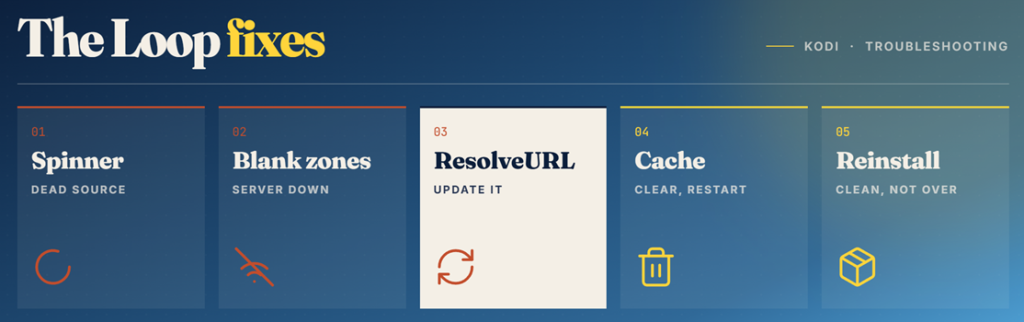
- Endless Spinner: A stream that spins without starting is almost always a dead source, so back out and pick a different link immediately.
- Empty Zones: First open https://loopaddon.uk/theloop/ in a browser; if the directory itself is unavailable, wait before reinstalling because the repository has had short outages.
- Dependency Errors: Update The Loop, InputStream Adaptive and InputStream Helper, because an older component can leave menus visible while every selected source fails to start.
- Stale Schedule: Run Refresh Menu, check for version 8.0c or newer, clear The Loop’s cache and restart Kodi if an old date or fixture list remains.
- Clean Reinstall: When nothing else helps, uninstall the addon and its repository, then add the source again rather than installing over the top.
| Symptom | Likely Cause | Fix |
|---|---|---|
| Stream spins forever | Dead source link | Try the next link listed |
| All zones empty | Repository server down | Wait and retry later |
| Playback fails instantly | Outdated ResolveURL | Update the resolver module |
| Old date or fixtures | Stale menu or addon | Refresh, update and restart |
| Install fails | Wrong source path typed | Re-add using the subfolder path |
Is The Loop Safe? What the Domain Redirect Tells You
There is a genuine wrinkle here that most guides skip over, and it is worth understanding before you type anything into Kodi File Manager.
- The Bare Domain: Visiting loopaddon.uk currently loads unrelated sports-betting content in an embedded frame rather than a Kodi repository page.
- Only the Subfolder: The repository itself lives one level down, and that path serves a normal directory listing with the expected zip files inside.
- Why It Matters: Redirect behaviour like this is a reason to install only from the exact path and never from mirrored zips found on forums.
- Content Legality: The addon holds no media, but the live feeds it surfaces are redistributed broadcasts, and watching those is unlawful in many countries.
- Safer Alternatives: Legal free channels through official services carry no risk, and several appear in our best Kodi sports addons comparison.
Best The Loop Alternatives
The Loop is worth keeping for its rolling channels alone, but a repository that occasionally disappears for a day is not something to rely on before a big fixture. These three alternatives each cover a different weakness, and all installed cleanly during testing.
1) Rising Tides
Rising Tides is the addon I reach for when the fixture I want is football or a pay-per-view fight card. It is narrower than The Loop by design, dropping rolling channels entirely in favour of a tightly curated live events list that loads quickly.
Features:
- Football Specialist: Premier League, Championship and European club fixtures are its core focus, and coverage of those competitions is deeper than most rivals manage.
- Live PPV Events: Boxing, wrestling and mixed martial arts cards appear on event nights, which is exactly where free sports addons usually fall apart.
- Highlights Section: Condensed match highlights sit alongside full fixtures, which suits anyone who wants the result without ninety minutes of commitment.
- No Account Required: Like The Loop it asks for nothing, so there is no subscription, no debrid service and no sign-up form anywhere.
- Testing Note: I found its links appeared roughly five minutes before kick-off rather than hours ahead, which explains most complaints about it.
- Light and Fast: The interface is deliberately minimal, so it loads noticeably faster than heavier all-in-one sports addons on older Fire TV hardware.
- Multiple Repo Mirrors: Several repository addresses serve the same files, which gives you a fallback when one host becomes unreachable temporarily.
| Pros | Cons |
| Excellent football coverage | Links appear very late |
| Strong PPV event nights | No 24/7 channels |
| Very light interface | Narrow sport selection |
| Completely free | Repository zips look dated |
| Multiple mirror hosts |
Pricing: Free, ad-free addon. No account, payment card or debrid subscription is required at any point.
Link: https://mullafabz.xyz/
2) DLTV (DaddyLive)
DLTV is the addon I install when I want a proper daily schedule rather than rolling channels, and it covers far more sports than The Loop attempts. Published by arkane14, it reads the DaddyLive listings directly and needs nothing paid to work.
Features:
- Full Daily Schedule: Every fixture starting today appears grouped by sport, making it the quickest way to find something already in progress.
- Global Channel List: A large general channel browser sits alongside sport, heavy on United States networks with solid British and European coverage too.
- Several Links Each: Events usually carry multiple numbered sources, so one failing provider rarely takes the entire fixture offline for you.
- Frequent Updates: The developer ships new builds regularly, which matters because the upstream site changes address more often than most.
- Personal Note: I keep it installed purely for its schedule view, which finds fixtures faster than browsing zones ever does.
- Zero Cost: No account, subscription or debrid service is needed, keeping it genuinely free in a way most sports addons are not.
- Wide Sport Range: Cricket, tennis, motorsport and horse racing all appear alongside the major leagues, which broadens its usefulness considerably.
| Pros | Cons |
| Best daily schedule view | Breaks when upstream moves |
| Huge channel selection | Needs frequent updating |
| Multiple links per event | No rolling channels |
| Completely free | Blocked by some providers |
| Very wide sport range |
Pricing: Free addon. No debrid account is used, though a VPN subscription is strongly recommended alongside it.
Link: https://arkane14.github.io/
3) Mad Titan Sports
Mad Titan Sports is the most complete free sports addon I have tested, and it is the one I would install if I could only keep a single option. It pulls from several source lists, so a failure in one provider rarely empties the whole addon.
Features:
- Aggregated Sources: It reads several independent lists rather than one website, which is the main reason it survives outages that flatten rival addons.
- Every Major League: Football, American football, basketball, baseball, hockey and motorsport all have dedicated sections rather than being buried together.
- Deep Replay Archive: Finished matches stay available for days, giving it the best catch-up coverage of any free sports addon tested here.
- Debrid Support: Connecting Real-Debrid improves link quality noticeably, although the addon remains fully usable on free sources without any account.
- My Experience: I opened three simultaneous fixtures and it found a working feed for all of them, which no other free addon managed.
- Own Loop Section: It carries its own rolling channel area too, so it partly covers what people install The Loop for anyway.
- Current Repository: The Magnetic source at magnetic.website/repo/ was reachable during this refresh and still listed repository.Magnetic-1.1.0b.zip.
| Pros | Cons |
| Most complete coverage | Menus take learning |
| Survives source outages | Heavier on older sticks |
| Excellent replay archive | Free link quality varies |
| Optional debrid support | Occasional dead sections |
| Very stable repository |
Pricing: Free addon. Optional Real-Debrid improves stream quality from roughly €4 per 30 days.
Link: https://magnetic.website/repo/
Verdict: Is The Loop Still Worth Installing?
The Loop earns its place on a Kodi build for one reason above all others, and it is not the live sport. The rolling 24/7 zones give you something genuinely watchable at any hour without hunting for a working link, and very few free addons do that well. The live schedule is a useful bonus rather than a headline feature, and it is less dependable than a dedicated sports addon. Add the repository using its exact subfolder path, ignore the bare domain entirely, and pair it with something stronger on fixtures so a bad night for one repository never leaves you with nothing to watch.
- Rising Tides: The sharpest football and pay-per-view option, ideal when you want one fixture rather than background viewing.
- DLTV (DaddyLive): The best daily schedule, covering far more sports and channels than The Loop attempts to list.
- Mad Titan Sports: The most complete free sports addon, aggregating several sources so single outages barely affect it.
FAQs
Is The Loop Kodi addon still working in 2026?
Yes. The source directory was reachable on August 7, 2026, and the latest tracked addon release was version 8.0c from July 14. Short outages still happen, so confirm the repository before reinstalling Kodi.
Where do I install The Loop addon from?
Use https://loopaddon.uk/theloop/. The bare domain displays unrelated betting content, while the theloop subfolder contains repository.loop-3.0.4.zip and the InputStream Helper package.
Do I need Real-Debrid for The Loop?
No. The Loop streams live and looping feeds directly and never touches torrents, so a debrid account brings no benefit at all. It is completely free to run beyond your normal broadband cost.
What is the 24/7 Zone in The Loop?
It is a set of themed channels that play continuously with no schedule, covering things like classic soaps, motorsport and fan collections. Most long-term users install the addon for this section rather than live fixtures.
Why do The Loop streams keep buffering?
Free sources are shared and often overloaded during popular fixtures. Try the next link rather than waiting, raise the Kodi video cache, and use a wired ethernet adapter on the Firestick if stuttering persists.
Is The Loop the same as the Loop section in Mad Titan Sports?
No. They share a name but are separate projects from different repositories. Mad Titan Sports includes an internal rolling-channel area, while The Loop is a standalone addon with far more zones.