Key Takeaway: The TMDB Stremio addon, built by mrcanelas, replaces Stremio’s thin default catalogs with rich metadata, artwork, and browsable lists pulled from The Movie Database. Install it from the verified community listing, set your language, and optionally connect a free TMDB account to sync your watchlist and favourites across every signed-in device.
The Movie Database addon is one of the most installed metadata tools for Stremio, and it changes how every movie and show looks inside the app. This guide walks through installing it cleanly and configuring each option properly.
I installed the current 3.1.7 build on a clean Stremio account and worked through every configuration switch, from language and catalog selection to the optional TMDB, IMDb, and RPDB integrations. Below I explain what each setting actually changes so you can set it up once and avoid the trial-and-error I went through.
What the TMDB Stremio Addon Actually Does
The addon swaps Stremio’s default catalogs for data pulled straight from The Movie Database, giving richer artwork, descriptions, and browsing rows than the built-in Cinemeta source provides on its own.
- Metadata Source: it pulls titles, posters, cast, runtimes, and descriptions directly from The Movie Database, so detail pages look fuller and more accurate than Stremio’s stock catalog.
- Custom Catalogs: it adds browsable rows like popular, trending, top rated, and now playing, letting you replace the sparse default home board with organised, genre-aware lists.
- Multi-Language: the addon supports dozens of interface and metadata languages, so titles, summaries, and artwork can appear in your own language instead of defaulting only to English.
- Personal Lists: once you connect a free TMDB account, your watchlist, favourites, and custom lists sync into Stremio as catalogs you can open on any signed-in device.
- No Streams Itself: it only supplies information and browsing, never video links, so you still need separate streaming or debrid addons to actually play any title you find.
Accounts and Keys You Need Before Installing
You can run the TMDB addon with zero setup, but a few optional accounts unlock personal lists and richer ratings. Gather these before you start so configuration flows without interruptions.
- Stremio Account: a single synchronised Stremio login is required, because addons install to your account and then follow you onto Firestick, phones, and web automatically.
- TMDB Account: a free account at themoviedb.org is optional, but it is the only way to sync your watchlist and custom lists into Stremio.
- API Read Token: personal list syncing asks for a TMDB read access token, generated free inside your account settings, which you paste into the addon’s configuration page.
- RPDB Key: an optional RatingPosterDB key overlays scores onto poster art; the free tier covers basic use, and a paid key removes its request limits.
- Stable Connection: keep the device you configure on a reliable network, since the addon fetches artwork and catalog data live from The Movie Database every session.
| Requirement | Needed for | Cost |
|---|---|---|
| Stremio account | Installing any addon | Free |
| TMDB account | Personal list sync | Free |
| API read token | Watchlist and lists | Free |
| RPDB key | Rating posters | Free tier or paid |
Installing the TMDB Addon on Stremio Step by Step
Installation starts from the verified community listing rather than a random configuration link. Open the addon page, set your options, then send the finished manifest into Stremio in a few clicks.
- Open the Listing: visit the addon’s page on the community catalog, confirm the version and reachable status, then click through to its configuration screen to begin setup.
- Set Options First: choose your language and catalogs before installing, because those choices are baked into the manifest URL that Stremio saves when you add the addon.
- Click Install: the configuration page generates an Install button that opens Stremio directly, or copies a manifest URL you can paste into Stremio’s search-bar addon field.
- Confirm in Stremio: Stremio shows the addon name and catalogs on an install prompt; approve it, and the new rows appear on your Discover and Board screens.
- Verify It Works: open Discover, pick a TMDB catalog, and load any title’s detail page to confirm posters, descriptions, and ratings are pulling in correctly before configuring extras.
Setting Your Language and Regional Catalogs
Language is the single setting that changes the most, affecting titles, descriptions, and artwork together. Set it deliberately, because switching later means reinstalling the addon with a new manifest.
- Interface Language: pick from dozens of options on the configuration page, and both catalog names and metadata summaries switch to that language across every device that syncs the addon.
- Artwork Region: localized posters and logos follow your language choice, so selecting a regional variant can surface native-language cover art instead of the default English promotional images.
- Catalog Relevance: some regional catalogs reorder trending and popular rows to match local viewing, which is useful if your household mostly watches non-English or regional-language films and series.
- Fallback Behaviour: when a title lacks translated data, the addon falls back to English text and artwork automatically, so you never see blank descriptions on obscure or newly added entries.
- Reinstall to Change: language lives inside the manifest, so altering it means reconfiguring on the listing and reinstalling; your Stremio account then updates the addon on every linked device.
Connecting a TMDB API Key for Personal Lists
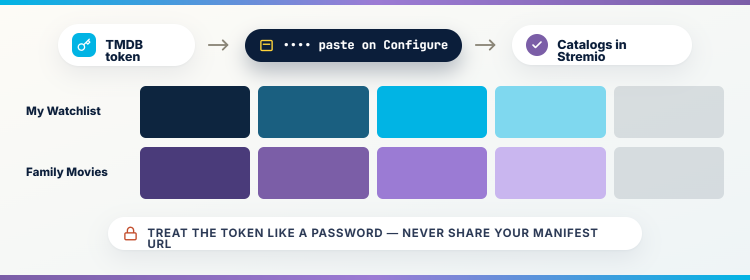
The account connection is what turns TMDB from a browsing tool into a personal library. Linking it brings your own watchlist and lists into Stremio as native catalogs.
- Generate the Token: sign in at themoviedb.org, open account settings, find the API section, and copy the read access token that the addon uses to reach your lists.
- Paste on Configure: drop that token into the configuration page’s TMDB field, and the addon gains permission to read your watchlist, favourites, and any custom lists you built.
- Watchlist as Catalog: your saved watchlist then appears as a Stremio row, so anything you flagged on the website or mobile app is ready to open on your television.
- Custom Lists Sync: themed lists you curate on The Movie Database, such as a family-movie list, become browsable catalogs inside Stremio without any manual copying between the two services.
- Privacy Reminder: the token is tied to your account, so treat it like a password, never share your manifest URL publicly, and regenerate the token if it leaks.
Adding IMDb Ratings, RPDB Posters, and MDBList
Three optional integrations layer extra ratings and richer posters on top of the base data. Each one is a simple toggle or key, and you can enable only the ones you want.
- IMDb Integration: enabling it maps TMDB entries to IMDb identifiers and shows IMDb ratings on detail pages, which many viewers trust more than crowd scores alone for films.
- RPDB Posters: RatingPosterDB prints the numeric score directly onto each poster, so you can judge quality while scrolling a catalog without opening every single title’s detail page.
- MDBList Catalogs: connecting MDBList lets you import community-built and personal lists as extra Stremio rows, expanding browsing far beyond the addon’s ten default catalogs when you want more.
- Selective Enabling: every integration is independent, so you can run IMDb ratings without RPDB, or MDBList without a TMDB account, matching the setup to what you actually use.
- Performance Note: each active integration adds a data call, so enabling everything at once can slow catalog loading slightly on older Fire TV hardware; disable extras you rarely open.
| Integration | What it adds | Needs a key |
|---|---|---|
| IMDb | IMDb ratings and IDs | No |
| RPDB | Scores printed on posters | Yes (free tier) |
| MDBList | Extra imported list catalogs | Yes |
| Search | TMDB-powered title search | No |
Choosing Which Catalogs Reach Your Home Board
By default the addon enables ten catalogs, which can crowd your home screen. Trimming them to the rows you use keeps Stremio fast and your browsing focused on what matters.
- Ten by Default: the configuration page ships with popular, trending, top rated, and similar rows active, and all of them push onto your Board unless you deselect some.
- Toggle Individually: untick catalogs you never browse, such as a genre you dislike, and they disappear from Discover, leaving a cleaner board that loads noticeably faster on television.
- Order Matters: the sequence on the configuration page roughly sets the order rows appear in Stremio, so place your most-used catalogs near the top before you install.
- Movies and Series: separate catalogs exist for films and shows, letting you keep, for example, trending movies while dropping trending series if your household only watches one type.
- Rebuild Anytime: because catalogs live in the manifest, changing your selection is just a reconfigure and reinstall, and your Stremio account syncs the new layout to every device.
TMDB Addon Compared With Cinemeta Defaults
Cinemeta is Stremio’s built-in metadata provider, and many users run both. Understanding where the TMDB addon improves on it helps you decide which catalogs to keep enabled. Our roundup of the best Stremio addons covers where each one fits.
- Richer Artwork: TMDB generally serves higher-quality and more numerous posters, backdrops, and logos than Cinemeta, so browsing feels more like a polished streaming service than a plain list.
- More Catalogs: Cinemeta offers a limited set of rows, while the TMDB addon adds popular, trending, and top-rated catalogs plus your own imported lists once connected.
- Language Depth: Cinemeta’s localization is basic, whereas the TMDB addon translates titles, descriptions, and artwork into many languages, which matters for non-English households wanting native metadata everywhere.
- Personal Sync: Cinemeta cannot show your external watchlist, but the TMDB addon pulls your own TMDB lists into Stremio, something the default provider simply does not do.
- Run Together: you can keep Cinemeta enabled for compatibility while letting the TMDB addon supply the browsing rows, since Stremio happily uses several metadata sources at once.
| Feature | Cinemeta (default) | TMDB addon |
|---|---|---|
| Poster quality | Basic | Higher, multiple options |
| Extra catalogs | Few | Ten plus imported lists |
| Language options | Limited | Dozens |
| Personal list sync | No | Yes, with account |
Installing and Syncing It on Firestick
Because addons live on your Stremio account, the smoothest path is to configure on a computer, then let your Fire TV Stick pick up the addon automatically after you sign in.
- Configure on Desktop: set language, catalogs, and integrations in a browser first, since typing tokens and toggling options is far easier there than with a Fire TV remote.
- Sign In Once: open Stremio on the Fire TV Stick, log into the same account, and the TMDB addon and all its catalogs appear without any extra installation.
- Check Board Layout: confirm your chosen catalogs render correctly on the television, because oversized boards with many rows can feel sluggish on the lower-powered Fire TV Stick Lite.
- Pair With Streams: the TMDB addon only browses, so install a separate streaming or debrid addon on the same account to actually play the titles you discover here.
- I Tested Sync: I configured on my laptop and the addon appeared on my Fire TV Stick 4K within seconds of signing in, with every catalog as I arranged.
TMDB Catalogs Not Loading? Practical Fixes
Most TMDB addon problems trace back to a bad token, a network hiccup, or an overloaded board rather than the addon being broken. Work through these before reinstalling anything.
- Empty Catalogs: if rows appear but stay blank, your device likely lost connection to The Movie Database; check the network and reopen Stremio before assuming the addon failed.
- Lists Not Syncing: a watchlist that never appears usually means the API token was pasted incorrectly, so regenerate it on themoviedb.org and reconfigure the addon with the fresh token.
- Slow Loading: boards that crawl are often overloaded with catalogs and integrations, so disable rows you rarely use and turn off RPDB temporarily to isolate the cause.
- Wrong Language: if metadata shows the wrong language, you likely installed before setting it, so reconfigure on the listing, reinstall, and let your account push the corrected manifest out.
- Old Version: a stale manifest can behave oddly after updates, so remove the addon, reinstall the current build from the listing, and confirm the version matches the latest release.
| Symptom | Likely cause | Fix |
|---|---|---|
| Blank catalog rows | Network or TMDB outage | Recheck connection, reopen Stremio |
| Watchlist missing | Bad API token | Regenerate token, reconfigure |
| Very slow board | Too many catalogs | Disable unused rows |
| Wrong language | Installed before setting it | Reconfigure and reinstall |
Keeping Metadata, Posters, and Ratings Current
The addon updates its data live, but a little maintenance keeps your setup accurate and fast. A few habits stop stale manifests and broken integrations from creeping in over time.
- Watch Version Notes: check the listing occasionally for new releases, because updates fix broken catalogs and add options, and reinstalling the current build keeps your setup aligned with them.
- Rotate Tokens: if you suspect your manifest URL was shared, regenerate the TMDB token and RPDB key, then reconfigure so old credentials can no longer read your personal lists.
- Prune Catalogs: revisit your enabled rows every few months and drop ones you stopped using, since a lean board loads faster and keeps browsing focused on current interests.
- Confirm Ratings: if IMDb or RPDB scores stop showing, toggle the integration off and on during a reconfigure, which usually restores the data without touching the rest of your setup.
- Back Up Choices: note your language, catalog selection, and keys somewhere safe, so rebuilding the addon after a reinstall or account change takes minutes rather than guesswork and retesting.
Is the TMDB Addon Safe and Legal to Use
The TMDB addon itself is a legitimate metadata tool that shows information, not pirated video. The safety questions are about your keys and which streaming addons you pair with it.
- Metadata Only: the addon serves descriptions, artwork, and ratings sourced from a public database, so browsing with it carries none of the risk attached to unofficial streaming sources.
- Official Data: The Movie Database is a well-known, legitimate service, and the addon simply presents its catalog, meaning the information layer of your Stremio setup is entirely above board.
- Guard Your Keys: the real risk is credential leakage, so never post your manifest URL or tokens in forums, since anyone with them can read your personal TMDB lists.
- Streaming Is Separate: legality depends on the playback addons you add alongside it, so review each streaming or debrid source you install for its own licensing and safety.
- Use a VPN Wisely: a VPN protects privacy for streaming addons you pair with TMDB, though the metadata addon alone does not require one to function safely or reliably.
Verdict
The TMDB addon is the cleanest way to make Stremio look and browse like a proper streaming service, and its configuration rewards a few careful minutes. Set your language first, connect a TMDB account only if you want personal lists, enable just the integrations you will use, and trim catalogs so your board stays fast. Configured that way, it is reliable, private, and genuinely better than the default.
FAQs
Is the TMDB Stremio addon free?
Yes, the addon is completely free, and the optional TMDB account, API token, and MDBList integration cost nothing on their standard tiers, though RPDB offers a paid key for heavier use.
Do I need a TMDB account to use it?
No, the addon works without any account for catalogs and metadata. You only need a free TMDB account and API token if you want your personal watchlist and custom lists synced into Stremio.
Does the TMDB addon play movies or shows?
No, it only provides metadata, artwork, and browsing catalogs. You must install a separate streaming or debrid addon on the same Stremio account to actually play any title you discover through it.
Why are my TMDB catalogs empty?
Empty rows usually mean a temporary connection problem or a TMDB outage. Recheck your network, reopen Stremio, and if lists still fail, regenerate your API token and reconfigure the addon from its listing.
Can I change the language after installing?
Yes, but language is stored in the manifest, so you must reconfigure the addon on its listing and reinstall it. Your Stremio account then pushes the updated language to every signed-in device automatically.
How is it different from the default Cinemeta?
The TMDB addon adds richer posters, many more catalogs, deep language options, and personal list syncing that Cinemeta lacks. For a wider view, see our guide to the Cinemeta Stremio addon and how they compare.