Key Takeaway: The original WebStreamr Stremio addon is archived, and its former public manifest now redirects to a retirement notice. You cannot install that shared instance today. Existing private or self-hosted deployments may still answer, but their extractors will gradually break as streaming sites change. Treat WebStreamr as retired software, remove its dead public entry, and migrate deliberately.
Old WebStreamr guides still present a working configuration page, so the current failure can look like a temporary outage. I checked the former manifest and configuration URLs, the archived repository, its final package version, the retirement notice, Stremio’s addon guidance, and the maintained fork landscape on August 14, 2026. This guide explains what ended, what can still run, and which recovery path fits each installation.
Is the WebStreamr Stremio Addon Still Working?
The honest answer depends on which WebStreamr you mean. The original public service is retired, while privately hosted copies can continue until upstream changes break them.
- Public Instance: the old webstreamr.hayd.uk manifest and configuration paths now redirect to a retirement page instead of returning an installable Stremio manifest.
- Source Project: GitHub marks the original repository read-only since April 10, 2026, preventing new fixes, releases, security patches, and extractor maintenance.
- Final Version: the archived package identifies itself as version 0.69.1, which is a historical build number rather than evidence of current compatibility.
- Private Deployments: the retirement notice says private instances may work temporarily, but warns that functionality can degrade whenever supported hosters change their pages.
- My Finding: I would not troubleshoot the shared endpoint as an outage because its destination explicitly announces retirement and offers no working manifest.
| WebStreamr route | Status on August 14, 2026 | Practical decision |
|---|---|---|
| Former public instance | Retired and redirected | Remove it from Stremio |
| Original GitHub project | Archived and read-only | Use only as reference |
| Existing private instance | May still respond | Plan a migration |
| Self-hosted 0.69.1 container | Possible but unsupported | Accept maintenance risk |
| Independent fork | Separate project | Re-evaluate from scratch |
What WebStreamr Actually Did Inside Stremio
WebStreamr was a stream-source addon, not a catalog, player, or debrid provider. It searched supported websites and returned direct HTTP options beside other Stremio results.
- HTTP Results: it extracted ordinary web-hosted video URLs, avoiding torrent transfers while remaining dependent on each source website and file host staying compatible.
- Title Matching: a required TMDB access token let self-hosted copies resolve titles and years before asking source modules for matching movie or episode pages.
- Source Modules: individual website adapters found candidate pages, while extractor modules translated supported hoster embeds into links that Stremio could attempt to play.
- Fallback Role: the maintainer described HTTP streams as limited and recommended keeping WebStreamr behind a debrid-based setup rather than making it the primary source.
- No Hosted Library: WebStreamr did not own a video catalog or guarantee rights; it acted as a connector between Stremio and changing third-party sites.
Why Old WebStreamr Installation Links Fail
A dead Install button is now expected behavior, not a device-specific fault. The retired endpoint no longer serves the JSON document Stremio needs to register an addon.
- Redirected Manifest: requesting the former manifest sends the browser to an HTML retirement page, which Stremio cannot parse as an addon description.
- Retired Configuration: the old configuration address reaches the same notice, so changing languages, proxy settings, or sources cannot generate a replacement manifest.
- Archived Backend: even a copied historical URL cannot restore the public server because the hosted application behind that address has been deliberately withdrawn.
- Account Persistence: Stremio may keep the old addon entry synchronized across devices after its server disappears, making the icon look installed but unusable.
- False Fixes: clearing Firestick cache, changing DNS, reinstalling Stremio, or enabling a VPN cannot convert a retirement webpage back into a valid manifest.
Status Link: https://webstreamr-is-deprecated.elfhosted.com/
Remove the Retired Public WebStreamr Entry
Removing the obsolete entry prevents repeated timeouts and cleans the stream list. Perform the change on one signed-in device, then let Stremio synchronize the account.
- Open Addons: use Stremio desktop, web, or mobile, open the puzzle-piece Addons area, and switch to the section containing installed community addons.
- Find WebStreamr: search the installed list rather than the public catalog, because retired community services can remain attached to an older Stremio account.
- Select Uninstall: remove only the entry whose manifest points to the former Hayduk public address, leaving unrelated source, metadata, and subtitle addons unchanged.
- Restart Clients: close Stremio completely on Firestick and other devices, reopen it, and confirm WebStreamr no longer appears beneath movie or episode streams.
- Check Duplicates: remove any second WebStreamr configuration using the same retired host, since individually configured manifests can appear as separate installed entries.
Stremio’s support documentation explains that community addons run as web services rather than extra software installed locally. Uninstalling the entry removes the account connection; there is no separate WebStreamr APK to delete from Firestick storage.
Can a Private WebStreamr Instance Still Be Used?
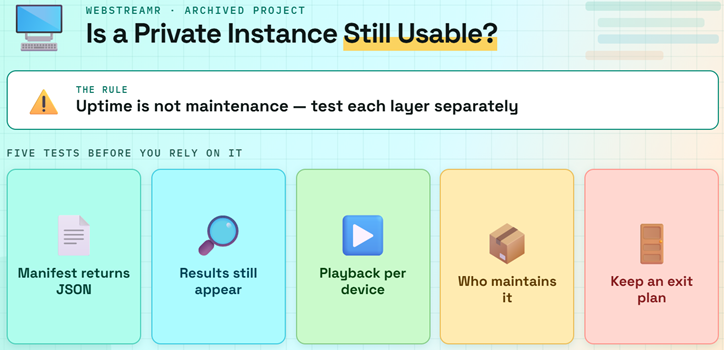
An already-running private instance may remain useful briefly, but continued uptime is not the same as maintenance. Test its manifest, results, and playback separately before relying on it.
- Manifest Test: open your private base URL followed by manifest.json and confirm it returns JSON naming WebStreamr, not an error, login page, or redirect.
- Result Test: check several current films and episodes because a healthy manifest proves only the server starts, not that individual source adapters still work.
- Playback Test: try Android TV and desktop separately, since header handling and HLS redirects caused platform-specific failures even before the original project was archived.
- Update Test: verify who now maintains your image or managed service; containers pinned to archived 0.69.1 receive no upstream extractor repairs.
- Exit Plan: keep another maintained source ready and record your private configuration, because one hoster redesign can remove many WebStreamr results without warning.
Self-Host the Archived WebStreamr Code Carefully
Self-hosting remains technically possible because the code and container instructions are public. It is an unsupported preservation project, however, not a normal current installation method.
- Docker Host: use a system capable of running containers continuously; a Firestick is a playback client and should not host the Node service itself.
- TMDB Token: provide a TMDB API Read Access Token through the required TMDB_ACCESS_TOKEN variable so the addon can match titles and release years.
- Service Port: the archived example exposes container port 51546, which must be reachable through HTTPS before remote Stremio devices can load the manifest.
- Persistent Cache: mount storage for the cache directory if you want SQLite cache files to survive container replacements, restarts, and host maintenance.
- Maintenance Burden: I would isolate the container and monitor logs closely because archived dependencies and abandoned extractors accumulate reliability and security risk over time.
| Requirement | Archived default | What you must supply |
|---|---|---|
| Application | WebStreamr 0.69.1 | Archived container image or source |
| Metadata lookup | TMDB integration | API Read Access Token |
| Web service | Port 51546 | Secure public HTTPS route |
| Cache | Operating-system temporary folder | Persistent mounted directory |
| Updates | None from original project | Your own fixes or migration |
Link: https://github.com/webstreamr/webstreamr
Configure Sources, Extractors, and TMDB Matching
WebStreamr’s useful controls live at the server level. They can narrow broken modules or route difficult hosts, but they cannot revive retired upstream websites automatically.
- Disable Sources: DISABLED_SOURCES accepts comma-separated website modules, allowing an administrator to stop slow or broken sources before they delay every title search.
- Disable Extractors: DISABLED_EXTRACTORS removes specific file-host handlers when they return dead links, trigger blocks, or repeatedly fail during embedded-player extraction.
- Proxy Rules: PROXY_CONFIG maps selected domains or wildcard patterns to HTTP or SOCKS proxies when a hosting provider rejects the server’s normal address.
- Cloudflare Helper: FLARESOLVERR_ENDPOINT can supply sessions for some challenges, although the archived documentation warns that TLS fingerprinting still limits cookie reuse.
- Custom Identity: MANIFEST_ID and MANIFEST_NAME distinguish multiple private deployments, preventing one WebStreamr configuration from silently replacing another inside the same Stremio account.
Understand WebStreamr’s MediaFlow Dependency
Some file hosts lock a stream to the server address that requested it. MediaFlow acted as the middle layer so Stremio playback came from that same network path.
- IP Locking: a host can issue a link usable only by WebStreamr’s server address, while the Firestick requests playback from a different household address.
- Header Preservation: proxying can preserve Referer, Origin, and related request details that embedded players expect but Stremio or an external player may omit.
- Restricted Hosts: the archived documentation listed Fastream, FileLions, FileMoon, LuluStream, Mixdrop, Streamtape, and VOE as requiring MediaFlow for WebStreamr playback.
- Android Limitation: Dropload and SuperVideo were documented as failing on Android because Stremio did not pass the required Referer correctly through HLS playlists.
- Security Cost: a proxy sees requested media URLs and consumes bandwidth, so protect it with authentication, updates, restricted access, and careful logging policies.
Use a Private WebStreamr Instance on Firestick
Firestick does not need a separate WebStreamr application. Configure and install a valid private manifest elsewhere, then use the same Stremio account on the television.
- Configure Elsewhere: open the private configuration page on a phone or computer, where long HTTPS addresses and optional proxy credentials are easier to enter accurately.
- Validate First: confirm the generated manifest opens as JSON before selecting Install, preventing a server error page from being saved to the Stremio account.
- Match Accounts: sign into Firestick with the same Stremio account used during installation, because community addon connections synchronize through the account rather than local files.
- Restart Stremio: force-close and reopen the television app after account changes so its installed-addon list and available stream sources refresh cleanly.
- Compare Platforms: if desktop results play but Firestick fails, investigate HLS headers, proxy routing, codec support, and external-player behavior before changing source modules.
Fix Empty Results, Timeouts, and Playback Errors
Troubleshooting should identify which layer failed. Start with the manifest, then query results, extractor output, proxy behavior, and finally the Stremio player.
- No Manifest: a redirect to the retirement notice confirms the public instance is gone; an error on private hosting points to container or HTTPS routing.
- No Results: confirm the TMDB token, inspect source errors, and try several mainstream titles before assuming every extractor or upstream website failed together.
- Dead Streams: a displayed result followed by immediate failure usually means the source found a page but its extractor returned an expired or changed host link.
- Desktop Only: successful computer playback with Android failure suggests missing headers, redirected HLS playlists, unsupported media, or a MediaFlow routing problem.
- Slow Search: disable the worst source modules individually and review server logs, rather than stacking retries that lengthen every Stremio stream request.
| Symptom | Likely layer | First action |
|---|---|---|
| Retirement page opens | Public endpoint | Uninstall old entry |
| Manifest gives server error | Private deployment | Check container and HTTPS |
| Titles return nothing | TMDB or source module | Verify token and logs |
| Results fail instantly | Extractor or file host | Disable failing module |
| Desktop works, Firestick fails | Headers, HLS, or proxy | Test MediaFlow path |
| Search takes too long | Slow upstream source | Narrow enabled sources |
Privacy, Security, and Legal Limits After Archival
Archival changes the risk calculation. An open-source license preserves access to code, but nobody is now committed to patching dependencies, reviewing reports, or repairing extractors.
- Community Software: Stremio states that community addons are independently controlled, so its support team cannot repair WebStreamr or verify the websites it queried.
- Dependency Risk: an unsupported Node application can accumulate vulnerable libraries, so expose only necessary ports, update the host, and isolate the container network.
- Proxy Secrets: never publish proxy usernames, passwords, TMDB tokens, or MediaFlow credentials inside a shareable manifest address, screenshot, forum post, or public log.
- Viewing Records: private addon and proxy operators can observe requests and addresses, making the host’s logging, retention, authentication, and privacy policy important.
- Copyright Boundary: direct HTTP playback is not automatically legal; verify that each selected source has distribution rights for the title and your region.
Choose a Maintained Path Beyond WebStreamr
The right replacement depends on whether you wanted direct HTTP fallback, debrid results, or one merged stream list. Migrate the function, not merely the familiar name.
- Merged Results: choose an actively maintained aggregator when you want several installed sources deduplicated and sorted into one clean Stremio stream list.
- Debrid Playback: choose a maintained debrid-capable addon when speed and cached availability matter more than WebStreamr’s no-account direct HTTP approach.
- HTTP Fallback: verify any direct-stream successor’s current manifest, repository activity, source policy, and device limitations instead of assuming a WebStreamr fork is equivalent.
- Private Hosting: prefer software with recent releases, documented secrets management, working health checks, and an operator who clearly owns updates and incident response.
- Migration Guide: our AIOStreams setup guide explains how to combine several maintained sources when replacing a retired standalone Stremio addon.
Verdict
WebStreamr was a clever HTTP fallback, but the original public addon is no longer installable and the source project is archived. Remove the retired manifest instead of chasing Firestick fixes. Keep an existing private copy only while it remains controlled, monitored, and useful, then move to maintained software. New users should not build a primary Stremio setup around an unsupported 0.69.1 codebase.
FAQs
Is WebStreamr down or permanently discontinued?
The original public WebStreamr service is retired, not temporarily down. Its former manifest and configuration URLs redirect to a retirement notice, while GitHub marks the repository archived since April 10, 2026. A separately operated private instance may still answer, but that does not restore the discontinued shared service.
Can I install the old WebStreamr manifest on Stremio?
No. The old public address returns an HTML retirement page instead of the JSON manifest Stremio expects. If the dead entry remains on your account, uninstall it from the installed community addons list. Reinstalling Stremio, changing DNS, or using a VPN will not recreate the retired backend.
Does WebStreamr require Real-Debrid?
No. WebStreamr was designed to return direct HTTP links and did not require a debrid account. Its maintainer nevertheless recommended using debrid-based streaming as the main option and WebStreamr as fallback, because direct host links were more fragile, rate-limited, and dependent on platform-specific headers.
Can I still self-host WebStreamr with Docker?
Technically yes, because the archived repository documents a Docker deployment using port 51546 and a required TMDB access token. Practically, the original project provides no further extractor, dependency, or security maintenance. Self-host only if you can isolate, monitor, troubleshoot, and eventually replace unsupported software.
Is WebStreamrMBG the same addon as WebStreamr?
No. WebStreamrMBG identifies itself as an independently maintained fork with a redesigned configuration interface. It inherits code history, not automatic endorsement, support, or trust from the archived original. Evaluate its repository activity, manifest, hosting operator, privacy exposure, supported sources, and device behavior as a separate community addon.
What should I use after removing WebStreamr?
Choose according to the missing function. A maintained aggregator replaces WebStreamr’s role in a broader setup, while a debrid source prioritizes cached playback. If you want a focused option rather than a large aggregator, our Comet Stremio addon guide covers installation, filters, and current compatibility.