Key Takeaway: AIOStreams is a free Stremio super-addon that queries every scraper you own at once, then deduplicates, filters, and sorts the results into one clean list. You install it from a manifest URL, enter your debrid key once, and enable the sources you want inside it.
If your Stremio stream list is three hundred entries of the same film in slightly different sizes, AIOStreams is the fix.
It is an open-source addon by a developer called Viren070 that sits in front of every other addon you use. This guide covers exactly what it does, how to set it up on a Firestick in about fifteen minutes, and which sources are actually worth enabling inside it.
What Is AIOStreams?
AIOStreams is a Stremio addon that sits in front of your other addons rather than beside them. Instead of installing Torrentio, Comet, MediaFusion and half a dozen others separately, each with its own debrid key and its own settings, you install AIOStreams once and enable those sources inside it. It is free, open-source, and hosts no content of its own.
- A meta-addon: It wraps around eighty supported Stremio addons, from torrent scrapers to usenet indexers, and presents them all as one single source.
- Built by Viren070: An open-source GPL project on GitHub with a public issue tracker and active releases, rather than an anonymous binary you cannot inspect.
- Not a content source: It indexes nothing itself, so every result you see was found by an addon that you deliberately switched on.
- Free to use: The addon and the public instances cost nothing, though a managed private instance is available if you want the limits lifted.
- Follows your account: Configure it once in a browser and it appears on your Firestick, phone, and desktop through your Stremio login.
That last point matters more than people realise. You never have to fight the Firestick remote, because everything is set up on a laptop and then simply syncs across to the television.
How Does AIOStreams Actually Work?
When you click a film in Stremio, AIOStreams asks every source you have enabled at the same time, collects everything back, and then does four jobs before Stremio ever sees a result. That pipeline is the entire point of the addon, and understanding it is what turns a messy stream list into a short, genuinely useful one.
- Aggregation: Queries all your enabled addons in parallel rather than one after another, so the whole set responds in roughly the time the slowest one takes.
- Deduplication: Detects identical releases by infohash or filename and removes the copies, which is what collapses hundreds of results into a few dozen.
- Filtering: Strips out resolutions, codecs, languages, release groups, and file sizes you never want, before any of them reach your television screen.
- Sorting: Orders whatever survives by quality, size, cached status, or your own rules, so the best available copy sits at the very top.
- Formatting: Rewrites every line so you see resolution, size, and source at a glance, instead of squinting at a raw release filename.
The deduplication step is the one you will notice first. On my own setup it took a stream list of roughly three hundred entries down to about thirty, and every one of those thirty was a genuinely different release.
How to Install AIOStreams on Firestick
Do not attempt this with a Firestick remote. Configure AIOStreams in a browser on your phone or laptop, then let it sync to the Firestick through your Stremio account. The whole process takes about fifteen minutes, and most of that is deciding which sources to switch on. If Stremio is not installed yet, our guide on how to install Stremio on Firestick covers that first.
- Open a public instance in a browser on a computer or phone, because typing long manifest URLs with a remote is genuinely miserable.
- Go to the Services tab and enter your Real-Debrid, TorBox, AllDebrid, or Premiumize key once, so every wrapped addon inherits it automatically.
- Open the Marketplace and toggle on the sources you want queried, starting with Torrentio, Comet, and MediaFusion rather than everything at once.
- Set your filters and sort order, keeping them broad initially, because aggressive filters are the single most common cause of an empty stream list.
- Save your configuration, then write down the UUID and password it gives you, because there is no reset and no recovery if you lose them.
- Click install, sign into the same Stremio account on your Firestick, and the addon will already be sitting there waiting for you.
How to Configure AIOStreams Properly
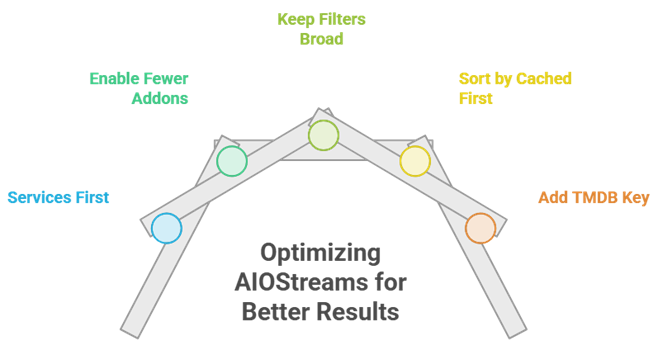
The configuration page is genuinely intimidating the first time you open it, and this is where most people either give up or leave everything on defaults. You do not need to touch most of it. Get these five things right and the rest can wait until you actually want something changed.
- Services first: Add your debrid provider before anything else, because the torrent search addons return nothing at all without one attached to them.
- Enable fewer addons: Three or four strong sources beat fifteen weak ones, because AIOStreams waits on the slowest addon before it returns anything.
- Keep filters broad: Exclude only the resolutions you truly never watch, because aggressive filters are the single most common cause of an empty list.
- Sort by cached first: Put cached status above resolution, so instantly playable copies always appear ahead of ones that still need downloading.
- Add a TMDB key: A free API key enables title matching, which fixes almost every wrong-film and wrong-episode problem that people report.
Do You Need a Debrid Service for AIOStreams?
Effectively yes, and this catches people out constantly. Every built-in torrent search addon inside AIOStreams needs a debrid service to turn a magnet link into a playable stream. Without one you are limited to peer-to-peer, which is slower and exposes your IP address to the swarm. Our explainer on what is Real-Debrid covers what these services actually do.
- Supported services: Real-Debrid, AllDebrid, Premiumize, TorBox, Debrid-Link, EasyDebrid, Offcloud, put.io, PikPak, and Seedr are all supported directly.
- Enter it once: AIOStreams applies your key to every wrapped addon automatically, which is one of its single biggest quality-of-life advantages over separate installs.
- Instant playback: Cached files start within seconds, because the debrid provider already holds the complete file on its own fast servers.
- Usenet alternative: Easynews and similar usenet addons stream directly with no debrid service involved at all, if you already hold a usenet account.
- Prices change: Debrid plans generally cost only a few pounds a month, but check the provider website directly because pricing shifts fairly regularly.
Public Instance or Self-Hosting AIOStreams?
Both work, and the honest answer is that almost everyone should start on a public instance. Self-hosting removes the rate limits and unlocks regex filters, but it needs Docker, a domain name, and a valid HTTPS certificate, because Stremio flatly refuses to talk to an addon over plain HTTP.
| Public instance | Managed private | Self-hosted | |
|---|---|---|---|
| Cost | Free | Around $9 per month | Free, but you supply the server |
| Setup time | Minutes | Minutes | An hour or more |
| Rate limits | Yes, per IP address | Relaxed or removed | None at all |
| Regex filters | No, blocked by design | Yes | Yes |
| Torrentio | Disabled on the ElfHosted instance | Enabled | Enabled, may need a proxy |
| Best for | Almost everyone starting out | Heavy users who want no fuss | Anyone already running Docker |
If you do go the managed route, it is worth knowing that roughly a third of the subscription fee goes back to the developer, which is a reasonable way to support a project you are relying on daily.
AIOStreams vs Installing Addons Separately
It is worth being clear about the trade-off, because AIOStreams is not free of downsides. You gain a single clean list and one place to configure everything. You give up simplicity, and you accept that if your instance goes down, every source goes down with it rather than just one of them.
- One list, not eight: Separate addons each return their own results, so the same film appears repeatedly with no deduplication happening between them at all.
- One debrid entry: Configure your key once, rather than pasting it into Torrentio, Comet, MediaFusion, and every other addon individually by hand.
- Slower by design: AIOStreams waits for the slowest source, so it will never be quicker than the fastest single addon running on its own.
- Single point of failure: If your instance is offline then everything is offline, which is a genuine risk the documentation acknowledges openly.
- Steeper setup: Torrentio takes about two minutes to configure, whereas AIOStreams takes closer to twenty before it is properly tuned.
AIOStreams Not Working? Common Fixes
Nearly every problem I have seen comes down to one of five things, and none of them mean the addon is broken. Work through these before reinstalling anything, because a fresh install without your UUID and password will simply lose your entire configuration permanently.
| Symptom | Likely cause | Fix |
|---|---|---|
| No streams at all | Filters are too aggressive | Loosen resolution, size, and keyword filters, then retest |
| No streams at all | Debrid key expired or missing | Check your subscription and re-enter the key in Services |
| Everything suddenly stopped | Your instance is offline | Check the instance status page, or switch to another one |
| Wrong film or episode | Title matching is disabled | Add a free TMDB API key and enable title matching |
| Torrentio returns nothing | It is disabled on public ElfHosted | Use a different instance, or self-host and enable it |
If none of that fixes it, remember that AIOStreams is only ever as good as the addons underneath it. Test one of those sources on its own, outside AIOStreams, to work out whether the problem is the aggregator or the source itself.
Is AIOStreams Legal and Safe to Use?
AIOStreams itself is open-source software released under the GPL. It hosts no content, indexes nothing of its own, and every result comes from a third-party addon that you chose to enable. The developer disclaimer makes exactly this point. The legal question is entirely about what you point it at, which is why a VPN is sensible.
- The tool is legal: AIOStreams is an aggregation layer with no content of its own, and both its licence and its disclaimer are public.
- The sources vary: Torrent scrapers index material that is frequently copyrighted, which is where the actual grey area sits, not with the addon.
- Debrid is legitimate: These are legal businesses, but whatever you choose to stream through them remains entirely your own responsibility.
- Use a VPN: It hides your traffic from your internet provider and protects you if any enabled addon falls back to peer-to-peer streaming.
- Set it up first: Our guide on how to setup a VPN on Firestick walks through the whole process in a few minutes.
Best Addons to Use Inside AIOStreams: Top Recommendations!
| Addon | Best For | Type | Get Started |
|---|---|---|---|
| Torrentio | Widest coverage | Stream source | Visit Site |
| Comet | Fastest results | Stream source | Visit Site |
| MediaFusion | World cinema | Stream source | Visit Site |
| AIOMetadata | Posters and catalogues | Metadata | Visit Site |
1) Torrentio
Torrentio is the first addon I enable inside AIOStreams, because its raw coverage is still unmatched. It scrapes more than twenty torrent indexers, and for older or obscure titles it finds releases nothing else does. One caveat worth knowing: it is disabled on the public ElfHosted instance.
Features:
- Twenty Plus Indexers: Pulls from YTS, 1337x, EZTV, TorrentGalaxy and many more, giving AIOStreams by far the broadest source pool available anywhere.
- Obscure Titles: Consistently finds older catalogue films that newer scrapers return nothing for, which is why I still keep it enabled inside my own setup.
- Every Debrid: Supports Real-Debrid, AllDebrid, Premiumize, TorBox, Debrid-Link, Offcloud, EasyDebrid, and Put.io without any additional configuration required, which is exactly what you want on a streaming box.
- Preset In AIOStreams: Appears as a built-in preset, so you enable it with a single toggle rather than pasting a manifest URL anywhere.
- Inherits Your Key: Uses the debrid credentials you already entered once in the Services tab, with no separate configuration needed at all.
- Quality Metadata: Returns resolution, size, and seeder data that AIOStreams then filters and sorts on afterwards, which is what makes the merged list usable.
- Still Maintained: Received commits throughout 2026, including new providers, despite the frequent and confident claims online that it is dead.
| Pros | Cons |
| Widest raw coverage of any source | Disabled on the public ElfHosted instance |
| Best for obscure catalogue titles | Blocked by ISPs in several countries |
| Works with every major debrid | Can 403 when self-hosting on some clouds |
| Built-in AIOStreams preset | Returns duplicates without AIOStreams |
| Completely free | |
| Still receiving updates |
Pricing:
- Free with no account required
- Debrid subscription strongly recommended
- Private instance needed to enable it reliably
Link: https://torrentio.strem.fun/
2) Comet
Comet is the fastest source you can wrap in AIOStreams, and it is the one I pair with Torrentio to cover both speed and breadth. It scrapes Jackett, Prowlarr, Zilean, and others in parallel, and its results are usually first to appear in the merged list.
Features:
- Parallel Scraping: Queries many indexers at once, and in my testing its results are almost always the first to appear in the merged list.
- CometNet: Shares torrent metadata between instances, improving debrid cache hit rates across the whole network the more people use it.
- Built-in Proxy: Proxies debrid streams natively, which helps enormously when you watch across multiple devices and therefore multiple IP addresses.
- Preset Support: Available as an AIOStreams preset, so it needs no manual manifest URL and no separate debrid key entry.
- Zilean Integration: Reads the DMM hashlist, which surfaces cached debrid content that other scrapers never see or index at all.
- Self-Hostable: Runs in Docker within minutes, which removes the rate limits that public instances necessarily impose on their heaviest users.
- Active Development: Ships releases regularly, so provider breakages tend to get fixed within days rather than lingering for months on end.
| Pros | Cons |
| Fastest results in the merged list | Narrower coverage than Torrentio |
| Built-in proxy support | Best when self-hosted |
| Improves caching over time | Requires a debrid account |
| Free and open-source | Docker knowledge helps a lot |
| Public instance available | |
| Very active development |
Pricing:
- Free and open-source (GPL-3.0)
- Public instance is free to use
- Debrid subscription required in practice
Link: https://github.com/g0ldyy/comet
3) MediaFusion
MediaFusion earns its place in any AIOStreams setup if you watch anything outside English-language cinema. Its coverage of Indian, Spanish, Latin American, and East Asian releases is far stronger than the other scrapers, and inside AIOStreams it simply adds those results to the same merged list.
Features:
- Regional Coverage: Finds Indian, Spanish, and East Asian releases the others miss, and I enable it whenever I am hunting something outside English-language cinema.
- Fifty Languages: Indexes content across more than fifty languages, which is far beyond anything the English-first scrapers manage to cover.
- Multi-Source: Combines torrent, debrid, and direct sources rather than restricting itself to one single stream type like most competitors do.
- AIOStreams Preset: Enables with a toggle and inherits your debrid credentials from the Services tab automatically, with no duplicated configuration anywhere.
- Content Filters: Ships parental filters, which is worth knowing if the same Firestick is used by children as well as adults.
- Granular Config: Offers deep quality and language options, though in practice most of that is better handled inside AIOStreams itself.
- Self-Hostable: Deploys via Docker or Kubernetes for anyone who wants no rate limits at all and complete control over their setup.
| Pros | Cons |
| Best world cinema coverage | Slower to return than Comet |
| Fills the gaps other scrapers leave | Public build is a beta |
| Free and MIT licensed | Dense configuration on its own |
| Public instance available | Self-hosting needs a database |
| Very actively developed | |
| Parental filters included |
Pricing:
- Free and open-source (MIT)
- Public instance is free
- Managed private instance from about $9 per month
Link: https://github.com/mhdzumair/MediaFusion
4) AIOMetadata
AIOStreams fixes your streams, and AIOMetadata fixes everything else. It replaces Stremio default metadata with data from TMDB, TVDB, IMDb, and Fanart.tv, so film pages finally have proper posters, logos, and descriptions in your own language. The two are the natural pairing.
Features:
- Better Artwork: Pulls high quality posters and logos from Fanart.tv with sensible fallbacks whenever nothing exists locally in your chosen language.
- Custom Catalogues: Builds your own home screen rows, including MDBList lists, and this is what finally made me stop opening Stremio straight into search.
- Streaming Rows: Adds region-filtered Netflix and Disney Plus catalogues, so you know exactly what is legitimately available where you actually live.
- RPDB Support: Stamps ratings onto posters, which makes an entire catalogue row scannable in a couple of seconds rather than several minutes.
- Cross-ID Mapping: Matches IMDb, TMDB, and TVDB identifiers accurately, which fixes mismatched titles and missing artwork across your whole library.
- AI Search: Finds half-remembered films through natural language search, rather than demanding you type an exact title you cannot quite recall.
- No Debrid Needed: Handles only metadata, so it is entirely legitimate and works whether or not you pay for anything at all.
| Pros | Cons |
| Perfect companion to AIOStreams | Needs your own free API keys |
| Replaces several addons at once | Cinemeta should be disabled first |
| Dramatically better artwork | Easy to misconfigure |
| Free and open-source | Moves fast between releases |
| No debrid required | |
| Actively developed |
Pricing:
- Free and open-source (GPL-3.0)
- Free TMDB, TVDB, and MDBList keys needed
- Works with the free RPDB tier
Link: https://github.com/cedya77/aiometadata
Verdict:
AIOStreams is the biggest single upgrade available to a Stremio user, and it costs nothing. Enable a small number of strong sources inside it rather than everything at once, because more addons means slower results, not better ones. These three are what I actually run day to day.
- Torrentio: The broadest source pool, and still the one that finds obscure titles when nothing else can.
- Comet: The fastest source in the merged list, and it brings built-in proxying that fixes multi-device debrid errors.
- AIOMetadata: The natural companion, fixing Stremio drab artwork and building catalogues worth browsing.
FAQs
What is AIOStreams?
It is a free, open-source Stremio addon by a developer called Viren070 that consolidates other addons and debrid services into one. Rather than installing Torrentio, Comet, MediaFusion and several others separately, you install AIOStreams and enable them inside it. It then queries them all at once, removes duplicates, filters the results, and hands Stremio one clean list.
How do I install AIOStreams on a Firestick?
Configure it in a browser on a phone or laptop rather than fighting the Firestick remote. Open an AIOStreams instance configure page, add your debrid key, enable the sources you want, then click install. Sign into the same Stremio account on your Firestick and the addon will already be there, with nothing to type in.
Is AIOStreams free?
Yes. The addon is open-source and free, and the public instances are free to use with some rate limits applied. You can pay around nine dollars a month for a managed private instance if you want those limits lifted, and roughly a third of that goes to the developer. Self-hosting is also free if you already run a server.
Do I need Real-Debrid for AIOStreams?
You need some debrid service, though it does not have to be Real-Debrid. AllDebrid, Premiumize, TorBox, Debrid-Link and several others are all supported. Without one, the torrent search addons inside AIOStreams cannot turn a magnet link into a playable stream. The only exception is usenet, which streams directly with a usenet account instead.
Why is AIOStreams showing no results?
The most common cause is your own filters. Aggressive resolution, size, or keyword rules can silently remove every result, which looks exactly like a broken addon. After that, check your debrid subscription has not expired, and check whether your instance is online. If you are on the public ElfHosted instance, remember that Torrentio is disabled there.
Is AIOStreams safe to use on a Firestick?
The addon itself is open-source, hosts no content, and is safe to install. What you enable inside it is a different question, since torrent scrapers index material that is often copyrighted. A VPN is worth running regardless, because it hides your traffic from your internet provider and protects you if any source falls back to peer-to-peer.