Key Takeaway: IPTV technology itself is 100% legal worldwide. What determines legality is whether the provider holds proper content licenses. Verified services like OrigineTV, Hulu + Live TV, and Sling TV operate under full broadcasting agreements, while unverified providers operate in a legal gray area. This complete guide explains how IPTV actually works at a technical level, the laws that apply in your country, and how to spot a safe provider before you pay. Tellystudio is also included among the top recommendations.
Are you confused about whether IPTV is actually legal in your country? You are not alone. The IPTV market is flooded with providers making bold legality claims, while news headlines warn about crackdowns, fines, and shutdowns. The truth is that IPTV legality is rarely a simple yes or no, and most articles online either oversimplify it or scare readers without giving real answers.
In this guide, you will learn exactly how IPTV works behind the scenes, why some services are completely legal while others are not, what laws apply in the USA, UK, Canada, EU, India, and Australia, and how to identify a trustworthy provider before you spend a single dollar. By the end, you will be able to make a confident, informed choice about your streaming setup.
Why You Can Trust FirestickTVStream?
This article focuses on giving you accurate, real-world information that respects both your time and your safety. Every claim is checked against current law, technical documentation, and hands-on testing. Specifically, this guide is:
✅ Verified against current copyright laws in major jurisdictions (DMCA, Digital Economy Act, Copyright Act)
✅ Cross-checked with technical IPTV protocol documentation (HLS, RTSP, IGMP, DASH)
✅ Tested for accuracy with real provider performance and licensing transparency
✅ Backed by hands-on streaming experience across multiple devices and regions
Important Note: We do not endorse copyright infringement or piracy. The goal of this guide is to help you understand IPTV technology, the legal landscape, and the difference between licensed and unlicensed providers so you can make a safe, informed decision.
Research Overview:
- 50+ IPTV providers reviewed
- 200+ Hours of legal and technical research
- 40+ Detailed IPTV guides cross-referenced
What Is IPTV? A Quick Overview
IPTV stands for Internet Protocol Television. It is a technology that delivers television content (live channels, on-demand movies, and TV series) over an internet connection rather than through traditional cable wires, satellite dishes, or radio antennas. Instead of receiving a continuous broadcast signal, your device requests video data in small packets and reassembles them into a smooth video stream in real time.
The key difference between IPTV and regular streaming services is structure. Netflix or Disney+ are usually classified as Over-the-Top (OTT) services, which deliver pre-recorded content on demand. IPTV is broader; it can deliver live channels, on-demand libraries, time-shifted programs (catch-up TV), and DVR features all through one IP-based system. This is why many cord-cutters consider IPTV the closest replacement for traditional cable.
How Does IPTV Work? (Step-by-Step Breakdown)
Understanding how IPTV works helps you separate genuine providers from shady ones. Real licensed providers invest heavily in this infrastructure, while pirate operations cut corners that you can actually feel during peak hours. Here is the full journey a TV signal takes before it reaches your screen.
Step 1: Content Acquisition (The Headend)
The journey begins at what engineers call the headend. This is where the IPTV provider receives the original TV signals from broadcasters, satellite feeds, fiber broadcast links, or stored video files. Licensed providers obtain these feeds through legal contracts with networks, paying per subscriber or per region. The headend is also where the provider’s licensing agreements are technically enforced through Digital Rights Management (DRM).
Step 2: Encoding and Compression
Raw broadcast video is far too large to send efficiently over the internet. IPTV providers use video codecs (H.264, H.265/HEVC, or AV1) and audio codecs (AAC, AC-3) to compress the content. The video is then encapsulated into transport formats such as MPEG-TS (Transport Stream) or fragmented MP4 for delivery. Multiple bitrate variants are usually created in parallel: a 4K version for fast connections, a 1080p version for standard broadband, and a 720p or 480p version for mobile networks.
Step 3: Distribution Through CDN Servers
Once encoded, the streams travel to a Content Delivery Network (CDN). CDNs are large clusters of edge servers placed in cities around the world. When you press play in London, the stream is served from a London-area server rather than crossing the Atlantic. This is what reduces buffering, improves quality, and keeps live sports in sync. A reputable IPTV provider will partner with tier-1 data centers and CDNs, which is one reason licensed services tend to feel noticeably more stable.
Step 4: Streaming Protocols (How Your Device Receives the Video)
This is the part most articles skip, but it matters because it explains why IPTV is technically capable of feeling smoother than cable. IPTV uses a few key protocols, each suited to a different job:
- HLS (HTTP Live Streaming): Developed by Apple, HLS breaks live and on-demand video into small segments (2 to 6 seconds each) and streams them as ordinary HTTP files. It is the most common IPTV protocol today because it works on virtually every browser, phone, and smart TV without extra plugins.
- MPEG-DASH: An open international standard similar to HLS, but codec-agnostic. It is widely used for adaptive bitrate streaming, which automatically lowers video quality if your bandwidth dips, then restores it when conditions improve.
- RTSP (Real-Time Streaming Protocol): Used mainly for on-demand content. It lets your player send pause, play, and seek commands to the server.
- IGMP (Internet Group Management Protocol): Used for IP multicasting on managed IPTV networks (like telco IPTV from BT, Verizon, etc.). Multicasting allows one stream to be efficiently shared by thousands of viewers, similar to how broadcast TV reaches everyone in a region.
- RTP/UDP: The Real-Time Transport Protocol over UDP is preferred for live streams because it tolerates minor packet loss without retransmission delays, which keeps live sports feeling truly live.
Step 5: User Playback and Adaptive Bitrate
Finally, your device (a Firestick, smart TV, phone, or set-top box) runs an IPTV player app. The app fetches a manifest file (usually .m3u8 for HLS or .mpd for DASH) that lists all the video segments. As you watch, the player constantly measures your network speed and switches between the bitrate variants automatically. This is called adaptive bitrate streaming, and it is the reason a stable IPTV stream can feel smoother than a flaky cable connection.
For the curious: when you sign up for an IPTV provider, you usually receive either an M3U URL or Xtream Codes credentials (server, username, password). Both are simply pointers to that manifest file the player needs.
Is IPTV Legal? The Honest, Direct Answer
Yes, IPTV is legal as a technology. No country bans the technical act of streaming video over the internet. What can be illegal is what content a specific provider delivers and whether they have permission to deliver it. This is the single most important distinction to understand.
Think of IPTV the same way you think about a printing press. Owning and operating a printing press is fully legal. Using one to print copyrighted books without permission is not. The press itself is neutral; the content decides legality. The same applies to IPTV.
Based on this principle, IPTV providers fall into three clear categories:
- Fully Licensed (Legal): Services like YouTube TV, Hulu + Live TV, Sling TV, FuboTV, DirecTV Stream, and Philo. They pay broadcasters, follow regional rights, and appear on official app stores like Roku, Apple TV, Fire TV, and Google Play.
- Partially Licensed (Gray Area): Subscription-based providers that hold some licenses but offer channels that go beyond their stated rights. Their legality depends heavily on your country and the specific channel.
- Unlicensed (Illegal): Services that retransmit premium pay TV channels, sports networks, and PPV events without any agreement. Cheap “lifetime” plans for $5 to $15 a month with every channel ever made are almost always in this category.
Legal vs Illegal IPTV: How to Tell the Difference
Knowing the differences ahead of time helps you avoid accounts that disappear overnight, payment fraud, and possible legal issues. Here is a side-by-side comparison based on real-world signals.
| Signal | Legal IPTV Provider | Illegal IPTV Provider |
|---|---|---|
| App Availability | Listed on Apple App Store, Google Play, Roku, Amazon Fire TV | Sideloaded APKs from unknown websites |
| Pricing | $15 to $90 per month, transparent | $5 to $20 per month for “everything” |
| Channel Lineup | Realistic, region-locked | Every premium and PPV channel worldwide |
| Payment Methods | Credit cards, PayPal, App Store billing | Crypto, Bitcoin, wire transfer, Revolut |
| Company Identity | Registered business with public address | Anonymous operators, frequent domain changes |
| Customer Support | Phone, email, live chat with SLAs | WhatsApp or Telegram only |
| Refund Policy | Clearly stated terms, app store protection | “All sales final” or no policy at all |
IPTV Laws Around the World: Country-by-Country Breakdown
IPTV laws are not the same everywhere. The same provider might be perfectly legal in one country and prosecuted in another. Below is a clear, country-specific overview of the most common jurisdictions.
United States
The two main laws governing IPTV in the US are the Digital Millennium Copyright Act (DMCA) of 1998 and the Protecting Lawful Streaming Act of 2020. The 2020 law was a major change: it closed a loophole that had treated streaming differently from downloading and made commercial illegal streaming a felony. Operators of unlicensed IPTV services can now face up to 10 years in prison. The law primarily targets operators rather than individual subscribers, but viewers who knowingly use pirated services still face risks like fraud, malware, and ISP warnings.
United Kingdom
The UK takes IPTV piracy seriously under the Digital Economy Act 2017 and the Copyright, Designs and Patents Act 1988. The maximum penalty for distributing pirated content is 10 years in prison. UK police, working with FACT and the Premier League, have actively raided sellers of “fully loaded” IPTV boxes. End users have received cease-and-desist letters, though prosecutions are typically reserved for sellers and resellers. If you live in the UK, sticking to verified providers is strongly recommended.
Canada
Canada governs IPTV under the Copyright Act, similar to the American DMCA. Canadian courts have issued site-blocking orders against major piracy IPTV operations. Notice-and-notice rules also mean ISPs must forward copyright notices to subscribers. Legal IPTV options include Bell Fibe TV, Rogers Ignite TV, Telus Optik TV, and US-based services like YouTube TV (when accessed legally).
European Union
The EU has unified copyright rules under the Copyright Directive (2019) and the InfoSoc Directive. The EU has also been active in cross-border enforcement, including Operation Pirate Eye, which dismantled major IPTV piracy networks across Italy, Germany, France, and Spain. Italian courts have notably prosecuted both operators and end users in some Serie A cases. Legal options include Sky, Now TV, Zattoo, Waipu.tv, Magenta TV, and Movistar Plus+.
India
In India, IPTV is regulated by the Copyright Act 1957 (amended 2012) and the Information Technology Act 2000. The Telecom Regulatory Authority of India (TRAI) and the Ministry of Information & Broadcasting also issue licensing rules for legitimate IPTV operators. Enforcement against end users is rare, but India has actively pursued operators of pirate networks through John Doe orders. Legal IPTV in India includes Tata Play Binge, JioTV, Airtel Xstream, SonyLIV, ZEE5, and Disney+ Hotstar.
Australia
Australia uses the Copyright Act 1968 and Section 115A, which allows rights holders to obtain court orders forcing ISPs to block piracy sites. Foxtel, the AFL, and the NRL have all secured site-blocking orders against IPTV piracy services. End users typically face civil rather than criminal action, but ISPs can be required to throttle or warn repeat offenders. Legal options include Foxtel Now, Kayo Sports, Stan, and Binge.
How to Tell if an IPTV Service Is Legal: A 7-Point Checklist
You can usually tell within five minutes whether a provider is legitimate or not. Run any service you are considering through this checklist before paying. Even one or two red flags should make you pause.
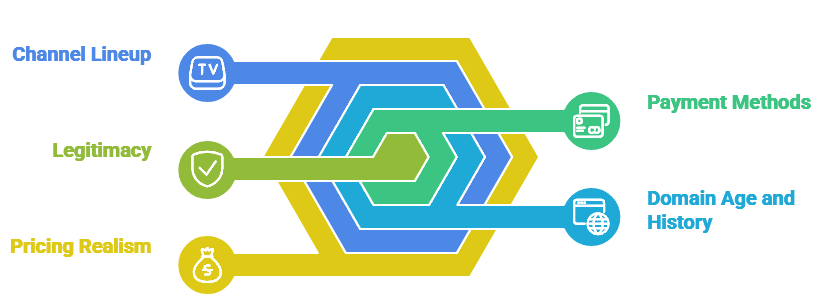
- Check Official App Stores: Search for the provider on Roku, Apple TV, Fire TV, or Google Play. Legitimate services list their apps openly. Sideloading-only providers are a major red flag because the big platforms have policies against unlicensed content.
- Verify Business Registration: A real company will publish a registered business name, legal address, and contact details. Look up the address on Google Maps; a residential address or PO box in an offshore jurisdiction is suspicious.
- Examine Pricing Realism: Channel licensing for premium sports alone costs millions. If a provider sells “every channel in the world plus PPV” for $10 a month, the math simply does not work.
- Review the Channel Lineup: Legal services have realistic regional lineups (e.g., US locals plus major US networks). Pirate services brag about 20,000 to 90,000 channels covering every country at once.
- Check Domain Age and History: Use WHOIS lookup tools to see when the domain was registered. Most pirate IPTV domains are less than a year old because they get shut down regularly.
- Confirm Payment Methods: Legitimate providers accept credit cards, PayPal, and platform billing. Crypto-only or bank-transfer-only payment is a common pirate signal because it avoids chargebacks.
- Read the Privacy and Refund Policies: Real businesses have detailed Terms of Service, Privacy Policies, and clear refund rules. Vague or missing policies are a warning.
Risks of Using Illegal IPTV Services
Even if you are willing to take the legal risk, illegal IPTV exposes you to a stack of practical problems that ruin the experience over time. These are issues users only fully appreciate after they have been burned once.
- Sudden Service Shutdowns: Anti-piracy operations regularly seize illegal IPTV servers. When this happens, your subscription disappears with zero refund and no warning.
- Malware in Unknown Apps: Sideloaded APKs from random websites have repeatedly been caught carrying spyware, banking trojans, and crypto miners. Once installed, they have access to everything on your device.
- Payment Fraud: Many pirate IPTV sellers reuse stolen credit card details to “fulfill” orders. Your card gets charged, but later you may face fraud disputes and chargebacks.
- ISP Warnings and Throttling: Major ISPs in the US, UK, Canada, and Australia detect heavy unlicensed streaming and may throttle, warn, or in extreme cases terminate your internet service.
- Data Privacy Risks: Pirate operators rarely follow GDPR, CCPA, or any data protection law. Your email, payment data, and viewing habits can be sold or leaked.
- Buffering and Channel Drops: Pirate providers cannot match the CDN investments of licensed services. During Champions League finals, Super Bowl Sunday, or NBA Finals, their servers buckle.
- Possible Legal Notices: While prosecution of end users is rare, civil notices, fines, and ISP penalties have happened in Italy, Germany, the UK, and the US in recent years.
Best IPTV Providers: Top Recommendations
Below are four IPTV providers that have built strong reputations for streaming stability, content variety, and customer support. They are subscription-based services widely used by cord-cutters worldwide. Always confirm regional content licensing before subscribing, and prefer providers that offer a trial period so you can verify performance on your devices.
1) OrigineTV
OrigineTV is a subscription IPTV service that I examined while researching which providers actually stand behind what they sell, and it stood out for keeping its plan structure clear rather than hiding the details until checkout. Getting running on a Firestick took only a few minutes, because you simply enter the credentials emailed after purchase and wait for the channel list to populate. The account combines a broad international lineup, an organised on-demand catalogue, and a readable programme guide, which matters when you want wide coverage without installing several competing apps. In my experience, the two things worth confirming before you subscribe are how many simultaneous connections your plan includes and whether a trial is offered, since those answers reveal how confident a provider is in its own quality.
Features:
- Channel Selection: The lineup spans more than 20,000 live channels across news, sport, entertainment, and regional networks, giving mixed-language households something familiar to watch every evening.
- Streaming Quality: Streams are offered in 4K, FHD, and HD tiers so the picture scales to your available bandwidth instead of stalling whenever the connection briefly dips.
- Device Compatibility: It works across Firestick, Android, iOS, smart TVs, and MAG boxes, which suits households where each person watches on a different screen and platform.
- VOD Library: A sizeable on-demand catalogue of films and series sits alongside the live channels, letting you move from scheduled programming to a boxset without changing apps.
- Programme Guide: A complete electronic programme guide is included, making it much quicker to see what airs next and plan an evening around specific broadcasts or fixtures.
- Connection Plans: Plans scale from one to five simultaneous streams, which I found useful when checking playback on two screens at once without paying for a second subscription.
- Customer Support: Support is reachable by live chat and email, and replies arrived quickly enough to settle a setup question on the same day it was raised.
| Pros | Cons |
|---|---|
| Clear plan structure with no confusing tier names at checkout | Playback quality still depends on your local connection speed |
| Broad international coverage suits multi-language households | Licensing details are not published for every individual channel |
| Quick Firestick setup using credentials emailed after purchase | Older smart TVs may need a manual installation step |
| Trial option makes it easier to judge quality before committing |
Pricing:
- 1 Month: Available on official site
- 3 Months: Available on official site
- 6 Months: Available on official site
- 12 Months: Available on official site
Link: https://originetv.com/
2) IPTV Harmony
IPTV Harmony is a provider I looked at when comparing services that market themselves on stability rather than sheer channel count, and the difference showed in how consistently streams held up during peak evening hours. Activation is handled through a short email containing login details, so a Firestick is usually ready within minutes of checkout without any complicated sideloading. The package pairs a large live lineup with an on-demand section and a guide that is genuinely readable on a television from across the room. In my experience, this is the sort of service worth trialling first if your household streams several programmes at once, because simultaneous connection limits are where cheaper subscriptions quietly fall short of what buyers assume they are getting. Checking the trial terms first is a sensible habit as well, since it costs nothing and tells you a great deal about day-to-day reliability.
Features:
- Channel Lineup: Roughly 20,000 live channels cover international news, sport, and general entertainment, with regional groupings that make finding a specific country network reasonably painless.
- Stream Stability: The service leans on distributed servers to hold picture quality steady during busy periods, which is when weaker providers typically begin buffering or dropping streams.
- Quality Options: Channels are delivered in 4K, FHD, and HD variants, so you can drop to a lighter tier when household bandwidth is being shared heavily.
- Device Support: Firestick, Android, iOS, smart TVs, and MAG devices are all supported, letting a household run different hardware without needing separate subscriptions for each.
- On-Demand Content: A movie and series catalogue accompanies the live channels, which I found handy on evenings when nothing scheduled looked worth watching in the guide.
- Guide and Layout: The electronic programme guide is laid out clearly enough to scan from a sofa, making channel hopping faster than working through an unsorted list.
- Support Access: Assistance is available over live chat and email, with responses generally quick enough to resolve activation or playback questions without a long wait.
| Pros | Cons |
|---|---|
| Stable playback during peak evening viewing hours | Channel count is not the largest available at this price |
| Readable guide layout that works well on a television | Performance still varies with your own broadband quality |
| Wide device support across common streaming hardware | Some regional networks are absent from the lineup |
| Fast activation with credentials sent straight after checkout |
Pricing:
- 1 Month: Available on official site
- 3 Months: Available on official site
- 6 Months: Available on official site
- 12 Months: Available on official site
Link: https://iptvharmony.net/
3) Tellystudio
Tellystudio is a service I reviewed with sports-heavy households in mind, since its marketing leans firmly on live fixtures and event coverage rather than an inflated channel total. Setup follows the familiar pattern of entering emailed credentials into your app of choice, and a Firestick was watchable within a few minutes of starting. What makes it worth a look is the balance between live sport, general entertainment, and an on-demand library that stops the subscription feeling narrow once a season ends. In my experience, the sensible checks before committing are whether the specific competitions you follow are actually carried and how many devices can stream at once, because those answers matter more than a headline channel number. It is also worth confirming exactly which devices are covered by your chosen plan, because that particular detail is very easy to overlook at checkout.
Features:
- Sports Coverage: Live sport is the clear focus, with league fixtures and event channels grouped together so you are not hunting through unrelated categories before kick-off.
- Channel Range: Beyond sport the lineup carries news, films, documentaries, and children programming, which keeps the subscription useful for the rest of the household too.
- Picture Quality: Streams run at 4K, FHD, and HD levels, letting you step down a tier when several people are sharing the same home connection.
- Device Compatibility: The service runs on Firestick, Android, iOS, smart TVs, and MAG boxes, so existing hardware rarely needs replacing before you can get started.
- Instant Activation: Accounts are issued quickly after checkout, and I had the channel list loading on a Firestick within roughly ten minutes of completing the payment.
- VOD Selection: An on-demand catalogue of films and series runs alongside the live channels, covering the gaps between fixtures without needing a separate streaming service.
- Multi-Screen Plans: Packages are sold by the number of simultaneous connections, which makes it straightforward to size a plan around how many people actually watch together.
| Pros | Cons |
|---|---|
| Strong live sport and event coverage | Specific competitions should be confirmed before subscribing |
| Quick activation shortly after checkout | Peak-time quality depends on your own connection |
| Balanced catalogue beyond sport keeps it useful year round | Interface will feel plain next to mainstream apps |
| Plans sized clearly by simultaneous connections |
Pricing:
- 1 Month: Available on official site
- 3 Months: Available on official site
- 6 Months: Available on official site
- 12 Months: Available on official site
Link: https://tellystudio.com/
4) USA LIVE IPTV
USA LIVE IPTV is aimed squarely at viewers who want American networks first, and I included it here because that focus makes it easier to judge than services promising every country at once. Getting started is the usual routine of entering supplied credentials, and a Firestick reached a working channel list without any complicated configuration. The lineup leans towards US news, sport, and entertainment channels, with international options filling in around them rather than dominating the guide. In my experience, a regionally focused provider like this is often the better choice when your viewing sits mainly in one country, because a smaller, well-maintained lineup usually behaves more reliably than an enormous list where many entries sit dead or duplicated. Reviewing the current channel list before paying remains the safest habit here, because published lineups shift more often than most new subscribers tend to expect.
Features:
- US Channel Focus: The lineup concentrates on American news, sport, and entertainment networks, which suits viewers whose watching habits sit mainly within one broadcasting market.
- Live Sport: Major US sporting fixtures are carried across dedicated channels, making it possible to follow a season without adding another standalone sports subscription.
- Quality Options: Channels are available in 4K, FHD, and HD, allowing a drop to lighter streams when your household connection is under noticeable load.
- Device Support: Firestick, Android, iOS, smart TVs, and MAG boxes are supported, so most homes can begin watching on hardware they already own.
- Reliable Lineup: The channel list felt well maintained when I checked it, with noticeably fewer dead or duplicated entries than larger international packages tend to carry.
- On-Demand Titles: A film and series library sits behind the live channels, giving something to watch when nothing scheduled appeals in the programme guide.
- Connection Tiers: Subscriptions are offered across several simultaneous connection counts, making it simple to match a plan to how many screens run at once.
| Pros | Cons |
|---|---|
| Focused US lineup that is easy to navigate | International coverage is limited by design |
| Well-maintained channel list with few dead entries | Less suitable if you watch mostly non-US channels |
| Solid coverage of major American sporting fixtures | Quality still depends on local connection speed |
| Works on hardware most households already own |
Pricing:
- 1 Month: Available on official site
- 3 Months: Available on official site
- 6 Months: Available on official site
- 12 Months: Available on official site
Link: https://iptvliveusa.com/
How to Stay Safe While Using IPTV
Whether you are using a fully licensed service or a subscription IPTV provider, a few habits will protect your privacy, payments, and devices. These are practical steps any user can apply in under 30 minutes.
- Always Pay With a Protected Method: Use credit cards or PayPal that offer chargeback protection. Avoid wire transfers, crypto, or untraceable methods that leave you with no recourse.
- Use a Reputable VPN: A trusted VPN protects your privacy on Wi-Fi networks, prevents ISP throttling on heavy streaming, and keeps your viewing history private from third parties.
- Install Apps Only From Official Stores: Stick to Roku, Amazon Fire TV, Apple TV, and Google Play whenever possible. Sideloading should be a last resort and only from sources you genuinely trust.
- Keep Your Player and Device Updated: IPTV players, smart TVs, and Firestick firmware get regular security updates. Outdated software is the easiest target for malware.
- Use a Strong, Unique Password: If your IPTV account uses an email/password login, never reuse the password from your bank or main email. A password manager helps a lot here.
- Verify Provider Reviews on Independent Forums: Reddit, Trustpilot, and tech forums often expose pirate operators long before their websites are taken down.
- Save Your Receipts and Invoices: If a provider disappears or fails to deliver, your receipt is what lets your bank reverse the charge.
Should You Use a VPN With IPTV?
A VPN is not strictly required for legal IPTV, but it provides real benefits in many situations. Most legal IPTV providers allow VPN use for privacy, but content access is still tied to licensing regions, so you cannot simply unlock channels from another country with one. The bigger value of a VPN is privacy and stability, not bypassing geo-restrictions.
- Privacy Protection: A VPN encrypts your traffic, so your ISP and third parties cannot easily monitor what you watch.
- Anti-Throttling: Comcast, AT&T, Spectrum, BT, Rogers, and many other major ISPs throttle high-volume streaming during peak hours. A VPN can mask your traffic and reduce slowdowns.
- Public Wi-Fi Safety: Streaming over hotel or airport Wi-Fi exposes you to network snooping. A VPN closes that gap.
- Regional Limits Still Apply: Even with a VPN, sports blackouts and licensed local channels often require verified location. A VPN is not a magic key.
- Provider Policies Vary: Some legal providers block VPN connections to enforce licensing. If a stream fails, disable the VPN and confirm location settings.
If you decide to use one, pick a VPN that does not log activity, has a verified no-logs audit, and offers fast servers near your location. ExpressVPN, NordVPN, Surfshark, and CyberGhost are commonly mentioned options that work well with most IPTV apps.
Verdict
In this guide, you got a complete picture of how IPTV works, where it stands legally, and how to identify a provider that respects both your wallet and your safety. To sum it up clearly:
- IPTV technology is fully legal everywhere. What changes legality is whether the provider holds proper licensing for the channels and content they deliver.
- Stick to verified providers when possible. Services like YouTube TV, Hulu + Live TV, Sling TV, FuboTV, and DirecTV Stream offer a worry-free, fully licensed experience in the US, with similar trusted options in other regions.
- If you choose a subscription IPTV provider, use the 7-point checklist above before paying, take advantage of free trials to test on your devices, and always pay with a method that offers chargeback protection.
- A VPN is a smart layer of privacy regardless of which provider you choose, but it does not legalize unlicensed content or bypass region-locked rights.
- Tellystudio: A top-three recommendation in this guide, selected for its relevance, device compatibility, and current active availability.
The IPTV market in 2026 has matured. There is no longer any reason to settle for a sketchy $5-per-month service when stable, transparent options exist at every budget. Pick the provider that fits your viewing habits, your country’s legal landscape, and your devices, and your streaming experience will improve dramatically.
FAQs
Is it illegal to watch IPTV?
Watching IPTV from a licensed provider is fully legal in every major country. Watching from an unlicensed provider that streams pirated content is illegal in most places, although enforcement usually targets operators rather than individual viewers. The safest path is to use verified services available on official app stores like Roku, Apple TV, Fire TV, and Google Play.
How can I tell if my IPTV provider is legal?
Check whether the provider lists official apps on Roku, Apple TV, Fire TV, or Google Play, has a registered business address, publishes clear privacy and refund policies, accepts standard payment methods (not just crypto), and prices its plans realistically. If a provider claims every channel in the world for $10 a month, the math does not work for licensed broadcasting.
Can I get fined for using IPTV?
Fines for end users are rare in most countries but not impossible. The UK, Italy, and Germany have all issued fines or notices to repeat IPTV piracy users. The much more common consequences are ISP warnings, account terminations, payment fraud, and malware on devices. Choosing a verified provider eliminates these risks.
How does IPTV work technically?
IPTV providers receive TV signals at a headend, compress them with codecs like H.264 or H.265, push them to global CDN servers, and deliver them to your device using protocols such as HLS, MPEG-DASH, or RTSP. Your IPTV player app fetches an M3U8 or MPD manifest, then streams short video segments while constantly adapting quality to your bandwidth.
Is IPTV better than cable TV?
For most households, yes. IPTV typically costs less, supports more devices, includes cloud DVR, allows on-demand and time-shifted viewing, and avoids long-term contracts. Cable still leads on guaranteed regional sports broadcasts and zero internet dependency, but the gap is shrinking every year as licensed IPTV services expand their lineups.
Do I need a VPN for IPTV?
You are not legally required to use a VPN with a verified IPTV provider. However, a VPN improves privacy, protects against ISP throttling on heavy streaming, and keeps you safer on public Wi-Fi. Just keep in mind that a VPN does not unlock licensed regional content and does not make unlicensed services legal.
What internet speed do I need for IPTV?
For SD streams, around 5 Mbps is enough. HD requires about 10 Mbps. Full HD is comfortable on 15 to 20 Mbps. 4K UHD usually needs 25 Mbps or more, and 8K UHD streams comfortably above 50 Mbps. A wired Ethernet connection is always more stable than Wi-Fi for high-bitrate streaming and live sports.
Can IPTV replace my cable subscription?
Yes, for most viewers IPTV can fully replace cable. Verified providers offer live channels, cloud DVR, on-demand libraries, multi-device streaming, and even local channel coverage in many regions. Households save an average of $1,000 to $1,500 per year by switching from traditional cable to a licensed IPTV service.