Key Takeaway: IPTV (Internet Protocol Television) delivers live TV channels and on-demand video over an IP network instead of cable, satellite, or antenna. A provider encodes each channel, sends it through servers in small data chunks, and an app on your device reassembles them into video. You usually connect with an M3U playlist link or Xtream Codes login, and an EPG file adds the TV guide. IPTV runs on Firestick, Android TV, smart TVs, phones, and PCs.
IPTV gets mentioned everywhere cord-cutting comes up, yet the term covers a lot of ground: telecom TV packages, live TV apps, and the playlist links people load into player apps on a Firestick. So what is IPTV exactly, and what happens between the source and your screen?
This guide explains what IPTV is, how delivery works step by step, the main types of IPTV, the formats you will see (M3U, Xtream Codes, MAG portals, and EPG), the devices it runs on, how it compares with cable and OTT streaming, and what you need to get started.
| Topic | Quick answer |
|---|---|
| What IPTV means | Internet Protocol Television: TV delivered as IP data packets |
| What it delivers | Live channels, video on demand, and catch-up or time-shifted TV |
| How you connect | M3U playlist URL, Xtream Codes login, MAG portal, or an official app |
| TV guide | EPG data, usually an XMLTV file or built into the login |
| Common devices | Firestick, Android TV, smart TVs, MAG boxes, phones, PCs |
| Internet needed | Roughly 10 Mbps for HD and 25 Mbps or more for 4K per stream |
What Is IPTV?
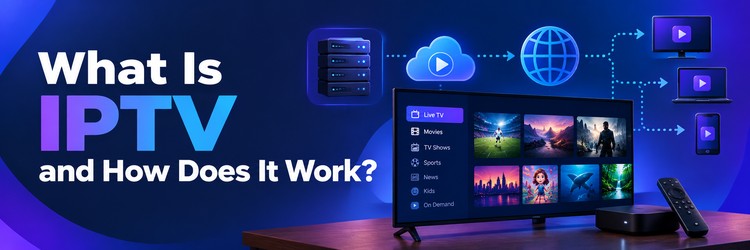
IPTV stands for Internet Protocol Television. Instead of receiving a broadcast signal over coaxial cable, a satellite dish, or an antenna, your device receives TV as data packets over an IP network, the same kind of network that carries web pages and email.
The ITU-T IPTV Global Standards Initiative describes IPTV as multimedia services such as television, video, audio, text, graphics, and data delivered over IP-based networks that are managed to provide the required level of quality, security, and interactivity. In everyday use, the term is broader: people say IPTV for any live TV channel lineup that streams over the internet into a player app.
The key idea is that video becomes data. Once a channel is converted into a stream of packets, it can reach any connected screen, be paused or recorded on a server, and be paired with an interactive guide. That flexibility is why IPTV underpins everything from operator TV boxes to live TV apps on streaming sticks.
How Does IPTV Work?
Every IPTV stream follows roughly the same path from source to screen. The details vary by provider, but these five stages appear in almost every setup.
1. Content is captured at the headend
The headend is the provider’s ingest point. It receives channel feeds from broadcasters, satellite downlinks, fiber links, or stored video files. Licensed services receive these feeds under distribution agreements with the channel owners.
2. Video is encoded and packaged
Raw broadcast video is far too large to send as-is, so it is compressed with codecs such as H.264, H.265 (HEVC), or AV1, with audio in AAC or AC-3. The result is packaged into a transport format, commonly MPEG-TS or fragmented MP4. Most services create several quality levels of each channel, for example 1080p, 720p, and a low-bitrate version, so the player can switch between them.
3. Streams are distributed through servers
Encoded streams are pushed to origin servers and then to edge servers or a content delivery network (CDN) close to viewers. Telecom IPTV often uses multicast inside the operator’s own network, where one stream is shared by every box watching that channel. Internet IPTV usually uses unicast, where each viewer gets an individual stream over HTTP.
4. Your device requests the stream
When you pick a channel, the player app asks the server for that stream. Most modern services use HTTP-based protocols. Apple HTTP Live Streaming (HLS), specified in RFC 8216, splits video into short segments listed in an .m3u8 playlist. MPEG-DASH works in a similar way with a manifest file. Older or operator systems may use RTSP, RTP, or UDP multicast.
5. The player decodes and adapts
The app downloads segments a few seconds ahead, decodes them, and plays them back. With adaptive bitrate streaming, the player drops to a lower quality when your connection slows and climbs back up when it recovers. That buffer is why a channel can take a second or two to start, and why weak Wi-Fi shows up as buffering rather than a frozen picture.
| Protocol | How it delivers video | Where it is common |
|---|---|---|
| HLS | Short HTTP segments listed in an .m3u8 playlist | Most internet IPTV, phones, smart TVs, Fire TV |
| MPEG-DASH | HTTP segments described by an MPD manifest | Adaptive streaming on Android and browsers |
| MPEG-TS over HTTP | One continuous transport stream per channel | Many playlist-based IPTV services |
| RTSP / RTP | Real-time session control and packet delivery | Cameras, some legacy IPTV systems |
| UDP multicast | One shared stream per channel on a managed network | Telecom operator IPTV boxes |
Types of IPTV Services
IPTV is not one product. The same technology supports three distinct viewing modes, and most services combine them.
- Live IPTV: linear channels streamed in real time, just like broadcast TV, including news, sports, and entertainment networks.
- Video on demand (VOD): a library of movies and series you can start at any time, similar to a streaming catalog.
- Time-shifted or catch-up TV: programs that already aired, kept on the server for a set number of days so you can replay them. Some services also offer cloud DVR recording.
It also helps to separate who runs the service. Operator IPTV comes from an internet or phone company and runs over its own managed network with a set-top box. Internet IPTV, sometimes called open IPTV, streams over the public internet to any compatible app, which is the kind most Firestick users mean when they talk about IPTV.
IPTV Formats Explained: M3U, Xtream Codes, MAG, and EPG
When you sign up with an IPTV service, you usually receive one or more of the following. Knowing what each one does makes setting up a player app much easier.
M3U playlists
An M3U or M3U8 file is a plain-text playlist. Each entry lists a channel name, optional details such as a logo and group, and the stream URL. Providers often share it as a link, and the player downloads and refreshes it automatically. The guide on how to create an M3U playlist shows how the file is structured line by line.
Xtream Codes API logins
Xtream Codes started as a panel used to run IPTV services, and its API format is still widely supported by player apps. Instead of a long playlist URL, you enter a server address, a username, and a password. The app then pulls live channels, VOD, series, and the guide in organized categories, which is usually faster and tidier than a raw M3U list.
MAG and Stalker portals
MAG boxes are dedicated IPTV set-top boxes. They connect to a portal URL, and the service authorizes the box by its MAC address rather than a username and password. Some apps on Android and Fire TV can emulate this portal login, so the same subscription can work on more than one kind of device.
EPG (electronic program guide)
The EPG is the TV guide grid that shows what is on now and next. It is usually delivered as an XMLTV file, a format documented by the XMLTV project, or built into the Xtream Codes login. The player matches guide entries to channels using an ID, so a missing or mismatched ID is the most common reason a guide shows blank rows.
| Format | What you receive | Best for |
|---|---|---|
| M3U / M3U8 | A playlist URL or file | Almost every player app |
| Xtream Codes API | Server URL, username, password | Organized live, VOD, and series menus |
| MAG / Stalker portal | Portal URL tied to a MAC address | MAG boxes and portal-capable apps |
| EPG / XMLTV | A guide URL, often .xml or .xml.gz | Adding the TV guide to any of the above |
What Devices Can Run IPTV?
Because IPTV is just data over a network, almost any modern screen can play it with the right app.
- Amazon Firestick and Fire TV: one of the most popular options, with player apps available from the Appstore or by sideloading on Fire OS models.
- Android TV and Google TV: boxes, sticks, and TVs from many brands, with the widest choice of player apps.
- Smart TVs: Samsung (Tizen) and LG (webOS) support a smaller set of player apps from their own stores.
- MAG and other set-top boxes: dedicated hardware built for portal-based IPTV.
- Phones, tablets, and computers: Android, iPhone, iPad, Windows, and Mac all have player apps or can open streams in a media player.
- Apple TV and Roku: supported through specific apps, though app choice and sideloading are more limited.
On a Firestick, the usual path is to install a player app and then add your playlist or login. The step-by-step guide on how to set up IPTV on Firestick walks through the full process.
IPTV vs Cable vs Satellite vs OTT
IPTV is often compared with traditional TV and with streaming apps. The main differences come down to how the signal travels and what you watch.
| Feature | IPTV | Cable / satellite | OTT streaming |
|---|---|---|---|
| Delivery | IP network or internet | Coaxial cable or dish | Public internet |
| Live channels | Yes, core feature | Yes, core feature | Some services, mostly on demand |
| On demand and catch-up | Usually included | Limited, box dependent | Core feature |
| Equipment | App or set-top box | Provider box and wiring | App on any device |
| Works away from home | Often, depending on service | Rarely | Yes |
| Depends on internet speed | Yes | No | Yes |
OTT (over-the-top) streaming, such as Netflix or a broadcaster’s own app, also uses the internet but is mostly on demand and tied to one company’s catalog. IPTV focuses on live channel lineups with a guide, often combined with VOD. In practice the line has blurred: many live TV apps are technically IPTV services delivered over the top of your internet connection.
Pros and Cons of IPTV
Pros
- Works on many devices, including streaming sticks, phones, and smart TVs
- Combines live TV, VOD, and catch-up in one interface
- No dish or cable wiring needed
- Fast channel switching and searchable guides in good player apps
- Easy to move between rooms or devices
Cons
- Quality depends on your internet connection and the provider’s servers
- Live events can buffer during peak hours on overloaded services
- Setup involves playlists, logins, and EPG links that can confuse first-time users
- Many unlicensed services exist, so provider choice matters
Is IPTV Legal?
The technology itself is legal and is used by major telecom companies and broadcasters. Legality depends on whether the service holds the rights to the channels it streams. Licensed services pay for distribution, while services reselling channels without rights operate unlawfully in most countries. For country-by-country detail and a checklist for spotting unlicensed services, see the full guide on whether IPTV is legal.
What You Need to Get Started with IPTV
- A stable internet connection: around 10 Mbps per HD stream and 25 Mbps or more for 4K. Wired Ethernet or 5 GHz Wi-Fi helps.
- A compatible device: a Firestick, Android TV box, smart TV, MAG box, phone, or computer.
- A player app: an app that supports M3U, Xtream Codes, or portal logins, or the service’s own app.
- A licensed IPTV subscription: the service provides your playlist, login, or portal details.
- An EPG link if needed: many logins include the guide automatically; otherwise add the XMLTV URL in the app.
If you are comparing services for a Fire TV device, the roundup of the best IPTV for Firestick is a good next step. Some users also run a VPN for IPTV to protect their privacy on public or shared networks.
Common IPTV Terms
| Term | Meaning |
|---|---|
| Headend | The provider’s ingest point for channel feeds |
| Codec | Compression format such as H.264, HEVC, or AV1 |
| Bitrate | Data per second of video; higher means sharper and heavier |
| Multicast | One shared stream per channel on a managed network |
| Unicast | One individual stream per viewer |
| Catch-up | Replay of recently aired programs from the server |
| Connections | Number of devices allowed to stream at the same time |
| MAC address | Hardware ID used to authorize MAG boxes |
Final Verdict
IPTV is simply television delivered as data over an IP network. A provider encodes channels, servers deliver them in small segments, and a player app on your device turns them back into live TV, complete with a guide, on-demand titles, and catch-up. Once you know how M3U playlists, Xtream Codes logins, portals, and EPG files fit together, setting up IPTV on a Firestick or any other device becomes straightforward. Choose a licensed service, make sure your connection can handle the quality you want, and pick a player app that supports your login type.
Frequently Asked Questions
What is IPTV in simple terms?
IPTV, or Internet Protocol Television, is TV delivered over an internet or IP network instead of cable, satellite, or antenna. A player app on your device receives the channel as data and plays it as live TV or on-demand video.
How does IPTV work?
A provider captures channel feeds, compresses them with codecs like H.264 or HEVC, and sends them through servers in short segments. Your app requests the stream, buffers a few seconds, and adjusts quality to match your connection.
What is the difference between IPTV and OTT?
Both use IP networks, but IPTV focuses on live channel lineups with a TV guide, while OTT services are mostly on-demand catalogs from a single company. Many live TV apps today are IPTV services delivered over the top of your internet.
What is an M3U playlist in IPTV?
An M3U file is a plain-text playlist that lists each channel name and its stream URL. Providers usually share it as a link that a player app loads and refreshes automatically.
What is Xtream Codes?
Xtream Codes is an API login format supported by many IPTV player apps. You enter a server URL, username, and password, and the app loads live channels, VOD, series, and the guide in organized menus.
What is EPG in IPTV?
EPG stands for electronic program guide. It is the TV guide grid showing current and upcoming programs, usually supplied as an XMLTV file or included in an Xtream Codes login.
What internet speed do I need for IPTV?
Plan for about 10 Mbps for each HD stream and 25 Mbps or more for each 4K stream. A wired connection or 5 GHz Wi-Fi reduces buffering, especially during live events.
Can I use IPTV on a Firestick?
Yes. Fire OS Firesticks and Fire TV devices run many IPTV player apps. Install a player, then add the M3U link, Xtream Codes login, or portal details from your service.