Key Takeaway: Popcorn Time died in 2022, and nothing has replaced it one-for-one. Stremio is the closest match for the same instant, poster-driven experience, Kodi is the most flexible if you enjoy configuring things, and Tubi is the safest fully legal option.
Popcorn Time was the app that made torrenting look like Netflix. Its shutdown left a very specific gap, and most replacement lists ignore what people actually miss about it.
I installed and tested all ten of these on a Fire TV Stick 4K Max and a Windows laptop over the past two weeks, checking install friction, how quickly a film starts playing, catalogue depth, and whether the app still receives updates in 2026.
Best Popcorn Time Alternatives: Top Recommendations!
| App | Best For | Cost | Get Started |
|---|---|---|---|
| Stremio | Closest Popcorn Time feel | Free | Visit Site |
| Kodi | Full customisation | Free | Visit Site |
| Plex | Your own media library | Free + Plex Pass | Visit Site |
| Tubi | Fully legal free films | Free with ads | Visit Site |
| Jellyfin | Self-hosting, no accounts | Free | Visit Site |
1) Stremio
Stremio is the app Popcorn Time fans almost always land on, and the resemblance is not accidental. You get a poster wall, a one-click play button, and streams that start almost immediately, with the actual sources supplied by add-ons you install yourself rather than baked into the app.
Features:
- Add-On Marketplace: Every source lives in an add-on you install separately, so the core app stays clean, legal, and completely empty until you decide what to add.
- Netflix-Style Catalogue: Posters, trailers, cast lists, and ratings come from Cinemeta by default, giving you a proper browsing experience rather than a bare list of files.
- Debrid Support: Pair it with Real-Debrid through Torrentio or Comet and streams resolve to fast cached HTTPS links instead of unpredictable live torrent swarms.
- Cross-Device Library: A free Stremio account syncs your library, watch progress, and installed add-ons across Firestick, Android, Windows, macOS, and the browser player.
- My Testing Note: I had Stremio installed and playing a film in under ten minutes on a Firestick, which no other app on this list managed.
- Built-In Player: Playback, subtitles, and audio track switching are all handled internally, with OpenSubtitles wired in through a first-party add-on you install once.
- Firestick Friendly: The Android build sideloads onto a Firestick through Downloader in roughly two minutes and runs comfortably on a Fire TV Stick 4K Max.
| Pros | Cons |
| Closest thing to Popcorn Time | Empty and useless without add-ons |
| Genuinely fast setup | Third-party add-ons are grey-area |
| Free and actively developed | No official Amazon Appstore build |
| Excellent debrid support | Torrent add-ons need a VPN |
| Clean, remote-friendly interface | |
| Works on nearly every device |
Pricing:
- App and account are completely free, with no premium tier
- Official add-ons cost nothing to install or use
- Optional Real-Debrid: ~€4 / 30 days (checked 14 July 2026)
Link: https://www.stremio.com/
2) Kodi
Kodi is the opposite trade-off to Stremio: far more work up front, far more control afterwards. It is a full media centre rather than a streaming app, so it will play your local files, drive live TV through a PVR client, and run add-ons, all behind whichever skin you prefer.
Features:
- Total Customisation: Skins, builds, and widget layouts let you rebuild the entire interface, which no closed streaming app on this list will ever allow you to do.
- Local Library Playback: Point Kodi at a folder or a network share and it scrapes artwork, cast, and metadata into a properly organised library automatically.
- PVR and Live TV: The PVR IPTV Simple Client turns Kodi into a live television box using any M3U playlist and EPG source that you already own.
- Huge Add-On Ecosystem: The official repository covers players, subtitles, and utilities, while third-party repositories supply everything the official one has deliberately decided not to.
- My Testing Note: I spent close to an hour getting Kodi configured properly, and that gap is exactly why most people quietly abandon it early.
- Debrid Compatible: Addons such as Seren and Umbrella hand playback off to Real-Debrid, delivering cached links rather than the unreliable free scrapers most guides recommend.
- Fully Open Source: Kodi is a non-profit project with no advertising, no telemetry, and no account requirement of any kind at any stage.
| Pros | Cons |
| Most powerful option here | Steep learning curve |
| Free and completely open-source | Setup takes real time |
| Plays local and streamed media | Third-party add-ons break often |
| Enormous add-on ecosystem | Confusing for casual users |
| Skins change everything | |
| No account or tracking |
Pricing:
- Free and open-source (GPL-2.0), run by a non-profit foundation
- No ads, no accounts, and no paid tier of any kind
- Optional Real-Debrid for addons: ~€4 / 30 days
Link: https://kodi.tv/
3) Plex
Plex approaches the problem from the other end. Instead of finding films on the internet for you, it organises the media you already own into a polished library, then adds a free ad-supported catalogue of films and live channels on top of it at no cost.
Features:
- Personal Media Server: Point Plex at films and shows you already own and it builds a polished library with posters, synopses, cast, and trailers automatically.
- Free Ad-Supported Tier: Thousands of free films and hundreds of live channels are included without a subscription or even a payment method on file.
- Remote Streaming: Your server streams to any device anywhere, though remote playback now sits behind a Plex Pass or the separate Remote Watch Pass.
- Hardware Transcoding: Plex Pass unlocks GPU transcoding, which matters enormously the moment several people in a household start streaming from one server at the same time.
- Watch Together: Synchronised playback lets friends on entirely different networks watch the same film simultaneously, with shared playback controls between everyone in the session.
- My Testing Note: I would think carefully before buying lifetime now, because the price tripled to $749.99 on 1 July 2026 and that is a serious commitment.
- Universal Clients: Native apps exist for Firestick, smart televisions, consoles, phones, and browsers, and all of them pull from the same underlying server.
| Pros | Cons |
| Best interface of any option here | Needs media you already own |
| Genuinely free tier included | Remote streaming now costs money |
| Completely legal, no grey area | Lifetime pass price rose sharply |
| Excellent Firestick app | Server needs decent hardware |
| Great for households | |
| Live TV channels built in |
Pricing:
- Plex Pass: $6.99/month or $69.99/year
- New five-year Plex Pass: $249.99
- Lifetime Plex Pass: $749.99 (raised from $249.99 on 1 July 2026)
- Free tier: films, live channels, and local playback at no cost. Prices checked 14 July 2026.
Link: https://www.plex.tv/
4) Tubi
Tubi is the answer for anyone who liked Popcorn Time purely because it was free and instant, and who would rather not think about legality at all. It is a Fox-owned, ad-supported service with a surprisingly deep film catalogue and zero setup whatsoever.
Features:
- Completely Free: There is no subscription, no trial, and no payment method required, because the whole service is funded by short advertising breaks during playback.
- Deep Film Library: The catalogue runs well past 50,000 titles, and it leans heavily into older films that the major services have quietly dropped from their catalogues.
- No Account Needed: You can start watching on a Firestick without registering at all, though signing in does preserve your watchlist and viewing progress.
- Tubi Originals: A growing slate of exclusive films and series now sits alongside the licensed catalogue, and it costs nothing extra to watch any of it.
- My Testing Note: I found the ad load noticeably lighter than I expected, and the older film selection genuinely surprised me more than once.
- Live TV Channels: More than 200 free linear channels cover news, sport, and classic television, sitting alongside the enormous on-demand library at no additional cost.
- Official Firestick App: It installs straight from the Amazon Appstore, so there is no sideloading, no Downloader, and absolutely nothing you need to configure.
| Pros | Cons |
| Entirely free and fully legal | Ad breaks are unavoidable |
| Massive back catalogue | US and a few other regions only |
| Official Firestick app | Few recent blockbusters |
| No account required | Catalogue rotates frequently |
| Genuinely good older films | |
| Live channels included |
Pricing:
- Completely free, funded entirely by advertising
- No subscription, trial, or payment method required at any point
- Optional free account only syncs your watchlist and progress
Link: https://tubitv.com/
5) Jellyfin
Jellyfin is what you choose when you like the Plex idea but object to the subscription creeping into it. It is a community-run fork with no paid tier, no account server, and no feature quietly moved behind a paywall later on.
Features:
- Zero Paywalls: Every feature, including hardware transcoding and remote access, is free forever, with no premium tier and nothing held back for paying users.
- No Cloud Account: Your server never phones home, so your library and your viewing habits stay entirely on hardware that you own and control yourself.
- Live TV and DVR: A tuner and a guide source together turn Jellyfin into a complete DVR that records straight to your own disk.
- Plugin System: Community plugins add Trakt scrobbling, subtitle providers, intro skipping, and a choice of metadata scrapers, all installed from inside the web interface.
- Official Firestick Client: The Android TV app sideloads cleanly and handles direct play well on a Fire TV Stick 4K Max in everyday use.
- My Testing Note: I run Jellyfin alongside Kodi rather than instead of it, because the Jellyfin for Kodi plugin makes the two work together properly.
- Genuinely Open Source: It is GPL-licensed with a public roadmap, which means no company can quietly change the terms on you a year from now.
| Pros | Cons |
| Completely free, no premium tier | Apps are rougher than Plex |
| No account or cloud dependency | No free built-in catalogue |
| Remote access at no cost | You supply the media |
| Active community development | Setup assumes some confidence |
| Works alongside Kodi | |
| Full DVR support |
Pricing:
- Free forever (GPL), with no premium tier whatsoever
- Hardware transcoding and remote access included at no cost
- You supply the media and the hardware to host it
Link: https://jellyfin.org/
6) Butter Project
Butter Project is the most literal answer to this question, because it is the open-source skeleton Popcorn Time was originally built on. The developers stripped out the torrent sources and released the clean shell, which is why it still exists when Popcorn Time does not.
Features:
- Same Interface DNA: The poster grid, the detail page, and the single play button are all but identical to the Popcorn Time that people actually remember using.
- Source-Free by Design: It ships with no content whatsoever, and that is precisely why the project survived the legal pressure that killed the original outright.
- Fully Open Source: The entire codebase is public, auditable, and free to fork, with no bundled trackers, no advertising, and no telemetry of any kind.
- Desktop Focused: Builds exist for Windows, macOS, and Linux, which makes Butter a laptop tool rather than something you will realistically run on a television.
- My Testing Note: I could not get this onto a Firestick in any sensible way, so I tested it purely on a Windows laptop instead.
- Built-In Subtitles: OpenSubtitles support is included out of the box, with language selection handled directly inside the player rather than through a separate add-on.
- Community Maintained: Development is slow and entirely volunteer-driven, so expect steady maintenance and bug fixes rather than a stream of ambitious new features.
| Pros | Cons |
| Direct Popcorn Time descendant | No content out of the box |
| Familiar interface | No official Firestick build |
| Open-source and transparent | Development is slow |
| Very light on resources | Requires technical setup |
| No ads or tracking | |
| Free forever |
Pricing:
- Free and open-source, with no ads or trackers
- Desktop builds for Windows, macOS, and Linux at no cost
- Ships with no content, so nothing to subscribe to
Link: https://butterproject.org/
7) Pluto TV
Pluto TV solves a different itch. Popcorn Time was about choosing a film; Pluto is about not choosing one. It is a free, ad-supported service built around linear channels, so you turn it on and something is already playing.
Features:
- Linear Channel Grid: Over 250 free channels run to a schedule with a proper EPG, which suits background viewing far better than any on-demand grid does.
- On-Demand Library: A separate catalogue of films and complete series sits behind the live channels, for the times when you do actually want to choose something.
- No Sign-Up Required: Nothing is gated behind an account, and no payment details are requested at any point during setup or afterwards while watching.
- Single-Show Channels: Entire channels are dedicated to one series, which is oddly compelling and something that no paid subscription service currently offers anywhere.
- My Testing Note: I use Pluto more than I expected to, purely because it removes the twenty minutes I would otherwise spend choosing something.
- Paramount Owned: Backing from a major studio means the licensing is solid, and the service is not going to quietly vanish overnight like smaller ones do.
- Low Bandwidth: Streams are modest in bitrate, which makes Pluto reliable on weak connections where torrent-based apps stall and buffer almost immediately.
| Pros | Cons |
| Free, legal, and zero setup | Ads cannot be skipped |
| No account needed | No 4K content |
| Great for background viewing | On-demand catalogue is thin |
| Official Firestick app | Little control over scheduling |
| Huge channel selection | |
| Stable and well funded |
Pricing:
- Completely free, ad-supported and owned by Paramount
- No sign-up, no account, and no payment details ever requested
- All 250+ live channels and the on-demand library included
Link: https://pluto.tv/
8) Crackle
Crackle is the smallest of the free services here and the one I would only reach for after the others, but it earns a place because its film catalogue is genuinely different rather than a thinner copy of Tubi.
Features:
- Curated Film Focus: The catalogue is smaller than Tubi, but it leans harder into recognisable studio films rather than padding the numbers with filler content.
- Crackle Originals: A modest slate of exclusive series and films is available here that you simply cannot stream for free anywhere else at the moment.
- No Subscription Ever: Everything is free and ad-supported, and there is no upgrade tier offered, suggested, or required at any point while you are watching.
- Optional Account: Registering syncs your watchlist and resume points across devices, but you can watch the entire catalogue without ever creating one at all.
- My Testing Note: I only reach for Crackle after Tubi, but its film selection is genuinely different rather than a thinner copy of the same catalogue.
- Lighter Ad Load: Advertising breaks are noticeably shorter than several rival free services, which makes sitting through a full-length feature film considerably more bearable.
- Firestick Support: The app is available directly through the Amazon Appstore, so there is no sideloading and nothing at all that needs configuring first.
| Pros | Cons |
| Completely free and legal | Small catalogue overall |
| Decent film selection | US-focused availability |
| No account required | Interface feels dated |
| Official Firestick app | No 4K streaming |
| Lighter ads than rivals | |
| Some exclusive originals |
Pricing:
- Completely free, ad-supported with no upgrade tier
- Optional account syncs watchlists across devices at no charge
- Available free through the Amazon Appstore on Firestick
Link: https://www.crackle.com/
9) Netflix
It feels almost rude to list Netflix on a Popcorn Time replacement page, but the honest reason many people used Popcorn Time was to avoid paying, and the honest alternative to piracy is a subscription. Netflix remains the least painful version of that trade.
Features:
- Largest Original Slate: No other service on this list produces exclusive films and series at anything close to the same volume, and that gap keeps widening.
- Genuine 4K HDR: The Premium tier streams in 4K with Dolby Vision and Atmos, which not one free option in this roundup can offer you.
- Offline Downloads: Most titles download for offline viewing on mobile devices, which torrent-based apps handle far less gracefully and often not at all.
- Profiles and Kids Mode: Every household member gets separate recommendations, a separate watch history, and parental controls that actually work as intended.
- My Testing Note: I include Netflix because the honest alternative to piracy is paying for something, and this remains the least painful version of that trade.
- Flawless Firestick App: It comes preinstalled on most Fire TV devices and delivers the most reliable playback experience of any app covered in this roundup.
- Ad-Supported Entry Tier: The cheapest plan cuts the monthly price substantially in exchange for short advertising breaks, which many people find a reasonable trade.
| Pros | Cons |
| Best original content anywhere | Genuinely expensive now |
| Completely legal and safe | Prices rose again in 2026 |
| Excellent Firestick playback | Catalogue rotates constantly |
| True 4K and Atmos | Password sharing restricted |
| Offline downloads | |
| No setup at all |
Pricing:
- Standard with Ads: $8.99/month
- Standard: $19.99/month
- Premium (4K): $26.99/month
- US pricing, checked 14 July 2026, following the March 2026 increase.
Link: https://www.netflix.com/
10) Prime Video
Prime Video is the pragmatic paid pick, because a large number of people are already paying for it without realising and simply never open the app. If you have Prime for the delivery, the film catalogue is effectively free.
Features:
- Bundled With Prime: If you already subscribe to Amazon Prime for the delivery, the entire video catalogue is included at no additional charge whatsoever.
- Rental Store: New releases can be rented individually, filling the recent-blockbuster gap that every single free service in this roundup very obviously has.
- Channel Add-Ons: Services such as Paramount+ and Max can be added inside the app and billed together, which simplifies household subscriptions considerably.
- Native Firestick Integration: This is an Amazon device, so Prime Video is comfortably the best-integrated app on the entire platform by a very wide margin.
- My Testing Note: I suspect a lot of people reading this are already paying for Prime Video without realising it, and simply never open the app.
- 4K at No Extra Cost: Unlike Netflix, 4K HDR titles are included in the base subscription rather than being locked behind a more expensive premium tier.
- X-Ray Metadata: Cast, soundtrack, and trivia overlay live during playback, which is a genuinely useful touch that nobody else on this list copies well.
| Pros | Cons |
| Often already paid for | Ads now shown by default |
| 4K included as standard | Interface pushes paid rentals |
| Best Firestick integration | Catalogue is hard to browse |
| Huge rental catalogue | Standalone plan is poor value |
| Add-on channels in one bill | |
| Completely legal |
Pricing:
- Prime Video standalone: $8.99/month
- Included with Amazon Prime: $14.99/month or $139/year
- Ad-free upgrade: $2.99/month extra
- US pricing, checked 14 July 2026.
Link: https://www.primevideo.com/
Why Popcorn Time Shut Down and What Actually Replaced It
Popcorn Time was never one app. It was a codebase that anyone could fork, which is why it kept reappearing under new names, and also why it eventually collapsed. The official project closed in January 2022, and understanding why explains what a real replacement has to look like today.
- Legal pressure won: Sustained action from rights holders made hosting sources inside the app itself an untenable position for any maintainer.
- The forks fragmented: Dozens of copies appeared, many bundled with malware, and users stopped trusting which download was genuine.
- Sources moved outside: Modern apps ship empty and let you add sources yourself, which is precisely how Stremio and Kodi survive.
- Free legal streaming grew: Tubi, Pluto, and Crackle now offer thousands of films legally, which simply did not exist in 2014.
- Debrid changed everything: Cached links from Real-Debrid made streaming faster and steadier than live torrent swarms ever were.
How I Tested These Popcorn Time Alternatives
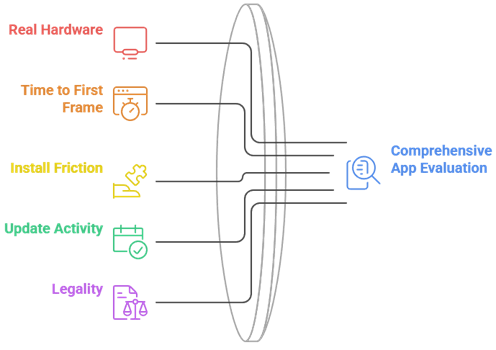
I did not want a list assembled from other lists, so every app here went onto real hardware and had to earn its position. The Fire TV Stick 4K Max is the device most of our readers actually use, so it was the primary test bed rather than a fast desktop.
- Real hardware: Everything was installed on a Fire TV Stick 4K Max and cross-checked on a Windows laptop.
- Time to first frame: I measured how long it took from opening the app to a film actually playing.
- Install friction: Apps needing Downloader and sideloading were marked down against those in the Amazon Appstore.
- Update activity: Anything without a release in the past year was dropped, regardless of how often it gets recommended.
- Legality flagged honestly: Where an app depends on grey-area add-ons, I have said so rather than glossing over it.
Torrent-Based Apps vs Ad-Supported Streaming
This is the real fork in the road, and it decides which half of this list is right for you. Popcorn Time was torrent-based, so people looking for a direct replacement gravitate that way instinctively, but the ad-supported services now cover a surprising amount of the same ground.
- Torrent-based: Stremio, Kodi, and Butter Project pull from public swarms, giving huge choice with real legal and safety exposure.
- Ad-supported: Tubi, Pluto TV, and Crackle are licensed, free, and carry zero legal risk in exchange for ad breaks.
- Personal library: Plex and Jellyfin play only what you already own, which is the safest route of all.
- Speed differs: A well-seeded torrent can beat a free service, but a poorly seeded one will buffer endlessly.
- Reliability differs: Licensed catalogues never break, whereas grey-area add-ons stop working with no warning at all.
Which of These Actually Work Well on a Firestick
A Fire TV Stick is not a powerful machine, and several apps that feel excellent on a laptop become sluggish once they are driving a television through a remote. This is where a few popular recommendations quietly fall apart, so it is worth separating them properly.
- Appstore, no effort: Tubi, Pluto TV, Crackle, Netflix, and Prime Video install directly with no sideloading whatsoever.
- Sideload, but excellent: Stremio, Kodi, Plex, and Jellyfin all install through Downloader and run well on a 4K Max.
- Not really viable: Butter Project has no television build, so treat it as a desktop tool only.
- Watch your storage: The Firestick has limited space, so clear the cache before installing several heavy apps at once.
- Skip the heaviest skins: If you go the Kodi route, a lightweight skin matters far more on a Firestick than on a PC.
Do You Need a VPN or Real-Debrid With These?
These two questions come up constantly and they are not the same question. One is about privacy and the other is about stream quality, and whether you need either depends entirely on which half of this list you have chosen to use.
- VPN, torrent apps: Strongly advised for Stremio with torrent add-ons, Kodi third-party add-ons, and Butter Project, since your IP is visible in the swarm.
- VPN, licensed apps: Unnecessary for Tubi, Pluto, Crackle, Netflix, or Prime Video, beyond ordinary privacy preferences.
- Real-Debrid, what it does: It converts torrents into fast cached HTTPS links, removing most buffering and dead sources.
- Real-Debrid, cost: Roughly €4 for 30 days or €16 for 180 days, checked 14 July 2026.
- Where to start: Our guides to the best Kodi alternatives and the best Stremio addons cover both setups in detail.
Verdict:
There is no single Popcorn Time replacement, because Popcorn Time was really two things at once: an effortless interface and a free source of everything. Those have now split apart, and choosing well means deciding which of the two you actually cared about in the first place.
- Stremio: The closest match by a wide margin, giving you the same poster-driven, one-click experience once add-ons are installed.
- Kodi: The right pick if you enjoy configuring things and want live TV, local files, and add-ons in one place.
- Tubi: The best choice if free and instant mattered more than unlimited, with no legal exposure at all.
FAQs
Is Popcorn Time still working in 2026?
The official project shut down in January 2022 and has not returned. Sites still offering a Popcorn Time download are unofficial forks of unknown origin, and several have been found bundling malware, so they are best avoided entirely.
What is the closest app to Popcorn Time?
Stremio. It reproduces the poster-driven interface and one-click playback almost exactly, with the difference that sources come from add-ons you install yourself rather than being built into the app.
Are Popcorn Time alternatives legal?
It depends which one. Tubi, Pluto TV, Crackle, Netflix, Prime Video, Plex, and Jellyfin are entirely legal. Stremio, Kodi, and Butter Project are legal apps, but the third-party add-ons people install into them frequently are not.
Do I need Real-Debrid to use Stremio or Kodi?
No, but it makes an enormous difference. Free scrapers return dead or badly seeded links constantly, whereas Real-Debrid resolves cached torrents into fast HTTPS streams for roughly €4 a month.
Which Popcorn Time alternative is best on a Firestick?
Stremio if you want the closest replacement, and Tubi if you want something that installs from the Amazon Appstore and simply works. Both run comfortably on a Fire TV Stick 4K Max.