Key Takeaway: The CyberFlix Stremio addon is no longer installable from its former ElfHosted address. The host marks Cyberflix Catalog deprecated, its manifest returns 404, and the maintained community directory has no current listing. Do not chase unofficial mirrors; remove stale entries, record the catalog rows you liked, and rebuild them with a maintained catalog addon.
Searching for CyberFlix in Stremio now leads to a confusing mix of old manifest links, the unrelated CyberFlix TV APK, and articles written while the catalog server still worked. I checked the former host, manifest response, community directory, source repository, commit history, and replacement manifests to establish what is usable in August 2026.
This guide does not pretend a retired addon can still be installed. Instead, it explains what Cyberflix Catalog actually did, why the familiar setup fails, how to remove a dead account entry, and how to reproduce its useful Netflix, Disney+, Prime Video, Max, anime, kids, and regional discovery rows without confusing catalogs with video sources.
Is the CyberFlix Stremio Addon Working in August 2026?
No. The original hosted Cyberflix Catalog route is retired, and the evidence is stronger than a temporary outage or one failed installation attempt.
- Host Notice: https://cyberflix.elfhosted.com/ now displays a Cyberflix deprecated notice and says development stalled before the public instance was permanently retired.
- Manifest Failure: the former manifest address returned HTTP 404 during this review, so Stremio has no current descriptor to read or install.
- Directory Removal: searching the maintained Stremio Addons API for Cyberflix returned zero records, while the old Cyberflix detail route returned 404.
- Development Gap: the public server repository remains accessible, but its latest code push was December 26, 2024, far behind current Stremio changes.
- Practical Verdict: treat Cyberflix Catalog as discontinued rather than intermittently unavailable, even if an old entry or cached row still appears on one device.
| Signal checked | August 22, 2026 result | What it means |
|---|---|---|
| Former homepage | Deprecated notice | Public hosting was intentionally retired |
| Former manifest | HTTP 404 | New installation cannot complete |
| Community directory search | No Cyberflix record | No maintained approved listing is available |
| Public repository | Last push in December 2024 | Source exists without current maintenance |
| Old Stremio entry | May remain cached | Visible does not mean functional |
Cyberflix Catalog Is Not the CyberFlix TV APK
The shared name causes the most damaging mistake. Cyberflix Catalog was a remote Stremio metadata service; CyberFlix TV is a separate Android streaming application.
- Stremio Addon: Cyberflix Catalog connected through a manifest URL and added movie or series rows to Stremio Home and Discover screens.
- Android Application: CyberFlix TV uses an APK installed directly on Android devices, outside Stremio’s addon account and remote manifest system.
- No APK Needed: legitimate Stremio community addons are web services, so an installer claiming Cyberflix Catalog requires an APK is describing something else.
- Different Removal: uninstalling Cyberflix Catalog happens inside Stremio Addons, whereas removing CyberFlix TV uses the Firestick or Android application settings menu.
- Safer Search: include the word Catalog when evaluating old instructions, then reject pages that mix APK sideloading with Stremio manifest installation.
What Cyberflix Catalog Used to Add to Stremio
Cyberflix was useful because it turned several discovery sources into selectable catalog rows. It organized titles but did not deliver the videos behind them.
- Platform Rows: the source defined popular and newer catalogs for Netflix, Disney+, Max, Prime Video, Apple TV+, Hulu, Paramount+, Peacock, and others.
- Discovery Lists: premieres, daily and weekly trends, blockbusters, award winners, genre collections, and year filters created browsing paths beyond provider brands.
- Special Interests: dedicated configurations covered anime, Asian programming, Indian titles, documentaries, kids content, and several additional country-specific services or languages.
- Metadata Sources: the archived code referenced TMDB, IMDb, JustWatch, Trakt, AniList, and MDBList providers while enriching items through Stremio-compatible identifiers.
- No Streams: its manifest declared catalog and metadata resources, not a stream resource, so playback always depended on another addon or licensed provider.
| Task | Cyberflix handled it? | What handled the rest |
|---|---|---|
| Add branded discovery rows | Yes | Cyberflix catalog responses |
| Show posters and title metadata | Yes | Metadata providers in its server |
| Filter by genre or year | Yes | Configured catalog options |
| Find playable sources | No | A separate stream addon or service |
| Unlock paid subscriptions | No | Your valid provider account |
Why Old Cyberflix Install Links and Configurators Fail
A retired remote addon can fail at several stages. Identifying the stage prevents endless reinstall attempts and exposes links that never belonged to Cyberflix.
- Root Redirect: the former addon homepage now loads an informational retirement page rather than the configuration application that generated personalized manifest paths.
- Missing Descriptor: Stremio needs a valid manifest containing identity, version, resources, types, and catalogs; the original endpoint now supplies none of these.
- Dead Configuration: previously generated paths still depend on the retired host, so saving an old configured URL cannot resurrect its server-side catalogs.
- Cached Appearance: an installed name or poster row may remain locally until refresh, yet selecting it fails when the remote catalog request reaches nothing.
- Mirror Risk: a working page with the Cyberflix name may be an unofficial fork, archived clone, or unrelated application with different operators and behavior.
Remove a Stale Cyberflix Catalog Installation Safely
Removing the dead account entry is safer than repeatedly adding mirrors. First record the rows you valued, then clean the addon from one signed-in device.
- Record Favorites: note the platform, genre, anime, kids, regional, and award catalogs you actually browsed rather than trying to reproduce every old row.
- Confirm Account: verify the same Stremio profile is active on desktop, phone, and Firestick because installed community addons synchronize through that account.
- Open Addons: select the puzzle-piece Addons area, switch to installed addons, and locate Cyberflix Catalog rather than any similarly named Android application.
- Choose Uninstall: remove the Cyberflix entry once, allow account synchronization to finish, and close Stremio normally before checking another connected device.
- Refresh Devices: reopen Stremio on Firestick and mobile, confirm the dead rows disappear, and avoid clearing application data unless account refresh genuinely fails.
Stremio’s own support describes community addons as remote services and states that Install or Uninstall changes the user’s account. Therefore, removing Cyberflix Catalog does not delete a local executable. If the name persists on one television, sign out and back into the same account before resetting the entire Stremio application.
Preserve the Catalog Layout You Actually Want
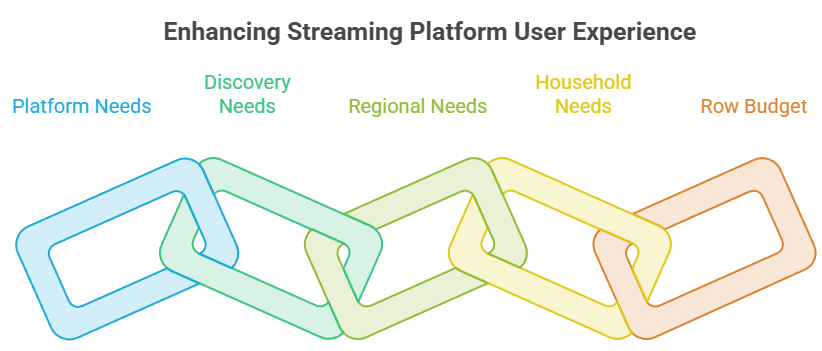
Migration works best when you preserve intent rather than the retired addon’s exact configuration. A short requirement list produces a cleaner, more resilient replacement.
- Platform Needs: list only services you browse, such as Netflix, Disney+, Prime Video, Max, Apple TV+, or Crunchyroll, instead of selecting everything.
- Discovery Needs: separate platform browsing from trending, popular, new-release, top-rated, genre, year, award, and watchlist rows before choosing replacement features.
- Regional Needs: record country and metadata language independently because provider availability, displayed titles, and streaming-rights information may use different location settings.
- Household Needs: decide whether kids or anime rows require stricter age filters, separate profiles, localized metadata, or merely a dedicated discovery category.
- Row Budget: set a modest maximum number of Home rows so the replacement stays readable and avoids the oversized configurations that troubled Cyberflix users.
Match Cyberflix Features to a Current Replacement
No single successor is automatically correct. Choose by the Cyberflix function you miss, then confirm the current manifest before entering accounts, keys, or personal lists.
- Streaming Catalogs: suits simple Netflix, Max, Disney+, Prime Video, and Apple TV+ discovery with relatively few branded movie and series rows.
- TMDB Addon: provides configurable metadata, search, languages, favorites, watchlist, ratings, IMDb integration, and broader genre, year, trending, and discovery catalogs.
- AIOLists: focuses on importing, ordering, renaming, merging, and hiding Trakt, MDBList, or external-addon catalogs when detailed list control matters most.
- Streaming Catalogs Plus: adds region, metadata language, age profile, provider selection, multiple sort modes, continuous loading, and newer platform-based catalog controls.
- Cinemeta Baseline: keep Stremio’s protected core metadata addon available for basic search and title pages, even when another tool supplies additional discovery rows.
| Cyberflix feature missed | Closest current route | Important limitation |
|---|---|---|
| Basic platform rows | Streaming Catalogs | Catalog-only; fewer controls |
| Rich metadata and filters | TMDB Addon | Some integrations need accounts or keys |
| Personal list management | AIOLists | Configured manifests may contain sensitive data |
| Age and region controls | Streaming Catalogs Plus | Large selections can crowd Home |
| Core title metadata | Cinemeta | Not a Cyberflix-style provider catalog |
Rebuild a Small Catalog Setup Without Overloading Stremio
Begin with the lightest configuration that answers your browsing need. Adding dozens of rows immediately makes successful installation look slow or broken.
- One General Row: start with Popular or Trending for movies and series, creating a dependable baseline before adding provider-specific catalogs or personal lists.
- Two Platforms: enable only the services your household uses most, then verify their movies and series rows display expected regional titles.
- One Specialty: add a single anime, kids, regional, awards, documentary, or genre row rather than activating every optional discovery group.
- Controlled Search: choose one primary metadata or search provider first, since overlapping Cinemeta and TMDB results can appear duplicated despite working correctly.
- Incremental Expansion: add two rows at a time, refresh Home and Discover, and remove anything that duplicates existing catalogs without improving discovery.
Move the Replacement to Firestick and Android TV
Configure catalog addons on a desktop or phone browser where long options are easier to review, then let Stremio synchronize the finished account state.
- Same Profile: sign into the identical Stremio account on the configuring device and Firestick; different email addresses create separate addon collections and layouts.
- Desktop Configure: open the replacement’s verified configure page, select a minimal set of rows, and inspect the addon name before approving installation.
- Account Sync: wait for installation to finish, close Stremio on the television, then reopen it so the Firestick receives the updated addon set.
- Discover Check: inspect both Home and Discover because some catalogs may be hidden from Home intentionally while remaining accessible through category filters.
- Remote-Friendly Order: keep high-use rows near the top and remove redundant sections, reducing long Firestick scrolling and unnecessary remote navigation.
Fix Missing Rows, Duplicates, and Playback Confusion
Troubleshoot the replacement layer by layer. Catalog visibility, title metadata, account synchronization, and stream availability come from different services and require different fixes.
- No New Rows: confirm installation under the correct Stremio account, then check Discover before assuming Home should display every configured catalog automatically.
- Duplicate Rows: compare installed catalog addons and disable overlapping provider, trending, search, or watchlist sections rather than reinstalling the newest addon repeatedly.
- Wrong Region: return to configuration, correct country and metadata language, update the existing addon, and allow cached results time to refresh.
- Empty Playback: remember that Cyberflix and its catalog replacements supply discovery metadata, so playable choices still require a separate lawful stream source.
- Firestick Delay: restart Stremio, verify account identity, and test another connected device before clearing data or rebuilding a configuration that already synchronized elsewhere.
| Symptom | Likely layer | Best first action |
|---|---|---|
| Addon will not install | Manifest or configure page | Verify the current approved listing |
| Catalog absent from Home | Visibility setting | Check Discover and Home-view controls |
| Rows appear twice | Overlapping catalog addons | Disable duplicate catalog groups |
| Titles do not match region | Country or language setting | Update regional configuration |
| Title opens with no streams | Separate playback layer | Check the lawful stream provider |
Treat Cyberflix Forks, Mirrors, and Self-Hosting Claims Carefully
Open source availability does not make every deployment trustworthy or maintained. Evaluate ownership, code freshness, secrets, and manifest behavior before adopting a Cyberflix-branded copy.
- Archived Source: https://github.com/marcojoao/cyberflix-server preserves version 1.6.0 metadata and server code, but public preservation does not equal an active hosted service.
- Fork Inspection: check recent commits, issue responses, release notes, manifest identity, configured domains, and documented operators before trusting any modified Cyberflix deployment.
- Secret Burden: the archived server expects TMDB and Trakt credentials, so self-hosting creates API-key, update, database, logging, and network-security responsibilities.
- Upstream Drift: provider APIs, Stremio clients, regional catalog sources, and authentication flows changed after the last push, potentially breaking an otherwise successful deployment.
- Name Alone: reject manifests that hide their source, operator, privacy behavior, or current status while borrowing familiar Cyberflix branding to encourage installation.
Verify the Replacement Before Retiring Your Notes
Finish migration with evidence, not a successful install popup. Compare the rebuilt layout against your short requirement list across two devices and several catalog types.
- Status Proof: reopen the approved listing and manifest after installation, recording the addon name, version, operator, and configuration address you actually used.
- Layout Proof: verify general, platform, and specialty rows appear once, use helpful names, follow your chosen order, and avoid unnecessary Home-screen clutter.
- Content Proof: sample new, older, regional, and series titles to expose incomplete pages, wrong filters, stale caching, or language mismatches early.
- Account Proof: compare desktop and Firestick under the same Stremio identity, confirming removal of Cyberflix and synchronization of the replacement configuration.
- Migration Record: keep source URLs and row choices separately; our AIOLists Stremio addon guide explains list imports and credential cautions when rebuilding complex catalogs.
CyberFlix Stremio Addon Verdict
Cyberflix Catalog should be treated as retired, not temporarily down. Its former host explicitly marks it deprecated, the manifest returns 404, and the current community directory no longer lists it. The sensible route is to remove the stale account entry, preserve only the catalog functions you valued, and rebuild a smaller layout with a maintained catalog or metadata addon.
FAQs
Is the CyberFlix Stremio addon still working?
No. On August 22, 2026, the former ElfHosted homepage displayed a deprecation notice, its manifest returned 404, and the maintained community addon directory returned no Cyberflix listing. An old installed name may remain cached, but new installation and catalog requests cannot rely on the retired original service.
Is Cyberflix Catalog the same as the CyberFlix TV APK?
No. Cyberflix Catalog was a remote metadata addon installed in a Stremio account through a manifest. CyberFlix TV is a separate Android application installed from an APK. Instructions that combine a Cyberflix Catalog manifest with APK sideloading are mixing two different products and removal methods.
Can I install Cyberflix from an old manifest URL?
The former manifest now returns 404, and personalized configuration paths still depend on that retired host. Saving or repasting an old address does not restore its server. Avoid mystery mirrors using the same name unless their operator, source, current manifest, privacy behavior, and maintenance history are independently clear.
Which addon replaces Cyberflix Catalog?
Choose by function: Streaming Catalogs for simple platform rows, TMDB Addon for rich metadata and filters, AIOLists for personal list control, or Streaming Catalogs Plus for region and age profiles. The broader best Stremio addons guide helps separate catalog, metadata, subtitle, and stream roles.
Did Cyberflix Catalog provide movies or streaming links?
No. The archived manifest declared catalog and metadata resources for movies and series, not a stream resource. Cyberflix arranged discovery rows and title information. Playback required another stream addon or a licensed provider, and replacing the catalog alone will not create playable sources.
How do I remove Cyberflix from Stremio on Firestick?
Open Stremio Addons under the same account used on Firestick, find Cyberflix Catalog among installed addons, and select Uninstall. Allow account synchronization, close Stremio, and reopen it on Firestick. If the entry remains, sign out and back into the same account before clearing application data.