Key Takeaway: The StremThru Stremio addon most people want is StremThru Torz, a configurable stream addon backed by a crowdsourced torrent database, optional indexers, and multiple debrid stores. The maintainer-linked public manifest answered normally on August 14, 2026 and reported version 0.103.2. StremThru is free and open source, but a debrid account may cost extra.
StremThru can look confusing because it is not one addon. It is a companion service with separate List, Wrap, Store, Torz, Newz, and Sidekick addons. I checked the current project documentation, the live Torz configuration screen, the public manifest, and the community listing to separate those pieces and build a setup that does not expose a private token or install the wrong component.
What the StremThru Stremio Addon Actually Is
StremThru is an open-source companion layer for Stremio, not a video service. It connects Stremio with external stores, indexes, lists, and upstream addons through six purpose-built components.
- Torz: returns movie, series, and anime torrent results from a crowdsourced database, optional indexers, and connected stores, making this the usual target for this keyword.
- Store: browses and searches files already held in supported debrid, cloud, or usenet store accounts instead of searching the shared Torz database.
- Wrap: places other Stremio addons behind one StremThru endpoint, allowing common store handling and proxy behavior without turning those upstreams into Torz sources.
- List and Newz: List creates catalogues from external lists, while Newz handles usenet integration; neither is a substitute for Torz torrent results.
- Sidekick: adds supporting Stremio functions rather than torrent discovery, so installing it alone will not make Torz-labelled movie streams appear.
| StremThru component | Main job | Choose it when |
|---|---|---|
| Torz | Crowdsourced torrent and indexer results | You want streams for a selected title |
| Store | Browse an existing store account | You want files already saved in your cloud |
| Wrap | Combine upstream addon handling | You manage several Stremio addons |
| List | Build external-list catalogues | You want discovery rows, not stream search |
| Newz | Usenet integration | Your provider and indexer support usenet |
| Sidekick | Additional Stremio utilities | You need a supporting feature |
StremThru Torz Status, Version, and Catalogue Signal
The maintainer-linked public instance and community directory currently disagree on version numbers. That is not proof of an outage; it shows why the live manifest should be checked before relying on a catalogue card.
- Live Manifest: the public Torz manifest returned HTTP 200 and identified itself as StremThru Torz version 0.103.2 when checked on August 14, 2026.
- Catalogue Entry: Stremio Addons displayed version 0.102.1 with 82 installs, two instances, and a manifest status still marked Checking during research.
- Version Difference: a public instance can update before its directory record, while another listed instance may remain behind, so compare the actual install dialog.
- Adoption Context: 82 catalogue installs indicate a smaller community than Torrentio or MediaFusion, which means fewer beginner tutorials and less crowd-sourced troubleshooting.
- Practical Check: I would confirm the displayed addon name and version immediately before installation rather than treating an old screenshot as a trustworthy manifest.
How StremThru Torz Finds and Prepares Streams
Torz is not simply another live scraper. It searches a crowdsourced database, can query optional indexers, checks connected stores, and then sorts or filters the results before Stremio displays them.
- Title Request: Stremio sends a movie or episode identifier to Torz, which uses that metadata to look for matching torrent records and release names.
- Shared Database: the project describes Torz content as crowdsourced, reducing dependence on every torrent site answering successfully at the moment you search.
- Optional Indexers: Torz also supports Jackett indexers, allowing self-hosters or advanced users to add search sources beyond the public crowdsourced database.
- Store Check: connected debrid or cloud stores can identify available content and prepare a playable result according to that provider’s API and account rules.
- Result Cleanup: stream sorting and filtering can prioritize resolution, quality, size, or HDR, preventing an unmanageable list of near-identical releases.
Requirements Before You Configure StremThru Torz
Prepare the account and privacy decisions first. The installation itself is short, but entering the wrong token or using a personalized URL carelessly creates avoidable security and playback problems.
- Stremio Account: sign into the same account on your browser, phone, computer, and Firestick because installed addons normally synchronize across Stremio clients.
- Trusted Instance: begin from the maintainer’s repository or maintained directory listing, then inspect the full domain before entering any store token or password.
- Store Choice: decide whether you will use a supported debrid service, another store, or experimental peer-to-peer mode before opening the configuration form.
- Private Token: obtain the provider token from your own account dashboard and never copy another person’s key, screenshot, or configured manifest.
- Baseline Title: choose one authorized, popular title with predictable metadata so you can distinguish an installation failure from genuinely missing content.
How to Install the StremThru Stremio Addon Step by Step
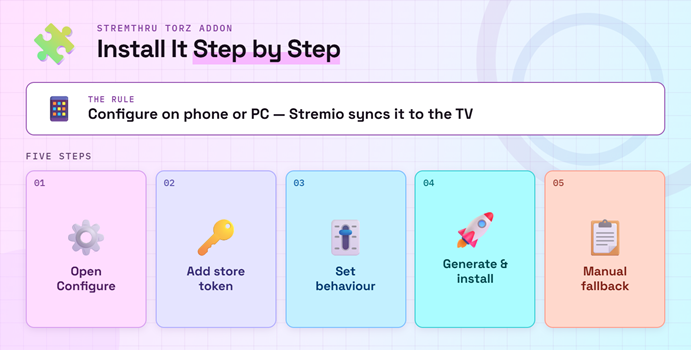
Use a phone or computer for configuration, then let Stremio synchronize the finished addon to your television. This avoids typing long tokens or manifest addresses with a remote.
- Open Configure: visit the StremThru Torz configuration page and confirm the page identifies the expected version before entering any account information.
- Add a Store: select your provider under Store Name, paste its API token into Store Token, and add another row only when needed.
- Set Behavior: choose cached-only mode if appropriate, leave indexers blank for the simplest public setup, and retain the default sort initially.
- Generate Install: click Install, allow the Stremio application to open, and verify that the confirmation dialog says StremThru Torz before approving.
- Manual Fallback: if the deep link does not launch, copy the generated manifest into Stremio’s Add addon screen without sharing that personalized address.
Choose the Right Store, Token, or P2P Mode
The current public form offers numerous external stores plus an experimental P2P choice. Each option changes authentication, availability, privacy, and whether uncached torrents can play.
- Supported Choices: the current form listed AllDebrid, Debrider, Debrid-Link, EasyDebrid, Offcloud, Premiumize, PikPak, Real-Debrid, TorBox, Torrin, StremThru, and experimental P2P access.
- Token Meaning: Store Token is the selected provider’s API credential, not your Stremio password, payment-card number, or ordinary account password.
- Multiple Stores: Torz supports multiple store rows, letting one configured addon check more than one service without installing duplicate Torz manifests.
- Public Limits: project configuration documents a default maximum of three stores and two indexers on public instances, though operators may choose different limits.
- P2P Tradeoff: peer-to-peer avoids a debrid subscription but exposes your network address to torrent peers and depends on seeders, local rules, and device support.
| Setup choice | Best fit | Main caution |
|---|---|---|
| One debrid store | Most beginners | Token must stay private |
| Multiple stores | Redundancy and account comparison | Harder to identify which service failed |
| Cached only | Fast, ready-to-play results | May hide useful uncached releases |
| P2P | Users who understand torrenting | Peer exposure and seeder dependence |
| Self-hosted Torz | Advanced privacy and control | Server, HTTPS, updates, and monitoring |
Cached Only, Indexers, Sort, and Filter Explained
The default sort is sensible for a first installation. Change one control at a time and keep a known title available, because aggressive filters can make a healthy addon appear empty.
- Cached Only: this hides results not already available through a connected store, improving immediate playback while reducing the number of releases shown.
- Indexer Field: indexers extend search through compatible endpoints such as Jackett, but they introduce additional credentials, latency, maintenance, and possible source failures.
- Default Sort: the public configuration page currently sorts by descending resolution, then quality, then size, written as
-resolution,-quality,-sizein the field. - Sort Direction: a minus prefix reverses a field, so removing or adding one changes priority without affecting whether Torz actually finds a release.
- Filter Risk: custom expressions can remove every result when written incorrectly; test the unfiltered default first and save your last working configuration.
Sync StremThru Torz to Firestick and Android TV
StremThru Torz is configured in a browser but consumed inside Stremio. Once installed on the correct account, it should synchronize to Fire TV and Android TV clients.
- Match Accounts: compare the complete Stremio login on the setup device and Firestick; different sign-in methods can create separate accounts unexpectedly.
- Restart Stremio: force-close the television app after installation and reopen it before deciding synchronization failed or attempting another manifest installation.
- Check My Addons: confirm exactly one StremThru Torz entry appears, since duplicates can produce repeated results and make troubleshooting unnecessarily confusing.
- Search a Baseline: open the authorized test title and wait for Torz-labelled results, then compare the same title on desktop if Firestick remains empty.
- Avoid Remote Entry: never type a debrid token with a television remote when a trusted phone or desktop can configure the synchronized account more safely.
Fix StremThru Torz When No Streams Appear
An empty stream list can originate at five different layers: metadata, Torz reachability, store authorization, filters, or playback. Test them in that order instead of reinstalling everything.
- Confirm Manifest: reopen the maintained configuration page and check that its base manifest responds before rotating a valid store token or changing unrelated settings.
- Remove Filters: return to the default sort, disable cached-only temporarily, and clear custom filter expressions to see whether configuration hid the results.
- Refresh Token: generate a new provider API token only through the provider dashboard, then reinstall the newly configured manifest and revoke the old key.
- Compare Titles: test a current popular movie and one television episode because a metadata mismatch can affect one record while Torz remains healthy.
- Separate Playback: if streams appear but fail after selection, investigate the store account, file compatibility, network, and player rather than the Torz search.
| Symptom | Likely layer | First useful check |
|---|---|---|
| No Torz entry in My Addons | Account synchronization | Compare the Stremio login on both devices |
| Torz appears but returns nothing | Filter, metadata, or token | Restore defaults and test a popular title |
| Only uncached results disappear | Cached-only setting | Temporarily turn cached-only off |
| Authorization error | Store token | Create and install a fresh provider token |
| Stream opens then fails | Provider, network, or player | Test another compatible file and device |
StremThru Cost, Public Instances, and Self-Hosting
StremThru’s source code uses the MIT license and the maintainer-linked public instance does not advertise an addon fee. External services and self-hosting still carry separate costs.
- Addon Price: StremThru Torz is free and open source; it does not sell the films, series, anime, or torrent records returned through Stremio.
- Debrid Billing: Real-Debrid, TorBox, Premiumize, and other stores set their own plans, limits, refunds, and acceptable-use rules independently of StremThru.
- Public Instance: shared hosting is easiest, but its operator controls uptime, updates, logs, limits, and which StremThru features remain publicly available.
- Self-Hosting: the repository includes Docker support and an example stack, while production use still requires HTTPS, persistent data, upgrades, and secure authorization.
- Hidden Cost: self-hosting exchanges subscription convenience for server fees and administrator time, so it is not automatically cheaper or safer for beginners.
StremThru Privacy, Token Safety, and Legal Limits
StremThru is legitimate open-source software, but its configuration can contain powerful account credentials and its results may point to unauthorized files. Treat software safety and content legality separately.
- Protect Tokens: a debrid API token can expose account functions, so keep the configured manifest private and revoke its credential after any accidental disclosure.
- Verify Hosts: enter credentials only on a maintainer-linked or personally controlled instance; copied configuration pages can imitate the interface and capture store tokens.
- Review Providers: compare account requirements in our best Real-Debrid addons guide before granting another service access to a private store token.
- Content Rights: a torrent hash or cached file is not proof of distribution permission, and neither StremThru nor a VPN grants viewing rights.
- P2P Exposure: direct torrenting shares your address with peers and may upload data while viewing, creating different privacy and legal risks than cached playback.
Torz vs Store vs Wrap: Which One Should You Keep?
Keep the smallest set that solves your actual problem. More StremThru addons do not automatically improve coverage, and overlapping components can clutter catalogues or duplicate streams.
- Keep Torz: choose it when the priority is finding torrent results for selected movies or episodes through the crowdsourced index and optional stores.
- Add Store: use Store when browsing and searching content already held in your connected account matters more than discovering public Torz records.
- Use Wrap: choose Wrap when several upstream Stremio addons need consistent store or proxy handling, not merely because Torz returned few results.
- Avoid Duplicates: remove obsolete configurations after confirming the replacement works, because two personalized Torz manifests can display nearly identical release lists.
- Keep a Baseline: record the instance, version, stores, cached-only state, sort, and filters before experimenting, making every later comparison easier to reverse.
Link: https://github.com/MunifTanjim/stremthru
Verdict
StremThru Torz is worth installing when you understand its role: it is a configurable torrent and store interface, not a content subscription or a guaranteed replacement for every scraper. The current public manifest is reachable, the project remains active, and multi-store support is genuinely useful. Start with one trusted instance, one store, default sorting, and no custom filter; add complexity only after that baseline returns predictable results.
FAQs
What is the StremThru Stremio addon?
StremThru is a companion platform containing six built-in Stremio addons. Most searches for this keyword mean StremThru Torz, which supplies torrent results through a crowdsourced database, optional Jackett indexers, and connected stores. Store, Wrap, List, Newz, and Sidekick solve different tasks.
Is StremThru Torz working in August 2026?
Yes, the maintainer-linked public Torz manifest returned HTTP 200 on August 14, 2026 and reported version 0.103.2. The community directory displayed 0.102.1 and 82 installs, so check the actual manifest and installation dialog rather than assuming the catalogue version is current.
Do I need Real-Debrid for StremThru Torz?
No single provider is mandatory. The configuration page supports several debrid and cloud stores plus experimental P2P. A supported store generally makes cached playback easier, while P2P depends on seeders and exposes your network address to peers. Choose according to privacy, cost, and local law.
Is StremThru free?
StremThru is free, open-source software licensed under MIT, and the maintainer-linked public instance does not advertise an addon fee. Debrid subscriptions, cloud storage, usenet access, VPN service, server hosting, and bandwidth are separate products that may charge independently.
Is the StremThru Stremio addon safe and legal?
The software itself is open source, but safety depends on the instance and how you protect store tokens. Legality depends on the specific content and source. A torrent result, debrid cache, proxy, or VPN does not prove authorization or grant rights to copyrighted material.
Why does StremThru Torz show no streams?
First confirm the addon exists under My Addons, restore the default sort, disable cached-only temporarily, remove custom filters, and test a current authorized title. Then refresh the store token. For problems affecting every addon, use our complete Stremio troubleshooting guide.