Key Takeaway: Umbrella is the most popular premium Kodi add-on in 2026, streaming movies and TV shows in crisp HD once paired with a debrid service such as TorBox or Real-Debrid. This guide walks you through installing Umbrella on Firestick, adding the CocoScrapers module, authorising debrid, applying the Umbrestuary skin, and fixing the errors that users hit most often.
If you want a single add-on that can replace your streaming subscriptions, Umbrella is the one most Kodi users reach for. Below I cover the complete 2026 setup, starting from a clean Kodi install.
I installed Umbrella fresh on a Fire TV Stick 4K Max running Kodi 21.3 Omega, added the CocoScrapers module and a TorBox account, and had cached 4K links playing within about ten minutes. The process has a few more steps than an average add-on, so I have broken every stage down clearly so nothing trips you up.
What Is the Umbrella Kodi Addon?
Umbrella is a free, third-party video add-on for Kodi that has topped popularity lists for years. It scrapes streaming links for movies and TV shows and resolves them into fast, high-definition playback when connected to a premium debrid service.
- On-Demand Library: Umbrella covers movies and TV series with sections for Discover, Search, My Movies and My TV Shows, plus a built-in YouTube trailers area.
- Debrid Powerhouse: it is designed around premium hosts like TorBox, Real-Debrid, Premiumize and AllDebrid, which return cached 1080p and 4K links instead of unreliable free sources.
- External Scrapers: recent versions rely on the CocoScrapers module to gather sources, a small extra install that keeps link-finding fast and current.
- Highly Customisable: the latest 6.7.77 release added a fully editable main menu, letting you reorder, rename or hide sections to suit how you browse.
- Actively Maintained: the developer ships frequent updates through the official GitHub page, which is a big reason Umbrella has outlasted most rival add-ons.
What You Need Before You Install Umbrella
Umbrella will not stream out of the box, so gathering a few things first saves frustration. You need a compatible device, the current Kodi build, an external scraper and, for the best experience, a debrid subscription.
- A Kodi Device: any Firestick, Android or Google TV box, or computer running Kodi 21.3 Omega will run Umbrella; my best Kodi builds guide covers ready-made setups.
- Unknown Sources On: you must enable Unknown sources in Kodi settings so it can install the Umbrella repository from outside the official catalogue.
- CocoScrapers Module: Umbrella needs this external provider to find links, so we install it straight after the add-on in the steps below.
- A Debrid Account: TorBox, Real-Debrid, Premiumize or AllDebrid unlocks fast cached links; without one you will find very few working sources.
- A VPN: because Umbrella streams from unverified sources, a VPN keeps your activity private from your internet service provider.
| Requirement | What You Need |
|---|---|
| Device | Firestick, Fire TV, Android/Google TV, Windows, Mac or Linux |
| Kodi version | 21.3 Omega (current stable) recommended |
| Scraper module | CocoScrapers (required for links) |
| Debrid service | TorBox, Real-Debrid, Premiumize or AllDebrid |
| VPN | Recommended for privacy while streaming |
How to Install Umbrella on Kodi (Step by Step)
Installing Umbrella follows Kodi’s standard repository process. Enable unknown sources, add the Umbrella repository URL in File Manager, install the repository from zip, then install the add-on itself from that repository.
- Enable Sources: go to Settings, System, then Add-ons and switch on Unknown sources, clicking Yes on the warning that Kodi displays.
- Add the Source: open File Manager, choose Add source, select None and type https://umbrellaplug.github.io exactly, then name it umbrella and click OK.
- Install From Zip: under Add-ons pick Install from zip file, choose umbrella, and select repository.umbrella.zip to install the Umbrella Repository.
- Install the Add-on: click Install from repository, open Umbrella Repository, select Video add-ons, choose Umbrella and click Install, then OK.
- Finish Up: wait for the installation complete message and close the changelog; the add-on is installed but still needs a scraper and debrid to stream.
How to Install and Enable CocoScrapers
Modern Umbrella versions need the CocoScrapers module to find streaming links. You install it just like a repository, then enable it inside Umbrella’s provider settings so the add-on can pull sources.
- Add the Source: in File Manager choose Add source, select None and enter https://cocojoe2411.github.io exactly, then name it coco and confirm.
- Install the Repo: under Add-ons pick Install from zip file, choose coco, and select repository.cocoscrapers.zip to add the CocoScrapers repository.
- Install the Module: click Install from repository, open CocoScrapers Repository, choose Program add-ons, then install the CocoScrapers Module.
- Enable in Umbrella: open Umbrella, go to Tools, then Settings Providers, and under Providers Accounts choose Enable External Providers.
- Select the Module: pick External Provider, choose CocoScrapers Module, and wait for the confirmation that the external module was set successfully.
How to Set Up a Debrid Service in Umbrella
Umbrella really shines once a debrid host is attached, turning slow scrapes into instant cached streams. Here I authorise TorBox, but Real-Debrid, Premiumize and AllDebrid follow almost identical steps inside the add-on.
- Open Accounts: from Umbrella’s home screen select Tools, then Settings Accounts, where every supported debrid host is listed for authorisation.
- Start Authorisation: hover over Accounts Debrid, find TorBox or your chosen service, and click Authorization to generate a pairing code.
- Enter the Code: visit the on-screen link on any browser, sign in to your debrid account, type the code shown in Kodi and confirm the pairing.
- Confirm Success: return to Umbrella and you will see a successfully authorised message; click OK to save your new debrid connection.
- Allow Metahandler: if Umbrella prompts you to install Metahandler for artwork and metadata, click Yes so posters and details load correctly.
How to Customize Umbrella with the Umbrestuary Skin
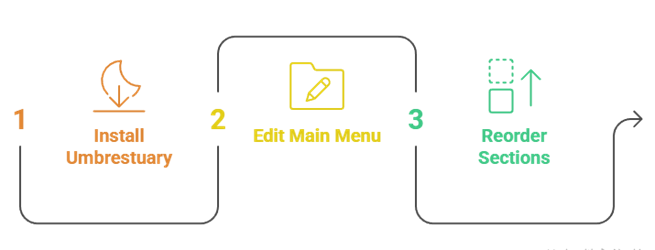
The Umbrella Repository includes an exclusive skin called Umbrestuary that reshapes the interface for a slicker, build-style look. You can also rearrange the main menu without any skin, tailoring Umbrella to how you actually watch.
- Open the Repo: from the Umbrella Repository choose Look and Feel, then Skin, where the Umbrestuary option is available to install.
- Install the Skin: select Umbrestuary, click Install, choose OK and then Yes to switch to it; you can always revert in settings later.
- Edit the Menu: back in Umbrella, long-press any main menu item and choose Edit Main Menu to disable, rename or reorder sections.
- Reorder to Taste: move Discover Movies or Search to the top if that is how you browse, keeping your most-used areas within instant reach.
- Keep It Optional: the skin is a bonus, not a requirement, so stick with the default Estuary skin if you prefer a lighter, familiar layout.
Umbrella Not Working? Common Fixes
Most Umbrella problems trace back to three things: a missing scraper, an unauthorised debrid account, or an outdated repository. The table and checklist below resolve the errors people report most often on forums.
- Check CocoScrapers: if no sources appear, confirm the CocoScrapers module is installed and enabled under Umbrella’s external providers settings.
- Re-Authorise Debrid: expired keys are the top cause of dead links, so reconnect TorBox or Real-Debrid from Tools, Settings Accounts.
- Clear the Cache: open Tools inside Umbrella and clear providers and cache to remove stale data that can block fresh scraping results.
- Update the Add-on: reinstall from https://umbrellaplug.github.io if you are on an old build, since scraper changes break outdated versions.
- Reboot Kodi: a full force-close and restart clears memory and fixes many one-off glitches after installing or updating Umbrella.
| Symptom | Likely Cause | Fix |
|---|---|---|
| No sources found | CocoScrapers missing or disabled | Reinstall CocoScrapers and enable external providers |
| Links will not play | Debrid not authorised or expired | Re-authorise TorBox or Real-Debrid in Accounts |
| Repository will not install | Old URL or unknown sources off | Re-add umbrellaplug.github.io and enable sources |
| Constant buffering | No debrid or weak connection | Add a debrid service, use a VPN, lower resolution |
Do You Need Real-Debrid or a VPN With Umbrella?
Technically Umbrella can run without either, but in practice both matter. A debrid service is what makes Umbrella genuinely usable, while a VPN protects your privacy when streaming from unverified third-party sources.
- Debrid Is Essential: without a host like TorBox or Real-Debrid, Umbrella finds very few working links and buffers heavily on the ones it does.
- Debrid Pricing: Real-Debrid costs about four euros for thirty days, TorBox starts near three dollars monthly and AllDebrid is similarly cheap.
- VPN For Privacy: a VPN hides which add-ons you open from your internet provider and is strongly advised for any grey-area Kodi streaming.
- Avoid Throttling: some providers slow streaming traffic, and a VPN can restore full speed, reducing buffering during busy evening hours.
- My Recommendation: I run TorBox plus a VPN on my Firestick, and the combination gives Umbrella fast, private and reliable playback every time.
Is Umbrella Legal and Safe to Use?
Umbrella itself is a free, open piece of software, and installing it is legal. The grey area is the content it links to, which may not be licensed, so responsibility sits with you as the viewer.
- The App Is Legal: Umbrella is add-on software, not a content library, and installing it on Kodi breaks no laws by itself.
- Content Is Grey: many links point to unlicensed streams, so I recommend sticking to public-domain or clearly licensed titles wherever possible.
- Scans Come Back Clean: VirusTotal checks of the Umbrella repository have not flagged malicious files, though you should still only use the official URL.
- Use A VPN: protect your identity with a VPN, and see my best Kodi repositories guide for trusted sources.
- Guard Your Accounts: only enter debrid credentials on the official pairing page in a browser, never inside a form built into an add-on.
Best Umbrella Alternatives
Umbrella is excellent, but it is worth keeping a backup or two in case a scraper breaks. These three debrid add-ons cover the same on-demand movies and TV shows and set up in a similar way, so switching is painless.
1) POV
POV is a debrid-only add-on from developer Kodifitzwell and one of the fastest Umbrella alternatives available right now. It shares the familiar FEN-style layout, resolves links quickly through the CocoScrapers module, and in my testing it loaded 4K movies almost as fast as Umbrella did on the same TorBox account.
Features:
- Fast Resolving: POV added a Limit Resolve Attempts option that skips dead sources, so you reach a working link without wading through broken results.
- Clean Menus: Movies, TV Shows, Discover and People are laid out simply, making POV an easy switch for anyone already comfortable with Umbrella.
- Debrid Support: it works with TorBox, Real-Debrid, Premiumize and AllDebrid, delivering cached 1080p and 4K links rather than unreliable free scrapes.
- MDBList Ready: improved MDBList pagination lets you browse large custom lists smoothly, a handy feature for building your own curated collections.
- Trakt Sync: POV connects to Trakt so your progress and watchlist follow you across every device where the add-on is installed.
- My Testing: I found POV resolved links a touch faster than Umbrella on the same TorBox account, making it my favourite lightweight alternative.
- Frequent Updates: Kodifitzwell patches the scrapers regularly, so POV keeps working reliably when heavier, less-maintained rival add-ons quietly stop returning any links.
| Pros | Cons |
| Very fast links | Debrid required |
| Familiar FEN layout | No free links |
| All debrid services | Needs CocoScrapers |
| Regular updates | |
| Trakt and MDBList |
Pricing: Free add-on; needs a debrid service such as TorBox ($3–$10/mo) or Real-Debrid (about €4/30 days). Checked July 2026.
Link: https://kodifitzwell.github.io/repo/
2) The Gears
The Gears is a newer premium add-on from the Chains Repository built on the FEN Light AM codebase. It focuses purely on on-demand movies and TV shows through debrid, and when I tried it the link quality matched Umbrella closely on cached 4K releases.
Features:
- FEN Lineage: The Gears is based on the maintained FEN Light AM fork, so it inherits reliable scraping logic that experienced Umbrella users will appreciate.
- Debrid Only: it requires a host like TorBox, Real-Debrid, Premiumize or AllDebrid, focusing on high-quality cached links rather than patchy free sources.
- Chains Repository: installed from a busy, active repo, The Gears sits beside other current add-ons, so one URL unlocks several quality options.
- VOD Focus: there is no live TV or clutter, just clean movie and TV sections, which keeps the add-on fast and easy to navigate.
- Regular Releases: the developer pushes updates often, an important sign of health in a scene where forks are abandoned quickly and frequently.
- My Experience: I installed The Gears alongside Umbrella and found its cached links every bit as quick, making it a strong backup add-on.
- Simple Setup: once a debrid service is attached it works immediately, with no complicated extra configuration beyond the usual scraper module.
| Pros | Cons |
| Strong cached links | Debrid only |
| Actively updated | No free content |
| Clean VOD focus | Newer project |
| Familiar FEN base | |
| Easy debrid setup |
Pricing: Free add-on; a debrid service (Real-Debrid about €4/30 days or TorBox from $3/mo) is required. Checked July 2026.
Link: https://unhingedthemes.github.io
3) Seren
Seren is the original debrid-only add-on for advanced Kodi users and a long-time community favourite. It uses modular provider-based streaming and pairs beautifully with Real-Debrid. I keep Seren installed because its detailed settings let me fine-tune sources more than almost any other add-on.
Features:
- Modular Providers: Seren lets you add and manage provider packages, giving power users granular control over exactly where streaming links come from.
- Debrid Focused: designed for Real-Debrid, Premiumize and AllDebrid, Seren delivers consistently high-quality cached links with minimal buffering when configured correctly.
- Trakt Integration: deep Trakt support drives its menus, so your watchlist, progress and personal recommendations shape almost everything that Seren shows you.
- Nixgates Repo: installed from the well-maintained Nixgates repository, Seren still continues to receive regular developer updates years after its first public release.
- Clean Interface: the layout is elegant and uncluttered, though its many settings reward users willing to spend a little time configuring them.
- My Setup: I use Seren with Real-Debrid as my power-user option, tweaking providers until the source list is exactly how I like it.
- Reliable Playback: once dialled in, Seren rarely serves a dead link, which is why it remains a benchmark for debrid streaming on Kodi.
| Pros | Cons |
| Powerful provider control | Steeper learning curve |
| Excellent with Real-Debrid | Debrid only |
| Deep Trakt features | Setup takes time |
| Long-maintained | |
| Clean design |
Pricing: Free add-on; requires a debrid service such as Real-Debrid (about €4/30 days) or TorBox (from $3/mo). Checked July 2026.
Link: https://nixgates.github.io/packages
Verdict:
Umbrella remains the add-on I recommend first for on-demand streaming on Kodi in 2026. It takes a few extra minutes to configure, but the payoff is fast, high-definition playback that can genuinely replace paid apps. If you want alternatives, start with these.
- Umbrella: the most complete premium add-on, with deep customisation and reliable HD links once debrid is attached.
- POV: the fastest lightweight alternative, resolving links quickly with a clean, familiar interface.
- The Gears: a well-maintained FEN Light AM fork that matches Umbrella closely for cached quality.
FAQs
Is the Umbrella Kodi addon still working in 2026?
Yes. Umbrella received a major update in May 2026 (version 6.7.77) and installs from https://umbrellaplug.github.io. It works well on Kodi 21.3 Omega once you add the CocoScrapers module and a debrid service.
Do I need Real-Debrid for Umbrella?
You need a debrid service, but not specifically Real-Debrid. Umbrella supports TorBox, Real-Debrid, Premiumize and AllDebrid. Without one, the add-on finds very few working links and buffers heavily, so a debrid account is strongly recommended.
Why does Umbrella say no sources found?
Almost always the CocoScrapers module is missing or disabled, or your debrid key has expired. Reinstall CocoScrapers, enable external providers in Umbrella, re-authorise your debrid service and clear the cache to restore sources.
What is the Umbrestuary skin?
Umbrestuary is an exclusive skin bundled in the Umbrella Repository that gives the add-on a slicker, build-style interface. It is optional; you install it from Look and Feel, Skin inside the repository and can revert anytime.
Is Umbrella safe and legal to use?
Umbrella itself is legal software and scans clean on VirusTotal. However, it can link to unlicensed content, which sits in a legal grey area, so stick to public-domain or licensed titles and use a VPN for privacy.