Key Takeaway: Stremio has no App Store listing, so installing it on an iPad means one of two official routes: add Stremio Web to your Home Screen as a Safari web app, which works anywhere but cannot stream torrents, or install AltStore PAL and get the full app with torrent support if you are in Europe or Japan.
Almost every iPad guide still circulating tells you to search the App Store for Stremio. That advice has been wrong since January 2026, and following it wastes fifteen minutes before you conclude the app simply does not exist on iPadOS.
I set both official methods up on an iPad Air this week to see which one a normal person should actually use. The web app route took under five minutes and worked immediately with a debrid account; the AltStore route delivered a genuinely full-featured Stremio but only because of where the account region was set.
How to Install Stremio on iPad Step by Step
There is no single install button, so pick your route first. Part one is the web app method that works for everyone, part two is the full app for supported regions, and part three finishes the setup so streams actually play.
Part 1: Install Stremio Web as an iPad Home Screen App
This is the route that works in every country with no computer involved. Safari is mandatory here because it is the only iPad browser that can install a web app to the Home Screen.
- Open Safari on your iPad and go to web.stremio.com. Do not use Chrome, Edge or Firefox, because none of them can add a web app to the iPadOS Home Screen.
- Tap the Share icon in the Safari toolbar, scroll the list of actions down, and choose Add to Home Screen.
- Name the icon Stremio and tap Add. A Stremio icon now sits on your Home Screen and opens without Safari chrome around it.
- Launch Stremio from that new icon rather than from Safari, otherwise you get the browser version and lose the full-screen layout.
- You will see a Streaming server is not available warning across the top. Tap Don’t show again, because Stremio Service does not exist for iPadOS and the warning is expected.
- Tap the login button and sign in with your Stremio account, or create one. Signing in syncs your addons and library from any other device you already use.
Part 2: Install the Full Stremio App via AltStore PAL
Stremio released the full app, including torrent and usenet support, on AltStore for Apple devices in June 2026. This route is region-gated, so check the first step before spending time on it.
- Confirm your region. AltStore PAL supports Europe and Japan for iPad. Brazil received Apple sideloading later and iPad support there has lagged behind iPhone.
- On your iPad, open altstore.io/download in Safari and install AltStore PAL. Apple now requires an alternative marketplace approval prompt, so accept it when iPadOS asks.
- Open AltStore PAL once it finishes installing and let it complete its first-run setup before you search for anything.
- Search for Stremio inside the AltStore marketplace, or use the one-click source link published on Stremio’s own downloads page under the iOS section.
- Tap install and wait. This is the full Stremio build, so torrent streaming and usenet both work without any external server.
- Sign in with your Stremio account so your addons and library carry across from your other devices immediately.
Part 3: Make Streams Actually Play on Your iPad
If you took the web app route, playback needs one more setting. Stremio Web on iPadOS hands streams to an external player rather than playing them itself.
- Install a compatible player from the App Store first. Stremio Web supports VLC and Outplayer, and VLC is the free option most people already have.
- Open Stremio from your Home Screen icon and go to the Settings page.
- Scroll down to Play in external player and change it from Disabled to VLC or Outplayer, matching whichever app you installed.
- Install a streaming addon, then open any title and pick a stream. It should hand off to your chosen player rather than throwing a Safari error.
- If you see Safari cannot open the page because the address is invalid, you tapped a torrent stream. Web app users need debrid or direct HTTP streams instead.
Why Stremio Is Not on the iPad App Store
The absence is not a bug in your search, and it is not a regional listing quirk you can work around with a different Apple ID.
- Removed in January 2026: Apple pulled the Stremio listing in mid-January 2026, and the official downloads page has carried no App Store link for iPadOS ever since
- Not abandoned: Stremio continued shipping Apple-family builds throughout 2026, including experimental picture-in-picture work, so the app is very much alive elsewhere
- Sideloading came instead: rather than fight the removal, Stremio released the full app through AltStore PAL in June 2026 for the regions where Apple permits marketplaces
- Store return not ruled out: Stremio has said publicly that the sideloading release does not mean they have given up on rejoining the international App Store
- Ignore old guides: any 2026 article telling you to search the App Store for Stremio was written from memory rather than checked against the vendor’s own page
Which iPad Install Method Should You Choose
The right route depends almost entirely on your region and whether you rely on torrent streams or a debrid account.
- Anywhere, no computer: the Safari web app is the only method with no region limit and no desktop involved, and it takes about four minutes end to end
- Europe or Japan: AltStore PAL gives you the real app with torrent and usenet support, which is a materially better experience than the web version
- Torrent users elsewhere: you either sideload the official IPA with a computer or run Stremio Service on a desktop and connect the web app to it
- Debrid subscribers: the web app is genuinely fine, because debrid returns direct HTTP links that external players handle without any local streaming server
- Casual viewers: start with the web app, and only escalate to sideloading if you hit something the browser version cannot do for you
| Method | Available In | Torrent Streaming | Effort |
|---|---|---|---|
| Stremio Web app (Safari) | Everywhere | No | About 4 minutes |
| AltStore PAL | Europe and Japan | Yes | About 10 minutes |
| Sideloaded official IPA | Everywhere | Yes | Needs a computer |
| Web app plus desktop service | Everywhere | Yes, via your PC | Needs a PC on the same network |
What You Need Before You Start
None of these routes require jailbreaking or a paid developer account, but a few things need to be in place before you begin.
- Safari specifically: the Home Screen web app step only exists in Safari on iPadOS, so a Chrome or Firefox user will never see the option appear
- A Stremio account: free to create, and it is what carries your installed addons and library between the iPad and any other device you own
- An external player: VLC or Outplayer from the App Store, because the web app hands playback off rather than decoding streams itself
- A stream source: Stremio ships almost empty, so you need addons installed before anything useful appears beyond the default Cinemeta catalogues that ship with the app
- Region awareness: the AltStore route checks your Apple account region, so a European app store account is what unlocks it rather than a VPN
| Requirement | Why It Matters | Cost |
|---|---|---|
| Safari browser | Only iPadOS browser that installs web apps | Free, built in |
| Stremio account | Syncs addons and library across devices | Free |
| VLC or Outplayer | Plays streams the web app hands off | Free (VLC) |
| Debrid service (optional) | Turns torrent results into direct links | From around EUR 3 monthly |
Why Torrent Streams Fail in the iPad Web App
This single limitation causes more confusion than everything else combined, and it is a platform restriction rather than a setup mistake.
- Stremio Service is missing: the background component that turns a torrent into a playable stream has no iPadOS build, so there is nothing locally to do that job
- The error you will see: tapping a torrent result produces a Safari message saying the address is invalid, because a magnet link is not something Safari can open
- Debrid solves it cleanly: services like Real-Debrid convert torrent results into direct HTTP links, and those play in VLC without any local server at all
- Desktop workaround: running Stremio Service on a PC on your network and pointing the web app at it restores torrent playback on the iPad
- AltStore build differs: the sideloaded full app includes torrent and usenet support natively, which is the main reason it is worth the extra steps
Setting Up Addons After Installing on iPad
A fresh Stremio install shows very little, because the catalogues you actually browse come from addons rather than from Stremio itself.
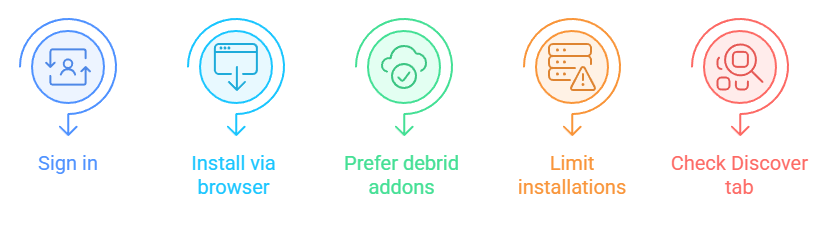
- Sign in first: logging in before adding anything means your addon choices sync to your account instead of living only on this one device
- Install from the browser: community addon pages open an install link that hands the manifest to your Stremio client, and this works in the iPad web app too
- Prefer debrid addons: on the web app route, addons that return direct links are far more useful than torrent-only ones you cannot play
- Do not over-install: a dozen overlapping addons makes the Discover tab slow and cluttered, especially on an iPad rendering large catalogue rows
- Check the Discover tab: newly added catalogues surface under Discover rather than on the Board, which is where most people look first and panic
Stremio Web App Versus the Full iPad App
The two routes look similar once open, but they differ in ways that matter as soon as you try to do anything demanding. I broke the browser build down further in my guide to the Stremio web app.
- Playback engine: the web app delegates to VLC or Outplayer, while the sideloaded app plays streams itself with its own controls and subtitle handling
- Torrent capability: only the full app streams torrents and usenet directly, which is the single largest functional gap between the two routes
- Offline downloads: the download manager exists in the sideloaded build for Supporters, though iOS background limits restrict it to HTTP streams
- Updates: the web app updates itself silently, whereas a sideloaded app needs refreshing through AltStore before its signing certificate expires
- Interface polish: the full app feels native with proper gestures, while the web app is a browser page in a Home Screen wrapper and occasionally shows it
Sideloading the Official IPA Without AltStore PAL
If you are outside the supported regions but still want the full app, Stremio publishes official IPA files you can sideload yourself.
- Official files only: Stremio hosts its own IPA builds, so there is no reason to download an installer package from a random third-party mirror site
- You need a computer: sideloading requires a Mac or PC to sign and push the IPA onto the iPad, which rules the method out for tablet-only households
- Free Apple ID limits: signing with a free account gives you seven days before the app stops opening and needs re-signing all over again
- Developer account option: a paid Apple Developer Program membership at ninety-nine dollars yearly extends the signing period to a full year instead
- Worth it for whom: only really worth doing if you stream torrents heavily and cannot use debrid, otherwise the web app is far less maintenance
Using a Debrid Service to Get the Best iPad Experience
Pairing the web app with a debrid account removes almost every limitation of running Stremio on iPadOS, and it is the setup I would recommend to most people.
- Direct links instead of magnets: debrid services fetch the file on their servers and hand you an HTTP link, which VLC opens without any complaint
- No local server required: because nothing is being downloaded on the iPad itself, the missing Stremio Service component stops mattering entirely
- Better bitrates: debrid links usually come from cached high-quality releases, so picture quality on an iPad Pro display is noticeably better
- Modest cost: Real-Debrid runs at roughly sixteen euros per one hundred and eighty days, and AllDebrid sits near three euros monthly
- Addon support needed: you still need a debrid-aware addon installed, since Stremio itself does not talk to these services on its own
Stremio Supporters and What It Adds on iPad
Stremio launched its first paid tier in June 2026, and several of its features shipped in the Apple sideload build straight away.
- Everything old stays free: Stremio has committed that features which existed before June 2026 remain free permanently, so this is not a paywall on the basics
- Pricing: Supporters costs thirty-nine dollars and ninety-nine cents yearly, with a Champion Donor lifetime option at one hundred and ninety-nine dollars
- Available in the Apple build: user profiles, skip intro and outro, catalog reorder and hide, and stream filtering all work in the AltStore release
- Download manager caveat: downloads are limited to HTTP streams on iOS because of Apple’s background execution restrictions rather than a Stremio decision
- Not needed to start: nothing in this guide requires Supporters, so treat it as optional support for the project rather than a prerequisite
Common iPad Installation Problems and How to Fix Them
Most failures come down to four or five recurring causes, and each has a quick check that tells you which one you are hitting.
- No Add to Home Screen option: you are almost certainly not in Safari, because no other iPadOS browser exposes that action in its share sheet
- Server warning keeps returning: you are opening the site in Safari rather than from the Home Screen icon, so the dismissal is not being remembered
- Streams open Safari and error: either the external player setting is still disabled or you selected a torrent rather than a direct link
- Stremio missing from AltStore: your Apple account region is outside Europe and Japan, and no VPN changes what the marketplace will show you
- Sideloaded app stops opening: the seven-day free signing period expired, so reconnect to your computer and refresh the app to sign it again
| Symptom | Likely Cause | Fix |
|---|---|---|
| No Add to Home Screen | Not using Safari | Reopen web.stremio.com in Safari |
| Address is invalid error | Torrent stream selected | Use a debrid or HTTP stream |
| Playback does nothing | External player disabled | Set VLC in Settings |
| Stremio absent in AltStore | Unsupported account region | Sideload the official IPA instead |
| App will not launch after a week | Free signing expired | Re-sign via your computer |
Is Stremio Safe to Install on an iPad
Installing outside the App Store understandably makes people nervous, so it is worth separating the real risks from the imagined ones.
- The app itself is open source: Stremio Web and Stremio Service are both published on public code repositories, so the software can be inspected by anyone
- AltStore PAL is Apple-sanctioned: alternative marketplaces in the European Union operate under Apple’s own notarisation rules rather than around them
- Source matters most: download IPAs only from Stremio’s own site, because repackaged builds from mirror sites are where genuine risk actually lives
- Addons are the real variable: Stremio is a shell, and what you install into it determines both your legal exposure and your stream quality
- Account hygiene: use a unique password for your Stremio account since it syncs across every device you sign into, iPad included
Getting Stremio From Your iPad Onto a Bigger Screen
Once Stremio runs on the tablet, most people immediately want it on the television, and the iPad can act as the bridge.
- AirPlay from the web app: streams handed to VLC can be AirPlayed to an Apple TV, which is the simplest path from tablet to television
- Screen mirroring: mirroring the whole iPad works for browsing too, though it drains battery faster and adds a small amount of input lag
- Apple TV directly: the tvOS situation mirrors the iPad one, and I covered the options in my Stremio on Apple TV guide separately
- Consider a Firestick instead: Stremio runs natively on Fire TV hardware without any sideloading gymnastics, which is why most readers end up there
- Same account everywhere: signing in with one Stremio account keeps your addons and library identical no matter which screen you finish watching on
Stremio on iPad Versus iPhone: What Actually Differs
The two platforms share a codebase, but a few practical differences change which route makes sense on each device.
- AltStore region coverage: the Brazilian AltStore rollout reached iPhone before iPad, so an iPhone owner may have options a tablet owner does not
- Screen real estate: Stremio Web was designed for large displays, so it looks considerably better on an iPad than squeezed onto a phone screen
- External player behaviour: VLC handoff works identically on both, but picture-in-picture on iPad makes multitasking while watching genuinely usable in a way the phone never quite manages
- Storage for downloads: the Supporters download manager is far more practical on an iPad, where there is usually more free storage available
- Same account, same addons: whichever device you set up first, signing in on the second one pulls your entire configuration across automatically
Keeping Your iPad Stremio Setup Working Long Term
The install is the easy part. Keeping it working is mostly about knowing which pieces expire and which ones quietly rot.
- Web app never expires: the Safari route has no certificate and no signing window, which is its single biggest advantage over anything sideloaded
- Refresh sideloaded builds: AltStore handles renewal automatically when your iPad and computer are on the same network, but only if you let it run
- Prune dead addons: addon backends go offline regularly, and an addon whose manifest no longer answers just makes your catalogue slower
- Watch for iPadOS changes: major iPadOS releases occasionally change Safari web app behaviour, so recheck your setup after a big system update
- Renew debrid in time: a lapsed debrid subscription looks exactly like a broken addon, so check the account before troubleshooting anything else
Alternatives Worth Considering If Stremio on iPad Frustrates You
If the iPadOS restrictions are more hassle than they are worth, a few other routes get you to the same place with less friction.
- A Fire TV Stick: Stremio installs natively on Fire TV hardware, and it is the cheapest way to sidestep every Apple restriction described above
- Stremio on a desktop: the full Windows, macOS and Linux apps have no limitations at all, and you can cast from there to a television
- Infuse for local media: if your priority is playing files you already own on the iPad, Infuse handles that natively far better than Stremio does
- The Stremio web app on a laptop: identical interface, no external player requirement, and torrents work because Stremio Service runs on desktop platforms
- Android tablets: the Google Play build installs in one tap with full torrent support, which is a stark contrast to the Apple situation
Stremio on iPad Verdict
Installing Stremio on an iPad in 2026 is entirely possible, just not through the App Store. For most people the Safari web app is the right answer: it takes four minutes, works in every country, never expires, and paired with a debrid account it does almost everything the desktop app does. If you live in Europe or Japan, take ten extra minutes and install through AltStore PAL instead, because the full build adds torrent and usenet streaming that the web version simply cannot offer. Sideloading the official IPA is the fallback for everyone else, and running Stremio Service on a desktop is the clever workaround if you already have a computer on the same network. Whichever route you pick, install a couple of good addons afterwards, because a bare Stremio install shows you almost nothing at all.
FAQs
Can you get Stremio on the iPad App Store?
No. Apple removed the Stremio listing in January 2026 and the official downloads page has carried no App Store link for iPadOS since. The supported routes are the Safari web app and AltStore PAL.
How do I install Stremio on an iPad without a computer?
Open web.stremio.com in Safari, tap Share, then Add to Home Screen. That installs Stremio as a Home Screen web app with no computer, no sideloading and no expiry date attached.
Does Stremio on iPad support torrent streaming?
Only in the full app installed through AltStore PAL or a sideloaded IPA. The Safari web app cannot stream torrents because Stremio Service has no iPadOS build to handle them.
Is AltStore PAL available for iPad everywhere?
No. AltStore PAL supports iPad in Europe and Japan. Brazil gained Apple sideloading later and iPad coverage there has trailed iPhone, so check before you start.
Why does Stremio say the streaming server is not available on iPad?
Because Stremio Service does not exist for iPadOS. The warning is expected on the web app route. Tap Don’t show again and use debrid or direct HTTP streams instead.
Which video player should I use with Stremio on iPad?
VLC or Outplayer, both selectable under the Play in external player setting. VLC is free and handles almost every container and subtitle format Stremio will hand it.
Does Stremio cost anything on iPad?
No. Stremio is free and everything that existed before June 2026 stays free. The optional Supporters tier costs 39.99 dollars yearly or 199.99 dollars for lifetime access.
Can I use my existing Stremio addons on the iPad?
Yes. Sign in with the same Stremio account and your installed addons and library sync across automatically, whether you chose the web app or the sideloaded full application.