Key Takeaway: Debridio is a paid addon bundle, not a debrid provider or IPTV subscription. Its official page lists $9.99 per year or $79.99 lifetime, covering all included addons, unlimited links under fair use, Discord support, an ad-free experience, and API access. Budget separately for any supported debrid account you connect.
Debridio combines several Stremio-facing services behind one account: its namesake scraper, TMDB and TvDB metadata options, WatchTower, and Hive. The bundle aims to reduce scattered configuration and fund maintained infrastructure, but payment does not create media rights, replace internet service, or guarantee that every third-party source remains available.
I reviewed the official plan page, signed-out addon routes, FAQ topics, privacy policy, service-status link, and current community setup flow. The decisive distinction is commercial scope: Debridio sells access to its addon platform, while debrid authorization, regional broadcaster access, and lawful content availability remain separate responsibilities.
What a Debridio Subscription Includes—and What It Does Not
The official plan promise covers the platform’s addon bundle and service features. Its homepage also carries a direct warning that Debridio is not a debrid or IPTV provider, preventing two costly assumptions before signup.
- All Addons: one subscription unlocks the platform’s current addon collection rather than charging separately for the scraper, metadata tools, WatchTower, or Hive.
- Unlimited Links: plans advertise unlimited links under a fair-use policy, so abusive automation or account behavior may still fall outside ordinary personal use.
- Support Access: the subscription includes a Discord support community for platform issues, feature requests, and guided diagnosis of the maintained addon services.
- API Availability: paid accounts receive API access for integrations, although external tools and their compatibility remain separate from the core Stremio setup.
- Excluded Service: a debrid account, internet connection, licensed television package, VPN, and Stremio Supporters membership are not automatically bundled with payment.
| Item | Included by Debridio | Separate requirement |
|---|---|---|
| Addon bundle | Yes | Stremio account |
| Debrid service | No | Optional supported provider account |
| IPTV subscription | No | Authorized broadcaster or provider |
| Support community | Yes | Discord account |
| Internet service | No | User’s connection |
Debridio Pricing: Annual vs Lifetime
The homepage currently presents two plans with the same feature list. The annual option minimizes upfront risk, while lifetime access trades a much larger one-time payment for avoiding yearly renewal. Neither option includes a separate debrid subscription.
- Annual Plan: $9.99 per year is the lower-commitment route and makes the most sense for evaluating maintenance, support, and personal compatibility.
- Lifetime Plan: $79.99 is charged once and advertises continuing access, but long-term value still depends on the platform remaining operated and supported.
- Feature Parity: both displayed tiers include all addons, unlimited links under fair use, shareable-account wording, Discord support, no platform ads, and API access.
- Renewal Check: read current checkout and cancellation terms immediately before payment because homepage prices do not explain every tax, processor, renewal, or refund condition.
- My Choice: I would begin with one annual term, confirm the needed addon works for several months, and reconsider lifetime only after consistent support.
| Plan | Advertised price | Best fit | Key limitation |
|---|---|---|---|
| Premium | $9.99 yearly | First-time buyers | Renews by current terms |
| Lifetime | $79.99 once | Established long-term users | Depends on future operation |
| Debrid account | Separate | Cached-source playback | Not sold by Debridio |
Create an Account and Install the Debridio Bundle
Begin at debridio.com, create the platform account, choose a plan only after reading current terms, and sign in. Addon configuration pages are account-gated, so use the authenticated dashboard rather than manifest addresses copied from videos or strangers.
- Official Signup: enter account information only on the verified HTTPS domain and use a unique password instead of credentials shared with Stremio or debrid.
- Plan Selection: compare annual and lifetime checkout totals, renewal wording, payment processor, and refund terms before authorizing the transaction.
- Addon Dashboard: open the required addon inside the signed-in Addons area, review its current options, and generate a configuration for one purpose.
- Stremio Handoff: select Install, verify the addon name and expected manifest in Stremio’s confirmation screen, then approve it for the correct account.
- Account Sync: restart Stremio on Firestick or Android TV after installation because the manifest normally follows the signed-in Stremio account across devices.
Connect Debrid Without Confusing Two Subscriptions
When the selected Debridio addon supports a debrid provider, authorize that provider through the current configuration flow. Debridio’s fee funds its platform; the debrid provider controls cache, traffic limits, host support, account rules, and resolved delivery.
- Provider Status: confirm the chosen debrid subscription is active and compatible before changing Debridio filters or reporting an empty source list.
- Official Authorization: approve access on the provider’s own domain when possible, avoiding messages or forms that request the provider’s main password directly.
- Token Privacy: treat the completed Debridio manifest as private because account identifiers or authorization details may be encoded inside its configuration path.
- Single Baseline: connect one provider first and test a clearly authorized title before adding backups, more scrapers, or aggressive quality filters.
- Revocation Route: learn where the provider lists authorized applications so a leaked or obsolete Debridio connection can be revoked without closing the account.
How Debridio, TMDB, TvDB, WatchTower, and Hive Differ
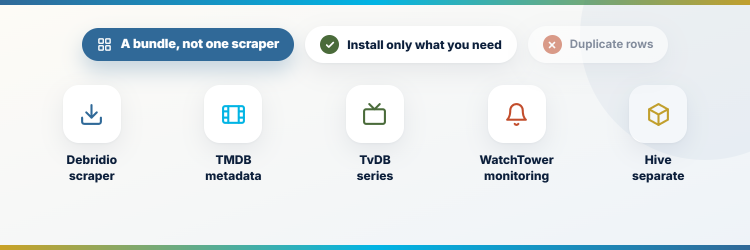
The navigation reveals a bundle rather than one monolithic scraper. Install only the components that solve a real problem; unnecessary metadata and catalog overlap can create duplicate rows without improving playback.
- Debridio Scraper: focuses on source discovery and downloading workflows, with actual delivery depending on configured services, available links, and current upstream behavior.
- TMDB Component: uses The Movie Database-oriented metadata and catalogs, potentially changing posters, descriptions, discovery rows, and title identity within Stremio.
- TvDB Component: provides a television-focused metadata path that may help series organization while overlapping with other installed metadata manifests.
- WatchTower: serves a monitoring or fallback-oriented role in the bundle, so its alerts and sources should be evaluated separately from catalog metadata.
- Hive: appears as a distinct addon destination under the same subscription, requiring its own current documentation and purpose check before installation.
Fix Debridio When Addons Install but Return Nothing
Separate platform status, subscription access, Stremio synchronization, addon configuration, debrid authorization, upstream source health, and player compatibility. A paid account can be healthy while one external dependency fails.
- Platform Status: open the official status link first to see whether a broad Debridio service interruption explains failures across addons and devices.
- Plan Access: sign into the website and confirm the subscription remains active before generating another manifest or repeating Stremio installation.
- Manifest Presence: check My Addons on two Stremio clients; absence everywhere suggests installation or account-sync failure rather than a source outage.
- Debrid Test: verify provider authorization, expiry, limits, and cloud access independently when metadata loads but cached or resolved links do not play.
- Support Report: share addon name, time, device, configuration category, and failure stage with support while redacting manifest URLs, tokens, and personal details.
| Observed problem | Check first | Avoid doing first |
|---|---|---|
| Website unavailable | Official status page | Resetting Stremio |
| Addon missing | Correct Stremio account | Buying another plan |
| Catalog loads, no links | Configuration and provider | Clearing device data |
| Links fail to resolve | Debrid authorization | Installing extra metadata |
| One device fails | Codec and app version | Regenerating every manifest |
Privacy, Fair Use, and Legal Boundaries
Debridio’s privacy policy says it collects personal, usage, and communication data, uses Stripe and Cloudflare among third parties, operates from Texas, and hosts servers in Canada. Read the current policy yourself; our Real-Debrid alternatives guide covers separate provider choices.
- Collected Data: the policy identifies account details, payment information, IP address, browser and device data, usage behavior, and support communications as collected categories.
- Data Location: it states that the business operates in Texas while servers are hosted in Canada, creating cross-border storage and processing considerations.
- Third Parties: payment processing, analytics, infrastructure, and support vendors keep their own policies, so Debridio’s statement is not the only relevant document.
- Fair Use: shareable-account language is explicitly qualified by fair use; do not treat it as permission for public resale, automation, or unlimited strangers.
- Content Rights: subscription to an addon platform or debrid provider does not establish authorization for a specific file, channel, broadcast, or territory.
Three Debridio Alternatives with Different Strengths
A paid bundle is not the only way to organize Stremio sources. AIOStreams aggregates several addon results, Comet provides a focused debrid scraper, and MediaFusion spans broader catalogs and multilingual discovery. Each has its own maintenance and hosting model.
1) AIOStreams
AIOStreams is the closest conceptual alternative for users who want several compatible stream addons queried and presented as one controlled result list. It emphasizes aggregation, deduplication, filtering, sorting, and proxy options rather than selling a fixed bundle. I recommend it to experienced users who already understand their upstream addons and can protect the generated configuration URL.
Features:
- Meta Aggregation: queries configured upstream addons and combines their responses, reducing the need to interpret several separate rows inside Stremio’s source screen.
- Deduplication: can remove equivalent results from multiple providers, keeping a broad setup readable when upstream addons return the same underlying file.
- Sorting Rules: prioritizes results by quality, cache state, language, size, provider, or other configured attributes before displaying the merged list.
- Result Filters: excludes unwanted codecs, qualities, release types, sizes, and sources so incompatible files do not dominate ordinary television-device choices.
- Proxy Options: offers advanced delivery and request controls whose privacy, hosting cost, service rules, and multi-IP implications require careful review.
- My Setup: I begin with two known upstream addons and simple 1080p sorting before enabling proxies, regex rules, or additional providers.
- Open Source: publishes code and documentation on GitHub, allowing users to inspect changes and choose public hosting or private deployment paths.
| Pros | Cons |
|---|---|
| Combines multiple addon results | Complex for beginners |
| Powerful filtering and sorting | Depends on every upstream addon |
| Reduces duplicate entries | |
| Open-source deployment choices |
Pricing:
- Software: Free and open-source
- Public Hosting: Availability and limits depend on the selected instance
- Private Hosting: Server or managed-hosting costs are separate
Link: https://github.com/Viren070/AIOStreams
2) Comet
Comet is a narrower alternative for people who want debrid-oriented torrent discovery without subscribing to a broader addon suite. Its configurable deployment can prioritize cached results and limit sources by quality or size. I prefer Comet as a clearly labeled backup scraper, not as a replacement for metadata, subtitles, live television, and every other function Debridio bundles.
Features:
- Focused Scraping: concentrates on torrent and debrid source discovery, providing a smaller responsibility surface than an account containing several different addon categories.
- Cached Results: works with supported premium services to identify cached availability, which can shorten startup compared with uncached torrent transfer.
- Quality Controls: lets users constrain resolution, size, language, and provider behavior so returned files suit the target network and playback device.
- Configuration URL: creates a personalized manifest that should remain private because it may encode provider choices, instance details, and authorization information.
- Hosted Choices: can run on public or privately administered infrastructure, making uptime, limits, logs, and upgrade responsibility dependent on deployment.
- My Role: I use Comet as a secondary scraper with visible labels, allowing direct comparison when the primary source addon has an outage.
- Project Transparency: maintained source and deployment material are available on GitHub, supporting independent review rather than relying only on promotional claims.
| Pros | Cons |
|---|---|
| Focused debrid scraper | Does not replace the whole bundle |
| Useful cached-result support | Hosting quality varies by instance |
| Configurable quality limits | |
| Can serve as a clean backup |
Pricing:
- Addon: Free and open-source
- Hosting: Public limits or private server costs vary
- Debrid: Compatible premium account purchased separately
Link: https://github.com/g0ldyy/comet
3) MediaFusion
MediaFusion is the broadest alternative in this group, combining several catalog and stream categories with configurable providers and multilingual interests. Its feature breadth can replace multiple narrow manifests, but it also requires disciplined filtering and legal judgment. I would install only the needed catalogs, test one source type, and avoid assuming that every indexed stream carries authorization.
Features:
- Broad Catalogs: supports multiple media categories and discovery paths, making it more expansive than a single-purpose movie and series torrent scraper.
- Multilingual Focus: organizes language and regional material that mainstream metadata or source addons may surface inconsistently for many international viewers.
- Debrid Support: can integrate compatible premium services for cached delivery while leaving provider billing, privacy, limits, and account status completely separate.
- Source Filters: offers configuration controls to narrow catalogs and results, which helps prevent irrelevant categories and unsuitable files from overwhelming Stremio.
- Deployment Choice: is available through hosted instances and self-hosting routes, each carrying different uptime, resource, privacy, log, and maintenance tradeoffs.
- My Test: I enable one catalog family and one authorized title first, then add languages or providers only after playback behaves predictably.
- Legal Separation: indexing or resolving a stream does not determine distribution rights, requiring the user to verify each source and applicable territory.
| Pros | Cons |
|---|---|
| Wide content categories | Breadth can create clutter |
| Strong multilingual discovery | Source rights require individual checking |
| Hosted and self-hosted options | |
| Useful provider controls |
Pricing:
- Software: Free and open-source
- Hosted Instance: Limits and fees depend on the operator
- External Services: Debrid or hosting subscriptions remain separate
Link: https://github.com/mhdzumair/MediaFusion
Is Debridio Worth $9.99 Per Year?
The annual price is reasonable for buyers who value maintained infrastructure, one account for several addons, community support, API access, and an ad-free platform. It is poor value if the expectation is an included debrid or IPTV subscription. Start annually, install only the components you understand, compare service status before troubleshooting, and consider lifetime only after the platform proves useful over time.
- AIOStreams: Best for merging several existing stream addons into one filtered and deduplicated result list.
- Comet: Best for a focused secondary debrid scraper without paying for a broader addon bundle.
- MediaFusion: Best for multilingual discovery and broader media categories when the configuration is kept intentionally narrow.
FAQs
How much does Debridio cost?
The official homepage listed $9.99 per year and $79.99 lifetime on August 6, 2026. Recheck checkout totals, taxes, renewal, and refund terms before paying.
Is Debridio a debrid provider?
No. Debridio explicitly says it is not a debrid provider. A compatible provider account, when required by the configured addon, is purchased and managed separately.
Does Debridio include IPTV service?
No. Its official warning also says it is not an IPTV provider. Any live source or broadcaster access has separate availability, rights, region, and reliability limits.
Can I use Debridio on Firestick?
Install the configured addon into your Stremio account, then sign into the same account on Firestick. Restart the client if synchronization is not immediately visible.
What should I install before Debridio?
Set up the Stremio client and confirm official catalogs work first. Our Stremio Firestick installation guide provides that clean baseline.