Key Takeaway: Kodi is the simpler choice when your movies already sit on a Fire TV device, USB drive, or home network share and you want to play them directly. Plex is built for a central library that serves multiple screens. Both can be free at home, but Plex charges for some remote and advanced features.
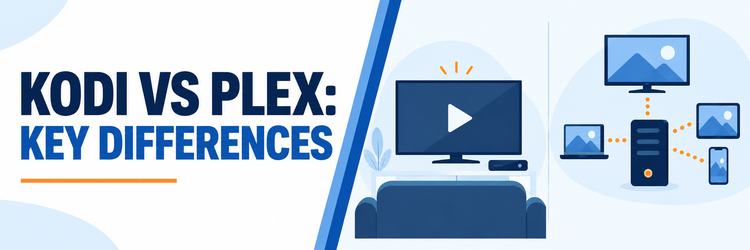
Kodi vs Plex sounds like a choice between two media players. The practical choice is where your files live and who needs to watch them. Kodi runs on the viewing device and can open files directly. Plex usually stores and manages the library on a separate computer, NAS, or compatible server, then streams it to player apps.
I would make the decision from three questions: Do you want a server running when you watch? Will people use several different screens? Do you need personal videos away from home? Those answers matter more than the appearance of either home screen, and they can be answered before you spend money on new hardware.
Kodi vs Plex: The Short Answer
Kodi is a free, open-source media center that excels at playing local or network files on the device in front of you. Plex is a managed media-server system with clients across TVs, phones, browsers, and streaming boxes. The quick table separates the jobs that each product performs without treating a Kodi network share as identical to a Plex library.
| Decision point | Kodi | Plex |
|---|---|---|
| Main role | Player and media center on each device | Central Media Server plus player apps |
| Where files live | Local storage or a network share Kodi can reach | Storage attached to or indexed by the server |
| Home-network playback | Free | Free for personal video |
| Library across screens | UPnP or a separately configured shared database | Server-managed library in client apps |
| Format adaptation | Device usually decodes the file itself | Server can Direct Play, remux, or transcode |
| Away-from-home personal video | Requires your own secure access setup | Built-in remote workflow; eligible pass required |
| Over-the-air TV | PVR client plus tuner and backend | Tuner/antenna and server; DVR needs Plex Pass |
| Fire TV role | Kodi player installed on Fire TV | Plex player connects to a separate server |
- Choose Kodi for direct playback: A single TV, attached drive, or reachable network folder fits Kodi’s player-first design without another computer acting as a permanent media service.
- Choose Plex for a shared household: One central library can present consistent artwork and progress to several Plex apps while a single machine stores the underlying files.
- Check remote access carefully: Plex’s remote personal-video feature is no longer an unqualified free feature; the relevant subscription depends on the viewer and server owner.
- Consider the server burden: Plex’s library is available to clients only while its server, storage, and network path are available, even if the client app opens normally.
- Use both when useful: Kodi can remain a direct file player on one screen while Plex serves the same legally obtained collection to other supported devices.
What Runs on the TV and What Runs Elsewhere?
Kodi is an application on the playback device. It can scan a folder and build a library there, or read a file from a share on your home network. Plex splits the job: Plex Media Server scans and manages the collection, and a Plex app asks that server for a playable stream. This difference shapes setup, troubleshooting, and cost.
- Kodi on a Firestick: The Fire TV device runs the player and handles the menus, decoding, and library interface. It can access a network drive when configured to reach it.
- Plex on a Firestick: The Fire TV app is a client. Personal movies need a Plex Media Server running on supported computer, NAS, or NVIDIA SHIELD hardware.
- One source of truth: Plex’s server owns the library catalog for its clients, so edits to a collection appear across screens without configuring each player as a separate catalog.
- Kodi sharing nuance: Kodi can expose a library through UPnP, but its own documentation says a UPnP client only browses and plays; it does not gain a full local library.
- Advanced Kodi sync: A shared database can coordinate multiple Kodi installations, but every installation still needs access to the underlying media files and extra setup.
Playback, Direct Play, and Transcoding
File compatibility is the clearest technical difference. Kodi normally asks the playback device to decode the video and audio it receives. Plex first tries to send a compatible file directly, then can change the container or convert media on its server when a client or connection cannot handle the original. The result depends on the file, device, and network.
- Kodi’s direct path: A compatible Fire TV device can read a file from attached or network storage without a separate transcoding server between the file and player.
- Plex Direct Play: When the client supports the original video, audio, container, and bandwidth, the Plex server can send it without expensive video conversion.
- Plex conversion: Free software transcoding can adapt incompatible media, but it uses server processing power and may reduce quality compared with playing the source unchanged.
- Paid acceleration: Hardware-accelerated transcoding is a Plex Pass feature on compatible server hardware; do not confuse this premium option with free software transcoding.
- Practical check: Before buying a server or a pass, try an owned sample file on your actual TV and inspect whether Plex Direct Plays it or requests conversion.
Watching Your Own Files Away From Home
Kodi’s normal file browsing is designed around storage it can reach directly. Remote access is possible with separate network arrangements, but Kodi is not a turnkey personal-media relay. Plex provides a remote-access workflow for a signed-in server and client, although its current free-versus-paid policy places a paid entitlement on personal-video playback away from the server’s local network on affected apps.
- Plex pass choices: Remote Watch Pass enables remote personal-video viewing for its subscriber. Plex Pass adds remote access and premium server features; a server owner’s Plex Pass can cover users of that server.
- Local use stays free: Watching personal video from Plex Media Server on the same local network remains part of Plex’s free core, subject to app-specific limitations.
- Server must remain reachable: A paid pass cannot fix a powered-off computer, broken storage, insufficient upload bandwidth, or a network configuration that blocks remote access.
- Kodi needs another method: A secure VPN into your home network or another carefully managed file-access method can make media reachable, but setup and protection are yours to maintain.
- Avoid an unsafe shortcut: Kodi’s documentation specifically warns against exposing its web-control port to the Internet. Remote control is different from secure personal-media streaming.
Live TV, Tuners, and Recording
The phrase live TV covers different things here. Plex has free ad-supported internet channels that work without your own server. Both Kodi and Plex can also display over-the-air broadcasts from hardware you provide. Recording those broadcasts has different requirements: see Kodi’s PVR explanation and Plex’s DVR rules. Neither app creates a channel subscription or an antenna signal out of nothing.
| Live-TV task | Kodi | Plex |
|---|---|---|
| Free internet channels supplied by the app | No equivalent bundled service | Ad-supported Plex channels on supported apps |
| Watch your antenna channels | Compatible tuner, backend, and PVR client | Compatible tuner, antenna, and Plex Media Server |
| Record antenna broadcasts | Recording handled through supported backend | Plex Pass required for DVR recording |
| Fire TV’s part | Frontend player; backend runs elsewhere | Player app; server and tuner run elsewhere |
- Kodi’s PVR model: Kodi is the frontend. A compatible tuner and backend receive channels, while a PVR client add-on brings the guide and controls into Kodi.
- Plex’s antenna model: With compatible tuner and antenna hardware connected to the server, live over-the-air viewing is free; recording requires Plex Pass.
- Separate Plex channels: Plex’s ad-supported live channels need no tuner, server, or Plex Pass, but they cannot be recorded with Plex’s personal DVR feature.
- Regional limits matter: Channel availability varies by location and reception. Compare your actual antenna coverage rather than assuming either interface adds channels.
- Plan the hardware: A Fire TV stick is a viewing endpoint in the usual tuner arrangement; put the tuner and backend or Plex server on suitable home-network hardware.
Fire TV and Other Device Support
On Fire TV, Plex is the simpler official-store install: its player app is available in the Amazon Appstore. Kodi supports Android-based hardware, but its Fire TV installation path differs from Plex’s store listing. The bigger difference begins after installation, when Kodi needs a file source and Plex needs a server library for personal media.
- Fire TV with Kodi: Install the official Kodi Android build through a trusted route, then point it at local storage or a permitted home-network share.
- Fire TV with Plex: Install the official Plex client from the Amazon Appstore, sign in, and select a library served by your own or an authorized server.
- More living-room clients: Plex lists Fire TV, Android TV, Apple TV, Roku, supported smart TVs, Xbox, and PlayStation among its player platforms.
- Kodi’s platform range: Official Kodi builds cover Windows, macOS, Linux, Android, iOS, and tvOS, though device-specific installation steps are not equally simple.
- Do not assume model support: App availability, decoding capabilities, and update support can differ by specific television model and operating-system version.
Hardware, Storage, and Setup Effort
Kodi is usually lighter to start for one screen because no separate Media Server is mandatory. Plex adds a server and storage plan, but reduces repeated setup when several people watch the same collection. Conversion is the expensive edge case: a file that every client can Direct Play places a very different load on the server than several simultaneous transcodes.
- Kodi’s basic setup: Install the player, add a local path or network source, and scan the library if you want posters and browsing rather than plain file navigation.
- Plex’s basic setup: Install Media Server on supported hardware, arrange folders, scan libraries, then sign in on each client that will display your personal media.
- Always-on tradeoff: A Plex server can be an existing computer, but turning that computer off takes its library offline for other screens until it starts again.
- Conversion headroom: A weak server may struggle with demanding real-time video conversion even when its hard drive and network are otherwise fast enough.
- Space on Fire TV: Neither approach changes the physical storage limit of the Fire TV device; keep large original files on suitable attached or network storage.
What Is Free, and What Can Cost Extra?
Kodi’s core player is free and open source. Plex’s server and same-network personal-video playback are free, as is its separate ad-supported catalog. Costs arise from hardware and storage in either system, plus optional or required Plex passes for particular features. Avoid assuming that paying Plex supplies the movies you have not already obtained legally.
- Kodi software: The Kodi application has no required subscription for local playback, library organization, skins, or its documented PVR frontend capability.
- Plex’s free core: Media Server, local personal-video playback on the same network, and Plex’s ad-supported video and live channels have free use cases.
- Remote personal video: Remote Watch Pass or Plex Pass may be needed for watching your own videos outside the server’s local network; entitlement varies by account arrangement.
- Plex Pass extras: Hardware-accelerated transcoding, DVR recording, and supported-app downloads are among its premium personal-media features.
- Budget honestly: A NAS, hard drives, backup storage, tuner, antenna, and electricity can outweigh software cost, especially if several devices share one library.
Privacy and Safer Setup
A library of personal files can reveal viewing habits and household information, so choose the access model deliberately. Kodi can be kept on a local device and network without a vendor account, while Plex relies on its account and server-client system for convenient sharing. Neither setup is automatically private merely because the files are stored at home.
- Keep Kodi local where possible: Limit shares to devices and users that need them. If enabling web control, require authentication and follow Kodi’s warning against Internet exposure.
- Secure Plex accounts: Use a strong unique password and the account protections Plex offers, and grant library access only to people you intend to invite.
- Limit exposed services: Open only the network access that your chosen remote setup needs; do not expose storage shares or Kodi control interfaces as a convenience shortcut.
- Install from trusted sources: Use official Kodi and Plex downloads or their documented app-store listings instead of unknown packages marketed as free premium content.
- Use lawful media: Both apps are legal tools. Keep personal libraries to owned, licensed, public-domain, or otherwise authorized material and avoid unverified add-on promises.
How to Choose for Your Household
Start with the shape of your collection rather than the number of features in a marketing list. A single Fire TV and a drive call for a different answer than three televisions, mobile viewing, and relatives who expect one curated library. You can change your setup later without changing ownership of the underlying files.
- One-screen viewer: Choose Kodi if the device can decode your files and you prefer a direct player with deep interface customization and no server to administer.
- Several-room household: Choose Plex if one library, user access, and consistent clients matter more than keeping every viewing device independent.
- Frequent travel: Choose Plex if its supported remote workflow and paid entitlement suit your needs; otherwise plan a secure network solution before choosing Kodi.
- Antenna enthusiast: Compare the tuner/backend work Kodi requires against Plex’s server and Plex Pass DVR requirement before committing to a recording setup.
- Try a small library first: Use a few legally obtained files in both apps, check playback on your own hardware, and see our Plex alternatives guide if another server may fit better.
Verdict: Kodi or Plex?
Kodi wins the single-screen, player-first decision: free software, direct access to your files, and extensive control over the interface. Plex wins when a home server should make one collection easy to use across many devices. For travel, recording, or hardware conversion, check Plex’s current paid entitlements before assuming those features are included with the free server.
- Pick Kodi: You mostly watch on one TV, want to keep the setup local, and are comfortable managing file paths, network shares, and device compatibility yourself.
- Pick Plex: Several screens or users need one catalog, and a dependable server is already available or worth maintaining for the household.
- Run both: A direct Kodi player and a Plex server can share owned media files while each app handles the screen or workflow it serves best.
FAQs
Is Kodi better than Plex for a Firestick?
Kodi is better when the Firestick itself should browse a local drive or reachable network share. Plex is better when the Firestick is one client of a central home library. The Plex player is in the Amazon Appstore; Kodi’s Fire TV setup follows its Android installation route.
Does Plex require a subscription to play my own movies?
Not for personal-video playback on the same local network as your Plex Media Server. Watching those videos away from home on affected apps requires Remote Watch Pass or Plex Pass under Plex’s current policy. Hardware-accelerated transcoding and DVR recording are Plex Pass features, while free software transcoding remains available.
Can Kodi stream files to several rooms?
Kodi can share through UPnP or use an advanced shared database, so it is inaccurate to say it cannot serve any other screen. Those arrangements need extra configuration and do not match Plex’s managed server-client experience. Each Kodi device also needs the necessary file or network access.
Which app records free over-the-air TV?
Both can participate in recording with additional equipment. Kodi is a PVR frontend for a compatible tuner and backend that handles recording. Plex can use a compatible tuner and antenna through Media Server, but its DVR recording needs Plex Pass. Plex’s separate free internet channels cannot be recorded with that DVR.
Can I use Kodi and Plex without the internet?
Kodi can play reachable local files without a vendor account. Plex’s same-network media system can work locally in some circumstances, but account sign-in and client authentication can depend on network and server settings. Test your actual offline scenario before relying on Plex during an outage.
What if I want another media-server option?
If your main goal is a central library but you do not want Plex’s subscription structure, compare other servers first. For a purely local player, Kodi may already cover the job; our Kodi on Firestick installation guide covers that route.