Key Takeaway: MediaFlow Proxy is not a standalone Stremio addon and does not provide a manifest, catalog, or streams. It is a separately hosted proxy that compatible addons can use to relay HTTP, HLS, DASH, debrid, and live streams. For most users, the correct setup is MediaFlow Proxy on a server, HTTPS in front of it, and MediaFusion or AIOStreams connecting Stremio to that server.
Searching for a MediaFlow Proxy Stremio addon usually leads to Docker commands, passwords, proxy URLs, and addon settings without explaining how those pieces fit together. I checked the official repository, current 2.4.9 release, installation and networking documents, Stremio integration notes, endpoint examples, limitations, and compatible-addon guides on August 18, 2026. This guide shows what to install, where each setting belongs, and how to isolate playback failures.
Is MediaFlow Proxy Really a Stremio Addon?
No. MediaFlow Proxy is a web service that sits between a compatible addon and the upstream media server. Stremio never installs it from a manifest.
- No Manifest: MediaFlow has no Stremio catalog, configure page, or manifest.json address that can be pasted into Stremio’s Add Addon field.
- Separate Server: it runs through Docker, Python, or managed hosting on a computer or server that remains reachable during the entire playback session.
- Compatible Addon: MediaFusion, AIOStreams, and other supported addons create MediaFlow URLs, then return those proxy-wrapped links to Stremio for playback.
- No Content: the proxy does not discover movies, supply channels, or replace a debrid provider; it only handles destinations another service provides.
- My Check: I found installation instructions for the server but no official Stremio manifest because the project is infrastructure rather than an addon.
| Component | What it does | Where it runs |
|---|---|---|
| Stremio | Displays catalogs and plays selected links | Firestick, TV, phone, or computer |
| Stremio addon | Finds or organizes stream results | Remote addon server |
| MediaFlow Proxy | Relays and rewrites selected playback traffic | Your server or managed host |
| Debrid service | Resolves supported files into playable URLs | Provider infrastructure |
Project Link: https://github.com/mhdzumair/mediaflow-proxy
What MediaFlow Changes in the Playback Path
Without a proxy, Stremio requests the final stream directly. With MediaFlow enabled, the compatible addon returns a MediaFlow address that fetches or transforms the upstream response.
- Consistent Address: IP-bound providers see playback coming from the MediaFlow server, matching the address used when the addon created or resolved the link.
- Header Handling: required Referer, Origin, User-Agent, authorization, and range headers can travel through the proxy when direct Stremio playback would omit them.
- Playlist Rewriting: HLS manifests can be rewritten so their segments, keys, and nested playlists keep following the selected routing and authentication rules.
- DASH Conversion: supported MPEG-DASH streams can become HLS while ClearKey or AES-128 material is processed when lawful keys are already available.
- Bandwidth Tradeoff: every fully proxied byte crosses the MediaFlow host, making its connection speed, transfer allowance, location, and uptime part of playback quality.
Choose Self-Hosted, Managed, or MediaFlow Light
The right deployment depends on who will maintain the server and how much traffic it must relay. Free software does not mean free compute, bandwidth, or HTTPS.
- Home Server: Docker on a NAS or mini PC is inexpensive, but remote Stremio devices need secure inbound access and adequate upload speed.
- Small VPS: a nearby virtual server offers consistent public reachability, although bandwidth caps and provider policies must support sustained media transfer.
- Managed Instance: hosted service removes container, certificate, and update work, but pricing, privacy, resource sharing, and operator access deserve careful review.
- Light Edition: the Rust-compatible alternative targets constrained hardware with lower memory and CPU use while retaining existing tokens and client integration compatibility.
- Avoid Public Proxies: unknown free endpoints can record URLs, consume credentials, disappear without notice, or expose other users through weak authentication and shared limits.
| Deployment | Maintenance | Best fit | Main drawback |
|---|---|---|---|
| Home Docker host | You manage everything | Local use and existing homelab | Remote access and upload limits |
| VPS | You manage software | Private always-on access | Monthly server and transfer cost |
| Managed service | Provider manages platform | Simplest remote setup | Recurring price and operator trust |
| MediaFlow Proxy Light | You manage a smaller service | Low-resource server or NAS | Confirm feature parity needed |
Install MediaFlow Proxy With Docker
Docker is the shortest supported route because it packages the application and dependencies. Complete this work on a server, not on the Firestick used for viewing.
- Prepare Docker: install Docker Engine or Docker Desktop on the host, confirm containers can reach the internet, and reserve enough storage for logs.
- Create Password: generate a long unique API_PASSWORD rather than copying the documentation placeholder, because that value protects bandwidth and proxy functionality.
- Run Container: start
docker run -p 8888:8888 -e API_PASSWORD=your_password mhdzumair/mediaflow-proxy, replacing the placeholder before the command enters shell history. - Check Interface: open the host address on port 8888 locally, verify the home or URL-generator page loads, and inspect container logs for startup errors.
- Pin Updates: record the deployed version and review release notes before upgrading, since extractor, routing, and environment-variable behavior can change between builds.
Documentation: https://mhdzumair.github.io/mediaflow-proxy/
Expose the Proxy Safely Through HTTPS
A local HTTP address works only inside the same network. Remote Stremio playback needs a stable public HTTPS URL, correct streaming headers, and restricted forwarded-header trust.
- Domain Route: point a private subdomain toward the host, then place Nginx, Caddy, or another reverse proxy in front of MediaFlow’s port.
- Valid Certificate: use a trusted TLS certificate so Firestick and Stremio clients accept the connection without unsafe certificate-verification workarounds from unknown hosts.
- Streaming Headers: preserve Range and If-Range, disable response buffering, and allow long read timeouts so seeking and sustained playback do not break.
- Trusted Proxy: set FORWARDED_ALLOW_IPS to the actual reverse-proxy or container network rather than trusting arbitrary forwarded headers from the public internet.
- Private Port: expose HTTPS publicly but firewall direct access to port 8888, preventing visitors from bypassing certificate, rate-limit, and access controls.
Connect MediaFlow to MediaFusion or AIOStreams
MediaFlow is connected inside the compatible addon’s configuration, not in Stremio settings. Finish the proxy first, then generate a new addon configuration that uses it.
- Choose Integration: use an addon version that explicitly supports MediaFlow Proxy; an ordinary manifest cannot automatically discover or use your separate proxy server.
- Enter Public URL: provide the externally reachable HTTPS base address when the form asks where Stremio clients should send proxied playback requests.
- Enter Internal URL: self-hosted stacks may accept a Docker-network address for server-to-server calls while returning the public URL to remote playback clients.
- Match Password: enter the same MediaFlow API password in the addon proxy credentials; a typo normally produces unauthorized errors rather than empty catalogs.
- Reinstall Manifest: save the configuration and install its newly generated manifest, because an older Stremio entry will not inherit recently added proxy settings.
Route Debrid Streams Without an IP Mismatch
Some debrid playback URLs are associated with the address used during link creation. Routing the final stream through another address can therefore invalidate an otherwise good result.
- Remote Proxy: a compatible addon can query MediaFlow’s
/proxy/ipendpoint and use that public address while creating the provider’s playback URL. - Same Egress: link creation and video transfer should leave through the same proxy path whenever the provider enforces single-address or IP-binding rules.
- Local Exception: official guidance notes that locally deployed integrations can use the client address directly when no internet-hosted MediaFlow egress sits between them.
- Account Rules: a proxy does not override provider limits, simultaneous-use rules, or geographic terms; configure it only within the debrid service’s current policy.
- Verify Address: compare the IP reported through MediaFlow with the address used by the addon before rotating tokens or blaming the selected cached file.
Tune HLS Routing for Firestick Playback
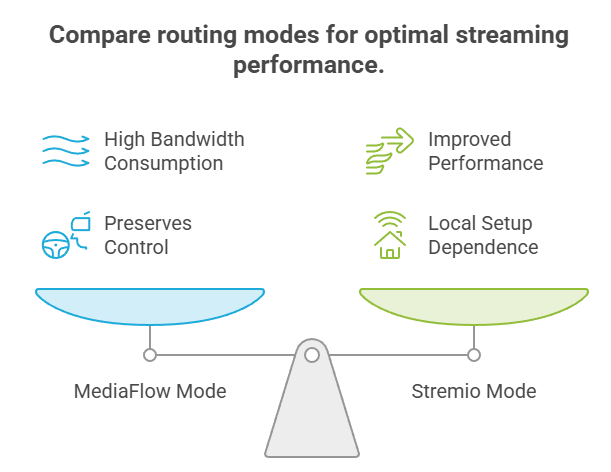
MediaFlow can route every HLS segment itself, send segments through Stremio Server, or let the player fetch them directly. Each option changes compatibility and server load.
- MediaFlow Mode: the default sends playlists and video segments through MediaFlow, preserving control and source consistency while consuming the most proxy bandwidth.
- Stremio Mode: playlists remain behind MediaFlow while segments travel through Stremio Server, which can improve performance in a properly connected local setup.
- Direct Mode: MediaFlow handles the playlist but exposes segment destinations to the player, reducing server traffic while losing protection against IP or header restrictions.
- Prebuffer Control: HLS prebuffering is enabled by default with five upcoming segments; reduce or disable it when a small host experiences memory pressure.
- Firestick Test: compare one known stream across routing modes and players, changing one variable at a time while watching MediaFlow and reverse-proxy logs.
Know the Supported Formats and DRM Limits
MediaFlow supports far more than a basic URL relay, but its feature list should not be mistaken for universal compatibility or a general DRM bypass.
- HTTP Streams: ordinary HTTP and HTTPS media can be proxied with custom request headers, range handling, optional routing rules, and response-header cleanup.
- Adaptive Formats: HLS playlists and MPEG-DASH manifests can be rewritten, selected by resolution, prebuffered, or converted where the documented processing path supports them.
- ClearKey Only: decryption supports ClearKey and AES-128 when lawful keys are available; rotating keys and commercial systems remain outside supported capability.
- Commercial DRM: Widevine, PlayReady, and FairPlay require licensed communication and secure hardware, so MediaFlow cannot convert protected subscription services into ordinary streams.
- Optional Functions: Acestream, Xtream Codes, EPG, Telegram media, extraction, transcoding, and forward-proxy features require separate configuration and may add considerable resource use.
Fix Authentication, Redirect, and Buffering Errors
Start at the first failed layer instead of reinstalling Stremio repeatedly. Test server access, authentication, addon output, reverse-proxy behavior, and the player in that order.
- Unauthorized Response: confirm the addon’s stored API password matches MediaFlow exactly, then regenerate its manifest if credentials were changed after installation.
- Forbidden Home: a disabled home or documentation page may return 403 intentionally; test a documented authenticated endpoint before declaring the server offline.
- Unexpected Redirect: repeated 302 responses behind Docker or Nginx often indicate incorrect forwarded-header trust, public scheme detection, or mismatched internal and external URLs.
- Playback Stalls: inspect upstream speed, proxy bandwidth, Range headers, buffering settings, container memory, and reverse-proxy timeouts before changing the Stremio addon source.
- Desktop Only: successful computer playback but Firestick failure points toward player codec support, HLS routing, redirect handling, or device-specific header behavior.
| Symptom | Likely layer | First check |
|---|---|---|
| 401 Unauthorized | MediaFlow credentials | Match API password |
| 403 on home or docs | Disabled interface | Test an authenticated endpoint |
| Repeated 302 redirect | Reverse-proxy trust | Check forwarded headers and URLs |
| Addon works without proxy only | Integration settings | Regenerate manifest with correct base URL |
| Playback starts then buffers | Bandwidth or timeout | Check host transfer and logs |
| Desktop works, Firestick fails | Player or HLS route | Compare routing mode and player |
Protect Passwords, URLs, and Server Bandwidth
A working proxy is also a valuable network resource. Treat its URL, credentials, logs, and generated playback addresses as secrets rather than harmless Stremio settings.
- Unique Secret: keep API_PASSWORD long and exclusive to MediaFlow, store it in a protected environment file, and rotate it after accidental disclosure.
- Encrypted URLs: use generated encrypted links with expiration or IP binding when supported, preventing recipients from freely reusing hidden destinations and parameters.
- Reduced Surface: disable the home page, API documentation, or speed test when they are unnecessary, while preserving authenticated endpoints required by integrations.
- Log Hygiene: restrict log access and retention because request lines may expose destination addresses, content choices, credentials, tokens, or client network information.
- Usage Controls: monitor traffic, apply rate limits, isolate containers, update quickly, and alert on unexplained transfer spikes that suggest leaked proxy access.
Decide Whether MediaFlow Is Worth Adding
MediaFlow solves specific routing and format problems; it is not a mandatory upgrade for every Stremio installation. Add it only when the benefit outweighs another server dependency.
- Good Fit: use it for IP-bound debrid links, protected HLS headers, supported DASH conversion, live-stream routing, or a shared egress address across devices.
- Skip It: direct cached streams already playing reliably gain little from an extra hop, new failure points, server maintenance, bandwidth use, and possible latency.
- Addon First: choose the content addon before the proxy; our MediaFusion Stremio addon guide explains one maintained integration and its configuration flow.
- Measure Results: compare start time, seeking, buffering, host traffic, and failure rates with and without MediaFlow rather than assuming proxying always improves speed.
- Keep Rollback: retain a known direct configuration so one proxy update, certificate problem, or server outage does not make every configured source unusable.
MediaFlow Proxy Stremio Addon Verdict
MediaFlow Proxy is useful Stremio infrastructure, but calling it an addon hides the most important setup detail: you must run and secure a separate server, then connect a compatible addon to it. Use it when IP consistency, HLS headers, DASH conversion, or controlled routing solves a real playback problem. If direct streams already work, the added bandwidth, latency, credentials, and maintenance may not be worthwhile.
FAQs
How do I install MediaFlow Proxy in Stremio?
You do not install MediaFlow directly in Stremio. Run it on a server or obtain a managed instance, secure it with HTTPS and an API password, then enter its public URL and credentials in a compatible addon such as MediaFusion or AIOStreams. Save that addon configuration and install the newly generated manifest in Stremio.
Does MediaFlow Proxy provide movies or live TV channels?
No. It is a proxy and stream-processing service, not a catalog or channel provider. A Stremio addon, legal IPTV source, personal server, or debrid integration supplies the destination. MediaFlow then relays or transforms supported traffic. A blank Stremio catalog therefore cannot be fixed by installing MediaFlow alone.
Do I need Real-Debrid to use MediaFlow?
No. MediaFlow can proxy HTTP, HLS, DASH, live, EPG, Xtream Codes, Acestream, and other supported traffic without Real-Debrid. Debrid is one integration where MediaFlow’s consistent public address can matter. If you use another provider or direct legal streams, configure only the endpoints and routing that your source actually requires.
Can MediaFlow Proxy run directly on a Firestick?
A Firestick should remain the Stremio playback client, not the proxy host. MediaFlow needs a continuously available server environment, network access, logs, updates, and enough bandwidth to relay streams. Run Docker on a NAS, mini PC, VPS, or managed platform, then let the Firestick reach its public HTTPS address.
Why does MediaFlow work on desktop but fail on Firestick?
That split usually points to player codec support, redirects, HLS routing, missing headers, or the way Android TV handles the returned stream. Compare the same URL and account, inspect proxy logs, test the three M3U8 routing modes, and try Stremio’s available players before rebuilding the whole server.
Which Stremio addon works with MediaFlow Proxy?
MediaFusion and AIOStreams both document MediaFlow support, while other community addons may expose compatible proxy fields. Confirm support in the maintained documentation for the exact version you use. Our AIOStreams setup guide explains its broader configuration flow; the proxy section still requires your own valid MediaFlow URL and password.