Key Takeaway: IPTV Smarters Pro not working is usually caused by server issues, an expired subscription, cache problems, or app updates that break playback. A few quick fixes often bring it back. If it keeps failing, reliable players like TiViMate and OTT Navigator keep your channels running.
Are you tired of opening IPTV Smarters Pro only to see a black screen, endless loading, or a login that suddenly refuses to work? If you rely on it for live TV, a broken player is frustrating, especially right when you sit down to watch. The problem is rarely your whole setup and is usually small and fixable.
In this guide, I will walk you through why IPTV Smarters Pro stops working, the fixes that solve it most often, and the best alternative players I trust when it will not cooperate. Everything here comes from hands-on testing so you can get back to watching quickly.
Why Trust FirestickTVStream?
This ranking includes popular IPTV Smarters Pro alternatives that have been tested firsthand. Every option here is:
- Verified for stable playback and reliable playlist loading
- Checked for safety, permissions, and reduced security risks
- Compatible with Firestick, Android TV, and multiple devices
- Regularly updated and actively maintained
Important Note: We do not recommend unverified apps that may expose you to malware or copyright issues. Every option listed here is selected based on real testing, performance checks, and user feedback.
Research Overview:
- 40+ IPTV players and apps tested
- 255+ Hours of research and testing
- 45+ Detailed IPTV guides and reviews checked
Why is IPTV Smarters Pro Not Working?
IPTV Smarters Pro usually stops working because of issues on the provider side, your subscription status, or the app itself. It is rarely one big failure and more often a small, fixable problem. Understanding what is actually breaking helps you target the right fix before switching apps.
- Server or Provider Downtime: If your provider’s servers are down or overloaded, channels fail to load no matter what you do.
- Expired or Suspended Subscription: A lapsed plan or provider account issue triggers login and playback errors.
- Cache or Data Corruption: Old cached data can cause freezing, loading loops, or blank screens after updates.
- App Update or Compatibility Issues: A new build or Android version can break playback until settings are refreshed.
- Wrong Playlist or Login Details: A mistyped M3U URL or Xtream Codes credential stops channels from loading.
How to Fix IPTV Smarters Pro When It Is Not Working
Most IPTV Smarters Pro problems clear up with a few targeted steps. I always work through these in order, from the quickest checks to the deeper fixes, so I avoid reinstalling everything unnecessarily.
- Check subscription and provider status: Confirm your plan is active and ask your provider if servers are down.
- Restart the app and device: Close the app fully and reboot your Firestick to clear temporary glitches.
- Clear the app cache: In device settings, find the app and clear its cache to fix loading loops.
- Re-enter your playlist details: Remove and re-add your M3U URL or Xtream Codes login, checking for typos.
- Update or reinstall the app: Install the latest version, or reinstall fresh if playback still fails.
- Test your connection: Switch to Ethernet or move closer to your router, then try a lower stream quality.
If you have worked through all of these and it still will not cooperate, switching to one of the alternative players above saves you time and frustration.
Best IPTV Smarters Pro Alternatives: Top Recommendations!
1) TiViMate
TiViMate is the player I reach for first when IPTV Smarters Pro stops working. It feels like a proper TV guide, with a clean EPG, smooth channel switching, and reliable M3U or Xtream Codes handling on Firestick and Android TV. It loaded large channel lists without choking and recovered from hiccups quickly.
Features:
- Polished EPG Guide: It offers a full program guide that feels like traditional TV, which makes finding live channels and upcoming shows simple even across a very large lineup.
- Multiple Playlist Support: It handles M3U and Xtream Codes and lets you add several playlists at once, which helps if you run more than one provider or subscription.
- Smooth Channel Switching: Zapping between channels stays quick and responsive, and that reduces the long delays that make weaker players frustrating during live sports or busy evenings.
- Favorites and Groups: It lets you organize channels into custom groups and favorites, so navigation stays tidy and your regular channels remain a single click away.
- Recording and Catch-Up: The premium tier adds scheduled recording and catch-up, which is genuinely useful for events you cannot watch at their original air time.
- Wide Device Support: It runs well on Firestick, Android TV, and Android boxes, and performance stayed smooth even on the older hardware I tested during longer sessions.
| Pros | Cons |
| Guide feels like real TV | Advanced features need paid Premium |
| Handled large playlists without slowdowns | No native iOS version |
| Fast channel switching reduced waiting | EPG setup takes initial effort |
| Favorites kept regular channels handy | Not on every platform by default |
Pricing:
- Free base version
- Optional paid Premium upgrade (recording, catch-up, multi-playlist)
Link: https://tivimate.com/
2) OTT Navigator
OTT Navigator is a highly flexible replacement for users who like to fine-tune everything. It supports M3U and Xtream Codes and layers on a rich interface with a strong EPG, catch-up, and archive support. I found it handled playlist reloads cleanly and gave real control over layout and playback stability.
Features:
- Deep Customization: It lets you adjust layout, categories, and playback behavior in detail, which helps you shape the app around your own viewing habits rather than a fixed design.
- Strong EPG and Archive: It provides a detailed guide with catch-up and archive support, so missing a live show becomes far less of a problem than it is on many players.
- Flexible Playback Settings: It exposes decoder and buffer options to reduce stutter, and tuning these settings noticeably stabilized the weaker streams I tested during peak evening hours.
- M3U and Xtream Support: It loads both playlist formats cleanly, which keeps switching between providers straightforward whenever you change or add a new subscription.
- Multi-Device Sync: It works across Android, Android TV, and iOS, so your carefully tuned setup can follow you between the television, phone, and tablet you use.
- Reminders and Favorites: It offers reminders, favorites, and smart sorting, which makes organizing a large lineup feel manageable instead of overwhelming during daily use.
| Pros | Cons |
| Extensive settings gave real control | Many options overwhelm beginners |
| Catch-up and archive filled in missed shows | Best features need the premium unlock |
| Handled playlist reloads without errors | Initial setup takes longer |
| Works across Android and iOS | Interface density feels busy at first |
Pricing:
- Free version available
- Premium $0.99/month or $19.99 lifetime (verified July 2, 2026)
Link: https://ottnavigator.app/
3) IPTV Extreme
IPTV Extreme is a long-standing, no-nonsense player for everyday live TV. It supports M3U and Xtream Codes, includes a built-in guide, and falls back on external players when a stream is fussy. I found it started channels reliably and added useful extras like recording and parental control that many free players skip.
Features:
- Built-in and External Players: It plays streams itself or hands off to an external player, which helps whenever a specific codec causes trouble on a particular channel or source.
- Recording Support: It can record live streams within set limits, which is useful for saving events to watch later without relying on a separate cloud DVR service.
- Parental Controls: It lets you set a PIN to protect private playlists, so households with children can keep casual browsing safer without extra apps or workarounds.
- Multiple EPG Sources: It supports several guide formats for accurate schedules, which keeps matching channels to the correct program information flexible across different providers.
- Playlist Management: It handles multiple M3U and Xtream playlists at once, so switching between providers or testing a new subscription stays quick and simple.
- Customization Options: It offers themes and layout tweaks for a personal feel, and the app stayed usable and responsive on the modest, older Android hardware I tested.
| Pros | Cons |
| Reliable playback with external fallback | Interface looks dated |
| Recording and parental controls add value | Ads appear in the free version |
| Handled multiple playlists smoothly | Some options assume IPTV knowledge |
| Runs well on older devices | Occasional manual EPG matching |
Pricing:
- Free (ad-supported)
- Paid Pro version available (verified July 2, 2026)
Link: https://play.google.com/store/apps/details?id=com.pecana.iptvextreme
4) GSE Smart IPTV
GSE Smart IPTV is a versatile player with broad format support across platforms. It handles M3U, Xtream Codes, and other playlist types, with EPG support, Chromecast, and a clean layout for mobile and TV. I found it loaded playlists reliably and offered flexible controls for sorting and playback during testing.
Features:
- Broad Format Support: It reads M3U, Xtream Codes, and several other playlist types, which reduces import headaches when a provider supplies an unusual or less common format.
- EPG Integration: It supports external EPG sources for accurate schedules, so planning your viewing around program times becomes much easier than working from a plain channel list.
- Chromecast and Casting: It can cast streams to a TV from mobile, which is useful when you have not set up a dedicated television app for your provider yet.
- Parental Controls: It offers PIN protection for restricted content, so families can keep browsing safer without needing to install a separate control app on the device.
- Local and Remote Playlists: It manages both local files and remote URLs, and I found organizing several sources in one place kept everything tidy and easy to maintain.
- Cross-Platform Apps: It runs on Android, iOS, and Apple TV, so your setup can move between ecosystems without forcing you to learn an entirely new interface.
| Pros | Cons |
| Wide format support eased imports | Free version shows ads |
| Casting worked well from phone to TV | Some tools need the paid version |
| Available across Android and Apple | Interface can feel cluttered |
| Clean, easy-to-navigate layout | Occasional format tweaks for imports |
Pricing:
- Free version available
- Paid Pro version available (verified July 2, 2026)
Link: https://gsesmartiptv.com/
5) Smart IPTV (SIPTV)
Smart IPTV, often called SIPTV, is a lightweight player especially handy for smart TV owners. It focuses on loading your M3U playlist and playing channels with minimal fuss through a simple web portal. I found uploads smooth and playback stable on supported TVs and streaming devices during hands-on testing on the console.
Features:
- Web Portal Management: It lets you upload and edit playlists from a browser, which is far easier than typing long URLs with a TV remote during first-time setup.
- Smart TV Focus: It runs natively on many Samsung and LG televisions, which suits users who prefer not to buy a separate streaming stick or box.
- EPG Support: It adds an electronic guide when you provide a source, so schedules stay clear and readable rather than leaving you guessing what is on next.
- Simple, Stable Playback: It keeps the feature set lean for stability, and fewer moving parts meant fewer crashes and less troubleshooting in the everyday viewing I did.
- Multi-Device Reach: It also works on Android, Firestick, and other devices, so your playlist can travel with you across the screens you already own.
- External Playlist Editing: It supports editing groups and channel order online, which keeps a tidy, personalized lineup easy to maintain from a computer whenever you want.
| Pros | Cons |
| Web portal made setup effortless | One-time activation fee after trial |
| Runs natively on many smart TVs | Fewer advanced features than TiViMate |
| Stable, no-frills playback | Setup relies on the web portal |
| Lightweight and quick to load | No built-in recording tools |
Pricing:
- Free 7-day trial
- One-time device activation fee (verified July 2, 2026)
Link: https://siptv.app/
6) Kodi
Kodi is a powerful open-source media center and the most flexible pick for a complete home hub. With the built-in PVR IPTV Simple Client, it turns your M3U playlist and EPG into full live TV alongside local media. I found it handled live channels well once configured, with unmatched customization across devices.
Features:
- PVR IPTV Simple Client: It turns your M3U and EPG into live TV through a built-in PVR add-on, which effectively replaces a standalone IPTV app on the same device.
- All-in-One Media Hub: It combines live TV with local movies, music, and photos, so everything you watch sits inside one clean, organized interface instead of scattered apps.
- Extensive Customization: It supports skins and layout changes for a personal feel, letting you shape the home screen and menus however best suits your household.
- Cross-Device Support: It runs on Firestick, Android, Windows, and more, which makes repeating the same trusted setup across several devices quick and predictable.
- Hardware Acceleration: It offers acceleration for smoother playback on weak hardware, and I found this kept older Firestick models keeping up with higher-bitrate streams.
- Strong Format Support: It plays a wide range of codecs and subtitle formats, so compatibility issues with unusual files or streams are rare in day-to-day use.
| Pros | Cons |
| PVR add-on brings full live TV | Initial PVR setup takes effort |
| One hub for live TV and local media | Interface can overwhelm new users |
| Deep customization with skins | Add-on quality varies |
| Runs across nearly every platform | Heavier than a simple player |
Pricing:
- Free (open-source)
Link: https://kodi.tv/
How to Install an IPTV Smarters Pro Alternative?
Moving to a new player is simple, and your existing subscription details usually carry straight over. Using official sources keeps things safe, and if you follow the steps below you can be back to watching in just a few minutes.
- Pick your player: Choose an alternative from the list above based on your device and needs.
- Install from an official source: Use the Amazon Appstore, Google Play, or the developer’s site, and sideload only when needed.
- Add your playlist: Enter the same M3U URL or Xtream Codes details you used in IPTV Smarters Pro.
- Load your EPG: Paste your provider’s guide URL so schedules appear correctly.
- Test a channel: Play a live stream to confirm everything works, then lower quality if you see buffering.
How Did We Choose the Best IPTV Smarters Pro Alternatives?
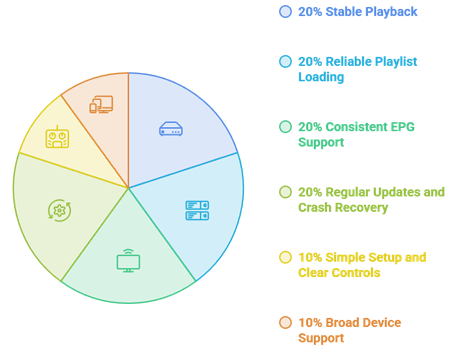
Our experts reviewed multiple players to find options that perform smoothly, remain secure, and support standard playlist formats. This approach aims to ensure trustworthy recommendations that help users restore reliable playback with ease and confidence.
- We chose players based on stable playback, reliable playlist loading, and consistent EPG support.
- Our experts shortlisted apps that update regularly, avoid crashes, and recover quickly from stream drops.
- We shortlisted players with simple setup, M3U and Xtream Codes support, and clear controls.
- The experts selected apps with broad device support across Firestick, Android TV, and more.
- Our team chose tools based on safety, reasonable permissions, and active maintenance.
Should You Use a VPN With IPTV Player Apps?
The app itself is just a tool, but some providers raise privacy concerns because of where they pull content from. A VPN can add a layer of privacy while streaming, though it is not a magic solution. If you want to set one up, our guide on the best VPNs for Firestick covers apps that also work on Android TV.
- Privacy Protection: A VPN hides your IP address from external servers.
- Public Wi-Fi Safety: On public networks, a VPN encrypts your connection.
- Geo Restrictions: A VPN may help access region-limited content, depending on service policies.
- Legal Responsibility: A VPN does not make unlicensed streaming legal.
- Speed Impact: Choose one with fast servers for smooth playback.
How to Stream Safely With IPTV Player Apps?
Safety comes from using trusted apps, limiting permissions, and choosing licensed providers. If you sideload any player, be strict about where you get it and what it can access. Safer habits prevent most common problems and keep your devices secure during streaming.
- Official Sources: Install players from the Appstore, Google Play, or the developer’s site to avoid fake builds.
- Licensed Providers: Choose services with clear terms and secure payment to reduce risk.
- Limit Permissions: Deny access to contacts or SMS, since player apps do not need them.
- Device Protection: Keep your system updated and enable built-in security tools.
- Network Security: Use a strong Wi-Fi password and keep router firmware current.
Verdict:
Each player here delivers different strengths, whether it is a polished guide, deep customization, or all-in-one flexibility. To help you take the final call, I have created this verdict.
- TiViMate: The best overall replacement, with a polished TV-style guide, smooth channel switching, and reliable playlist handling that make it an easy daily driver.
- OTT Navigator: The top pick for power users who want deep customization, strong catch-up and archive support, and fine control over playback.
- Kodi: The most flexible choice for a complete media hub, combining live TV through the PVR add-on with local movies and music in one place.
FAQs
Why did IPTV Smarters Pro suddenly stop working in 2026?
It usually stops working due to provider server downtime, an expired subscription, cache corruption, or an app update that breaks playback. Wrong M3U or Xtream Codes details also cause failures. Confirm your subscription is active and servers are up, then clear the cache and re-enter your login.
Can I switch to another player without a new subscription?
Yes. Your IPTV subscription is separate from the player app, so your existing M3U URL or Xtream Codes login works in almost any alternative. Install a new player, enter the same details, add your EPG, and your channels should load without buying anything new.
Which alternative player is best for Firestick specifically?
TiViMate is a favorite on Fire TV for its guide and stability, but the right pick depends on your needs. For a broader comparison tailored to Fire devices, see our roundup of the best IPTV players for Firestick to match a player to your setup.
Are these IPTV Smarters Pro alternatives free?
Several are free or offer free versions, including Kodi, IPTV Extreme, and the base tiers of TiViMate and OTT Navigator. Some unlock advanced features through a low-cost premium upgrade. Smart IPTV uses a small one-time activation fee after its trial. Always download from official sources.
Is it legal to use IPTV Smarters Pro alternatives?
Using an IPTV player app is legal, since the app is only a tool for loading playlists. Legality depends on your provider. Licensed services with proper rights are legal, while unverified providers streaming copyrighted channels without permission may not be. Always check your local streaming laws.