Key Takeaway: OpenSubtitles is Stremio’s official subtitles addon, pulling captions in dozens of languages from the OpenSubtitles.com database. The current OpenSubtitles v3 comes built in, and this guide shows how to enable it, choose your languages, filter uploaders, turn on hash matching, link an account for higher download limits, fix missing subtitles, and pick the best alternatives.
Nothing ruins a film faster than missing or out-of-sync subtitles. OpenSubtitles is the addon that fixes that inside Stremio, and a few minutes of setup makes captions appear reliably on almost everything you watch.
I set up OpenSubtitles v3 on my Fire TV Stick 4K Max, added English and Spanish, and enabled movie-hash matching so the captions lined up with the exact file. After signing in with a free OpenSubtitles.com account, my download limit rose and subtitles stopped drying up mid-binge, so I have documented every step below.
What Is the OpenSubtitles Stremio Addon?
OpenSubtitles is the official subtitles addon bundled with Stremio. It connects to the huge OpenSubtitles.com database and delivers captions in dozens of languages for the movies and shows you play, matching them to the exact title you are watching.
- Official Addon: the current version, OpenSubtitles v3, is maintained for Stremio and uses the newer OpenSubtitles.com API for a faster, cleaner catalogue.
- Massive Database: OpenSubtitles is one of the largest subtitle libraries online, so captions exist for the vast majority of films and TV episodes.
- Many Languages: you choose which languages appear, from English and Spanish to dozens of others, and only those are offered during playback.
- Built In: most Stremio installs already include OpenSubtitles v3, so setup is usually about configuring it rather than installing anything new.
- Hash Matching: it can use a file’s movie hash to find subtitles made for that exact release, dramatically improving synchronisation accuracy.
Is OpenSubtitles Already Installed? Setup and Enabling
On most accounts OpenSubtitles v3 is already present, so your task is to confirm it is there and enabled. Guest accounts occasionally miss it, in which case you add it back from the official addon catalogue in seconds.
- Check Installed: open the Addons area and look under Installed for OpenSubtitles v3; it should already sit among your default addons.
- Guest Accounts: if you signed in as a guest rather than with email, verify OpenSubtitles v3 is present and reinstall it from the catalogue if missing.
- Avoid Old Versions: make sure you are using v3, not an older deprecated OpenSubtitles addon, since the legacy version can fail to return results.
- Configure After Install: once present, open its Configure page to add languages and filters, because a default install may show no subtitles yet.
- Install Stremio First: new to the app? My Stremio on Firestick guide covers the base install before addons.
How to Configure OpenSubtitles Languages and Filters
OpenSubtitles only shows what you tell it to, so configuration is the most important step. From its Configure page you add languages, filter which uploaders you trust, allow AI translations and switch on movie-hash matching for tighter sync.
- Add Languages: on the Configure page, search each language you want and click Add, and only those languages will appear during playback.
- Filter Uploaders: choose whether to show subtitles from everyone, from registered users, or only from trusted uploaders for higher quality results.
- AI Translations: optionally include machine-translated subtitles, useful for rare languages where human uploads are scarce, though quality naturally varies.
- Hash Matching: enable the movie-hash option so the addon finds subtitles created for the exact file, which greatly improves timing accuracy.
- Save and Reload: after adjusting settings, save the configuration and reopen a title so Stremio loads your updated OpenSubtitles preferences correctly.
How to Connect an OpenSubtitles Account
You can use OpenSubtitles without signing in, but anonymous use has lower daily download limits. Linking a free OpenSubtitles.com account raises those limits and reduces the chance of subtitles suddenly stopping during a long binge session.
- Create An Account: register a free account at OpenSubtitles.com, which raises your daily subtitle download allowance above the anonymous guest limit.
- Authenticate The Addon: on the OpenSubtitles Configure page, enter your account details where prompted so downloads count against your higher personal limit.
- Why It Helps: heavy viewers hit the anonymous cap quickly, so an account keeps captions flowing instead of failing partway through an evening.
- Optional VIP: OpenSubtitles offers a paid VIP tier that removes ads on its site and raises limits further, though it is unnecessary for most users.
- Keep It Private: only enter credentials on the official configuration page, and never share your account details inside untrusted third-party addons.
| Detail | OpenSubtitles v3 |
|---|---|
| Type | Official Stremio subtitles addon |
| Source | OpenSubtitles.com API |
| Languages | Dozens, user-selectable |
| Account | Optional, raises download limits |
| Cost | Free (optional paid VIP) |
Key Features of the OpenSubtitles Addon
OpenSubtitles earns its default status through breadth and accuracy. Its combination of a vast database, flexible filters and hash matching means the right subtitle, in the right language, usually appears within seconds of pressing play.
- Huge Library: decades of community uploads mean OpenSubtitles covers obscure films and old shows that smaller subtitle addons simply cannot match.
- Language Choice: you control exactly which languages appear, keeping the subtitle list short and relevant rather than cluttered with dozens you never use.
- Quality Filters: the trusted-uploader option filters out poor or spam entries, so the captions you see are more likely to be accurate and well timed.
- Hash Accuracy: movie-hash matching finds subtitles made for your exact release, which is the single biggest factor in getting perfect synchronisation.
- Account Boost: signing in lifts download limits, and I found captions far more reliable across a long evening once my account was linked.
OpenSubtitles Not Working? Common Fixes
When subtitles fail to show, the cause is almost always configuration or download limits rather than a broken addon. The table and checklist below walk through the fixes that resolve the vast majority of OpenSubtitles complaints.
- Add Languages First: an empty language list is the top cause of missing subtitles, so open Configure and add every language you need.
- Check The Version: confirm you are on OpenSubtitles v3, because the older v2 addon frequently returns nothing on the current Stremio app.
- Sign In: if captions stop after a few titles, you have likely hit the anonymous download limit, so link a free account to continue.
- Fix Sync Issues: enable movie-hash matching or manually pick a different upload when subtitles run ahead of or behind the audio.
- Reload Stremio: after changing settings, restart the app so your updated OpenSubtitles configuration takes effect and fresh results load properly.
Is OpenSubtitles Safe and Legal?
OpenSubtitles is among the safest addons you can run in Stremio. It handles only subtitle text, never video streams, and is an official addon backed by a long-established subtitle community, so it raises very few concerns.
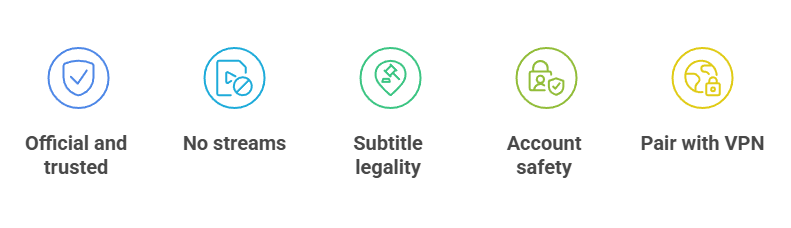
- Official And Trusted: OpenSubtitles v3 is an official Stremio addon tied to a reputable, long-running subtitle service, not an anonymous third-party project.
- No Streams: the addon only fetches caption files, so it carries none of the streaming-source risks attached to video addons in Stremio.
- Subtitle Legality: community subtitles occupy a mild grey area in some regions, but downloading captions for personal use is broadly tolerated worldwide.
- Account Safety: only sign in on the official Configure page, and treat your OpenSubtitles password like any other, keeping it away from untrusted addons.
- Pair With A VPN: a VPN matters most for the stream addons you use, but running one keeps your overall Stremio activity private regardless.
Best OpenSubtitles Alternatives
OpenSubtitles covers most titles, but keeping a backup subtitle addon or two means you almost never hit a dead end. These three pull from different databases, so running them together with OpenSubtitles gives Stremio the widest possible caption coverage; for more options see my best Stremio subtitles addons roundup.
1) SubDL Subtitles
SubDL is an unofficial addon that fetches subtitles from the SubDL database, a fast-growing source with strong multilingual coverage. It makes an excellent backup when OpenSubtitles lacks a caption. I added SubDL and instantly found subtitles for a niche title OpenSubtitles had missed entirely.
Features:
- SubDL Source: it pulls captions from the SubDL database, an increasingly popular subtitle site that often covers newer releases quickly and reliably.
- Many Languages: SubDL carries a wide range of languages, so it frequently fills gaps when OpenSubtitles has no upload for your chosen title.
- Simple Config: its configuration page lets you choose languages much like OpenSubtitles, keeping the subtitle list focused on what you actually need.
- Great Backup: running SubDL alongside OpenSubtitles gives Stremio two large databases to search, sharply reducing the odds of no subtitles appearing.
- Frequent Uploads: the SubDL community adds captions quickly for fresh releases, which is handy when a brand-new film has few subtitles elsewhere.
- My Experience: I installed SubDL as a second source and it caught several subtitles OpenSubtitles missed, making it a permanent part of my setup.
- Lightweight: the addon adds no noticeable overhead, simply appearing as another subtitle option beneath each title without slowing playback down at all.
| Pros | Cons |
| Large SubDL database | Unofficial addon |
| Strong language range | Overlaps OpenSubtitles |
| Good for new releases | Occasional sync issues |
| Easy language config | |
| Great OpenSubtitles backup |
Pricing: Free to install and use from the addon catalogue. No account or payment required. Checked July 2026.
Link: https://stremio-addons.net/addons/subdl-subtitles
2) SubSource Subtitles
SubSource is an unofficial addon that draws captions from the SubSource community, known for well-synced, high-quality uploads. It pairs neatly with OpenSubtitles for tricky titles. I reached for SubSource whenever an OpenSubtitles caption was slightly out of sync and usually found a cleaner match.
Features:
- SubSource Community: the addon taps the SubSource site, a curated community that prioritises accurate timing and clean, well-formatted subtitle files.
- Quality Focus: SubSource uploads tend to be carefully synced, so it is a strong choice when OpenSubtitles captions arrive slightly off the audio.
- Language Options: like the others, it lets you pick languages during configuration, keeping the subtitle menu tidy and relevant to you.
- Reliable Sync: because the community values timing, SubSource often resolves the frustrating drift where subtitles run ahead of or behind speech.
- Good Companion: installed beside OpenSubtitles and SubDL, it adds a third database, making it very rare to find no subtitle at all.
- My Testing: I turned to SubSource for a poorly synced episode and it delivered a perfectly timed caption where OpenSubtitles had struggled.
- Straightforward Setup: configuration mirrors the other subtitle addons, so if you can set up OpenSubtitles you can add SubSource in moments.
| Pros | Cons |
| Well-synced uploads | Unofficial addon |
| Quality community | Smaller than OpenSubtitles |
| Good sync fixes | Coverage varies |
| Simple configuration | |
| Strong third source |
Pricing: Free to install and use from the addon catalogue. No account or payment required. Checked July 2026.
Link: https://stremio-addons.net/addons/subsource-subtitles
3) SubSense
SubSense is a subtitle aggregator that fetches captions in your chosen languages from several sources at once. Instead of a single database, it pools results, so you often get more options per title. I like SubSense as an all-in-one layer when I do not want to install three separate subtitle addons.
Features:
- Aggregator Approach: SubSense gathers subtitles from multiple sources simultaneously, presenting a combined list so you rarely need several separate subtitle addons installed.
- Language Selection: you set your preferred languages once, and SubSense filters every source down to just those, keeping the results list clean.
- More Options: because it pools sources, a single title often shows more subtitle choices than any one addon would provide on its own.
- Convenient: running SubSense can replace juggling several subtitle addons, since its aggregation already reaches across the databases those addons would use.
- Sync Choices: with more uploads listed, you can quickly try another version when the first caption is slightly out of sync with playback.
- My Use: I keep SubSense installed as a catch-all and only add specialist addons when it cannot find a subtitle for something obscure.
- Clean Results: despite pulling from many places, its language filtering keeps the final list focused, so you are not overwhelmed with irrelevant options.
| Pros | Cons |
| Aggregates many sources | Unofficial addon |
| More options per title | Depends on sources |
| Set languages once | Results can vary |
| All-in-one convenience | |
| Clean filtered results |
Pricing: Free to install and use from the addon catalogue. No account or payment required. Checked July 2026.
Link: https://stremio-addons.net/addons/subsense
Verdict:
OpenSubtitles remains the subtitle addon I set up first on any Stremio install, thanks to its enormous database and accurate hash matching. Add a free account, pick your languages, and it rarely lets you down. For the occasional gap, these backups are worth installing too.
- OpenSubtitles: the official, free default with the largest database and the best synchronisation once hash matching is enabled.
- SubDL Subtitles: the strongest backup, frequently covering new releases OpenSubtitles has not indexed yet.
- SubSense: a convenient aggregator that pools several sources, giving you more caption options per title.
FAQs
Is OpenSubtitles built into Stremio?
Yes. The official OpenSubtitles v3 addon ships with most Stremio installs. On some guest accounts it can be missing, in which case you simply reinstall it from the official addon catalogue and then configure your languages.
Why are my OpenSubtitles subtitles not showing?
The most common reason is that no languages are selected. Open the addon’s Configure page and add your languages. Also confirm you are using v3, and sign in with a free account if you have hit the anonymous download limit.
Do I need an OpenSubtitles account?
No, but it helps. Anonymous use has lower daily download limits, so heavy viewers run out of subtitles sooner. A free OpenSubtitles.com account raises those limits and keeps captions loading throughout a long session.
How do I fix out-of-sync OpenSubtitles?
Enable movie-hash matching on the Configure page so the addon finds subtitles made for your exact file. If a caption is still off, simply select a different upload from the list, which usually resolves the timing.
Is OpenSubtitles safe to use?
Yes. OpenSubtitles v3 is an official Stremio addon that only handles subtitle files, never video streams, so it carries no streaming-source risk. Sign in only on the official page and pair Stremio with a VPN for overall privacy.