Key Takeaway: The official TorBox Stremio addon is no longer available. TorBox disabled its hosted addon on May 20, 2026, and the old manifest hostname does not currently resolve. Your TorBox account can still power Stremio through a compatible community addon such as Torrentio, Comet, or MediaFusion. Use a fresh API key, disable direct torrents when you want debrid-only playback, and remove the retired entry.
Searching for the TorBox Stremio addon now leads to conflicting instructions because its old community-catalogue page still exists while the service behind it has been retired. I checked TorBox’s official changelog, the former manifest hostname, current pricing, API limits, supported third-party integrations, and Stremio’s addon guidance on August 22, 2026. This guide separates the discontinued hosted addon from the TorBox debrid service you can still connect to Stremio safely. The result separates plan limits from connector failures so troubleshooting starts at the correct layer.
TorBox Stremio Addon Status in August 2026
The original TorBox-hosted addon is retired, not merely experiencing a brief outage. Three independent signals now point to the same status.
- Official Announcement: TorBox version 8.4.4 explicitly states that the company disabled its Stremio addon on May 20, 2026.
- Manifest Failure: the former stremio.torbox.app hostname returned no address record during the August 22 check, preventing any manifest response.
- Stale Listing: the community directory still shows TorBox version 1.1.1, but its health field remains “Checking” and cannot prove service availability.
- No Restoration: TorBox’s July 2026 version 9 and version 9.1 announcements describe other integrations without announcing the hosted Stremio addon’s return.
- Working Service: TorBox itself remains active, with current plans, API access, WebDAV, downloads, and continuing support for compatible third-party applications.
| Layer checked | August 22 result | Meaning |
|---|---|---|
| TorBox v8.4.4 changelog | Addon disabled | Retirement was intentional |
| Former manifest hostname | No address record | Old install URL cannot load |
| Community listing | Version 1.1.1, status Checking | Directory record is stale evidence |
| TorBox main service | Pricing and API online | Account remains usable elsewhere |
Status: https://feedback.torbox.app/changelog
Why the Old TorBox Addon Still Appears in Search
A catalogue entry and a functioning addon are separate things. Search engines can retain descriptive pages long after the remote manifest stops answering.
- Remote Architecture: Stremio addons are web services rather than locally installed executables, so the catalogue record may survive after its server disappears.
- Old Instructions: archived guides still direct users to TorBox Settings and an Access Stremio Addon button that belonged to the retired service.
- Version Confusion: version 1.1.1 describes the former addon package, not the present TorBox platform release or proof of current uptime.
- Install Button: a directory can display an installation control based on saved metadata even when the referenced manifest hostname cannot resolve.
- Correct Test: verify the dated maintainer announcement and live manifest response before following any tutorial, copied URL, screenshot, or forum comment.
What TorBox Still Does for Stremio Users
TorBox remains a debrid and cloud-download service. A compatible addon can search releases, ask TorBox about cache availability, and return playable HTTPS links.
- Cache Lookup: the connector submits torrent hashes to TorBox, allowing already stored files to appear as immediately available debrid results.
- Remote Download: uncached torrents can be sent to TorBox for server-side downloading, subject to seeds, account slots, limits, and rate controls.
- HTTPS Playback: compatible addons request a generated TorBox download link, so Stremio streams from TorBox rather than joining the torrent swarm directly.
- Account Library: some connectors can expose completed TorBox items as Your Media or a personal catalogue, depending on their supported feature set.
- Separate Responsibilities: the addon discovers and organizes streams, while TorBox handles cache checks, remote downloading, storage, and secure link generation.
Choose a Compatible Addon Before Connecting TorBox
The easiest replacement depends on whether you want a familiar scraper, stronger filtering, broad catalogues, or access to files already saved in TorBox.
- Torrentio: choose it for a simple, familiar torrent-provider configurator that currently lists TorBox among its supported optional debrid account services.
- Comet: choose it for advanced ranking, multiple debrid entries, direct-torrent controls, deduplication, and self-hosting options documented by its maintained project.
- MediaFusion: choose it when you also want configurable catalogues, broader source types, provider profiles, and either public or self-hosted deployment.
- StremThru Torz: choose it when you understand store tokens, crowdsourced indexes, and its separation between Torz search and Store library functions.
- TorBox Librarian: consider it only for a personal tagged library workflow; it does not replace a general movie-and-series torrent scraper.
| Route | Best fit | TorBox role | Main caution |
|---|---|---|---|
| Torrentio | Simple torrent results | Cached and remote download links | Generated URL contains a credential |
| Comet | Filtering and ranking | Debrid service and library source | Instance features can differ |
| MediaFusion | Broader catalogues and profiles | Configured streaming provider | Many settings complicate diagnosis |
| StremThru Torz | Store-aware advanced setup | Connected store account | Component names are easy to confuse |
| TorBox Librarian | Tagged personal library | Existing TorBox media source | Not a general scraper replacement |
Pick the Right TorBox Plan for Stremio
All current plans include API access and third-party apps, but their download allowance, concurrent slots, file size, speed, storage, and Usenet access differ.
- Free Plan: costs $0, permits ten downloads monthly, one concurrent slot, 10GB maximum files, 250Mbps speed, and a 24-hour cooldown.
- Essential Plan: costs $3 monthly with unlimited downloads, three slots, 200GB per file, 1Gbps speed, and 300GB included permanent storage.
- Standard Plan: costs $5 monthly and raises concurrent slots to five, seeding to fourteen days, and permanent storage to 500GB.
- Pro Plan: costs $10 monthly with ten slots, 1TB files, 80Gbps listed speed, thirty-day seeding, and 1TB included permanent storage.
- Usenet Difference: the pricing page reserves unlimited Usenet downloads and NNTP for Pro, while lower tiers show that feature unavailable.
| Plan | Monthly price | Slots | Maximum file | Listed speed |
|---|---|---|---|---|
| Free | $0 | 1 | 10GB | 250Mbps |
| Essential | $3 | 3 | 200GB | 1Gbps |
| Standard | $5 | 5 | 200GB | 1Gbps |
| Pro | $10 | 10 | 1TB | 80Gbps |
Create and Protect Your TorBox API Key
A compatible Stremio addon needs an API key, not your TorBox password. Treat that key as a credential capable of using account resources.
- Account Source: copy the key only from your signed-in TorBox settings or tools area, never from screenshots, shared profiles, or tutorials.
- Trusted Configurator: enter it only into the official page or reviewed instance of the addon you deliberately selected for Stremio.
- Private Manifest: many addons encode credentials inside the generated manifest path, so never publish, bookmark publicly, or send that complete URL.
- Rotation Plan: replace the API key after accidental exposure, then reinstall every connected addon because its old configuration immediately stops authenticating.
- Least Exposure: connect one maintained addon first and add others only when they provide distinct coverage worth another credential-bearing configuration.
Connect TorBox to Stremio Step by Step
The exact labels vary between addons, but the safe workflow remains consistent. Configure on a phone or computer before opening Stremio on television.
- Select Instance: open the maintained project’s documented configuration page and confirm its domain before entering any key, token, password, or personal setting.
- Add Service: choose TorBox in Debrid Services or Streaming Provider, then paste your current API key into the matching TorBox field.
- Choose Mode: disable direct torrent or P2P results when you want every selected stream routed through TorBox rather than torrent peers.
- Start Broad: retain several providers, common resolutions, and modest size limits until one authorized test title returns a working TorBox result.
- Install Configuration: press Install in Stremio or copy the generated manifest into Add Addon, approve its details, and verify My Addons.
Sync the New Setup to Firestick and Android TV
Stremio attaches addons to your account. Configure once on a convenient device, then use the same account on Fire TV or Android TV.
- Same Login: sign into the identical Stremio account on desktop or mobile and television, because guest sessions do not provide dependable addon synchronization.
- Remote Convenience: avoid typing a long token-bearing manifest with the Firestick remote; install it from a trusted phone or computer instead.
- Restart Client: force-close Stremio on Fire TV after installation, reopen it, and inspect My Addons before creating a duplicate configuration.
- Device Filters: limit oversized REMUX, unsupported Dolby Vision, and excessive results when a television client struggles despite TorBox links being healthy.
- Player Separation: if one file fails, test a smaller compatible release before blaming account synchronization, the addon, or the TorBox service.
Understand Cached, Uncached, and Slot Messages
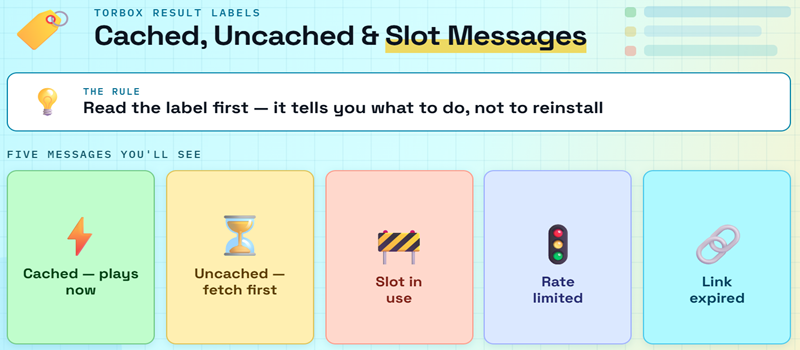
The label beside a result explains what TorBox must do next. Reading it correctly prevents unnecessary reinstalls and repeated remote-download attempts.
- Cached Result: TorBox already stores the torrent, allowing the connector to request a streaming link without waiting for a new remote download.
- Uncached Result: TorBox must fetch the torrent first, so progress depends on active seeders, file size, queue conditions, and available slots.
- Slot Error: every active download consumes a concurrent slot; stop or finish another job, or wait, before retrying the selected stream.
- Rate Limit: general API endpoints allow 300 requests per minute, while uncached torrent creation is limited to sixty requests each hour.
- Expired Link: a previously generated URL may stop working, so refresh the title’s stream list and select the result again.
Fix Missing Streams, Bad Keys, and Playback Errors
Locate the first failing layer before reinstalling. The retired official addon, connector manifest, filters, TorBox authorization, download state, and player need different fixes.
- Old Addon Missing: do not repeatedly install the former TorBox manifest; remove it and configure a currently maintained TorBox-compatible addon instead.
- No Results: restore provider defaults, remove quality and size exclusions, and retry one mainstream authorized title before changing the API key.
- Authorization Error: confirm the selected service is TorBox, rotate the key, reinstall the generated configuration, and remove the obsolete copy.
- Download Stalled: inspect the TorBox dashboard for seeders, queue state, available slots, file size, and any incomplete or failed status.
- Network Block: allow TorBox and its CDN domains in DNS security tools rather than disabling every antivirus, router, or VPN protection globally.
| Symptom | Likely layer | First useful action |
|---|---|---|
| Old TorBox addon will not install | Retired manifest | Use a compatible maintained addon |
| Addon installs but shows nothing | Providers or filters | Restore broad defaults |
| Invalid API key | TorBox authorization | Rotate key and reinstall configuration |
| Downloading video never finishes | Uncached torrent or slots | Check dashboard state and seeders |
| Cached result buffers | Network, CDN, or file bitrate | Try a smaller compatible result |
| Works on desktop, not Firestick | Account sync or decoding | Restart Stremio and test 1080p |
Account Sharing, Multiple IPs, and Abuse Limits
TorBox currently permits use from multiple devices and addresses, but that flexibility does not remove concurrent slots, rate limits, or dynamic fair-use enforcement.
- Multiple Locations: TorBox says accounts can be used from different IP addresses, including home, mobile, travel, workplace, and VPN connections.
- Concurrent Slots: the plan’s one, three, five, or ten slots govern simultaneous active downloads even when many devices remain signed in.
- Dynamic Threshold: TorBox monitors unusually high rolling usage instead of advertising a single fixed transfer ceiling for every account and plan.
- Warning Effect: each abuse warning rotates the account’s API key, immediately requiring every configured Stremio addon to be updated and reinstalled.
- Outage Diagnosis: follow our TorBox troubleshooting guide when the dashboard, API, CDN, or downloads fail broadly beyond one Stremio connector.
Protect Privacy and Stay Within Legal Limits
Debrid-only playback changes the network path, but it does not automatically make every addon, file, account-sharing pattern, or viewing choice private and lawful.
- Disable P2P: turn off direct torrent mode when you intend Stremio to use only TorBox HTTPS links instead of connecting to swarm peers.
- Remote Visibility: the selected addon instance receives title requests and a TorBox credential, while TorBox processes cache checks and generated links.
- Credential Exposure: screenshots, copied manifests, browser exports, logs, and support posts can reveal API keys even when passwords remain completely private.
- VPN Boundary: a VPN changes your network route but cannot grant content rights, repair a retired addon, or guarantee complete anonymity.
- Rights Check: use public-domain, personally owned, or licensed files because an available torrent, cached copy, or debrid link proves no permission.
Link: https://www.torbox.app/pricing
TorBox Stremio Addon Verdict
The original TorBox Stremio addon should now be treated as discontinued. I would remove its dead entry, keep TorBox only as the debrid provider behind one maintained connector, disable direct torrents for a debrid-only setup, and protect the generated manifest like a password. TorBox remains inexpensive and flexible, but its cache, account, and API cannot compensate for a dead addon host, an invalid key, restrictive filters, or an unsupported video file.
FAQs
Is the official TorBox Stremio addon working?
No. TorBox announced on May 20, 2026 that it disabled the hosted Stremio addon. The former manifest hostname also had no address record during the August 22 check. A saved catalogue page or old Install button does not make that endpoint available again.
Can I still use TorBox with Stremio?
Yes. TorBox still provides API access and generated download links to compatible third-party addons. Configure TorBox as the debrid or streaming provider inside Torrentio, Comet, MediaFusion, StremThru Torz, or another maintained integration that explicitly lists current support.
Which Stremio addon works best with TorBox?
Torrentio is the simplest familiar route, while Comet offers deeper filtering and multiple service controls. MediaFusion suits broader catalogue needs. Start with one connector rather than duplicating results. Our Comet Stremio addon guide explains its current TorBox configuration in detail.
Is the free TorBox plan enough for Stremio?
It is suitable for limited testing, not frequent streaming. The current free plan allows ten downloads monthly, one slot, 10GB per download, 250Mbps, and a 24-hour cooldown. Essential starts at $3 monthly with unlimited downloads and larger files.
Why does a TorBox stream say it is downloading?
The selected torrent was not already cached, so TorBox must download it remotely before producing a playable link. Progress depends on seeds, size, queue conditions, and an available account slot. Choose a cached result when immediate playback matters.
Should I share my TorBox Stremio manifest URL?
No. A personalized manifest commonly contains an encoded TorBox API key. Anyone receiving it may consume account resources. If it leaks, rotate the key in TorBox, remove the old addon entry, and install a newly generated configuration on your Stremio account.